
家庭记账本app进度之复选框以及相应滚动条的应用
这次主要是对于android中复选框的相应的操作。以及其中可能应用到的滚动条的相关应用。每一个复选框按钮都要有一个checkBox与之相对应。
推荐使用XML配置,基本语法如下:
<CheckBox
android:text="显示文本"
android:id="@+id/ID号"
android:layout_width="wrap_content"
android:layout_height="wrap_content">
</CheckBox>
最后添加点击事件实现相应的操作。具体的代码实现如下:
MainActivity.java
package com.example.myapplicationhome;

import androidx.appcompat.app.AppCompatActivity;

import android.os.Bundle;

import android.view.View;

import android.widget.Button;

import android.widget.CheckBox;

import android.widget.TextView;

import org.w3c.dom.Text;

public class MainActivity extends AppCompatActivity {

    private CheckBox mChkBoxMusic,mChkBoxSing,mChkBoxDance,mChkBoxTravel,mChkBoxReading,mChkBoxWriting,mChkBoxFitness,mChkBoxClimbing,mChkBoxSwim,mChkBoxExercise,mChkBoxPhoto,mChkBoxEating,mChkBoxPainting;

    private CheckBox mChkBoxwen1,mChkBoxwen2,mChkBoxwen3,mChkBoxwen4,mChkBoxwen5,mChkBoxwen6;

    private Button mBtnOk;

    private TextView mTxtHobby;

    @Override

    protected void onCreate(Bundle savedInstanceState) {

        super.onCreate(savedInstanceState);

        setContentView(R.layout.activity_main);

        mChkBoxwen1=(CheckBox)findViewById(R.id.chkBoxwen1);

        mChkBoxwen2=(CheckBox)findViewById(R.id.chkBoxwen2);

        mChkBoxwen3=(CheckBox)findViewById(R.id.chkBoxwen3);

        mChkBoxwen4=(CheckBox)findViewById(R.id.chkBoxwen4);

        mChkBoxwen5=(CheckBox)findViewById(R.id.chkBoxwen6);

        mChkBoxwen6=(CheckBox)findViewById(R.id.chkBoxwen5);

        mChkBoxMusic=(CheckBox)findViewById(R.id.chkBoxMusic);

        mChkBoxSing=(CheckBox)findViewById(R.id.chkBoxSing);

        mChkBoxDance=(CheckBox)findViewById(R.id.chkBoxDancing);

        mChkBoxTravel=(CheckBox)findViewById(R.id.chkBoxTravel);

        mChkBoxReading=(CheckBox)findViewById(R.id.chkBoxReading);

        mChkBoxWriting=(CheckBox)findViewById(R.id.chkBoxWriting);

        mChkBoxClimbing=(CheckBox)findViewById(R.id.chkBoxClimbing);

        mChkBoxSwim=(CheckBox)findViewById(R.id.chkBoxSwim);

        mChkBoxExercise=(CheckBox)findViewById(R.id.chkBoxExercise);

        mChkBoxFitness=(CheckBox)findViewById(R.id.chkBoxFitness);

        mChkBoxPhoto=(CheckBox)findViewById(R.id.chkBoxPhoto);

        mChkBoxEating=(CheckBox)findViewById(R.id.chkBoxEating);

        mChkBoxPainting=(CheckBox)findViewById(R.id.chkBoxPainting);

        mBtnOk=(Button)findViewById(R.id.btnOk);

        mTxtHobby=(TextView)findViewById(R.id.txtHobby);

        mBtnOk.setOnClickListener(btnOkOnClick);

    }

    private View.OnClickListener btnOkOnClick=new View.OnClickListener() {

        @Override

        public void onClick(View v) {

            String s=getString(R.string.your_hobby);

            if(mChkBoxMusic.isChecked())

                s+=mChkBoxMusic.getText().toString();

            if(mChkBoxSing.isChecked())

                s+=mChkBoxSing.getText().toString();

            if(mChkBoxDance.isChecked())

                s+=mChkBoxDance.getText().toString();

            if(mChkBoxTravel.isChecked())

                s+=mChkBoxTravel.getText().toString();

            if(mChkBoxReading.isChecked())

                s+=mChkBoxReading.getText().toString();

            if(mChkBoxWriting.isChecked())

                s+=mChkBoxWriting.getText().toString();

            if(mChkBoxClimbing.isChecked())

                s+=mChkBoxClimbing.getText().toString();

            if(mChkBoxSwim.isChecked())

                s+=mChkBoxSwim.getText().toString();

            if(mChkBoxExercise.isChecked())

                s+=mChkBoxExercise.getText().toString();

            if(mChkBoxFitness.isChecked())

                s+=mChkBoxFitness.getText().toString();

            if(mChkBoxPhoto.isChecked())

                s+=mChkBoxPhoto.getText().toString();

            if(mChkBoxEating.isChecked())

                s+=mChkBoxEating.getText().toString();

            if(mChkBoxPainting.isChecked())

                s+=mChkBoxPainting.getText().toString();

            if(mChkBoxwen1.isChecked())

                s+=mChkBoxwen1.getText().toString();

            if(mChkBoxwen2.isChecked())

                s+=mChkBoxwen2.getText().toString();

            if(mChkBoxwen3.isChecked())

                s+=mChkBoxwen3.getText().toString();

            if(mChkBoxwen4.isChecked())

                s+=mChkBoxwen4.getText().toString();

            if(mChkBoxwen5.isChecked())

                s+=mChkBoxwen5.getText().toString();

            if(mChkBoxwen6.isChecked())

                s+=mChkBoxwen6.getText().toString();

            mTxtHobby.setText(s);

        }

    };

}
strings.xml
<resources>

    <string name="app_name">兴趣选择程序</string>

    <string name="wen1">w温11</string>

    <string name="wen2">w温12</string>

    <string name="wen3">w温33</string>

    <string name="wen4">w温44</string>

    <string name="wen5">w温55</string>

    <string name="wen6">w温67</string>

    <string name="music">音乐</string>

    <string name="sing">唱歌</string>

    <string name="dance">跳舞</string>

    <string name="travel">旅行</string>

    <string name="reading">阅读</string>

    <string name="writing">写作</string>

    <string name="climbing">爬山</string>

    <string name="swim">游泳</string>

    <string name="exercise">运动</string>

    <string name="fitness">健身</string>

    <string name="photo">摄影</string>

    <string name="eating">美食</string>

    <string name="painting">绘画</string>

    <string name="your_hobby">您的兴趣:</string>

    <string name="btn_ok">确定</string>

</resources>
activity_main.xml
<?xml version="1.0" encoding="utf-8"?>

<ScrollView xmlns:android="http://schemas.android.com/apk/res/android"

    xmlns:app="http://schemas.android.com/apk/res-auto"

    xmlns:tools="http://schemas.android.com/tools"

    android:layout_width="match_parent"

    android:layout_height="wrap_content">

    <LinearLayout

        android:id="@+id/LinearLayout1"

        android:layout_width="wrap_content"

        android:layout_height="wrap_content"

        android:orientation="vertical"

        tools:context=".MainActivity">

        <CheckBox

            android:id="@+id/chkBoxwen6"

            android:layout_width="wrap_content"

            android:layout_height="wrap_content"

            android:textSize="30sp"

            android:text="@string/wen6" />

        <CheckBox

            android:id="@+id/chkBoxwen5"

            android:layout_width="wrap_content"

            android:layout_height="wrap_content"

            android:textSize="30sp"

            android:text="@string/wen5" />

        <CheckBox

            android:id="@+id/chkBoxwen4"

            android:layout_width="wrap_content"

            android:layout_height="wrap_content"

            android:textSize="30sp"

            android:text="@string/wen4" />

        <CheckBox

            android:id="@+id/chkBoxwen3"

            android:layout_width="wrap_content"

            android:layout_height="wrap_content"

            android:textSize="30sp"

            android:text="@string/wen3" />

        <CheckBox

            android:id="@+id/chkBoxwen2"

            android:layout_width="wrap_content"

            android:layout_height="wrap_content"

            android:textSize="30sp"

            android:text="@string/wen2" />

        <CheckBox

            android:id="@+id/chkBoxwen1"

            android:layout_width="wrap_content"

            android:layout_height="wrap_content"

            android:textSize="30sp"

            android:text="@string/wen1" />

        <CheckBox

            android:id="@+id/chkBoxMusic"

            android:layout_width="wrap_content"

            android:layout_height="wrap_content"

            android:textSize="30sp"

            android:text="@string/music" />

        <CheckBox

            android:id="@+id/chkBoxSing"

            android:layout_width="wrap_content"

            android:layout_height="wrap_content"

            android:textSize="30sp"

            android:text="@string/sing" />

        <CheckBox

            android:id="@+id/chkBoxDancing"

            android:layout_width="wrap_content"

            android:layout_height="wrap_content"

            android:textSize="30sp"

            android:text="@string/dance" />

        <CheckBox

            android:id="@+id/chkBoxTravel"

            android:layout_width="wrap_content"

            android:layout_height="wrap_content"

            android:textSize="30sp"

            android:text="@string/travel" />

        <CheckBox

            android:id="@+id/chkBoxReading"

            android:layout_width="wrap_content"

            android:layout_height="wrap_content"

            android:textSize="30sp"

            android:text="@string/reading" />

        <CheckBox

            android:id="@+id/chkBoxWriting"

            android:layout_width="wrap_content"

            android:layout_height="wrap_content"

            android:textSize="30sp"

            android:text="@string/writing" />

        <CheckBox

            android:id="@+id/chkBoxClimbing"

            android:layout_width="wrap_content"

            android:layout_height="wrap_content"

            android:textSize="30sp"

            android:text="@string/climbing" />

        <CheckBox

            android:id="@+id/chkBoxSwim"

            android:layout_width="wrap_content"

            android:layout_height="wrap_content"

            android:textSize="30sp"

            android:text="@string/swim" />

        <CheckBox

            android:id="@+id/chkBoxExercise"

            android:layout_width="match_parent"

            android:layout_height="wrap_content"

            android:text="@string/exercise"

            android:textSize="30sp" />

        <CheckBox

            android:id="@+id/chkBoxFitness"

            android:layout_width="wrap_content"

            android:layout_height="wrap_content"

            android:textSize="30sp"

            android:text="@string/fitness" />

        <CheckBox

            android:id="@+id/chkBoxPhoto"

            android:layout_width="wrap_content"

            android:layout_height="wrap_content"

            android:textSize="30sp"

            android:text="@string/photo" />

        <CheckBox

            android:id="@+id/chkBoxEating"

            android:layout_width="wrap_content"

            android:layout_height="wrap_content"

            android:textSize="30sp"

            android:text="@string/eating" />

        <CheckBox

            android:id="@+id/chkBoxPainting"

            android:layout_width="wrap_content"

            android:layout_height="wrap_content"

            android:textSize="30sp"

            android:text="@string/painting" />

        <Button

            android:id="@+id/btnOk"

            android:layout_width="wrap_content"

            android:layout_height="wrap_content"

            android:text="@string/btn_ok" />

        <TextView

            android:id="@+id/txtHobby"

            android:layout_width="420dp"

            android:layout_height="47dp" />

    </LinearLayout>

</ScrollView>
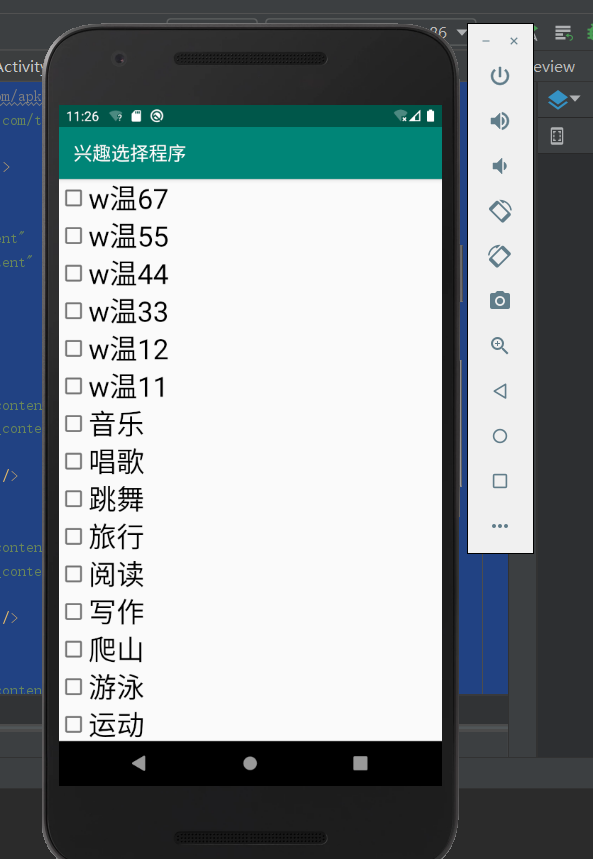
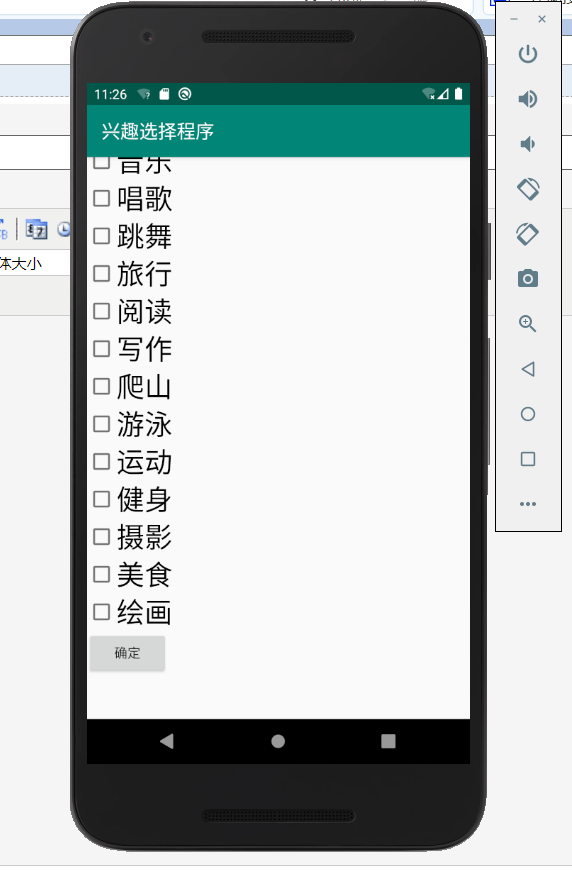
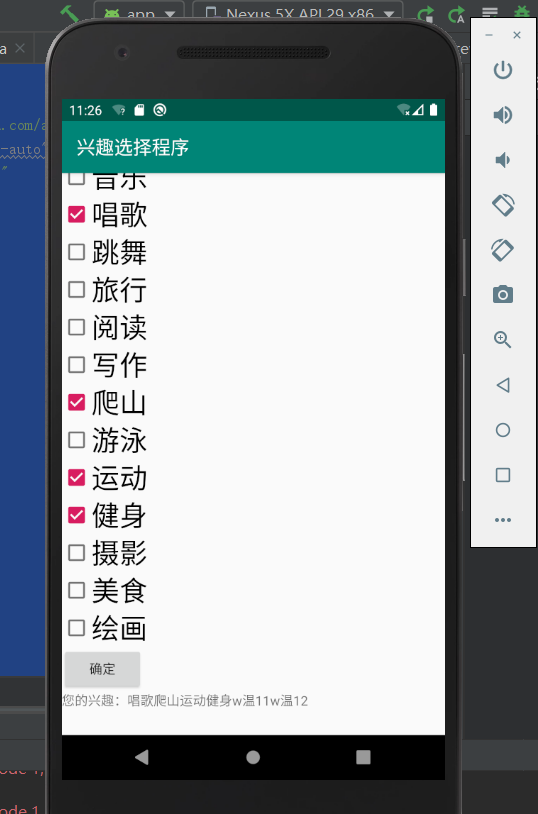
选出几个兴趣之后。点击确定按钮的显示结果:
家庭记账本app进度之复选框以及相应滚动条的应用的更多相关文章
- 家庭记账本app进度之android中AlertDialog的相关应用以及对日期时间的相关操作(应用alertdialog使用的谈话框)
对于AlertDialog的相关知识: 1.创建构造器AlertDialog.Builder的对象: 2.通过构造器对象调用setTitle.setMessage.setIcon等方法构造对话框 ...
- 家庭记账本app进度之对于登录和注册两个界面点击按钮的相互跳转
这次主要完成了两个两个android页面之间的跳转.从登录页面点击注册就会跳转到注册页面.在注册页面点击返回登录,这样就可以返回到登录界面.主要是这样的操作.其中遇到了一个困难主要是当点击按钮的时候, ...
- 家庭记账本app进度之下拉框和数字转轮的相关应用
这次主要是悬系的下拉框Spinner和数字转轮NumberPicker的使用.先分析相关的用到的知识点. 在Android中,用string-array是一种简单的提取XML资源文件数据的方法. 例子 ...
- 家庭记账本app进度之关于单选按钮的相关操作(添加点击按钮事件以及点击单选更改事件)
这次主要是通过代码实现了android中的相关单选按钮的相关操作,之后再最下面有一个按钮,当点击这个按钮的时候,会获取当上面的相关信息,之后再下方会进行相应的文字显示,获取的信息不同显示的信息也不会一 ...
- 家庭记账本app进度之关于tap的相关操作1
今天还主要学习关于怎样制作微信的先关的tap. 今天的主要成果是已经了解了相关的技术,以及相关的思路.代码经过一个下午的编写,基本接近尾声. 更详细的实验代码,以及相关的知识点将在明天完善后进行发表. ...
- 家庭记账本app进度之ui相关概念控制ui界面与布局管理
ui就是用户界面设计的意思. 首先是view,view相当于窗户上的玻璃. 1.android:id属性.android:id="@+id/user".他的id是user前面的@+ ...
- 进度1_家庭记账本App
今天完成了昨天的初步构想,详细介绍见上一篇博客,具体项目结构和案例如下: MainActivity.java: package com.example.familybooks; import andr ...
- 家庭记账本APP开发准备(三)
单选框(RadioButton) 通过设置单选框,可以将非此即彼的问题进行解决,成功学会并应用了手机端单项选择框; 复选框(CheckBox) 学习复选框是为了给使用软件的人更多的选择,在其他选择框后 ...
- 进度4_家庭记账本App
在上一个博客中,我学习了用Fragment进行数据的传值,但是出现了好多问题,我通过百度查阅资料发现fregment在进行数值传输的时候有的语法不能使用,并且不方便的进行数据库的使用,所以我在原来的家 ...
随机推荐
- JsonFormat 日期少了8个小时?还我
JsonFormat 后日期少了8个小时什么鬼? 前言 今天测试的时候发现时间对不上,比数据库里的时间少了8个小时?测试小姐姐一顿狂轰乱炸,一点都不温柔. 什么鬼?哪里出了问题?数据库显示的是下面
- react 给选中的li添加样式(转载)
路:使用事件委托,关键:获取到的index必须转为数字,因为它是字符串 handleClick = (e) => { const nodeName = e.target.nodeName.toU ...
- [AFO·游记]我的C++451天游击战
写在前面 05/10/19 今天心情很糟糕,没学新东西,复习没复习,作业没写完,下午要网课,明天要月考,脑子里就像是被一团棉花塞住了.静静的思考了半个小时,把自己手头上的事情排了个序,所以决定先把游记 ...
- 关于MySQL数据库事务的机制学习总结
这几天面试多次被问到了数据库事务机制.隔离级别.乐观锁悲观锁类的问题,之前对这些只能说有所了解,有些概念还停留在记忆层面,没有理解,所以回答的不好.后面翻书学习了下,理解了一些东西,在此做一个记录. ...
- Android 缓存的使用
缓存基础类 import android.content.Context; import android.content.SharedPreferences; public class CachePa ...
- mysql数据库表格之间的关系
外键 昨日内容回顾: 字段类型 约束条件 创建表的完整语法 create table 表名( 字段名 字段类型[(宽度) 约束条件], 字段名 字段类型[(宽度) 约束条件], 字段名 字段类型[(宽 ...
- [币严BIZZAN区块链]Java生成ETH钱包助记词、私钥、地址
本文主要介绍在Java工程中如何生成ETH钱包的助记词.私钥.地址. 一.在之前创建的spring boot 项目中的 pom.xml文件中加入需要的依赖 <dependency> < ...
- Contest 153
2019-09-14 23:16:25 总体感受:节奏尚可,难度尚可.然而还是卡在了最后一题,完全没有想到使用dp. 注意点: 1)Contest的最后一题往往是DP,Graph,这个敏感度需要提高: ...
- [bfs,深度记录] East Central North America Regional Contest 2016 (ECNA 2016) D Lost in Translation
Problem D Lost in Translation The word is out that you’ve just finished writing a book entitled How ...
- 插入排序与Shell排序
ElementType ShellSort( ElementType A[], int N ) { ;h>;h/=){ for(int i=h;i<N;i++){ ElementType ...