
WPF之数据绑定Data Binding
一般情况下,应用程序会有三层结构:数据存储层,数据处理层(业务逻辑层),数据展示层(UI界面)。
WPF是“数据驱动UI”。
- Binding实现(通过纯C#代码)
Binding分为source和target,即源和目标。
如何通过Binging实现UI元素和代码对象的连接。
首先绑定源对象要实现INotifyPropertyChanged接口,该接口引用自System.ComponentModel命名空间,所有使用前要引用该命名空间。该接口有一个PropertyChanged事件,可以帮助自动监听源对象的属性变化。
 using System;

 using System.Collections.Generic;

 using System.Linq;

 using System.Text;

 using System.Threading.Tasks;

 using System.Windows;

 using System.Windows.Controls;

 using System.Windows.Data;

 using System.Windows.Documents;

 using System.Windows.Input;

 using System.Windows.Media;

 using System.Windows.Media.Imaging;

 using System.Windows.Navigation;

 using System.Windows.Shapes;

 using System.ComponentModel;

    class Student:INotifyPropertyChanged

     {

         public event PropertyChangedEventHandler PropertyChanged;

         private string name;

         public string Name

         {

             get { return name; }

             set {

                 name = value;

                 if(this.PropertyChanged!=null)

                 {

                     this.PropertyChanged.Invoke(this, new PropertyChangedEventArgs("Name"));

                 }

             }

         }

     }
如上代码所示,在绑定了接口以后,当Name属性的值发生变化时,就会自动通知,然后刷新UI元素进行更新。
当然还没有结束,我们现在需要添加界面。然后在后台代码中设置Binding
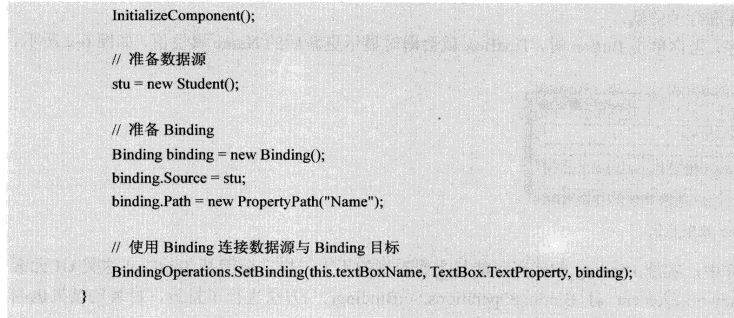
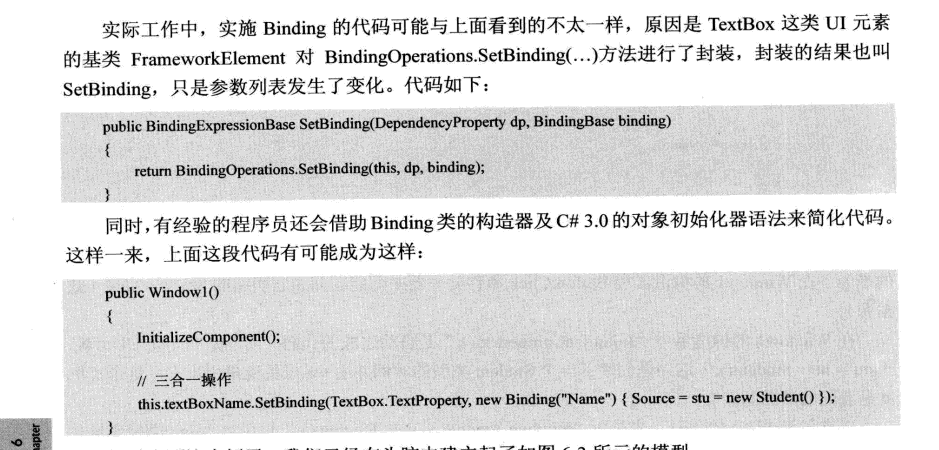
其实在textBox元素中已经为我们封装好了这些,即SetBinding方法。
所以可以改写如下:
- 标记扩展进行Data Binding
- 控制Binding数据流向的是Mode属性,而控制数据更新的是UpdateSourceTrigger属性
- 没有Path的Binding
有时候,Binding源本身就是数据,比如字符串,或者int类型,他们的实例本身就是数据,而不需要通过属性来提供访问,那么在指定path时可以通过一个.来代替,或者直接不写path,在XAML代码里可以省略不写,在C#代码中必须显式写.来表示path指向实例本身。
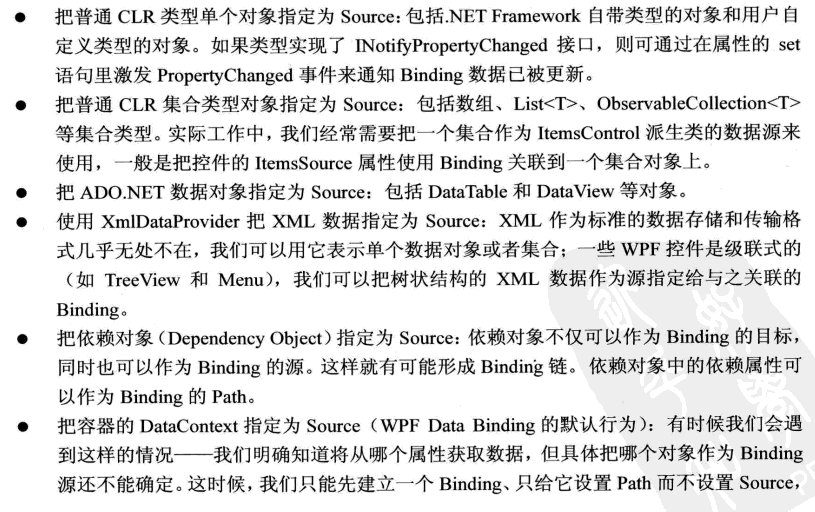
- 为Binding指定源的几种方法
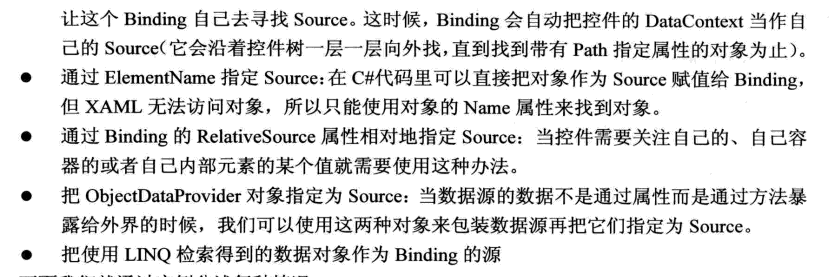
- Binding过程中可以没有path,那么可不可以没有source,当然可以,可以通过添加DataContext来隐式表达source。
- 使用集合对象作为列表控件的ItemsSource
 using System;

 using System.Collections.Generic;

 using System.Linq;

 using System.Text;

 using System.Threading.Tasks;

 using System.Windows;

 using System.Windows.Controls;

 using System.Windows.Data;

 using System.Windows.Documents;

 using System.Windows.Input;

 using System.Windows.Media;

 using System.Windows.Media.Imaging;

 using System.Windows.Navigation;

 using System.Windows.Shapes;

 using System.ComponentModel;

 namespace WpfApp7

 {

     /// <summary>

     /// MainWindow.xaml 的交互逻辑

     /// </summary>

     public partial class MainWindow : Window

     {

         public MainWindow()

         {

             InitializeComponent();

             //准备数据源

             List<Student> stuList = new List<Student>()

             {

                 new Student(){Id=,Name="Tim",Age=},

                 new Student(){Id=,Name="Tom",Age=},

                 new Student(){Id=,Name="Kyle",Age=},

                 new Student(){Id=,Name="Tony",Age=},

                 new Student(){Id=,Name="Vina",Age=},

             };

             //为listBox设置Binding

             this.listBoxStudents.ItemsSource = stuList;

             this.listBoxStudents.DisplayMemberPath = "Name";

             //为TextBox设置Binding

             Binding binding = new Binding("SelectedItem.Id") { Source = this.listBoxStudents };

             this.textBoxId.SetBinding(TextBox.TextProperty, binding);

         }

     }

     class Student

     {

         public int Id { get; set; }

         public string Name { get; set; }

         public int Age { get; set; }

     }

 }
界面代码如下:
<Window x:Class="WpfApp7.MainWindow"

        xmlns="http://schemas.microsoft.com/winfx/2006/xaml/presentation"

        xmlns:x="http://schemas.microsoft.com/winfx/2006/xaml"

        xmlns:d="http://schemas.microsoft.com/expression/blend/2008"

        xmlns:mc="http://schemas.openxmlformats.org/markup-compatibility/2006"

        xmlns:local="clr-namespace:WpfApp7"

        mc:Ignorable="d"

        Title="Binding Source" Height="240" Width="300">

    <StackPanel x:Name="stackPanel1" Background="LightBlue">

        <TextBlock Text="Student ID" FontWeight="Bold" Margin="5"/>

        <TextBox x:Name="textBoxId" Margin="5"/>

        <TextBlock Text="Student List" FontWeight="Bold" Margin="5"/>

        <ListBox x:Name="listBoxStudents" Height="110" Margin="5"/>

    </StackPanel>

</Window>
- 使用ObjectDataProvider对象作为Binding的Source
现在有一个Calculator的类,他具有加减乘除的方法:
 using System;

 using System.Collections.Generic;

 using System.Linq;

 using System.Text;

 using System.Threading.Tasks;

 using System.Windows;

 using System.Windows.Controls;

 using System.Windows.Data;

 using System.Windows.Documents;

 using System.Windows.Input;

 using System.Windows.Media;

 using System.Windows.Media.Imaging;

 using System.Windows.Navigation;

 using System.Windows.Shapes;

 namespace ObjectDateProvider

 {

     /// <summary>

     /// MainWindow.xaml 的交互逻辑

     /// </summary>

     public partial class MainWindow : Window

     {

         public MainWindow()

         {

             InitializeComponent();

             this.SetBinding();

         }

         private void SetBinding()

         {

             //创建并配置ObjectDataProvider对象

             ObjectDataProvider odp = new ObjectDataProvider

             {

                 ObjectInstance = new Calculator(),

                 MethodName = "Add"

             };

             odp.MethodParameters.Add("");

             odp.MethodParameters.Add("");

             //以ObjectDataProvider对象为Source创建Binding

             Binding bindingToArg1 = new Binding("MethodParameters[0]")

             {

                 Source = odp,

                 BindsDirectlyToSource = true,

                 UpdateSourceTrigger = UpdateSourceTrigger.PropertyChanged

             };

             Binding bindingToArg2 = new Binding("MethodParameters[1]")

             {

                 Source = odp,

                 BindsDirectlyToSource = true,

                 UpdateSourceTrigger = UpdateSourceTrigger.PropertyChanged

             };

             Binding bindingToResult = new Binding(".") { Source = odp };

             //将Binding关联到UI元素上

             this.textBoxArg1.SetBinding(TextBox.TextProperty, bindingToArg1);

             this.textBoxArg2.SetBinding(TextBox.TextProperty, bindingToArg2);

             this.textBoxResult.SetBinding(TextBox.TextProperty, bindingToResult);

         }

     }

     class Calculator

     {

         public string Add(string arg1,string arg2)

         {

             double x = ;

             double y = ;

             double z = ;

             if(double.TryParse(arg1,out x)&&double.TryParse(arg2,out y))

             {

                 z = x + y;

                 return z.ToString();

             }

             return "Input Error";

         }

     }

 }
界面代码如下:
 <Window x:Class="ObjectDateProvider.MainWindow"

         xmlns="http://schemas.microsoft.com/winfx/2006/xaml/presentation"

         xmlns:x="http://schemas.microsoft.com/winfx/2006/xaml"

         xmlns:d="http://schemas.microsoft.com/expression/blend/2008"

         xmlns:mc="http://schemas.openxmlformats.org/markup-compatibility/2006"

         xmlns:local="clr-namespace:ObjectDateProvider"

         mc:Ignorable="d"

         Title="MainWindow" Height="135" Width="300">

     <StackPanel Background="LightBlue">

         <TextBox x:Name="textBoxArg1" Margin="5"/>

         <TextBox x:Name="textBoxArg2" Margin="5"/>

         <TextBox x:Name="textBoxResult" Margin="5"/>

     </StackPanel>

 </Window>
界面代码
- 使用Binding的RelativeSource
- Binding对数据的转换与校验
Binding用于数据有效性检验的是ValidationRules属性,用于数据类型转换关卡的是Converter属性。
WPF之数据绑定Data Binding的更多相关文章
- [WPF]如何调试Data Binding
前言 在WPF开发中,将ViewModel中对象绑定到UI上时,会出现明明已经将数据对象Binding到UI,但是UI上就是不显示等等的问题.这篇博客将介绍WPF Data Binding相关的内容, ...
- WPF QuickStart系列之数据绑定(Data Binding)
这篇博客将展示WPF DataBinding的内容. 首先看一下WPF Data Binding的概览, Binding Source可以是任意的CLR对象,或者XML文件等,Binding Targ ...
- WPF中的数据绑定Data Binding使用小结
完整的数据绑定的语法说明可以在这里查看: http://www.nbdtech.com/Free/WpfBinding.pdf MSDN资料: Data Binding: Part 1 http:// ...
- WPF中的Data Binding调试指南
大家平时做WPF开发,相信用Visual studio的小伙伴比较多.XAML里面曾经在某些特殊版本的Visual Studio中是可以加断点进行调试的,不过目前多数版本都不支持在XAML加断点来调试 ...
- Windows phone 8.1之数据绑定(Data Binding)
学习Winphone8.1的时候经常需要对Slider进行数据绑定后使之视觉化,方便调节Slider的值. 数据绑定分为源(Source)和目标(Target),Source一般分为两种,其他控件的数 ...
- WP8.1 Study5:Data binding数据绑定
一.数据绑定 最简单的编程UI控件的方法是写自己的数据来获取和设置控件的属性,e.g. , textBox1.Text = "Hello, world"; 但在复杂的应用程序,这样 ...
- [WPF系列]-DataBinding(数据绑定) 自定义Binding
自定义Binding A base class for custom WPF binding markup extensions BindingDecoratorBase Code: public c ...
- XAML数据绑定(Data Binding)
XAML数据绑定(Data Binding) Data Binding可以使得XAML标签属性的赋值更为灵活和方便.在绑定过程中,获取数据的标签成为目标标签:提供数据的标签成为源标签.在XAML中 ...
- .NET: WPF Data Binding
WPF是分离UI和Logic的最佳工具,不同于Window Form的事件驱动原理,WPF采用的是数据驱动,让UI成为了Logic的附属,达到分离的效果. 本篇主要讲讲wpf的精华:data bind ...
随机推荐
- 与IBM的Lin Sun关于Istio 1.0和微服务的问答
北京时间 7 月 31 日,Istio 正式发布了 1.0 版本,并表示已经可用于生产环境.该版本的主要新特性包括跨集群 mesh 支持.细粒度流量控制以及在一个 mesh 中增量推出 mutual ...
- 图论--SCC缩点--Tarjan
// Tarjan算法求有向图强连通分量并缩点 /*强连通缩点与双连通缩点大同小异,也就是说将强连通分支缩成一个点之后,没有强连通,成为有向无环图,在对图进行题目的操作.*/ #include< ...
- python(json 模块)
1.Json 定义 定义:JSON(JavaScript Object Notation, JS 对象简谱) 是一种轻量级的数据交换格式.JSON 的数据格式其实就是 python 里面的字典格式,里 ...
- 内存淘汰机制——LRU与LFU
内存淘汰机制之LRU与LFU LRU(Least Recently Used):淘汰 近期最不会访问的数据 LFU(Least Frequently Used):淘汰 最不经常使用(访问次数少) 所谓 ...
- php扩展开发之hello world
最近在公司做的事情就是php扩展开发,虽然我只负责c++代码的编写,但是了解扩展开发的流程还是很有必要的. (本文介绍的是动态扩展,对静态扩展有兴趣的读者可自行google) php扩展开发环境搭建可 ...
- springboot中json转换LocalDateTime失败的bug解决过程
环境:jdk1.8.maven.springboot 问题:前端通过json传了一个日期:date:2019-03-01(我限制不了前端开发给到后端的日期为固定格式,有些人就是这么不配合), ...
- Qt for Android (三) 打开Android相册并选一个图片进行显示
Qt for Android (三) 这两天弄了一下android相册的相关功能.还是花了挺长时间的,这里总结一下,避免以后再踩坑.同时也在这篇文章里面补齐一些android开发的基础支持 打开And ...
- Java流式思想和方法引用
目录 Java流式思想和方法引用 1. Stream流 1.1 概述 传统集合的多步遍历代码 Stream的更优写法 1.2 流式思想的概述 1.3 获取流 1.4 常用方法 ①逐一处理:forEac ...
- 【HBase】HBase与MapReduce的集成案例
目录 需求 步骤 一.创建maven工程,导入jar包 二.开发MapReduce程序 三.运行结果 HBase与MapReducer集成官方帮助文档:http://archive.cloudera. ...
- Day_12【集合】扩展案例4_判断字符串每一个字符出现的次数
分析以下需求,并用代码实现 1.利用键盘录入,输入一个字符串 2.统计该字符串中各个字符的数量(提示:字符不用排序) 3.如: 用户输入字符串 "If~you-want~to~change- ...