
[WPF系列]-DataBinding(数据绑定) 自定义Binding
自定义Binding
A base class for custom WPF binding markup extensions
BindingDecoratorBase
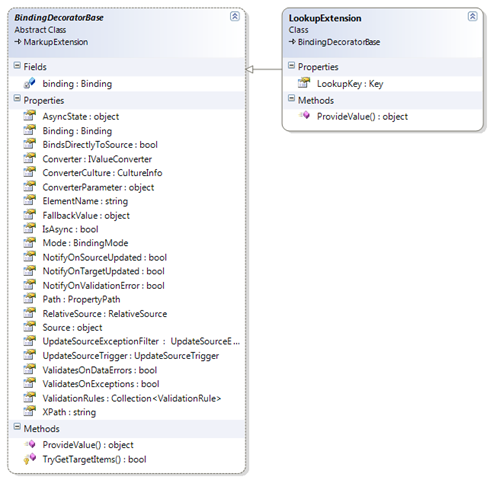
Code:
public class LookupExtension : BindingDecoratorBase

{

  //A property that can be set in XAML

  public string LookupKey { get; set; }

  public override object ProvideValue(IServiceProvider provider)

  {

    //delegate binding creation etc. to the base class

    object val = base.ProvideValue(provider);

    //try to get bound items for our custom work

    DependencyObject targetObject;

    DependencyProperty targetProperty;

    bool status = TryGetTargetItems(provider, out targetObject,

                                              out targetProperty);

    if (status)

    {

      //associate an input listener with the control

      InputHandler.RegisterHandler(targetObject, LookupKey);

    }

    return val;

  }

}
XAML:
<TextBox Name="txtZipCode">

  <TextBox.Text>

    <local:LookupExtension Source="{StaticResource MyAddress}"

                           Path="ZipCode"

                           LookupKey="F5" />

  </TextBox.Text>

</TextBox>
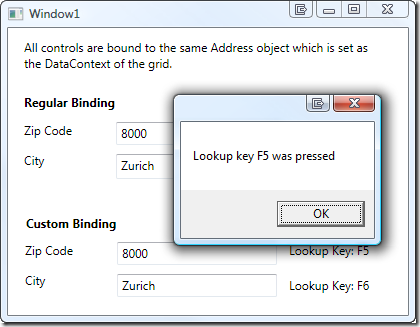
效果图:
---------------------------------------------===================================------------------------------
DelayBinding: a custom WPF Binding

<TextBox Text="{z:DelayBinding Path=SearchText, Delay='00:00:01'}" />
[MarkupExtensionReturnType(typeof(object))]

public class DelayBindingExtension : MarkupExtension

{

    public DelayBindingExtension()

    {

        Delay = TimeSpan.FromSeconds(0.5);

    }

    public DelayBindingExtension(PropertyPath path)

        : this()

    {

        Path = path;

    }

    public IValueConverter Converter { get; set; }

    public object ConverterParamter { get; set; }

    public string ElementName { get; set; }

    public RelativeSource RelativeSource { get; set; }

    public object Source { get; set; }

    public bool ValidatesOnDataErrors { get; set; }

    public bool ValidatesOnExceptions { get; set; }

    public TimeSpan Delay { get; set; }

    [ConstructorArgument("path")]

    public PropertyPath Path { get; set; }

    [TypeConverter(typeof(CultureInfoIetfLanguageTagConverter))]

    public CultureInfo ConverterCulture { get; set; }

    public override object ProvideValue(IServiceProvider serviceProvider)

    {

        var valueProvider = serviceProvider.GetService(typeof (IProvideValueTarget)) as IProvideValueTarget;

        if (valueProvider != null)

        {

            var bindingTarget = valueProvider.TargetObject as DependencyObject;

            var bindingProperty = valueProvider.TargetProperty as DependencyProperty;

            if (bindingProperty == null || bindingTarget == null)

            {

                throw new NotSupportedException(string.Format(

                    "The property '{0}' on target '{1}' is not valid for a DelayBinding. The DelayBinding target must be a DependencyObject, "

                    + "and the target property must be a DependencyProperty.",

                    valueProvider.TargetProperty,

                    valueProvider.TargetObject));

            }

            var binding = new Binding();

            binding.Path = Path;

            binding.Converter = Converter;

            binding.ConverterCulture = ConverterCulture;

            binding.ConverterParameter = ConverterParamter;

            if (ElementName != null) binding.ElementName = ElementName;

            if (RelativeSource != null) binding.RelativeSource = RelativeSource;

            if (Source != null) binding.Source = Source;

            binding.ValidatesOnDataErrors = ValidatesOnDataErrors;

            binding.ValidatesOnExceptions = ValidatesOnExceptions;

            return DelayBinding.SetBinding(bindingTarget, bindingProperty, Delay, binding);

        }

        return null;

    }

}
public class DelayBinding

{

    private readonly BindingExpressionBase _bindingExpression;

    private readonly DispatcherTimer _timer;

    protected DelayBinding(BindingExpressionBase bindingExpression, DependencyObject bindingTarget, DependencyProperty bindingTargetProperty, TimeSpan delay)

    {

        _bindingExpression = bindingExpression;

        // Subscribe to notifications for when the target property changes. This event handler will be

        // invoked when the user types, clicks, or anything else which changes the target property

        var descriptor = DependencyPropertyDescriptor.FromProperty(bindingTargetProperty, bindingTarget.GetType());

        descriptor.AddValueChanged(bindingTarget, BindingTarget_TargetPropertyChanged);

        // Add support so that the Enter key causes an immediate commit

        var frameworkElement = bindingTarget as FrameworkElement;

        if (frameworkElement != null)

        {

            frameworkElement.KeyUp += BindingTarget_KeyUp;

        }

        // Setup the timer, but it won't be started until changes are detected

        _timer = new DispatcherTimer();

        _timer.Tick += Timer_Tick;

        _timer.Interval = delay;

    }

    private void BindingTarget_KeyUp(object sender, KeyEventArgs e)

    {

        if (e.Key != Key.Enter) return;

        _timer.Stop();

        _bindingExpression.UpdateSource();

    }

    private void BindingTarget_TargetPropertyChanged(object sender, EventArgs e)

    {

        _timer.Stop();

        _timer.Start();

    }

    private void Timer_Tick(object sender, EventArgs e)

    {

        _timer.Stop();

        _bindingExpression.UpdateSource();

    }

    public static object SetBinding(DependencyObject bindingTarget, DependencyProperty bindingTargetProperty, TimeSpan delay, Binding binding)

    {

        // Override some specific settings to enable the behavior of delay binding

        binding.Mode = BindingMode.TwoWay;

        binding.UpdateSourceTrigger = UpdateSourceTrigger.Explicit;

        // Apply and evaluate the binding

        var bindingExpression = BindingOperations.SetBinding(bindingTarget, bindingTargetProperty, binding);

        // Setup the delay timer around the binding. This object will live as long as the target element lives, since it subscribes to the changing event,

        // and will be garbage collected as soon as the element isn't required (e.g., when it's Window closes) and the timer has stopped.

        new DelayBinding(bindingExpression, bindingTarget, bindingTargetProperty, delay);

        // Return the current value of the binding (since it will have been evaluated because of the binding above)

        return bindingTarget.GetValue(bindingTargetProperty);

    }

}
参考
Automatically validating business entities in WPF using custom binding and attributes
Flexible and Powerful Data Binding with WPF, Part 2
[WPF系列]-DataBinding(数据绑定) 自定义Binding的更多相关文章
- WPF QuickStart系列之数据绑定(Data Binding)
这篇博客将展示WPF DataBinding的内容. 首先看一下WPF Data Binding的概览, Binding Source可以是任意的CLR对象,或者XML文件等,Binding Targ ...
- WPF中的数据绑定Data Binding使用小结
完整的数据绑定的语法说明可以在这里查看: http://www.nbdtech.com/Free/WpfBinding.pdf MSDN资料: Data Binding: Part 1 http:// ...
- [WPF系列]-DataBinding 绑定计算表达式
Width="{Binding RelativeSource={RelativeSource Self}, Path=ActualWidth, Converter={Stat ...
- [WPF系列]-DataBinding 枚举类型数据源
public class EnumerationDataProvider : ObjectDataProvider { public Type EnumerationType { get; set; ...
- WPF学习09:数据绑定之 Binding to List Data
从WPF学习03:Element Binding我们可以实现控件属性与控件属性的绑定. 从WPF学习07:MVVM 预备知识之数据绑定 我们可以实现控件属性与自定义对象属性的绑定. 而以上两个功能在实 ...
- WPF编游戏系列 之五 数据绑定
原文:WPF编游戏系列 之五 数据绑定 在上一篇通过用户控件将重复使用的控件封装为一个控件组,大大减少了C#代码数量,本篇继续对该控件组进行数据绑定,节省为每个控件赋值的工作.对于数据绑 ...
- WPF入门教程系列十五——WPF中的数据绑定(一)
使用Windows Presentation Foundation (WPF) 可以很方便的设计出强大的用户界面,同时 WPF提供了数据绑定功能.WPF的数据绑定跟Winform与ASP.NET中的数 ...
- WPF之数据绑定Data Binding
一般情况下,应用程序会有三层结构:数据存储层,数据处理层(业务逻辑层),数据展示层(UI界面). WPF是“数据驱动UI”. Binding实现(通过纯C#代码) Binding分为source和ta ...
- [WPF系列]-TreeView的常用事项
引言 项目经常会用Treeview来组织一些具有层级结构的数据,本节就将项目使用Treeview常见的问题作一个总结. DataBinding数据绑定 DataTemplate自定义 <Hier ...
随机推荐
- Java aes加密C#解密的取巧方法
摘要: 项目开发过程中遇到一个棘手的问题:A系统使用java开发,通过AES加密数据,B系统使用C#开发,需要从A系统获取数据,但在AES解密的时候遇到麻烦.Java的代码和C#的代码无法互通. Ja ...
- [Asp.net 5] Localization-Asp.net运行时多语言
本节介绍的是Microsoft.AspNet.Localization工程.该工程是运行在Asp.net 5环境中的运行时多语言设置. ASP.net 5中间件技术 在新的Asp.net 5中,可以将 ...
- 最好的Angular2表格控件
现在市面上有大量的JavaScript数据表格控件,包括开源的第三方的和自产自销的.可以说Wijmo的Flexgrid是目前适应Angular 2的最好的表格控件. Angular 2数据表格基本要求 ...
- 基于小脚丫的ADC081S101 电压采集595数码管显示
RTL结构图 采集模块运用SPI 通讯 MISO方式收集数据 module ad_collect(input sddata,input rst_n,output reg cs,output reg s ...
- LNMP环境搭建完整步骤
零.resource http://pan.baidu.com/s/1o83r3S2 一.centos 6.4.VirtualBox 5.0.14 二.nginx 1.9.9 安装 [root@p ...
- 如何配置Log4Net使用Oracle数据库记录日志
最近在做一个项目的时候,需要增加一个日志的功能,需要使用Log4Net记录日志,把数据插入到Oracle数据库,经过好久的研究终于成功了.把方法记录下来,以备以后查询. 直接写实现方法,分两步完成: ...
- Xdebug文档(四)函数跟踪
Xdebug能让你把所有函数调用,包括参数和返回值以不同的格式记录到文件中. 这些号称“函数跟踪”功能能帮助你面对一个新应用程序,亦或者在程序运行时你想弄清楚它在做什么.函数跟踪功能可以选择性地显示函 ...
- [ASP.NET MVC] ASP.NET Identity登入技术剖析
[ASP.NET MVC] ASP.NET Identity登入技术剖析 前言 ASP.NET Identity是微软所贡献的开源项目,用来提供ASP.NET的验证.授权等等机制.本篇文章介绍ASP. ...
- Imperva WAF使用笔记
添加IP白名单 在对自己公司网站进行安全测试时会被WAF拦截,如果把WAF彻底停掉就无法拦截到外部的攻击了. 此时可以添加IP地址白名单,白名单内的IP对网站发起扫描时不会做拦截.
- IOS开发基础知识--碎片37
1:iOS 使用NJKWebViewProgress做webview进度条 引入头文件: #import "NJKWebViewProgressView.h" #import &q ...