
[WPF]如何调试Data Binding
前言
在WPF开发中,将ViewModel中对象绑定到UI上时,会出现明明已经将数据对象Binding到UI,但是UI上就是不显示等等的问题。这篇博客将介绍WPF Data Binding调试相关的内容。
场景一(Binding的属性不存在)
ViewModel:
public partial class MainWindow : Window

{

    public MainWindow()

    {

        InitializeComponent();

        this.DataContext = new ViewModel() { Id = , Name = "Tom", Age = };

    }

}

public class ViewModel

{

    public int Id { get; set; }

    public string Name { get; set; }

    public int Age { get; set; }

}
XAML:
<StackPanel Margin="10">

    <TextBlock Text="{Binding ID}" />

    <TextBlock Text="{Binding Name}" Margin="0,10" />

    <TextBlock Text="{Binding Age}" />

</StackPanel>
运行结果:

UI中Binding的ID值没有显示出来。请注意加粗的代码,在UI代码中,由于拼写错误,将Id写成了ID。但是这段代码在编译时不会报错,在VS Output窗口中也不会有提示/警告信息。在程序运行时,仔细查看VS Output窗口,此时会有如下信息 (对信息进行了精简)
System.Windows.Data Error: 40 : BindingExpression path error: 'ID' property not found on 'object' ''ViewModel' (HashCode=20915929)'. BindingExpression:Path=ID; DataItem='ViewModel' (HashCode=20915929); target element is 'TextBlock' (Name=''); target property is 'Text' (type 'String')
这段信息告诉提示说在ViewModel对象上没有找到ID属性,此时我们再去检查一下ViewModel发现,原来是将Id错误的写成了ID。一般这种错误的提示开头为:System.Windows.Data Error:
场景二(使用System.Diagnostics来追踪)
XAML:
<Window x:Class="WpfBindingDebug.MainWindow"

        xmlns="http://schemas.microsoft.com/winfx/2006/xaml/presentation"

        xmlns:x="http://schemas.microsoft.com/winfx/2006/xaml"

        xmlns:d="http://schemas.microsoft.com/expression/blend/2008"

        xmlns:mc="http://schemas.openxmlformats.org/markup-compatibility/2006"

        mc:Ignorable="d"

        Title="MainWindow" Height="350" Width="525">

    <StackPanel>

        <TextBlock Text="{Binding Title}" />

    </StackPanel>

</Window>
将Title属性Binding到TextBlock的Text属性上面,XAML和C#代码中均未指定DataContext属性。编译项目并运行程序,在VS Output中没有任何提示/警告信息。此时应该如何调试呢?可以通过设置PresentationTraceSources对象的TraceLevel来强制WPF输出所有的Binding方面的信息。
更多PresentationTraceSources信息可以参考:
对XAML代码进行如下修改(注意加粗的代码行):
<Window x:Class="WpfBindingDebug.MainWindow"

        xmlns="http://schemas.microsoft.com/winfx/2006/xaml/presentation"

        xmlns:x="http://schemas.microsoft.com/winfx/2006/xaml"

        xmlns:d="http://schemas.microsoft.com/expression/blend/2008"

        xmlns:mc="http://schemas.openxmlformats.org/markup-compatibility/2006"

        xmlns:diag="clr-namespace:System.Diagnostics;assembly=WindowsBase"

        mc:Ignorable="d"

        Title="MainWindow" Height="350" Width="525">

    <StackPanel>

        <TextBlock Text="{Binding Title, diag:PresentationTraceSources.TraceLevel=High}" />

    </StackPanel>

</Window>
编译并运行程序,在VS Output窗口中可以找到关于Binding的信息(对信息进行了精简):
System.Windows.Data Warning: 56 : Created BindingExpression (hash=39201736) for Binding (hash=44325851)
System.Windows.Data Warning: 58 : Path: 'Title'
System.Windows.Data Warning: 60 : BindingExpression (hash=39201736): Default mode resolved to OneWay
System.Windows.Data Warning: 61 : BindingExpression (hash=39201736): Default update trigger resolved to PropertyChanged
System.Windows.Data Warning: 62 : BindingExpression (hash=39201736): Attach to System.Windows.Controls.TextBlock.Text (hash=17911681)
System.Windows.Data Warning: 67 : BindingExpression (hash=39201736): Resolving source
System.Windows.Data Warning: 70 : BindingExpression (hash=39201736): Found data context element: TextBlock (hash=17911681) (OK)
....
System.Windows.Data Warning: 67 : BindingExpression (hash=39201736): Resolving source
System.Windows.Data Warning: 70 : BindingExpression (hash=39201736): Found data context element: TextBlock (hash=17911681) (OK)
System.Windows.Data Warning: 71 : BindingExpression (hash=39201736): DataContext is null
System.Windows.Data Warning: 67 : BindingExpression (hash=39201736): Resolving source (last chance)
System.Windows.Data Warning: 70 : BindingExpression (hash=39201736): Found data context element: TextBlock (hash=17911681) (OK)
System.Windows.Data Warning: 78 : BindingExpression (hash=39201736): Activate with root item <null>
System.Windows.Data Warning: 106 : BindingExpression (hash=39201736): Item at level 0 is null - no accessor
System.Windows.Data Warning: 80 : BindingExpression (hash=39201736): TransferValue - got raw value {DependencyProperty.UnsetValue}
System.Windows.Data Warning: 88 : BindingExpression (hash=39201736): TransferValue - using fallback/default value ''
System.Windows.Data Warning: 89 : BindingExpression (hash=39201736): TransferValue - using final value ''
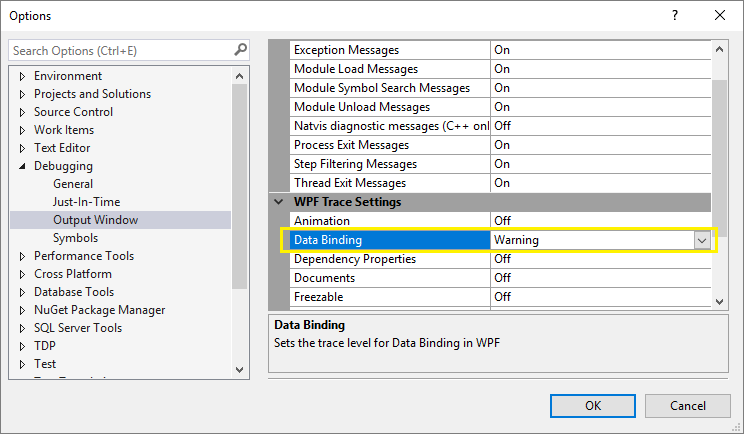
注意:在Visual Studio 2010中需要进行如下设置才能看到上面的提示信息:因为VS 2010默认将下面的设为Off。
Tools -> Options -> Debugging -> Output Window -> WPF Trace Settings -> Data Binding -> set to Warning
程序一直在尝试寻找Visual Tree上的可以Binding的Title值,最终找到一个合适的,DependencyProperty.UnsetValue。
上述方法对查找单个页面Binding很有用,当然我们也可以全局的来收集这些Binding信息。在App.xaml.cs中添加:
public partial class App : Application

{

    protected override void OnStartup(StartupEventArgs e)

    {

        PresentationTraceSources.Refresh();

        PresentationTraceSources.DataBindingSource.Listeners.Add(new ConsoleTraceListener());

        PresentationTraceSources.DataBindingSource.Listeners.Add(new DebugTraceListener());

        PresentationTraceSources.DataBindingSource.Switch.Level = SourceLevels.Warning | SourceLevels.Error;

        base.OnStartup(e);

    }

}

public class DebugTraceListener : TraceListener

{

    public override void Write(string message)

    {

        // Write your log here.

    }

    public override void WriteLine(string message)

    {

        // Write your log here.

    }

}
场景三(使用ValueConverter来调试)
场景一和场景二中的方法解决因拼写错误或者无明确DataContext时非常有效。不过有时候真正的通过VS进行调试一下,更加直观,便捷。可以使用实现一个简单的调试使用的Converter,然后将其Binding到目标上,
public class DebugConverter : IValueConverter

{

    public object Convert(object value, Type targetType, object parameter, CultureInfo culture)

    {

        Debugger.Break();

        return value;

    }

    public object ConvertBack(object value, Type targetType, object parameter, CultureInfo culture)

    {

        Debugger.Break();

        return value;

    }

}
Debugger.Break()的效果和VS中F9设置断点是一样的。
XAML
<Window x:Class="WpfBindingDebug.MainWindow"

        xmlns="http://schemas.microsoft.com/winfx/2006/xaml/presentation"

        xmlns:x="http://schemas.microsoft.com/winfx/2006/xaml"

        xmlns:d="http://schemas.microsoft.com/expression/blend/2008"

        xmlns:mc="http://schemas.openxmlformats.org/markup-compatibility/2006"

        xmlns:local="clr-namespace:WpfBindingDebug"

        mc:Ignorable="d"

        Title="MainWindow" Height="350" Width="525">

    <Window.Resources>

        <local:DebugConverter x:Key="DebugConverter" />

    </Window.Resources>

    <StackPanel>

        <TextBlock Text="{Binding Id, Converter={StaticResource DebugConverter}}" />

    </StackPanel>

</Window>
感谢您的阅读~如果您有其他关于Data Binding的调试方式,欢迎在评论区指出~
[WPF]如何调试Data Binding的更多相关文章
- WPF中的Data Binding调试指南
大家平时做WPF开发,相信用Visual studio的小伙伴比较多.XAML里面曾经在某些特殊版本的Visual Studio中是可以加断点进行调试的,不过目前多数版本都不支持在XAML加断点来调试 ...
- WPF之数据绑定Data Binding
一般情况下,应用程序会有三层结构:数据存储层,数据处理层(业务逻辑层),数据展示层(UI界面). WPF是“数据驱动UI”. Binding实现(通过纯C#代码) Binding分为source和ta ...
- WPF QuickStart系列之数据绑定(Data Binding)
这篇博客将展示WPF DataBinding的内容. 首先看一下WPF Data Binding的概览, Binding Source可以是任意的CLR对象,或者XML文件等,Binding Targ ...
- .NET: WPF Data Binding
WPF是分离UI和Logic的最佳工具,不同于Window Form的事件驱动原理,WPF采用的是数据驱动,让UI成为了Logic的附属,达到分离的效果. 本篇主要讲讲wpf的精华:data bind ...
- Data Binding in WPF
http://msdn.microsoft.com/en-us/magazine/cc163299.aspx#S1 Data Binding in WPF John Papa Code downl ...
- WPF binding<一> Data Binding在WPF中的地位
在代码中看到 <Image Source="{Binding ElementName=LBoxImages, Path=SelectedItem.Source}" /> ...
- WPF教程三:学习Data Binding把思想由事件驱动转变为数据驱动
之前大家写代码都喜欢用事件驱动,比如说鼠标输入的click事件.初始化的内容全部放在窗体加载完毕的load事件,等等,里面包含了大量的由事件触发后的业务处理代码.导致了UI和业务逻辑高度耦合在一个地方 ...
- WPF中的数据绑定Data Binding使用小结
完整的数据绑定的语法说明可以在这里查看: http://www.nbdtech.com/Free/WpfBinding.pdf MSDN资料: Data Binding: Part 1 http:// ...
- Data Binding和INotifyPropertyChanged是如何协调工作的?
前言 WPF的一大基础就是Data Binding.在基于MVVM架构的基础上,只有通过实现INotifyPropertyChanged接口的ViewModel才能够用于Data Binding. 要 ...
随机推荐
- Java 学习内容总结
最近对Core Java基础做了一些学习.有自己的见解,也有别人的总结,供大家参考. 1 实现多线程的方式有几种? 其实这个问题并不难,只是在这里做一个总结.一共有三种. 实现Runnable接口,并 ...
- Java中的clone()----深复制,浅复制
这篇文章主要介绍了Java中对象的深复制(深克隆)和浅复制(浅克隆) ,需要的朋友可以参考下 1.浅复制与深复制概念 ⑴浅复制(浅克隆) 被复制对象的所有变量都含有与原来的对象相同的值,而所有的对其他 ...
- Hexo博客添加SEO-评论系统-阅读统计-站长统计
原文地址:→传送门 写在前面 在五月出捣腾了一把个人博客,但是刚开始只做了一些基础设置,套路也没摸清,基础安装篇请看hexo从零开始到搭建完整,里面讲到了基础工具的安装及blog项目的文件夹含义,以及 ...
- 一步一步学习Vue(十)
本篇说一下组件通信的问题,父子组件通信,前面的博客中已有说明,vue也推荐props in,event out:兄弟节点通信如何做呢?官方其实也给出了实现方式,我们以下面的场景来实现一下: 上图中,实 ...
- TypeScript02 方法特性【参数种类、参数个数】、generate方法、析构表达式、箭头表达式、循环
1 方法的参数 1.1 必选参数 调用方法时实参的个数必须和定义方法时形参在数量和类型上匹配 /** * Created by Administrator on 2017/8/2 0002. */ f ...
- Linux(4)系统管理
系统管理 cal :查看当前月份和日历, 加-y查看整年日历 date :显示或设置时间 设置时间格式(需要管理员权限) date [MMDDhhmm[[CC]YY][.ss]]+format CC为 ...
- [POI2008]枪战Maf
[POI2008]枪战Maf 题目 有n个人,每个人手里有一把手枪.一开始所有人都选定一个人瞄准(有可能瞄准自己).然后他们按某个顺序开枪,且任意时刻只有一个人开枪.因此,对于不同的开枪顺序,最后死的 ...
- NYOJ 128 前缀表达式的计算
前缀式计算 时间限制:1000 ms | 内存限制:65535 KB 难度:3 描述 先说明一下什么是中缀式: 如2+(3+4)*5这种我们最常见的式子就是中缀式. 而把中缀式按运算顺序加上括 ...
- HTML的基本结构与标签的初步了解
一.初步了解HTML HTML是一种超文本标签语言,浏览器则是用来"解释和执行"HTML源码的工具. HTML的基本结构 <!DOCTYPE html> <htm ...
- Win7 IIS建站
1.在控制面板->程序和功能->打开或关闭windows功能->安装IIS服务 2.控制面板->管理工具->IIS管理器 客户端访问Web服务器,服务器端不需关闭防火墙, ...