
C#使用ActiveMQ实例
1. ActiveMQ消息总线简介
消息队列(Message Queue,简称MQ),从字面意思上看,本质是个队列,FIFO先入先出,只不过队列中存放的内容是message而已。主要用作不同进程、应用间的通信方式。
常见的消息队列有:rabbitMQ、activeMQ、zeroMQ、Kafka、Redis 比较 。
其中ActiveMQ是Apache出品的一款开源消息总线,支持多种语言和协议编写客户端。语言: Java,C,C++,C#,Ruby,Perl,Python,PHP。应用协议: OpenWire,Stomp REST,WS Notification,XMPP,AMQP。
ActiveMQ主要有两种消息分发方式:Queue和Topic。
Queue类似编程语言中的Queue,每条消息只会被一个消费者接收;
Topic类似广播,发送的消息会被多个消费者接受,前提是订阅了该主题的消息。
2. ActiveMQ安装
2.1. 下载ActiveMQ
官方网站下载地址:http://activemq.apache.org/
2.2. 运行ActiveMQ
解压缩apache-activemq-5.10.0-bin.zip,然后双击apache-activemq-5.10.0\bin\win32\activemq.bat运行ActiveMQ程序。
看见控制台最后一行输出: “access to all MBeans is allowed” 证明启动成功。
启动ActiveMQ以后,可以使用浏览器登陆:http://localhost:8161/admin/验证, 默认用户名是:admin 密码是:admin
(前提是安装好Java环境)
同时下载.net版Dll:Apache.NMS-1.7.0-bin.zip和Apache.NMS.ActiveMQ-1.7.0-bin.zip
都从这里下载:http://archive.apache.org/dist/activemq/apache-nms/1.7.0/
3. ActiveMQ Queue
在ActiveMQ中Queue是一种点对点的消息分发方式,生产者在队列中添加一条消息,然后消费者消费一条消息,这条消息保证送达并且只会被一个消费者接收。
这里使用Winform编写程序,其中需要添加两个dll,都在Apache.NMS-1.7.0-bin.zip和Apache.NMS.ActiveMQ-1.7.0-bin.zip中。
// 生产者

// 需要添加一个label, button, textbox

public Form1()

        {

            InitializeComponent();

            InitProducer();

        }

        private IConnectionFactory factory;

        public void InitProducer()

        {

            try

            {

                //初始化工厂,这里默认的URL是不需要修改的

                factory = new  ConnectionFactory("tcp://localhost:61616");

            }

            catch

            {

                lbMessage.Text = "初始化失败!!";

            }

        }

        private void btnConfirm_Click(object sender, EventArgs e)

        {

            //通过工厂建立连接

            using (IConnection connection = factory.CreateConnection())

            {

                //通过连接创建Session会话

                using (ISession session = connection.CreateSession())

                {

                    //通过会话创建生产者,方法里面new出来的是MQ中的Queue

                    IMessageProducer prod = session.CreateProducer(new Apache.NMS.ActiveMQ.Commands.ActiveMQQueue("firstQueue"));

                    //创建一个发送的消息对象

                    ITextMessage message = prod.CreateTextMessage();

                    //给这个对象赋实际的消息

                    message.Text = txtMessage.Text;

                    //设置消息对象的属性,这个很重要哦,是Queue的过滤条件,也是P2P消息的唯一指定属性

                    message.Properties.SetString("filter","demo");

                    //生产者把消息发送出去,几个枚举参数MsgDeliveryMode是否长链,MsgPriority消息优先级别,发送最小单位,当然还有其他重载

                    prod.Send(message, MsgDeliveryMode.NonPersistent, MsgPriority.Normal, TimeSpan.MinValue);

                    lbMessage.Text = "发送成功!!";

                    txtMessage.Text = "";

                    txtMessage.Focus();

                }

            }

        }
    // 消费者

     public Form1()

        {

            InitializeComponent();

            InitConsumer();

        }

         public void InitConsumer()

         {

             //创建连接工厂

             IConnectionFactory factory = new ConnectionFactory("tcp://localhost:61616");

             //通过工厂构建连接

             IConnection connection = factory.CreateConnection();

             //这个是连接的客户端名称标识

             connection.ClientId = "firstQueueListener";

             //启动连接,监听的话要主动启动连接

             connection.Start();

             //通过连接创建一个会话

             ISession session = connection.CreateSession();

             //通过会话创建一个消费者,这里就是Queue这种会话类型的监听参数设置

             IMessageConsumer consumer = session.CreateConsumer(new Apache.NMS.ActiveMQ.Commands.ActiveMQQueue("firstQueue"), "filter='demo'");

             //注册监听事件

             consumer.Listener += new MessageListener(consumer_Listener);

             //connection.Stop();

             //connection.Close();

         }

         void consumer_Listener(IMessage message)

         {

             ITextMessage msg = (ITextMessage)message;

             //异步调用下,否则无法回归主线程

             tbReceiveMessage.Invoke(new DelegateRevMessage(RevMessage),msg);

         }

         public delegate void DelegateRevMessage(ITextMessage message);

         public void RevMessage(ITextMessage message)

         {

             tbReceiveMessage.Text += string.Format(@"接收到:{0}{1}", message.Text, Environment.NewLine);

         }
我们可以到管理平台 http://localhost:8161 中查看对应的Queue,生产者产生消息,消费者接收后会删掉消息。
新建项目,更改 connection.ClientId 后可以启动多个消费者,可以发现每个消费者都有机会接收消息,测试的时候是每个消费者轮流接收一条消息,有兴趣的可以自己看一下接收规律。
4. ActiveMQ Topic
Topic和Queue类似,不过生产者发送的消息会被多个消费者接收,保证每个订阅的消费者都会接收到消息。
在管理平台可以看到每条Topic消息有两个记录值,一个是订阅的消费者数量,一个是已经接收的消费者数量。
//生产者

try

{

    //Create the Connection Factory

    IConnectionFactory factory = new ConnectionFactory("tcp://localhost:61616/");

    using (IConnection connection = factory.CreateConnection())

    {

        //Create the Session

        using (ISession session = connection.CreateSession())

        {

            //Create the Producer for the topic/queue

            IMessageProducer prod = session.CreateProducer(

                new Apache.NMS.ActiveMQ.Commands.ActiveMQTopic("testing"));

            //Send Messages

            int i = ;

            while (!Console.KeyAvailable)

            {

                ITextMessage msg = prod.CreateTextMessage();

                msg.Text = i.ToString();

                Console.WriteLine("Sending: " + i.ToString());

                prod.Send(msg, Apache.NMS.MsgDeliveryMode.NonPersistent, Apache.NMS.MsgPriority.Normal, TimeSpan.MinValue);

                System.Threading.Thread.Sleep();

                i++;

            }

        }

    }

    Console.ReadLine();

}

catch (System.Exception e)

{

    Console.WriteLine("{0}", e.Message);

    Console.ReadLine();

}
//消费者

static void Main(string[] args)

        {

            try

            {

                //Create the Connection factory

                IConnectionFactory factory = new ConnectionFactory("tcp://localhost:61616/");

                //Create the connection

                using (IConnection connection = factory.CreateConnection())

                {

                    connection.ClientId = "testing listener1";

                    connection.Start();

                    //Create the Session

                    using (ISession session = connection.CreateSession())

                    {

                        //Create the Consumer

                        IMessageConsumer consumer = session.CreateDurableConsumer(new Apache.NMS.ActiveMQ.Commands.ActiveMQTopic("testing"), "testing listener1", null, false);

                        consumer.Listener += new MessageListener(consumer_Listener);

                        Console.ReadLine();

                    }

                    connection.Stop();

                    connection.Close();

                }

            }

            catch (System.Exception e)

            {

                Console.WriteLine(e.Message);

            }

        }

        static void consumer_Listener(IMessage message)

        {

            try

            {

                ITextMessage msg = (ITextMessage)message;

                Console.WriteLine("Receive: " + msg.Text);

           }

            catch (System.Exception e)

            {

                Console.WriteLine(e.Message);

            }

        }
新建项目,更改connection.ClientId后可以启动多个消费者,可以发现每个消费者都会接收到消息,订阅一次后即使下线了,上线之后也会收到消息。
5. ActiveMQ持久化消息
ActiveMQ的另一个问题就是只要是软件就有可能挂掉,挂掉不可怕,怕的是挂掉之后把信息给丢了,所以本节分析一下几种持久化方式:
5.1 持久化为文件
ActiveMQ默认就支持这种方式,只要在发消息时设置消息为持久化就可以了。
打开安装目录下的配置文件:
D:\ActiveMQ\apache-activemq\conf\activemq.xml在越80行会发现默认的配置项:
<persistenceAdapter>

     <kahaDB directory="${activemq.data}/kahadb"/>

</persistenceAdapter>
注意这里使用的是kahaDB,是一个基于文件支持事务的消息存储器,是一个可靠,高性能,可扩展的消息存储器。
他的设计初衷就是使用简单并尽可能的快。KahaDB的索引使用一个transaction log,并且所有的destination只使用一个index,有人测试表明:如果用于生产环境,支持1万个active connection,每个connection有一个独立的queue。该表现已经足矣应付大部分的需求。
然后再发送消息的时候改变第二个参数为:
MsgDeliveryMode.Persistent
Message保存方式有2种
PERSISTENT:保存到磁盘,consumer消费之后,message被删除。
NON_PERSISTENT:保存到内存,消费之后message被清除。
注意:堆积的消息太多可能导致内存溢出。
然后打开生产者端发送一个消息:
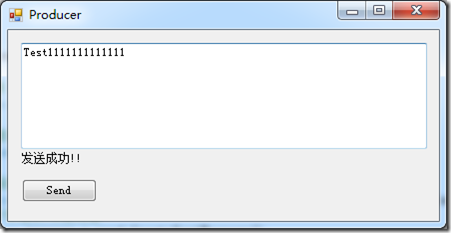
不启动消费者端,同时在管理界面查看:

发现有一个消息正在等待,这时如果没有持久化,ActiveMQ宕机后重启这个消息就是丢失,而我们现在修改为文件持久化,重启ActiveMQ后消费者仍然能够收到这个消息。
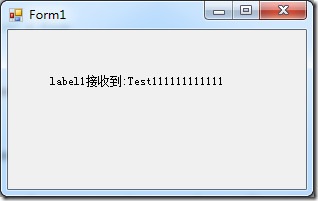
二、持久化为数据库
我们从支持Mysql为例,先从http://dev.mysql.com/downloads/connector/j/下载mysql-connector-java-5.1.34-bin.jar包放到:
D:\ActiveMQ\apache-activemq\lib目录下。
打开并修改配置文件:
<beans
xmlns="http://www.springframework.org/schema/beans"
xmlns:xsi="http://www.w3.org/2001/XMLSchema-instance"
xsi:schemaLocation="http://www.springframework.org/schema/beans http://www.springframework.org/schema/beans/spring-beans.xsd
http://activemq.apache.org/schema/core http://activemq.apache.org/schema/core/activemq-core.xsd"> <!-- Allows us to use system properties as variables in this configuration file -->
<bean class="org.springframework.beans.factory.config.PropertyPlaceholderConfigurer">
<property name="locations">
<value>file:${activemq.conf}/credentials.properties</value>
</property>
</bean> <!-- Allows accessing the server log -->
<bean id="logQuery" class="org.fusesource.insight.log.log4j.Log4jLogQuery"
lazy-init="false" scope="singleton"
init-method="start" destroy-method="stop">
</bean> <!--
The <broker> element is used to configure the ActiveMQ broker.
-->
<broker xmlns="http://activemq.apache.org/schema/core" brokerName="localhost" dataDirectory="${activemq.data}"> <destinationPolicy>
<policyMap>
<policyEntries>
<policyEntry topic=">" >
<!-- The constantPendingMessageLimitStrategy is used to prevent
slow topic consumers to block producers and affect other consumers
by limiting the number of messages that are retained
For more information, see: http://activemq.apache.org/slow-consumer-handling.html -->
<pendingMessageLimitStrategy>
<constantPendingMessageLimitStrategy limit="1000"/>
</pendingMessageLimitStrategy>
</policyEntry>
</policyEntries>
</policyMap>
</destinationPolicy> <!--
The managementContext is used to configure how ActiveMQ is exposed in
JMX. By default, ActiveMQ uses the MBean server that is started by
the JVM. For more information, see: http://activemq.apache.org/jmx.html
-->
<managementContext>
<managementContext createConnector="false"/>
</managementContext> <!--
Configure message persistence for the broker. The default persistence
mechanism is the KahaDB store (identified by the kahaDB tag).
For more information, see: http://activemq.apache.org/persistence.html
<kahaDB directory="${activemq.data}/kahadb"/>
-->
<persistenceAdapter>
<jdbcPersistenceAdapter dataDirectory="${activemq.base}/data" dataSource="#derby-ds"/>
</persistenceAdapter> <!--
The systemUsage controls the maximum amount of space the broker will
use before disabling caching and/or slowing down producers. For more information, see:
http://activemq.apache.org/producer-flow-control.html
-->
<systemUsage>
<systemUsage>
<memoryUsage>
<memoryUsage percentOfJvmHeap="70" />
</memoryUsage>
<storeUsage>
<storeUsage limit="100 gb"/>
</storeUsage>
<tempUsage>
<tempUsage limit="50 gb"/>
</tempUsage>
</systemUsage>
</systemUsage> <!--
The transport connectors expose ActiveMQ over a given protocol to
clients and other brokers. For more information, see: http://activemq.apache.org/configuring-transports.html
-->
<transportConnectors>
<!-- DOS protection, limit concurrent connections to 1000 and frame size to 100MB -->
<transportConnector name="openwire" uri="tcp://0.0.0.0:61616?maximumConnections=1000&wireFormat.maxFrameSize=104857600"/>
<transportConnector name="amqp" uri="amqp://0.0.0.0:5672?maximumConnections=1000&wireFormat.maxFrameSize=104857600"/>
<transportConnector name="stomp" uri="stomp://0.0.0.0:61613?maximumConnections=1000&wireFormat.maxFrameSize=104857600"/>
<transportConnector name="mqtt" uri="mqtt://0.0.0.0:1883?maximumConnections=1000&wireFormat.maxFrameSize=104857600"/>
<transportConnector name="ws" uri="ws://0.0.0.0:61614?maximumConnections=1000&wireFormat.maxFrameSize=104857600"/>
</transportConnectors> <!-- destroy the spring context on shutdown to stop jetty -->
<shutdownHooks>
<bean xmlns="http://www.springframework.org/schema/beans" class="org.apache.activemq.hooks.SpringContextHook" />
</shutdownHooks> </broker>
<bean id="derby-ds" class="org.apache.commons.dbcp.BasicDataSource" destroy-method="close">
<property name="driverClassName" value="com.mysql.jdbc.Driver"/>
<property name="url" value="jdbc:mysql://localhost/activemq?relaxAutoCommit=true"/>
<property name="username" value="root"/>
<property name="password" value=""/>
<property name="maxActive" value="200"/>
<property name="poolPreparedStatements" value="true"/>
</bean>
<!--
Enable web consoles, REST and Ajax APIs and demos
The web consoles requires by default login, you can disable this in the jetty.xml file Take a look at ${ACTIVEMQ_HOME}/conf/jetty.xml for more details
-->
<import resource="jetty.xml"/> </beans>
<!-- END SNIPPET: example -->
重启ActiveMQ打开phpmyadmin发现多了3张表:
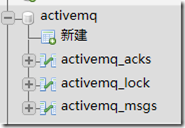
然后启动生产者(不启动消费者)
在Mysql中可以找到这条消息:

关掉ActiveMQ并重启,模拟宕机。
然后启动消费者:
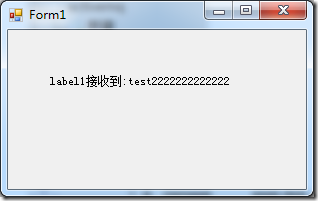
然后发现Mysql中已经没有这条消息了。
C#使用ActiveMQ实例的更多相关文章
- ActiveMQ实例1--简单的发送和接收消息
一.环境准备 1,官网http://activemq.apache.org/下载最新版本的ActiveMQ,并解压 2,打开对应的目录,在Mac环境下,一般可以运行命令: cd /Users/***/ ...
- JMS学习二(简单的ActiveMQ实例)
下载安装ActiveMQ服务,下载地址当然可以去官网下载 http://activemq.apache.org/download-archives.html ActiveMQ安装很简单,下载解压后到b ...
- ActiveMq实例
1.发布端 import javax.jms.Connection; import javax.jms.ConnectionFactory; import javax.jms.DeliveryMode ...
- ActiveMQ实例2--Spring JMS发送消息
参考文章:http://my.oschina.net/xiaoxishan/blog/381209#OSC_h3_7 一,步骤参照参考文献 二.新建的项目 三.补充 web.xml <?xml ...
- ActiveMQ挂了,重启一直无法将所有实例启起来的问题
背景 2017年3月29日 下午2-3点时分,工单模块无法访问.跟踪日志发现,ActiveMQ连接不上导致整个工单模块瘫痪: 首先判断可能是系统需要然后尝试重启工单模块,重新启动工单模块,结果:重启 ...
- ActiveMQ的集群方案对比及部署
转载:http://blog.csdn.net/lifetragedy/article/details/51869032 ActiveMQ的集群 内嵌代理所引发的问题: 消息过载 管理混乱 如何解决这 ...
- ActiveMQ笔记(4):搭建Broker集群(cluster)
上一篇介绍了基于Networks of Borkers的2节点HA方案,这一篇继续来折腾Networks of Brokers,当应用规模日渐增长时,2节点的broker可能仍然抗不住访问压力,这时候 ...
- ActiveMQ集群应用
ActiveMQ集群 ActiveMQ具有强大和灵活的集群功能,但在使用的过程中会发现很多的缺点,ActiveMQ的集群方式主要由两种:Master-Slave和Broker Cluster. 1.M ...
- ActiveMQ: 搭建Broker集群(cluster)
上一篇介绍了基于Networks of Borkers的2节点HA方案,这一篇继续来折腾Networks of Brokers,当应用规模日渐增长时,2节点的broker可能仍然抗不住访问压力,这时候 ...
随机推荐
- Unix网络编程 之 基本套接字调用(一)
Unix/Linux支持伯克利风格的套接字编程,它同一时候支持面向连接和面向无连接类型的套接字. 套接字最经常使用的一些系统调用: socket() bind() connect() listen() ...
- 在Java中final类与一般类有什么样的区别
final修饰的类不能被继承. Sting就是一个被final修饰的类,我们只能用,不用继承final不仅可以修饰类,还可以修饰变量,被final修饰的变量就是一个常量,只能赋值一次注意final和f ...
- Caffe搭建:常见问题解决办法和ubuntu使用中遇到问题(持续更新)
严正声明: 在linux下面使用命令行操作时,一定要懂得命令行的意思,然后再执行,要不然在不知道接下来会发生什么的情况下输入一通命令,linux很有可能崩掉. 因为在linux下面,使用sudo以及r ...
- PHP读取超大日志文件
打开一个17G的日志文件,都不吃力,除了占cpu之外,内存占用不多,如果直接fopen根本打不开 注:它是逐行读取的 foreach( glob( ngx_log. "/*.log" ...
- UIScrollView中图片放大后不居中,或居中后移动有偏差解决办法
转自:http://blog.sina.com.cn/s/blog_6ae8b50d0100yret.html 问题的描述如下:要显示一张图片,也只需要显示一张图片,该图片可能很大,也可能很小,但是要 ...
- sql中计算某天是全年的第几周及取得某天的所在周的周一的日期的函数
--取得某天的所在周的周一的函数 CREATE FUNCTION getMondayBtDate(@date datetime) RETURNS date AS begin DECLARE @week ...
- angular学习笔记(三十)-指令(7)-compile和link(2)
继续上一篇:angular学习笔记(三十)-指令(7)-compile和link(1) 上一篇讲了compile函数的基本概念,接下来详细讲解compile和link的执行顺序. 看一段三个指令嵌套的 ...
- 添加Fragment报已有父view,需先移除的错
错误LOG: 12-13 17:05:28.754: E/AndroidRuntime(8344): FATAL EXCEPTION: main 12-13 17:05:28.754: E/Andro ...
- js设置滚动条定位到所属容器的最底部
$('.help-gundongtiao').scrollTop($('.help-gundongtiao')[0].scrollHeight);
- Netty高性能之Reactor线程模型
Netty是一个高性能.异步事件驱动的NIO框架,它提供了对TCP.UDP和文件传输的支持,作为一个异步NIO框架,Netty的所有IO操作都是异步非阻塞的,通过Future-Listener机制,用 ...