
Vue2.5开发去哪儿网App 搜索功能完成
效果展示:
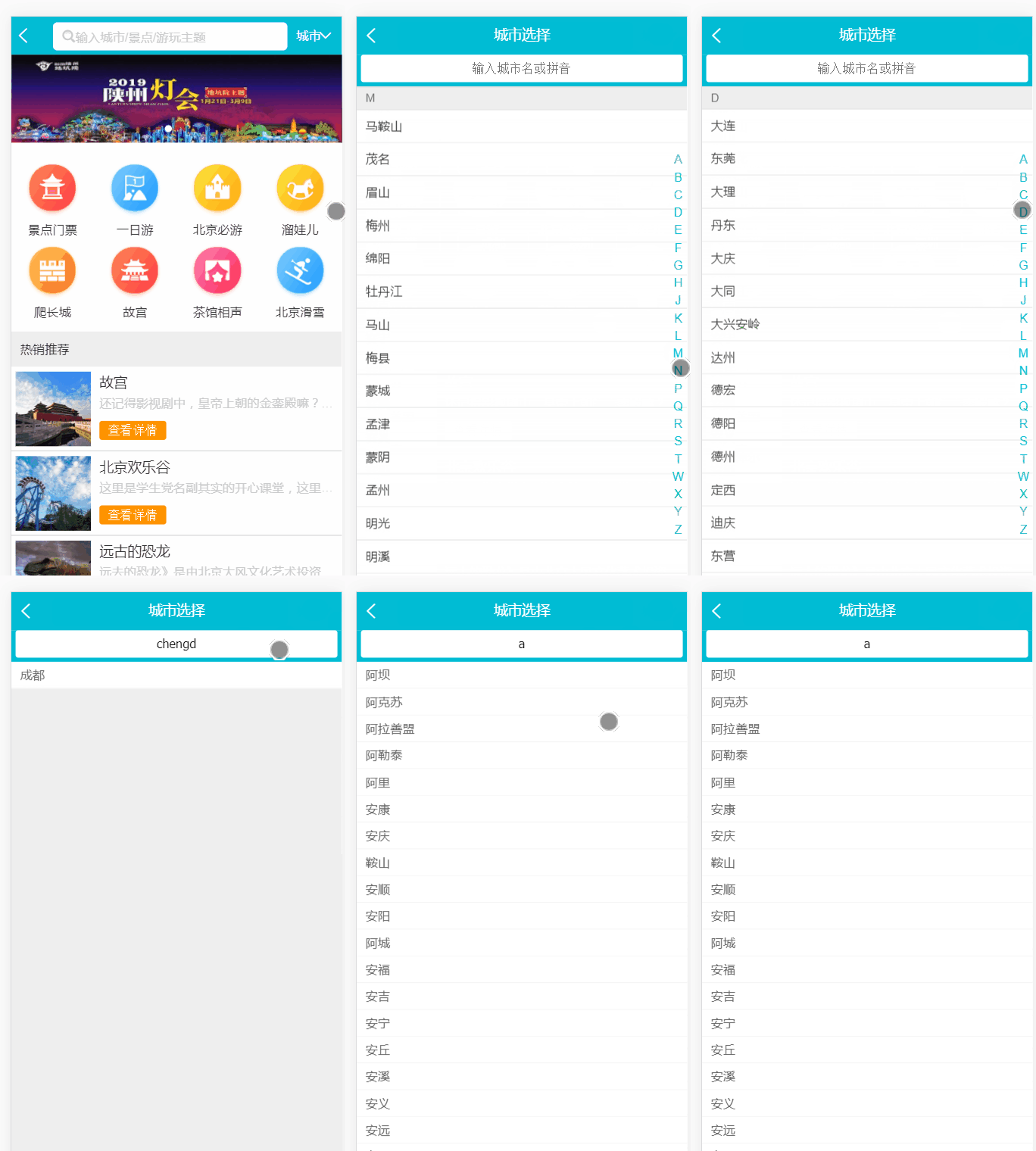
Search.vue:
    <div class="search-content" ref="search" v-show="keyword">

      <!--双向绑定keyword-->

      <ul>

        <!--遍历找到的城市-->

        <li class="search-item border-bottom" v-for="(city,index) in cityList" :key="index">{{city}}</li>

        <!--没有找到时的显示-->

        <li class="search-item border-bottom" v-show="hasCity">

          没有找到匹配数据

        </li>

      </ul>

    </div>
当有输入时:
const result = []
//this.cities格式: {
//   "id": 933,
//   "spell": "zhangpu",
//   "name": "漳浦"
// }
...
for (let i in this.cities) {
  this.cities[i].forEach((value) => {
    if (value.spell.indexOf(this.keyword) > -1 || value.name.indexOf(this.keyword) > -1) {
      result.push(value.name)
    }
  })
  this.cityList = result
}
没有输入时:
if (!this.keyword) {

this.cityList = []

return

}
添加 computed 计算属性:
  computed: {

    hasCity () {

      return !this.cityList.length

    }

  }
  //负责显示与否:
<li class="search-item border-bottom" v-show="hasCity">
  没有找到匹配数据
</li>
<template>

  <div>

    <div class="search">

      <input type="text" v-model="keyword" class="search-input" placeholder="输入城市名或拼音">

    </div>

    <div class="search-content" ref="search" v-show="keyword">

      <!--双向绑定keyword-->

      <ul>

        <!--遍历找到的城市-->

        <li class="search-item border-bottom" v-for="(city,index) in cityList" :key="index">{{city}}</li>

        <!--没有找到时的显示-->

        <li class="search-item border-bottom" v-show="hasCity">

          没有找到匹配数据

        </li>

      </ul>

    </div>

  </div>

</template>

<script>

import BScroll from 'better-scroll'

export default {

  name: 'CitySearch',

  props: ['cities'],

  data: function () {

    return {

      // 关键字

      keyword: '',

      // 城市列表

      cityList: [],

      // 函数节流

      timer: null

    }

  },

  computed: {

    hasCity () {

      return !this.cityList.length

    }

  },

  watch: {

    keyword: function () {

      if (this.timer) {

        clearTimeout(this.timer)

      }

      this.timer = setTimeout(() => {

        if (!this.keyword) {

          this.cityList = []

          return

        }

        const result = []

        for (let i in this.cities) {

          this.cities[i].forEach((value) => {

            if (value.spell.indexOf(this.keyword) > -1 || value.name.indexOf(this.keyword) > -1) {

              result.push(value.name)

            }

          })

          this.cityList = result

        }

      }, 100)

    }

  },

  mounted () {

    this.scroll = new BScroll(this.$refs.search)

  }

}

</script>

<!--组件样式,不影响其他组件-->

<!--1rem = html front-size = 50px-->

<style lang="stylus" scoped>

@import "~styles/varibles.styl"

  .search

    height .72rem

    padding 0 .1rem

    background $bgColor

    .search-input

      padding 0 .1rem

      box-sizing border-box

      height .62rem

      line-height .62rem

      width 100%

      text-align center

      border-radius .06rem

  .search-content

    overflow hidden

    background #eee

    position absolute

    top 1.58rem

    left 0

    right 0

    z-index: 1

    bottom 0

    .search-item

      line-height .62rem

      padding-left .2rem

      color #666

      background #fff

</style>
Search.vue
项目地址:
https://github.com/1417766861/Vue2.5-App/tree/city-search-logic/Travel
Vue2.5开发去哪儿网App 搜索功能完成的更多相关文章
- Vue2.5 开发去哪儿网App
Vue2.5开发去哪儿网App 技术栈和主要框架
- Vue2.5开发去哪儿网App 首页开发
主页划 5 个组件,即 header icon swiper recommend weekend 一. header区域开发 1. 安装 stylus npm install stylus --s ...
- Vue2.5开发去哪儿网App 城市列表开发之 Vuex实现数据共享及高级使用
一,数据共享 1. 安装: npm install vuex --save 2. 在src目录下 新建state文件夹,新建index.js文件 3. 创建一个 store import Vue f ...
- Vue2.5开发去哪儿网App 从零基础入门到实战项目
第1章 课程介绍本章主要介绍课程的知识大纲,学习前提,讲授方式及预期收获. 1-1 课程简介 试看第2章 Vue 起步本章将快速讲解部分 Vue 基础语法,通过 TodoList 功能的编写,在熟悉基 ...
- Vue2.5开发去哪儿网App 第五章笔记 上
1.css动画原理 .fade-enter{ opacity: 0; } .fade-enter-active{ transition: opacity 2s; } .fade-leave-to{ o ...
- Vue2.5开发去哪儿网App 城市列表开发之 兄弟组件间联动及列表性能优化
一, 兄弟组件间联动 1. 点击城市字母,左侧对应显示 给遍历的 字母 添加一个点击事件: Alphabet.vue @click="handleLetterClick" ha ...
- Vue2.5开发去哪儿网App 城市列表开发
一,城市选择页面路由配置 ...
- Vue2.5开发去哪儿网App 第五章笔记 下
1. 多个元素或组件的过渡 多个元素的过渡: <style> .v-enter,.v-leace-to{ opacity: 0; } .v-enter-active,.v-leave-ac ...
- Vue2.5开发去哪儿网App 第四章笔记 下
1.解决非父子组件之间的传值问题 非父子组件传值(Bus/总线/发布订阅模式/观察者模式) 给 Vue类上挂在一个属性,然后创建vue实例时,实例就拥有了这个属性 Vue.prototype.bus ...
随机推荐
- Educational Codeforces Round 62 E 局部dp + 定义状态取消后效性
https://codeforces.com/contest/1140/problem/E 局部dp + 定义状态取消后效性 题意 给你一个某些位置可以改变的字符串,假如字符串存在回文子串,那么这个字 ...
- Mysql正常启动之后默认使用的文件
--basedir=/usr/local/mysql --datadir=/usr/local/mysql/data --plugin-dir=/usr/local/mysql/lib/plugi ...
- 查询正在执行的SQL语句DBCCINPUTBUFFER
DBCC INPUTBUFFER 返回进程下SQL语句 如果查询所有的进程如何呢? 创建一个存储过程 CREATE proc pr_dbccINPUTBUFFER(@spid varchar(200) ...
- poj 3278 Catch That Cow(bfs+队列)
Description Farmer John has been informed of the location of a fugitive cow and wants to catch her i ...
- MySQL 安装与使用(二)
操作系统:CentOS release 5.10 (Final) MySQL版本:5.1.72-community 一.MySQL数据库简单迁移(备份与还原) 参考:http://dev.mysql. ...
- MFC模块状态(二)AFX_MANAGE_STATE(AfxGetStaticModuleState())
以前写MFC的DLL的时候,总会在自动生成的代码框架里看到提示,需要在每一个输出的函数开始添加上AFX_MANAGE_STATE(AfxGetStaticModuleState()).一直不明白这样做 ...
- 计算几何---凸包问题(Graham/Andrew Scan )
概念 凸包(Convex Hull)是一个计算几何(图形学)中的概念.用不严谨的话来讲,给定二维平面上的点集,凸包就是将最外层的点连接起来构成的凸多边型,它能包含点集中所有点的.严谨的定义和相关概念参 ...
- Hive为什么要分桶
对于每一个表(table)或者分区, Hive可以进一步组织成桶,也就是说桶是更为细粒度的数据范围划分.Hive也是针对某一列进行桶的组织.Hive采用对列值哈希,然后除以桶的个数求余的方式决定该条记 ...
- NameNode工作机制
NameNode工作机制
- yum-163源配置
原文:http://mirrors.163.com/.help/centos.html CentOS镜像使用帮助 收录架构 i386 x86_64 SRPMS 收录版本:所有版本更新时间:每4小时更新 ...