
Vue2.5开发去哪儿网App 城市列表开发
一,城市选择页面路由配置
1. 在 router目录下 的 index.js文件中,新增路由
import City from '@/pages/city/City'
{

  path: '/city',

  name: 'City',

  component: City

}
2. 在city 目录下新建city文件夹,然后新建 City.vue
<template>

  <div>

  </div>

</template>

<script>

export default {

  name: 'City',

  components: {

  }

}

</script>

<style lang="stylus" scoped>

</style>
3.在 首页的城市选择处,新增router-link 组件
<router-link to="/city">
<div class="header-right">
城市<span class="iconfont arrow-right"></span>
</div>
</router-link>
二,城市选择
1. header部分 在components 文件中 新增 header.vue
<template>
<div class="header">
<div class="header-left">
<div class="iconfont back-icon"></div>
</div>
<div class="header-input">
<span class="iconfont"></span>输入城市/景点/游玩主题
</div>
<router-link to="/city">
<div class="header-right">
城市<span class="iconfont arrow-right"></span>
</div>
</router-link>
</div>
</template> <script>
export default {
name: 'HomeHeader'
}
</script>
<!--组件样式,不影响其他组件-->
<!--1rem = html front-size = 50px-->
<style lang="stylus" scoped>
@import "~styles/varibles.styl"
.header
display flex
line-height:$headerHeight
background: $bgColor
color: #fff
.header-left
margin-left: 0.1rem
float:left
width :.64rem
.header-input
padding-left:.2rem
.back-icon
text-align center
font-size .4rem
flex: 1
height: .64rem
line-height: .64rem
margin-top: .12rem
margin-left: .2rem
padding-left: .2rem
color: #ccc
background: #fff
border-radius: .1rem
.header-right
.arrow-right
font-size .3rem
margin-left -.05rem
min-width: 1.04rem
padding: 0 .1rem
float: right
text-align: center
color: #ffffff
</style>
2. 在components 中新增 Search.vue
<template>

  <div class="search">

    <input type="text" class="search-input" placeholder="输入城市名或拼音">

  </div>

</template>

<script>

export default {

  name: 'CitySearch'

}

</script>

<!--组件样式,不影响其他组件-->

<!--1rem = html front-size = 50px-->

<style lang="stylus" scoped>

@import "~styles/varibles.styl"

  .search

    height .72rem

    padding 0 .1rem

    background $bgColor

    .search-input

      padding 0 .1rem

      box-sizing border-box

      height .62rem

      line-height .62rem

      width 100%

      text-align center

      border-radius .06rem

</style>
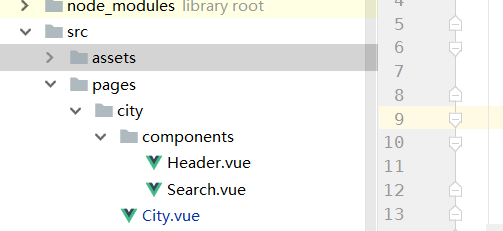
目录结构:
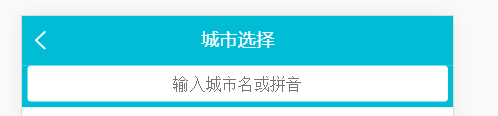
效果:
三,列表布局
1. 在components 中新建List.vue
<template>

  <div class="list" ref="wrapper">

    <div>

      <div class="area">

        <div class="title border-topbottom">当前城市</div>

        <div class="button-list">

          <div class="button-wrapper">

            <div class="button">北京</div>

          </div>

          <div class="button-wrapper">

            <div class="button">北京</div>

          </div>

          <div class="button-wrapper">

            <div class="button">北京</div>

          </div>

          <div class="button-wrapper">

            <div class="button">北京</div>

          </div>

          <div class="button-wrapper">

            <div class="button">北京</div>

          </div>

          <div class="button-wrapper">

            <div class="button">北京</div>

          </div>

        </div>

      </div>

      <div class="area">

        <div class="title border-topbottom">热门城市</div>

        <div class="button-list">

          <div class="button-wrapper">

            <div class="button">北京</div>

          </div>

          <div class="button-wrapper">

            <div class="button">北京</div>

          </div>

          <div class="button-wrapper">

            <div class="button">北京</div>

          </div>

          <div class="button-wrapper">

            <div class="button">北京</div>

          </div>

          <div class="button-wrapper">

            <div class="button">北京</div>

          </div>

        </div>

      </div>

      <div class="area">

        <div class="title border-topbottom">A</div>

        <div class="item-list">

          <div class="item border-bottom">阿里尔</div>

          <div class="item border-bottom">阿里尔</div>

          <div class="item border-bottom">阿里尔</div>

          <div class="item border-bottom">阿里尔</div>

          <div class="item border-bottom">阿里尔</div>

        </div>

      </div>

    </div>

  </div>

</template>
样式:
  @import "~styles/varibles.styl"

  .border-topbottom

    &:before

      border-color #ccc

    &:after

      border-color #ccc

  .border-bottom

  &:before

    border-color #ccc

  .list

    overflow hidden

    position absolute

    top 1.58rem

    right 0

    bottom 0

    left 0

    .title

      line-height .54rem

      padding-left .2rem

      background #eee

      color #666

      font-size .26rem

    .button-list

      padding .1rem .6rem .1rem .1rem

      overflow hidden

      .button-wrapper

        float left

        padding .1rem

        .button

          text-align center

          margin .1rem

          border .02rem solid #ccc

          border-radius .06rem

          padding .1rem .5rem

    .item-list

      .item

        line-height .76rem

        padding-left .2rem
2. 使用better-scroll 联级滚动
GIt地址 :https://github.com/ustbhuangyi/better-scroll
安装: npm install better-scroll
使用:
CityList.vue
<div class="list" ref="wrapper">
   <div>
  ......
  </div>
<div>
import BScroll from 'better-scroll'

export default {

  name: 'CityList',

  mounted: function () {
     //this.$refs.wrapper获取dom元素
     this.scroll = new BScroll(this.$refs.wrapper)
  }
}
3. 右侧字母表
新建 Alphabet.vue
<template>

  <div>

    <ul class="list">

      <li class="item">A</li>

      <li class="item">A</li>

      <li class="item">A</li>

      <li class="item">A</li>

      <li class="item">A</li>

      <li class="item">A</li>

      <li class="item">A</li>

    </ul>

  </div>

</template>

<script>

export default {

  name: 'CityAlphabet'

}

</script>

<style lang="stylus" scoped>

  @import "~styles/varibles.styl"

  .list

    position absolute

    right 0

    top 1.58rem

    bottom 0

    display flex

    width .4rem

    flex-direction column

    justify-content center

    .item

      text-align center

      line-height .4rem

      color $bgColor

</style>
目前效果:

4. 动态数据渲染
在static 目录下新建moc 文件夹,添加city.json文件
地址:https://github.com/1417766861/Vue2.5-App/blob/master/Travel/static/moc/city.json
发送ajax 请求:
import ApiUrl from '@/config/api_url'
......
data () {

    return {

      cities: {},

      hotCities: []

    }

  },

  methods: {

    getCityInfo () {

      axios.get(ApiUrl.api + 'city.json')

        .then(this.handleGetCityInfoSucc)

    },

    handleGetCityInfoSucc (res) {

      res = res.data

      if (res.ret && res.data) {

        this.cities = res.data.cities

        this.hotCities = res.data.hotCities

      }

    }

  },

  mounted () {

    this.getCityInfo()

  }
/src/config/api_url.js
export default {

  api: '/static/moc/'

}
给组件添加数据:
    <city-list :cities="cities" :hotcities="hotCities"></city-list>

    <city-alphabet :cities="cities"></city-alphabet>
遍历显示,List.vue
      <div class="area">

        <div class="title border-topbottom">热门城市</div>

        <div class="button-list">

          <div class="button-wrapper" v-for="city in hotcities" :key="city.id">

            <div class="button">{{city.name}}</div>

          </div>

        </div>

      </div>

      <div class="area" v-for="(city,key) in cities" :key="key">

        <div class="title border-topbottom">{{key}}</div>

        <div class="item-list">

          <div class="item border-bottom" v-for="c in city" :key="c.id">{{c.name}}</div>

        </div>

      </div>
遍历显示,Alphabet.vue
    <ul class="list">

      <li class="item" v-for="(item,key) in cities" :key="key">{{key}}</li>

    </ul>
效果:

Vue2.5开发去哪儿网App 城市列表开发的更多相关文章
- Vue2.5开发去哪儿网App 城市列表开发之 兄弟组件间联动及列表性能优化
一, 兄弟组件间联动 1. 点击城市字母,左侧对应显示 给遍历的 字母 添加一个点击事件: Alphabet.vue @click="handleLetterClick" ha ...
- Vue2.5开发去哪儿网App 城市列表开发之 Vuex实现数据共享及高级使用
一,数据共享 1. 安装: npm install vuex --save 2. 在src目录下 新建state文件夹,新建index.js文件 3. 创建一个 store import Vue f ...
- Vue2.5开发去哪儿网App 详情页面开发
一,banner 图的设计 1. 新建detail的路由 import Detail from '@/pages/detail/Detail' ...... { path: '/detail', na ...
- Vue2.5 开发去哪儿网App
Vue2.5开发去哪儿网App 技术栈和主要框架
- Vue2.5开发去哪儿网App 从零基础入门到实战项目
第1章 课程介绍本章主要介绍课程的知识大纲,学习前提,讲授方式及预期收获. 1-1 课程简介 试看第2章 Vue 起步本章将快速讲解部分 Vue 基础语法,通过 TodoList 功能的编写,在熟悉基 ...
- Vue2.5开发去哪儿网App 搜索功能完成
效果展示: Search.vue: <div class="search-content" ref="search" v-show="keywo ...
- Vue2.5开发去哪儿网App 首页开发
主页划 5 个组件,即 header icon swiper recommend weekend 一. header区域开发 1. 安装 stylus npm install stylus --s ...
- Vue2.5开发去哪儿网App 第五章笔记 上
1.css动画原理 .fade-enter{ opacity: 0; } .fade-enter-active{ transition: opacity 2s; } .fade-leave-to{ o ...
- Vue2.5开发去哪儿网App 第五章笔记 下
1. 多个元素或组件的过渡 多个元素的过渡: <style> .v-enter,.v-leace-to{ opacity: 0; } .v-enter-active,.v-leave-ac ...
随机推荐
- python3 提示 name ‘reload’ is not defined
import importlib importlib.reload(sys)
- c++中typedef、define、const、inline之间的区别
1.typedef和#define的区别 typedef int* pInt; , b = ; const pInt p1 = &a; //p1是常量指针 pInt const p2 = &a ...
- php Amome框架 层次设计备注
层次说明: 每一级中函数都是为而且只为 上(高)一层 的文件服务的 最底层: AmemoMySql 基础数据库函数:AmemoConfig 数据库信息配置文件 再高一层: 一个文件对应一个 ...
- 移植UC15 3G模块
https://blog.csdn.net/jack_a8/article/details/43114083 https://wenku.baidu.com/view/7ea5c9cd52d380eb ...
- Beta阶段第五篇Scrum冲刺博客-Day4
1.站立式会议 提供当天站立式会议照片一张 2.每个人的工作 (有work item 的ID),并将其记录在码云项目管理中: 昨天已完成的工作. 张晨晨:目标增加单词收藏功能 郭琪容:学习收藏功能的实 ...
- ubuntu下mysql远程连接
第一步: vim /etc/mysql/my.cnf找到bind-address = 127.0.0.1 注释掉这行,如:#bind-address = 127.0.0.1 ...
- hdu 4969 平面几何积分
http://acm.hdu.edu.cn/showproblem.php?pid=4969 Guizeyanhua要去追一个女孩,女孩在以Guizeyanhua为圆心,半径为R的圆上匀速运动,女孩的 ...
- hdu 5050 大数
http://acm.hdu.edu.cn/showproblem.php?pid=5050 大数模板最大公约数 信kuangbin,能AC #include <cstdio> #incl ...
- SRM476
250pt 题意:饲养N<=50只Badgers,每只食量是X[i],当没看到别的一只Badgers吃东西时,它的食量就会增加Y[i],现在一共用P的粮食,问最多能养的起多少只獾. 思路:枚举一 ...
- J - Oil Skimming 二分图的最大匹配
Description Thanks to a certain "green" resources company, there is a new profitable indus ...