
Android 布局之LinearLayout
Android 布局之LinearLayout
1 LinearLayout简介
LinearLayout是线程布局。它包括2个方向(android:orientation):“水平”(horizontal)和“竖值”(vertical)。
2 LinearLayout示例
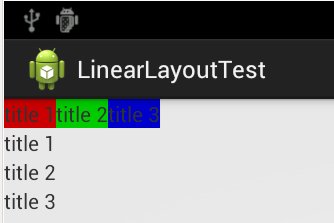
创建一个activity,包含2组LinearLayout:一组LinearLayout中包含3个文本,文本是水平排列;另一组LinearLayout中包含3个文本,文本是竖值排列。
layout文件
<LinearLayout xmlns:android="http://schemas.android.com/apk/res/android"

    xmlns:tooRelativeLayoutls="http://schemas.android.com/tools"

    android:layout_width="match_parent"

    android:layout_height="match_parent"

    android:orientation="vertical" >

    <LinearLayout

        android:layout_width="wrap_content"

        android:layout_height="wrap_content"

        android:orientation="horizontal"

        >

        <TextView

            android:layout_width="wrap_content"

            android:layout_height="wrap_content"

            android:background="#CC0000"

            android:text="@string/text_1" />

        <TextView

            android:layout_width="wrap_content"

            android:layout_height="wrap_content"

            android:background="#00CC00"

            android:text="@string/text_2" />

        <TextView

            android:layout_width="wrap_content"

            android:layout_height="wrap_content"

            android:background="#0000CC"

            android:text="@string/text_3" />

    </LinearLayout>

    <LinearLayout

        android:layout_width="wrap_content"

        android:layout_height="wrap_content"

        android:orientation="vertical"

        >

        <TextView

            android:layout_width="wrap_content"

            android:layout_height="wrap_content"

            android:text="@string/text_1" />

        <TextView

            android:layout_width="wrap_content"

            android:layout_height="wrap_content"

            android:text="@string/text_2" />

        <TextView

            android:layout_width="wrap_content"

            android:layout_height="wrap_content"

            android:text="@string/text_3" />

    </LinearLayout>

</LinearLayout>
点击下载:源代码
运行效果:
Android 布局之LinearLayout的更多相关文章
- Android布局之LinearLayout
LinearLayout 1.核心属性 高度:layout_height (基于内容 wrap_content:基于父控件:) 宽度:layout_width 方向:orientation (纵 ...
- Android 布局之LinearLayout 子控件weight权重的作用详析(转)
关于Android开发中的LinearLayout子控件权重android:layout_weigh参数的作用,网上关于其用法有两种截然相反说法: 说法一:值越大,重要性越高,所占用的空间越大: 说法 ...
- Android 布局之LinearLayout 子控件weight权重的作用详析
关于Android开发中的LinearLayout子控件权重android:layout_weigh参数的作用,网上关于其用法有两种截然相反说法: 说法一:值越大,重要性越高,所占用的空间越大: 说法 ...
- android 布局之LinearLayout(学习一)
一,View localView = mRadioGroup_content.getChildAt(i);指定自定义菜单栏的点击格,如child3 其中:mRadioGroup_content = ( ...
- Android布局管理详解(1)—— LinearLayout 线性布局
Android的布局方式共有6种,分别是LinearLayout(线性布局).TableLayout(表格布局).FrameLayout(帧布局).RelativeLayout(相对布局).GridL ...
- Android布局及属性归总(查询用)
常见布局 LinearLayout 线性布局 子元素任意,组织成一个单一的水平或垂直行,默认为水平方向TableLayout 表格布局 子元素为<Tabl ...
- Android中的LinearLayout布局
LinearLayout : 线性布局 在一般情况下,当有很多控件需要在一个界面列出来时,我们就可以使用线性布局(LinearLayout)了, 线性布局是按照垂直方向(vertical)或水平方向 ...
- Android的学习第六章(布局一LinearLayout)
今天我们来说一下Android五大布局-LinearLayout布局(线性布局) 含义:线性布局,顾名思义,指的是整个Android布局中的控件摆放方式是以线性的方式摆放的, 主要作用:主要对整个界面 ...
- android布局学习-使用FrameLayout和LinearLayout制作QQ空间底部导航栏
[声明:本博客通过学习“J灬叶小超 ”博客而写,链接:http://www.cnblogs.com/yc-755909659/p/4288260.html] --------------------- ...
随机推荐
- 连接SQL SERVER 2008需要加端口号
VC2010 ADO 连接SQL SERVER 2008,127.0.0.1,1433,要加上端口,否则连不上.注意:地址和端口之间使用逗号隔开. 连接SQL SERVER 2000可以不加端口号,使 ...
- Oracle Redo Log 机制 小结(转载)
Oracle 的Redo 机制DB的一个重要机制,理解这个机制对DBA来说也是非常重要,之前的Blog里也林林散散的写了一些,前些日子看老白日记里也有说明,所以结合老白日记里的内容,对oracle 的 ...
- CCNA实验4:HDLC和PPP
一.HDLC封装 router9和11上分别配置s0/0如下 conf t int s0/0 encapsulation hdlc do show int s0/0 ip address x.x.x. ...
- Asp.Net customErrors与httpErrors的区别
先看一下简单的对比 customErrors Asp.Net级别的错误处理程序,只处理Asp.Net应用抛出的异常(404,403,500..) 在IIS7+的服务器依然可用(IIS7之前就引进了) ...
- 机器学习编程语言之争,Python 夺魁【转载+整理】
原文地址 en cn 本文内容 表现平平的 MATLAB 貌似强大的 Julia 本身无错的 R 语言 逐渐没落的 Perl 老而弥坚的 Python 我个人很喜欢 Python~ 随着科技的发展,拥 ...
- C#人爱学不学9[C#5.0异步实例+WPF自己的MVVM Async应用 1/12]
文章摘要: 1. 通过简单DEMO.让读者理解Task和Task<T> 学习过程中,掌握async和await 2. 理解同步和异步的执行 3. Task.Factory.Start ...
- Maven - 解决Maven下载依赖包速度慢问题
通常我们会因为下载jar包速度缓慢而苦恼,这十分影响开发效率,以及程序员的心情,在IDE下载jar时,无法对IDE做任何动作,只能大眼对小眼. 下载jar速度慢究其原因就是因为很多资源都是国外的,我们 ...
- Unix Pipes to Javascript Pipes
Unix Pipes Unix管道扫描稿 简单样例: $ netstat -apn | grep 8080 相信这个大家经常使用,这里就不细说了. 那么管道基本思想是什么呢? 让每个程序只完成一件事, ...
- [转]Sublime Text3注册码(可用)
补充:2016.05 最近经过测试,3个注册码在新版3103的sublime上已经不可用了. 现补充两枚新版的license key: —– BEGIN LICENSE —– Michael Barn ...
- Android学习之ProgressBar
ProgressBar用于向用户显示某个耗时操作完成的百分比,避免长时间执行某个耗时操作时让用户感觉程序失去了响应,从而提高用户界面的友好性. 请看下面的界面布局: <LinearLayout ...