
Android布局之LinearLayout
LinearLayout
1.核心属性
高度:layout_height (基于内容 wrap_content;基于父控件;)
宽度:layout_width
方向:orientation (纵向 vertical;横向 horizontal;)
位置:layout_gravity (居中 center;居右 right;)
2.等分控件
做等分时将layout_width设为0dp layout_weight设为权重比是谷歌推荐的做法
<?xml version="1.0" encoding="utf-8"?>

<LinearLayout

    android:orientation="vertical"

    xmlns:android="http://schemas.android.com/apk/res/android"

    android:layout_height="wrap_content"

    android:layout_width="match_parent">

    <!-- 横排等分 layout_width="match_parent" 根据父控件的宽度决定自己的宽度-->

    <LinearLayout

        android:orientation="horizontal"

        xmlns:android="http://schemas.android.com/apk/res/android"

        android:layout_height="wrap_content"

        android:layout_width="match_parent">

        <!-- 做等分时将layout_width设为0dp layout_weight设为权重比是谷歌推荐的做法-->

        <Button

            android:layout_width="0dp"

            android:layout_height="wrap_content"

            android:layout_weight="1"

            android:background="#234578"

            android:text="等分1"/>

        <Button

            android:layout_width="0dp"

            android:layout_height="wrap_content"

            android:layout_weight="1"

            android:background="#234578"

            android:text="等分1"/>

        <Button

            android:layout_width="0dp"

            android:layout_height="wrap_content"

            android:layout_weight="2"

            android:background="#284578"

            android:text="等分(1+1)"/>

    </LinearLayout>

    <!-- 横排非等分 layout_width="wrap_content" 根据内容的宽度决定自己的宽度-->

    <LinearLayout

        android:orientation="horizontal"

        xmlns:android="http://schemas.android.com/apk/res/android"

        android:layout_height="wrap_content"

        android:layout_width="wrap_content"

        android:layout_marginTop="10dp">

        <Button

            android:layout_width="wrap_content"

            android:layout_height="wrap_content"

            android:background="#897654"

            android:text="非等分1"/>

        <Button

            android:layout_width="wrap_content"

            android:layout_height="wrap_content"

            android:background="#897654"

            android:text="=====非等分123====="/>

        <Button

            android:layout_width="wrap_content"

            android:layout_height="wrap_content"

            android:textAllCaps="false"

            android:background="#897654"

            android:text="Demo"/>

    </LinearLayout>

    <!-- 横排等分 -->

    <LinearLayout

        android:orientation="horizontal"

        xmlns:android="http://schemas.android.com/apk/res/android"

        android:layout_height="match_parent"

        android:layout_width="wrap_content"

        android:layout_marginTop="10dp">

        <!-- 竖排等分 -->

        <LinearLayout

            android:orientation="vertical"

            xmlns:android="http://schemas.android.com/apk/res/android"

            android:layout_height="match_parent"

            android:layout_width="0dp"

            android:layout_weight="1">

            <Button

                android:layout_width="wrap_content"

                android:layout_height="0dp"

                android:layout_weight="2"

                android:background="#457421"

                android:text="等分1"/>

            <Button

                android:layout_width="wrap_content"

                android:layout_height="0dp"

                android:layout_weight="1"

                android:background="#126735"

                android:text="等分2"/>

            <Button

                android:layout_width="wrap_content"

                android:layout_height="0dp"

                android:layout_weight="1"

                android:background="#843975"

                android:text="等分3"/>

        </LinearLayout>

        <!-- 竖排按数值确定高度 -->

        <LinearLayout

            android:orientation="vertical"

            xmlns:android="http://schemas.android.com/apk/res/android"

            android:layout_height="wrap_content"

            android:layout_width="0dp"

            android:layout_weight="1"

            android:layout_marginLeft="20dp">

            <Button

                android:layout_width="wrap_content"

                android:layout_height="44dp"

                android:background="#547836"

                android:text="按钮1"/>

            <Button

                android:layout_width="wrap_content"

                android:layout_height="66dp"

                android:background="#837282"

                android:text="按钮2"/>

            <Button

                android:layout_width="wrap_content"

                android:layout_height="98dp"

                android:layout_weight="2"

                android:background="#973422"

                android:text="按钮3"/>

        </LinearLayout>

    </LinearLayout>

    <LinearLayout

        android:orientation="vertical"

        xmlns:android="http://schemas.android.com/apk/res/android"

        android:layout_height="wrap_content"

        android:layout_width="wrap_content"

        android:layout_gravity="right">

        <Button

            android:layout_width="wrap_content"

            android:layout_height="44dp"

            android:background="#547836"

            android:text="靠右"/>

    </LinearLayout>

    <LinearLayout

        android:orientation="vertical"

        xmlns:android="http://schemas.android.com/apk/res/android"

        android:layout_height="wrap_content"

        android:layout_width="wrap_content"

        android:layout_gravity="center">

        <Button

            android:layout_width="wrap_content"

            android:layout_height="44dp"

            android:background="#547836"

            android:text="居中"/>

    </LinearLayout>

</LinearLayout>
效果图
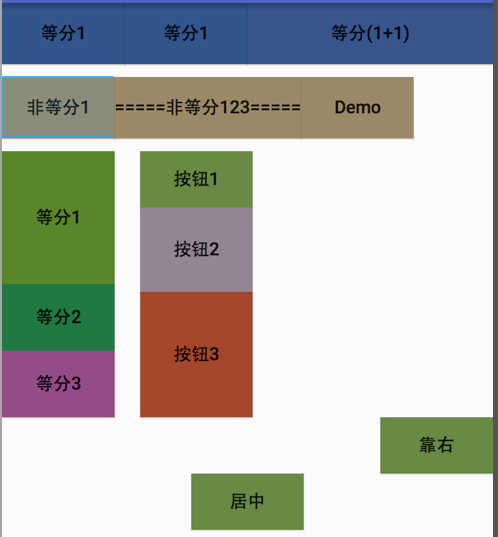
Android布局之LinearLayout的更多相关文章
- Android 布局之LinearLayout
Android 布局之LinearLayout 1 LinearLayout简介 LinearLayout是线程布局.它包括2个方向(android:orientation):“水平”(horizon ...
- Android 布局之LinearLayout 子控件weight权重的作用详析(转)
关于Android开发中的LinearLayout子控件权重android:layout_weigh参数的作用,网上关于其用法有两种截然相反说法: 说法一:值越大,重要性越高,所占用的空间越大: 说法 ...
- Android 布局之LinearLayout 子控件weight权重的作用详析
关于Android开发中的LinearLayout子控件权重android:layout_weigh参数的作用,网上关于其用法有两种截然相反说法: 说法一:值越大,重要性越高,所占用的空间越大: 说法 ...
- android 布局之LinearLayout(学习一)
一,View localView = mRadioGroup_content.getChildAt(i);指定自定义菜单栏的点击格,如child3 其中:mRadioGroup_content = ( ...
- Android布局管理详解(1)—— LinearLayout 线性布局
Android的布局方式共有6种,分别是LinearLayout(线性布局).TableLayout(表格布局).FrameLayout(帧布局).RelativeLayout(相对布局).GridL ...
- Android布局及属性归总(查询用)
常见布局 LinearLayout 线性布局 子元素任意,组织成一个单一的水平或垂直行,默认为水平方向TableLayout 表格布局 子元素为<Tabl ...
- Android中的LinearLayout布局
LinearLayout : 线性布局 在一般情况下,当有很多控件需要在一个界面列出来时,我们就可以使用线性布局(LinearLayout)了, 线性布局是按照垂直方向(vertical)或水平方向 ...
- Android的学习第六章(布局一LinearLayout)
今天我们来说一下Android五大布局-LinearLayout布局(线性布局) 含义:线性布局,顾名思义,指的是整个Android布局中的控件摆放方式是以线性的方式摆放的, 主要作用:主要对整个界面 ...
- android布局学习-使用FrameLayout和LinearLayout制作QQ空间底部导航栏
[声明:本博客通过学习“J灬叶小超 ”博客而写,链接:http://www.cnblogs.com/yc-755909659/p/4288260.html] --------------------- ...
随机推荐
- Python 入门学习 -----变量及基础类型(元组,列表,字典,集合)
Python的变量和数据类型 1 .python的变量是不须要事先定义数据类型的.能够动态的改变 2. Python其中一切皆对象,变量也是一个对象,有自己的属性和方法 我们能够通过 来查看变量的类型 ...
- IP address could not be resolved: Temporary failure in name resolution
今早发现mysql日志中有非常多例如以下的警告: 140724 18:41:25 [Warning] IP address '172.16.18.217' could not be resolved: ...
- What is the difference between SET and SELECT when assigning values to variables, in T-SQL?
http://vyaskn.tripod.com/differences_between_set_and_select.htm https://stackoverflow.com/questions/ ...
- js中Json字符串如何转成Json对象(4种转换方式)
js中Json字符串如何转成Json对象(4种转换方式) 一.总结 一句话总结:原生方法(就是浏览器默认支持的方法) 浏览器支持的转换方式(Firefox,chrome,opera,safari,ie ...
- tomcat:Could not publish to the server. java.lang.IndexOutOfBoundsException
1.将工程加入到tomcat,报上述错误 2. run--maven build 报jar包错误: invalid LOC header (bad signature) 3.根据提示找到上述jar包, ...
- tnsnames.ora文件说明
目录位置 unix:$ORACLE_HOME/network/admin WINDOW:%ORACLE_HOME%\network\admin 设置相应的环境变量:TNS_ADMIN tnsname. ...
- cnmp安装失败,报错npm ERR! enoent ENOENT: no such file or directory,
1.cnmp安装失败 2.提示如下: bogon:node_modules liangjingming$ sudo npm install cnpm -g --registry=https://reg ...
- iOS网络缓存机制
iOS的网络引擎自带缓存机制: 网络请求在经过网络引擎时有过处理(添加了字段),所以用api的网络请求无法获取缓存. [NSURLCache sharedURLCache]
- tensorflow-gpu
1.Cuda 查看Cuda支持的GPU型号:https://developer.nvidia.com/cuda-gpus 下载cuda:https://developer.nvidia.com/cud ...
- 用 while 循环做个小游戏
import random #可输入次数 flag = 0 #生成一个1到10之间的随机整数 res = random.randint(1,10) #判读三次输入机会 while(flag<3) ...