
7.9 数据注解特性--ForeignKey
外键特性,可以应用到类的属性中。Code-First默认的约定,对外键属性来说,假定外键属性的名称和主键属性是匹配的。
我们看一下,下面的代码:
using System;
using System.Collections.Generic;
using System.ComponentModel.DataAnnotations;
using System.ComponentModel.DataAnnotations.Schema;
using System.Linq;
using System.Text;
using System.Threading.Tasks;

namespace EF2
{
    [Table("StudentMaster",Schema="WaHaHa")]
   public class Student
    {
        [Key]
        [Column(Order=)]
        public int StudentKey1 { get; set; }

        [Key]
        [Column(Order=)]
        public int StudentKey2 { get; set; }

        [MaxLength()]
        [ConcurrencyCheck]
        [Required]
        [Column(,TypeName="nvarchar")]
        public string StudentName { get; set; }

        [NotMapped()]
        public int? Age { get; set; }

        public int StdId { get; set; }

        [ForeignKey("StdId")]
        public virtual Standard Standard { get; set; }

    }
}
using System;
using System.Collections.Generic;
using System.ComponentModel.DataAnnotations;
using System.Linq;
using System.Text;

namespace EF2
{
   public class Standard
    {
       [Key]
       public int StdId { get; set; }

       public string StandardName { get; set; }
    }
}
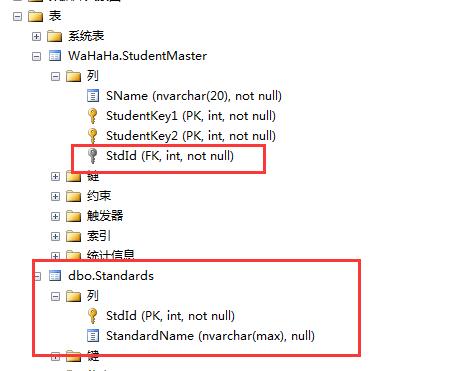
从上面的图中,可以看出,StdId在Student表中是外键,在Standard表中是主键。
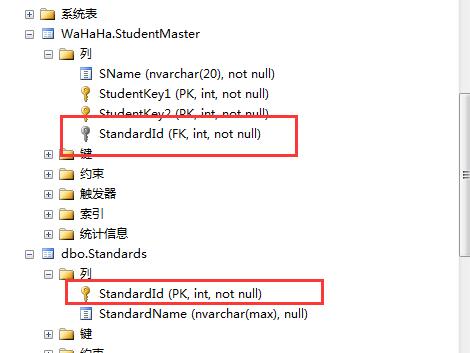
这里是不是用类名+id的做法,使用外键。
默认的是使用这样的:
using System;
using System.Collections.Generic;
using System.ComponentModel.DataAnnotations;
using System.ComponentModel.DataAnnotations.Schema;
using System.Linq;
using System.Text;
using System.Threading.Tasks;

namespace EF2
{
    [Table("StudentMaster",Schema="WaHaHa")]
   public class Student
    {
        [Key]
        [Column(Order=)]
        public int StudentKey1 { get; set; }

        [Key]
        [Column(Order=)]
        public int StudentKey2 { get; set; }

        [MaxLength()]
        [ConcurrencyCheck]
        [Required]
        [Column(,TypeName="nvarchar")]
        public string StudentName { get; set; }

        [NotMapped()]
        public int? Age { get; set; }

        public int StandardId { get; set; }   //类名+ID

        [ForeignKey("StandardId")]
        public virtual Standard Standard { get; set; }

    }
}
using System;
using System.Collections.Generic;
using System.ComponentModel.DataAnnotations;
using System.Linq;
using System.Text;

namespace EF2
{
   public class Standard
    {
       [Key]
       public int StandardId { get; set; }     //类名+ID

       public string StandardName { get; set; }
    }
}
看看下面的:
using System;
using System.Collections.Generic;
using System.ComponentModel.DataAnnotations;
using System.ComponentModel.DataAnnotations.Schema;
using System.Linq;
using System.Text;
using System.Threading.Tasks;

namespace EF2
{
    [Table("StudentMaster",Schema="WaHaHa")]
   public class Student
    {
        [Key]
        [Column(Order=)]
        public int StudentKey1 { get; set; }

        [Key]
        [Column(Order=)]
        public int StudentKey2 { get; set; }

        [MaxLength()]
        [ConcurrencyCheck]
        [Required]
        [Column(,TypeName="nvarchar")]
        public string StudentName { get; set; }

        [NotMapped()]
        public int? Age { get; set; }

        public int StandardRefId { get; set; }

        [ForeignKey("StandardRefId")]
        public virtual Standard Standard { get; set; }

    }
}
using System;
using System.Collections.Generic;
using System.ComponentModel.DataAnnotations;
using System.Linq;
using System.Text;

namespace EF2
{
   public class Standard
    {
       [Key]
       public int StandardId { get; set; }

       public string StandardName { get; set; }
    }
}
看数据库:
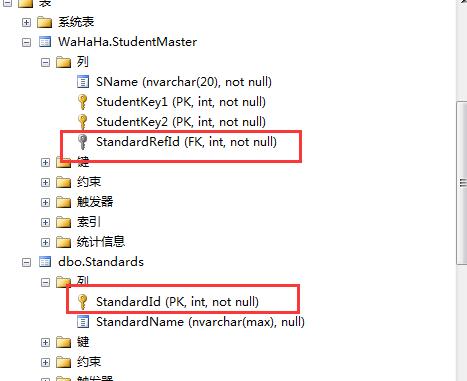
这个意思就是,我们可以随便指定外键的名称,哈哈哈哈哈。。。
7.9 数据注解特性--ForeignKey的更多相关文章
- 9.5 翻译系列:数据注解之ForeignKey特性【EF 6 Code-First系列】
原文链接:https://www.entityframeworktutorial.net/code-first/foreignkey-dataannotations-attribute-in-code ...
- 7.7 数据注解特性--Table
大家可能注意到,有几个特性,我没有翻译,因为实在是太简单了,看一下就知道,之前也学过,现在只是系统学一下,所以就粗略的看一下就行了. 现在学习数据注解特性的--Table特性. Table 特性可以被 ...
- 9.10 翻译系列:EF数据注解特性之StringLength【EF 6 Code-First系列】
原文链接:https://www.entityframeworktutorial.net/code-first/stringlength-dataannotations-attribute-in-co ...
- 9.9 翻译系列:数据注解特性之--MaxLength 【EF 6 Code-First系列】
原文链接:https://www.entityframeworktutorial.net/code-first/maxlength-minlength-dataannotations-attribut ...
- 9.7 翻译系列:EF数据注解特性之--InverseProperty【EF 6 Code-First系列】
原文链接:https://www.entityframeworktutorial.net/code-first/inverseproperty-dataannotations-attribute-in ...
- 9.3 翻译系列:数据注解特性之Key【EF 6 Code-First 系列】
原文链接:http://www.entityframeworktutorial.net/code-first/key-dataannotations-attribute-in-code-first.a ...
- 9.2 翻译系列:数据注解特性之---Column【EF 6 Code First系列】
原文链接:http://www.entityframeworktutorial.net/code-first/column-dataannotations-attribute-in-code-firs ...
- 9.翻译系列:EF 6以及EF Core中的数据注解特性(EF 6 Code-First系列)
原文地址:http://www.entityframeworktutorial.net/code-first/dataannotation-in-code-first.aspx EF 6 Code-F ...
- 9.1 翻译系列:数据注解特性之----Table【EF 6 Code-First 系列】
原文地址:http://www.entityframeworktutorial.net/code-first/table-dataannotations-attribute-in-code-first ...
随机推荐
- IOS网络第七天WebView-03js中调用webView中的代码
*********** #import "HMViewController.h" @interface HMViewController () <UIWebViewDeleg ...
- .NET跨平台:在Linux Ubuntu上编译coreclr/corefx/dnx(20150617)
编译时间:北京2015年6月17日上午 操作系统:Ubuntu 14.04.2 LTS Mono版本:Mono JIT compiler version 4.3.0 (master/3445ac5 T ...
- Async All the Way
Asynchronous code reminds me of the story of a fellow who mentioned that the world was suspended in ...
- ASP.Net请求处理机制初步探索之旅 - Part 3 管道
开篇:上一篇我们了解了一个ASP.Net页面请求的核心处理入口,它经历了三个重要的入口,分别是:ISAPIRuntime.ProcessRequest().HttpRuntime.ProcessReq ...
- FTP文件服务搭建与同步传输
需求 搭建一台FTP服务器,用于文件的上传与下载:同时将FTP服务器目录中的文件同步到多个服务器中,实现同步更新,同时文件需要控制用户访问对应的文件夹权限. 需要用到的软件有:bestsy ...
- Sharing A Powerful Tool For Application Auto Monitor
本文分享的这个应用监控小工具,本来是我在五年多以前开发实现的windows服务监控的一个windows服务.听上去比较拗口吧,是的,这个应用一开始就是个监控windows服务的windows服务. 记 ...
- ASP.NET MVC 从零开始 - 自动化部署(其二)
这篇文章是从我的 github 博客 http://lxconan.github.io 导入的. 这是这个系列的第五篇了,前四篇请参见: ASP.NET MVC 从零开始 – Create and R ...
- TODO:软件升级的那些事
TODO:软件升级的那些事 软件升级,指软件从低版本向高版本的更新.由于高版本常常修复低版本的部分BUG,所以经历了软件升级,一般都会比原版本的性能更好,得到优化的效果,用户也能有更好的体验. 最近常 ...
- 修改HTML5 input placeholder 颜色及修改失效的解决办法
input::input-placeholder{color: #bdbdbd ;} /* 有些资料显示需要写,有些显示不需要,但是在编辑器webstorm中该属性不被识别 */ ::-webkit- ...
- mysql数据库备份
前一段时间因为误操作删除了一张表的几条数据,弄得很尴尬,正好这周有空就折腾了下数据备份的知识,现把mysql的数据备份相关实践和心得总结如下: 一.使用mysqldump命令备份数据库: 备份整个数据 ...