
python爬取今日头条关键字图集
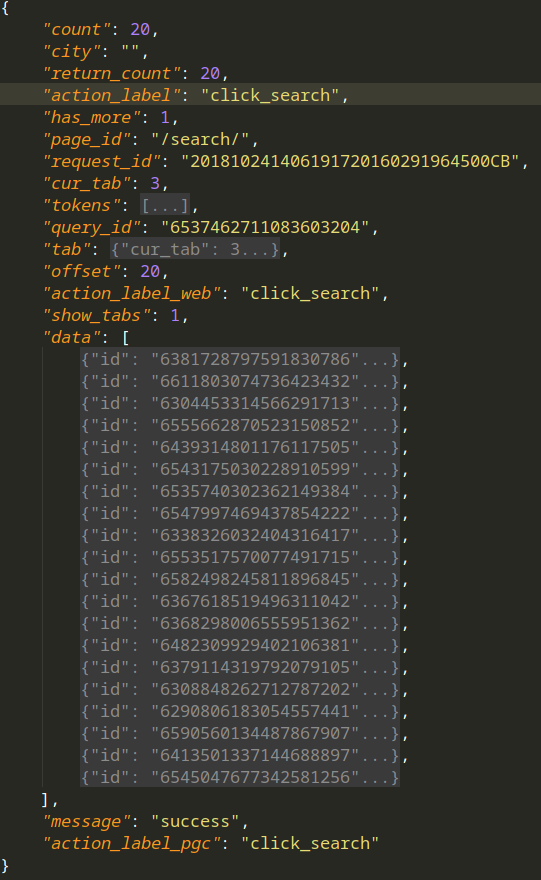
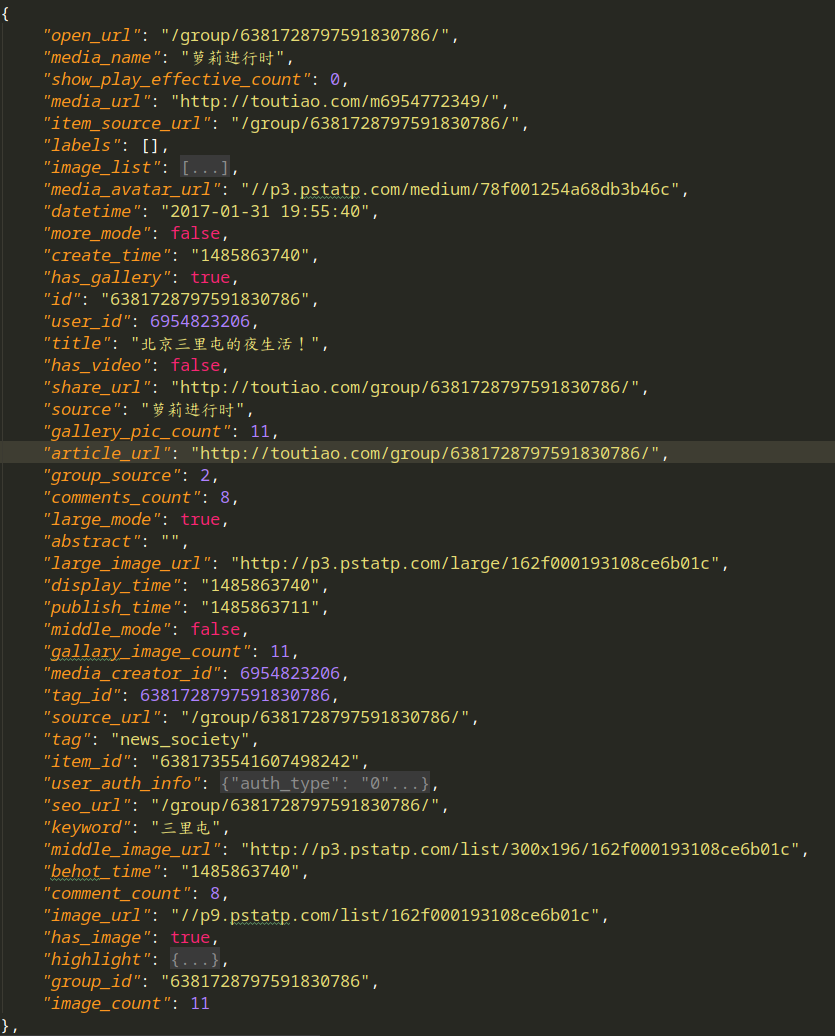
1.访问搜索图集结果,获得json如下(右图为data的一条的详细内容).页面以Ajax呈现,每次请求20个图集,其中
title --- 图集名字
artical_url --- 图集的地址
count --- 图集图片数量
2. 访问其中的图集
访问artical_url,获得图集图片详细信息,其中图片url为下载地址

展现出爬虫关键部分,整体项目地址在https://github.com/GeoffreyHub/toutiao_spider
 #!/usr/bin/env python

 # encoding: utf-8

 """

 @version: python37

 @author: Geoffrey

 @file: spider.py

 @time: 18-10-24 上午11:15

 """

 import json

 import re

 from multiprocessing import Pool

 import urllib3

 urllib3.disable_warnings()

 from requests import RequestException

 from common.request_help import make_session

 from db.mysql_handle import MysqlHandler

 from img_spider.settings import *

 class SpiderTouTiao:

     def __init__(self, keyword):

         self.session = make_session(debug=True)

         self.url_index = 'https://www.toutiao.com/search_content/'

         self.keyword = keyword

         self.mysql_handler = MysqlHandler(MYSQL_CONFIG)

     def search_index(self, offset):

         url = self.url_index

         data = {

             'offset': f'{offset}',

             'format': 'json',

             'keyword': self.keyword,

             'autoload': 'true',

             'count': '',

             'cur_tab': '',

             'from': 'gallery'

         }

         try:

             response = self.session.get(url, params=data)

             if response.status_code is 200:

                 json_data = response.json()

                 with open(f'../json_data/搜索结果-{offset}.json', 'w', encoding='utf-8') as f:

                     json.dump(json_data, f, indent=4, ensure_ascii=False)

                 return self.get_gallery_url(json_data)

         except :

             pass

             print('请求失败')

     @staticmethod

     def get_gallery_url(json_data):

         dict_data = json.dumps(json_data)

         for info in json_data["data"]:

             title = info["title"]

             gallery_pic_count = info["gallery_pic_count"]

             article_url = info["article_url"]

             yield title, gallery_pic_count, article_url

     def gallery_list(self, search_data):

         gallery_urls = {}

         for title, gallery_pic_count, article_url in search_data:

             print(title, gallery_pic_count, article_url)

             response = self.session.get(article_url)

             html = response.text

             images_pattern = re.compile('gallery: JSON.parse\("(.*?)"\),', re.S)

             result = re.search(images_pattern, html)

             if result:

                 # result = result.replace('\\', '')

                 # result = re.sub(r"\\", '', result)

                 result = eval("'{}'".format(result.group(1)))

                 result = json.loads(result)

                 # picu_urls = zip(result["sub_abstracts"], result["sub_titles"], [url["url"] for url in result["sub_images"]])

                 picu_urls = zip(result["sub_abstracts"], [url["url"] for url in result["sub_images"]])

                 # print(list(picu_urls))

                 gallery_urls[title] = picu_urls

             else:

                 print('解析不到图片url')

             with open(f'../json_data/{title}-搜索结果.json', 'w', encoding='utf-8') as f:

                 json.dump(result, f, indent=4, ensure_ascii=False)

             break

         # print(gallery_urls)

         return gallery_urls

     def get_imgs(self, gallery_urls):

         params = []

         for title, infos in (gallery_urls.items()):

             for index, info  in enumerate(infos):

                 abstract, img_url = info

                 print(index, abstract)

                 response = self.session.get(img_url)

                 img_content = response.content

                 params.append([title, abstract, img_content])

                 with open(f'/home/geoffrey/图片/今日头条/{title}-{index}.jpg', 'wb') as f:

                     f.write(img_content)

                 SQL = 'insert into img_gallery(title, abstract, imgs) values(%s, %s, %s)'

                 self.mysql_handler.insertOne(SQL, [title, abstract, img_content])

                 self.mysql_handler.end()

         print(f'保存图集完成' + '-'*50 )

         # SQL = 'insert into img_gallery(title, abstract, imgs) values(%s, %s, %s)'

         # self.mysql_handler.insertMany(SQL, params)

         # self.mysql_handler.end()

 def main(offset):

     spider = SpiderTouTiao(KEY_WORD)

     search_data = spider.search_index(offset)

     gallery_urls = spider.gallery_list(search_data)

     spider.get_imgs(gallery_urls)

     spider.mysql_handler.dispose()

 if __name__ == '__main__':

     groups = [x*20 for x in range(GROUP_START, GROPE_END)]

     pool = Pool(10)

     pool.map(main, groups)

     # for i in groups:

     #     main(i)
项目结构如下:
.
├── common
│ ├── __init__.py
│ ├── __pycache__
│ │ ├── __init__.cpython-37.pyc
│ │ └── request_help.cpython-37.pyc
│ ├── request_help.py
├── db
│ ├── __init__.py
│ ├── mysql_handle.py
│ └── __pycache__
│ ├── __init__.cpython-37.pyc
│ └── mysql_handle.cpython-37.pyc
├── img_spider
│ ├── __init__.py
│ ├── __pycache__
│ │ ├── __init__.cpython-37.pyc
│ │ └── settings.cpython-37.pyc
│ ├── settings.py
│ └── spider.py
└── json_data
├── 沐浴三里屯的秋-搜索结果.json
├── 盘点三里屯那些高逼格的苍蝇馆子-搜索结果.json
├── 搜索结果-0.json
├── 搜索结果-20.json
├── 搜索结果-40.json
python爬取今日头条关键字图集的更多相关文章
- Python爬取今日头条段子
刚入门Python爬虫,试了下爬取今日头条官网中的段子,网址为https://www.toutiao.com/ch/essay_joke/源码比较简陋,如下: import requests impo ...
- python爬取今日头条图片
import requests from urllib.parse import urlencode from requests import codes import os # qianxiao99 ...
- PYTHON 爬虫笔记九:利用Ajax+正则表达式+BeautifulSoup爬取今日头条街拍图集(实战项目二)
利用Ajax+正则表达式+BeautifulSoup爬取今日头条街拍图集 目标站点分析 今日头条这类的网站制作,从数据形式,CSS样式都是通过数据接口的样式来决定的,所以它的抓取方法和其他网页的抓取方 ...
- python 简单爬取今日头条热点新闻(一)
今日头条如今在自媒体领域算是比较强大的存在,今天就带大家利用python爬去今日头条的热点新闻,理论上是可以做到无限爬取的: 在浏览器中打开今日头条的链接,选中左侧的热点,在浏览器开发者模式netwo ...
- 分析ajax请求抓取今日头条关键字美图
# 目标:抓取今日头条关键字美图 # 思路: # 一.分析目标站点 # 二.构造ajax请求,用requests请求到索引页的内容,正则+BeautifulSoup得到索引url # 三.对索引url ...
- Python3从零开始爬取今日头条的新闻【一、开发环境搭建】
Python3从零开始爬取今日头条的新闻[一.开发环境搭建] Python3从零开始爬取今日头条的新闻[二.首页热点新闻抓取] Python3从零开始爬取今日头条的新闻[三.滚动到底自动加载] Pyt ...
- Python3从零开始爬取今日头条的新闻【四、模拟点击切换tab标签获取内容】
Python3从零开始爬取今日头条的新闻[一.开发环境搭建] Python3从零开始爬取今日头条的新闻[二.首页热点新闻抓取] Python3从零开始爬取今日头条的新闻[三.滚动到底自动加载] Pyt ...
- Python3从零开始爬取今日头条的新闻【三、滚动到底自动加载】
Python3从零开始爬取今日头条的新闻[一.开发环境搭建] Python3从零开始爬取今日头条的新闻[二.首页热点新闻抓取] Python3从零开始爬取今日头条的新闻[三.滚动到底自动加载] Pyt ...
- Python3从零开始爬取今日头条的新闻【二、首页热点新闻抓取】
Python3从零开始爬取今日头条的新闻[一.开发环境搭建] Python3从零开始爬取今日头条的新闻[二.首页热点新闻抓取] Python3从零开始爬取今日头条的新闻[三.滚动到底自动加载] Pyt ...
随机推荐
- 创建表空间、新增用户、给用户赋予DBA权限 、删除用户下的上有数据表
正文原创 一:查询数据库实例有多少用户: [oracle@localhost ~]$ sqlplus / as sysdba; SQL*Plus: Release 11.2.0.3.0 Product ...
- 【Linux】基本命令操作
一.用户操作 1.新增用户 useradd -u 1101 -g zte -d /home/xhs -m xhs --其中,1101,为用户ID,尽量使用500以上的 zte,为用户组 /home/x ...
- ionic3 使用html2canvas将数据导出为图片,并下载本地
1.安装html2canvas npm install --save html2canvas 官方网站 https://html2canvas.hertzen.com/ 2.在需要的组件中引入html ...
- LeetCode(124):二叉树中的最大路径和
Hard! 题目描述: 给定一个非空二叉树,返回其最大路径和. 本题中,路径被定义为一条从树中任意节点出发,达到任意节点的序列.该路径至少包含一个节点,且不需要经过根节点. 示例 1: 输入: [1, ...
- 【linux】复制文件夹中文件,排除部分文件
如下 cp `ls|grep -v -E '*json|out'|xargs` /home/data/ 用grep -v 表示排除, -E 表示正则 ls|grep -v -E '*json|out ...
- laravel PC内部方法调用
/** * [api 内部请求] * @author Foreach * @param string $method [请求方式] * @param string $url [地址] * @param ...
- 基于Web的漏洞利用
1.Nikto 基于Web的漏洞信息扫描 nikto 自动扫描web服务器上没有打补丁的软件,同时同时也检测驻留在服务器上的危险文件,nikto能够识别出特定的问题,检测服务器的配置问题, 检测某台主 ...
- lightoj1214 大数取模模板
#include<bits/stdc++.h> using namespace std; #define maxn 300 #define ll long long ll a,b; ]; ...
- A^B Mod C
A^B Mod C 时间限制: 1 Sec 内存限制: 32 MB Problem Description 给出3个正整数A B C,求A^B Mod C. 例如,3 5 8,3^5 Mod 8 = ...
- MyBatis - 4.动态SQL
动态 SQL是MyBatis强大特性之一.极大的简化我们拼装SQL的操作. 动态 SQL 元素和使用 JSTL 或其他类似基于 XML 的文本处理器相似. MyBatis 采用功能强大的基于 OGNL ...