
IdentityServer4 (1) 客户端授权模式(Client Credentials)
写在前面
1、源码(.Net Core 2.2)
git地址:https://github.com/yizhaoxian/CoreIdentityServer4Demo.git
2、相关章节
2.1、《IdentityServer4 (1) 客户端授权模式(Client Credentials)》
2.2、《IdentityServer4 (2) 密码授权(Resource Owner Password)》
2.3、《IdentityServer4 (3) 授权码模式(Authorization Code)》
2.4、《IdentityServer4 (4) 静默刷新(Implicit)》
2.5、《IdentityServer4 (5) 混合模式(Hybrid)》
3、参考资料
IdentityServer4 中文文档 http://www.identityserver.com.cn/
IdentityServer4 英文文档 https://identityserver4.readthedocs.io/en/latest/
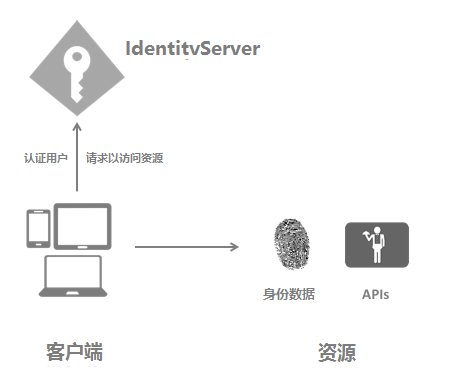
4、流程图
客户端授权模式是最基本的使用场景,我们需要做一个API(受保护的资源),一个客户端(访问的应用),一个IdentityServer(用来授权)
一、创建IdentityServer
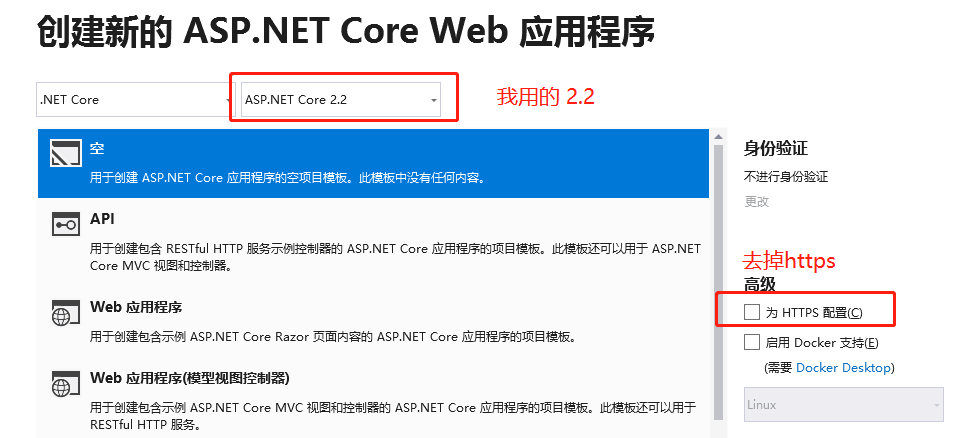
1、用VS创建一个Web 项目
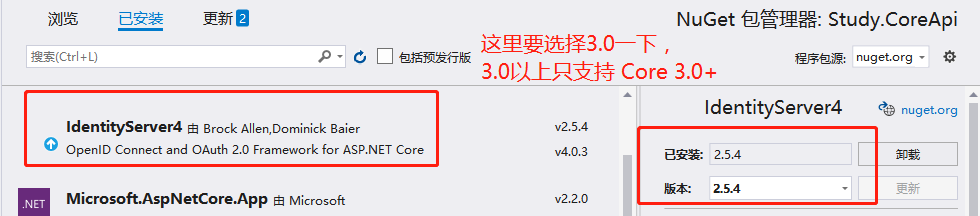
2、添加引用 IdentityServer4 包,下图是我已经安装好了的截图
3、添加一个配置文件(这里也可以使用json文件)
    public class IdpConfig

    {

        /// <summary>

        /// 用户认证信息

        /// </summary>

        /// <returns></returns>

        public static IEnumerable<IdentityResource> GetApiResources()

        {

            return new List<IdentityResource>

            {

                new IdentityResources.OpenId(),

                new IdentityResources.Profile(),

                new IdentityResources.Address(),

                new IdentityResources.Email(),

                new IdentityResources.Phone()

            };

        }

        /// <summary>

        /// API 资源

        /// </summary>

        /// <returns></returns>

        public static IEnumerable<ApiResource> GetApis()

        {

            return new List<ApiResource>

            {

                new ApiResource("api1", "My API")

            };

        }

        /// <summary>

        /// 客户端应用

        /// </summary>

        /// <returns></returns>

        public static IEnumerable<Client> GetClients()

        {

            return new List<Client>

            {

                new Client

                {

                    // 客户端ID 这个很重要

                    ClientId = "client",

                    //AccessToken 过期时间,默认3600秒,注意这里直接设置5秒过期是不管用的,解决方案继续看下面 API资源添加JWT

                    //AccessTokenLifetime=5,

                    // 没有交互性用户,使用 clientid/secret 实现认证。

                    AllowedGrantTypes = GrantTypes.ClientCredentials,

                    // 用于认证的密码

                    ClientSecrets =

                    {

                        new Secret("secret".Sha256())

                    },

                    // 客户端有权访问的范围(Scopes)

                    AllowedScopes = { "api1" }

                }

            };

        }

    }
4、在StartUp.cs 里注册 IdentityServer4
ConfigureServices()
    services.AddIdentityServer(options =>

    {

        options.Events.RaiseErrorEvents = true;

        options.Events.RaiseInformationEvents = true;

        options.Events.RaiseFailureEvents = true;

        options.Events.RaiseSuccessEvents = true;

    })

      .AddDeveloperSigningCredential()//解决Keyset is missing 错误

      //.AddTestUsers(TestUsers.Users)

      //.AddInMemoryIdentityResources(IdpConfig.GetApiResources())

      .AddInMemoryApiResources(IdpConfig.GetApis())

      .AddInMemoryClients(IdpConfig.GetClients());
Configure()方法添加使用 IdentityServer4 中间件
app.UseIdentityServer();
5、配置完成
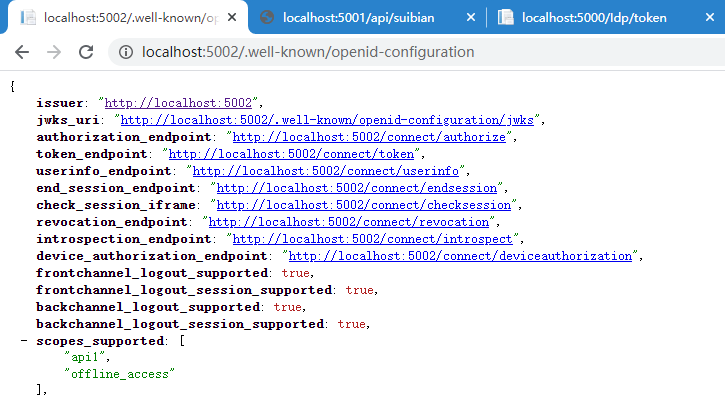
启动项目,访问 http://localhost:5002/.well-known/openid-configuration (我的端口号是5002) ,可以浏览 发现文档,参考下图,说明已经配置成功。
后面客户端会使用里面的数据进行请求toke
项目第一次启动根目录也会生成一个文件 tempkey.rsa
二、客户端
1、新建一个.Net Core Web 项目
这里可以使用其他建立客户端 。例如:控制台程序、wpf 等等。需要添加 NuGet 包 IdentityModel
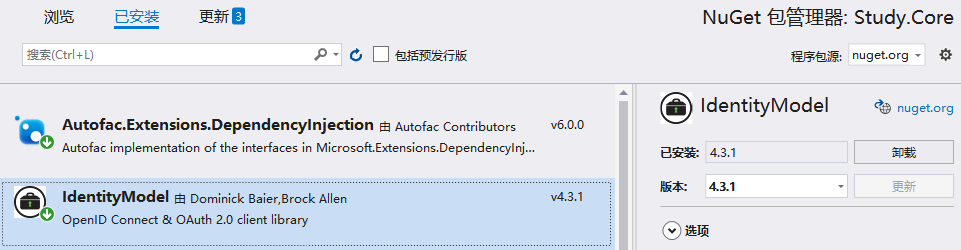
2、新建一个 Controller 用来测试访问上面的IdentityServer
获取token,访问 http://localhost:5003/Idp/token ,提示访问成功
    public class IdpController : Controller

    {

        private static readonly string _idpBaseUrl = "http://localhost:5002";

        public async Task<IActionResult> Token()

        {

            var client = new HttpClient();

            var disco = await client.GetDiscoveryDocumentAsync(_idpBaseUrl);

            if (disco.IsError)

            {

                return Content("获取发现文档失败。error:" + disco.Error);

            }

            var token = await client.RequestClientCredentialsTokenAsync(new ClientCredentialsTokenRequest()

            {

                Address = disco.TokenEndpoint,

                //ClientId、ClientSecret、Scope 这里要和 API 里定义的Client一模一样

                ClientId = "client",

                ClientSecret = "secret",

                Scope = "api1"

            });

            if (token.IsError)

            {

                return Content("获取 AccessToken 失败。error:" + disco.Error);

            }

            return Content("获取 AccessToken 成功。Token:" + token.AccessToken);

        }

    }

三、添加API资源
1、新建一个API项目
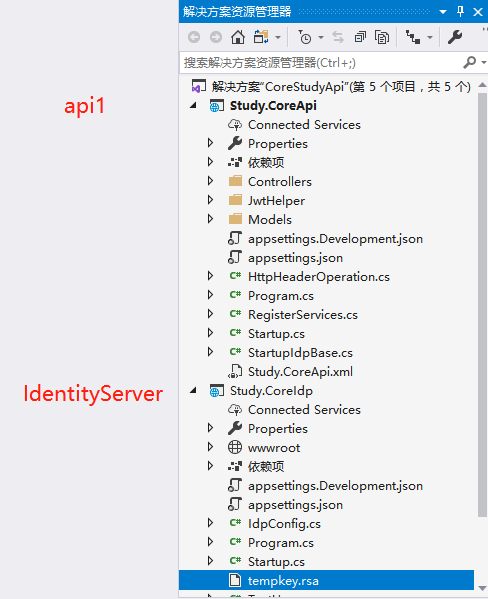
我把API项目和IdentityServer 放到同一个解决方案,这个自己定,无所谓的
API资源指的是IdentityServer IdpConfig.GetApis() 里面添加的 api1(这个api1名称随便起,但是要注意一定要保持一致)
添加认证之后就可以测试用 AccessToken 请求资源了
2、添加JWT 认证
StartUp.ConfigureServices()
       services.AddAuthentication(JwtBearerDefaults.AuthenticationScheme)

       .AddJwtBearer(JwtBearerDefaults.AuthenticationScheme, options =>

       {

           // IdentityServer 地址

           options.Authority = "http://localhost:5002";

           //不需要https

           options.RequireHttpsMetadata = false;

           //这里要和 IdentityServer 定义的 api1 保持一致

           options.Audience = "api1";

           //token 默认容忍5分钟过期时间偏移,这里设置为0,

           //这里就是为什么定义客户端设置了过期时间为5秒,过期后仍可以访问数据

           options.TokenValidationParameters.ClockSkew = TimeSpan.Zero;

           options.Events = new JwtBearerEvents

           {

               //AccessToken 验证失败

               OnChallenge = op =>

               {

                   //跳过所有默认操作

                   op.HandleResponse();

                   //下面是自定义返回消息

                   //op.Response.Headers.Add("token", "401");

                   op.Response.ContentType = "application/json";

                   op.Response.StatusCode = StatusCodes.Status401Unauthorized;

                   op.Response.WriteAsync(JsonConvert.SerializeObject(new

                   {

                       status = StatusCodes.Status401Unauthorized,

                       msg = "token无效"

                   }));

                   return Task.CompletedTask;

               }

           };

       });
3、添加认证中间件
//这里注意 一定要在 UseMvc前面,顺序不可改变

app.UseAuthentication();
4、Controller 添加特性认证 [Authorize]
    [Route("api/[controller]")]

    [Authorize]

    public class SuiBianController : Controller

    {

        [HttpGet]

        public string Get()

        {

            var roles = User.Claims.Where(l => l.Type == ClaimTypes.Role);

            return "访问成功,当前用户角色 " + string.Join(',', roles.Select(l => l.Value));

        }

    }
5、测试
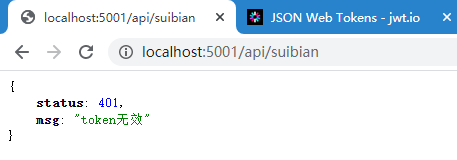
访问 http://localhost:5001/api/suibian ,提示 token 无效,证明我们增加认证成功
四、客户端测试
1、修改 IdpController, 添加一个action 访问 API资源 /api/suibian
    public class IdpController : Controller

    {

        //内存缓存 需要提前注册  services.AddMemoryCache();

        private IMemoryCache _memoryCache;

        private static readonly string _idpBaseUrl = "http://localhost:5002";

        private static readonly string _apiBaseUrl = "http://localhost:5001";

        public IdpController(IMemoryCache memoryCache)

        {

            _memoryCache = memoryCache;

        }

        public async Task<IActionResult> Token()

        {

            var client = new HttpClient();

            var disco = await client.GetDiscoveryDocumentAsync(_idpBaseUrl);

            if (disco.IsError)

            {

                return Content("获取发现文档失败。error:" + disco.Error);

            }

            var token = await client.RequestClientCredentialsTokenAsync(new ClientCredentialsTokenRequest()

            {

                Address = disco.TokenEndpoint,

                ClientId = "client",

                ClientSecret = "secret",

                Scope = "api1"

            });

            if (token.IsError)

            {

                return Content("获取 AccessToken 失败。error:" + disco.Error);

            }

            //将token 临时存储到 缓存中

            _memoryCache.Set("AccessToken", token.AccessToken);

            return Content("获取 AccessToken 成功。Token:" + token.AccessToken);

        }

        public async Task<IActionResult> SuiBian()

        {

            string token, apiurl = GetApiUrl("suibian");

            _memoryCache.TryGetValue("AccessToken", out token);

            if (string.IsNullOrEmpty(token))

            {

                return Content("token is null");

            }

            var client = new HttpClient();

            client.SetBearerToken(token);

            var response = await client.GetAsync(apiurl);

            var result = await response.Content.ReadAsStringAsync();

            if (!response.IsSuccessStatusCode)

            {

                _memoryCache.Remove("AccessToken");

                return Content($"获取 {apiurl} 失败。StatusCode:{response.StatusCode} \r\n Token:{token} \r\n result:{result}");

            }

            return Json(new

            {

                code = response.StatusCode,

                data = result

            });

        }

        private string GetApiUrl(string address)

        {

            return _apiBaseUrl + "/api/" + address;

        }

    }
2、请求 AccessToken
http://localhost:5003/Idp/token ,请求成功后会将 token 存储到 cache 中
3、请求 API 资源
http://localhost:5003/Idp/suibian ,token是直接在缓存里面取出来的

五、项目目录
IdentityServer4 (1) 客户端授权模式(Client Credentials)的更多相关文章
- (转)基于OWIN WebAPI 使用OAuth授权服务【客户端模式(Client Credentials Grant)】
适应范围 采用Client Credentials方式,即应用公钥.密钥方式获取Access Token,适用于任何类型应用,但通过它所获取的Access Token只能用于访问与用户无关的Open ...
- 基于OWIN WebAPI 使用OAuth授权服务【客户端模式(Client Credentials Grant)】
适应范围 采用Client Credentials方式,即应用公钥.密钥方式获取Access Token,适用于任何类型应用,但通过它所获取的Access Token只能用于访问与用户无关的Open ...
- IdentityServer4(客户端授权模式)
1.新建三个项目 IdentityServer:端口5000 IdentityAPI:端口5001 IdentityClient: 2.在IdentityServer项目中添加IdentityServ ...
- IdentityServer4[3]:使用客户端认证控制API访问(客户端授权模式)
使用客户端认证控制API访问(客户端授权模式) 场景描述 使用IdentityServer保护API的最基本场景. 我们定义一个API和要访问API的客户端.客户端从IdentityServer请求A ...
- IdentityServer(二)客户端授权模式
前言 客户端授权模,客户端直接向Identity Server申请token并访问资源.客户端授权模式比较适用于服务之间的通信. 搭建Identity服务 新建名为 IdentityServer 的W ...
- 基于 IdentityServer3 实现 OAuth 2.0 授权服务【客户端模式(Client Credentials Grant)】
github:https://github.com/IdentityServer/IdentityServer3/ documentation:https://identityserver.githu ...
- IdentityServer4系列 | 客户端凭证模式
一.前言 从上一篇关于 快速搭建简易项目中,通过手动或者官方模板的方式简易的实现了我们的IdentityServer授权服务器搭建,并做了相应的配置和UI配置,实现了获取Token方式. 而其中我们也 ...
- IdentityServer4(7)- 使用客户端认证控制API访问(客户端授权模式)
一.前言 本文已更新到 .NET Core 2.2 本文包括后续的Demo都会放在github:https://github.com/stulzq/IdentityServer4.Samples (Q ...
- OAuth2:客户端证书授权(Client Credentials)类型的开放授权
适应范围 认证服务器不提供像用户数据这样的重要资源,仅仅是有限的只读资源或者一些开放的API.例如使用了第三方的静态文件服务,如Google Storage或Amazon S3.这样,你的应用需要通过 ...
随机推荐
- JVM中栈的frames详解
目录 简介 JVM中的栈 Frame Local Variables本地变量 Operand Stacks Dynamic Linking动态链接 方法执行完毕 简介 我们知道JVM运行时数据区域专门 ...
- keepalived 热备
概述 keepalived高可用集群 keepalived最初是为了LVS的,因为LVS无法进行自动检测服务器的节点状态(可以自动部署LVS) keeplived后来加入VRRP给功 ...
- JVM 专题九:运行时数据区(四)本地方法栈
1. 本地方法栈 2. 什么是本地方法栈? Java虚拟机栈用于管理Java方法的调用,而本地方法栈用于管理本地方法的调用 本地方法栈,也是线程私有的. 允许被实现成固定或者是可动态拓展的内存大小 ...
- 数据可视化之powerBI技巧(二十二)利用这个方法,帮你搞定Power BI"增量刷新"
Power BI的增量刷新功能现在已经对Pro用户开通,但由于种种限制,很多人依然无法使用无这个功能,所以,每一次刷新,都要彻底更新数据集.这对于量级比较大的数据集来说,着实是一件耗费时间的事情. 拿 ...
- 这就是Java代码生成器的制作流程
1. 前言 前几天写了篇关于Mybatis Plus代码生成器的文章,不少同学私下问我这个代码生成器是如何运作的,为什么要用到一些模板引擎,所以今天来说明下代码生成器的流程. 2. 代码生成器的使用场 ...
- 机器学习 | SVD矩阵分解算法,对矩阵做拆分,然后呢?
本文始发于个人公众号:TechFlow,原创不易,求个关注 今天是机器学习专题第28篇文章,我们来聊聊SVD算法. SVD的英文全称是Singular Value Decomposition,翻译过来 ...
- 2. 妈呀,Jackson原来是这样写JSON的
没有人永远18岁,但永远有人18岁.本文已被 https://www.yourbatman.cn 收录,里面一并有Spring技术栈.MyBatis.JVM.中间件等小而美的专栏供以免费学习.关注公众 ...
- Go语言的跳跃表(SkipList)实现
之所以会有这篇文章,是因为我在学习Go语言跳表代码实现的过程中,产生过一些困惑,但网上的大家都不喜欢写注释- - 我的代码注释一向是写的很全的,所以发出来供后来者学习参考. 本文假设你已经理解了跳表的 ...
- 通过C语言获取MAC地址(转)
原文:http://blog.chinaunix.net/uid-25885064-id-3125167.html #include <sys/ioctl.h>#include <n ...
- docker时区不正确的问题修改记
前一阵子有一台服务器,mysql的时间比北京时间晚了8个小时.我知道是时区的问题,但是不知道为什么弄成这样,宿主机没有问题,后来一看mysql的docker,时区是错的. mybatis-plus打印 ...