
家庭记账本APP开发准备(二)
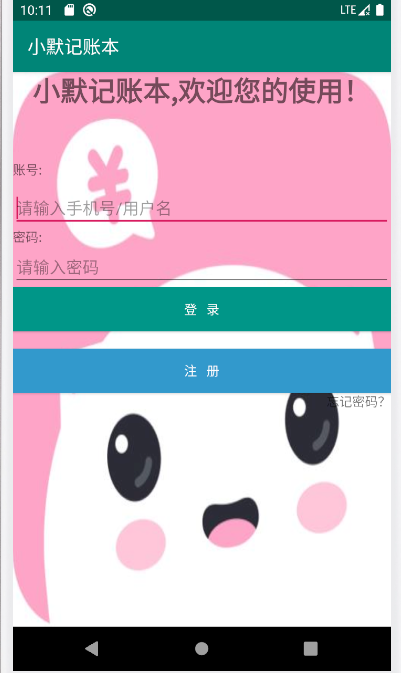
今天学习了选项卡,为记账本的分类做了准备。主登录界面进行了优化,但仍未实现各个组件之间的跳转。
选项卡
activity_main.xml
<?xml version="1.0" encoding="utf-8"?>

<TabHost xmlns:android="http://schemas.android.com/apk/res/android"

    xmlns:app="http://schemas.android.com/apk/res-auto"

    xmlns:tools="http://schemas.android.com/tools"

    android:layout_width="match_parent"

    android:layout_height="match_parent"

    android:id="@android:id/tabhost"

    tools:context=".MainActivity">

    <LinearLayout

        android:layout_width="match_parent"

        android:layout_height="match_parent"

        android:orientation="vertical">

        <TabWidget

            android:layout_height="wrap_content"

            android:layout_width="match_parent"

            android:id="@android:id/tabs"

            ></TabWidget>

        <FrameLayout

            android:layout_width="match_parent"

            android:layout_height="match_parent"

            android:id="@android:id/tabcontent"

            ></FrameLayout>

    </LinearLayout>

</TabHost>
tab1.xml
<?xml version="1.0" encoding="utf-8"?>

<LinearLayout xmlns:android="http://schemas.android.com/apk/res/android"

    android:orientation="vertical"

    android:id="@+id/left"

    android:layout_width="match_parent"

    android:layout_height="match_parent">

    <ImageView

        android:layout_width="match_parent"

        android:layout_height="match_parent"

        android:src="@drawable/bg"/>

</LinearLayout>
tab2.xml
<?xml version="1.0" encoding="utf-8"?>

<LinearLayout xmlns:android="http://schemas.android.com/apk/res/android"

    android:orientation="vertical"

    android:id="@+id/right"

    android:layout_width="match_parent"

    android:layout_height="match_parent">

    <ImageView

        android:layout_width="match_parent"

        android:layout_height="match_parent"

        android:src="@drawable/img"/>

</LinearLayout>
MainActivity.java
package com.example.xuanxiang;

import androidx.appcompat.app.AppCompatActivity;

import android.os.Bundle;

import android.view.LayoutInflater;

import android.widget.TabHost;

public class MainActivity extends AppCompatActivity {

    @Override

    protected void onCreate(Bundle savedInstanceState) {

        super.onCreate(savedInstanceState);

        setContentView(R.layout.activity_main);

        TabHost tabHost =(TabHost) findViewById(android.R.id.tabhost);

        tabHost.setup();//初始化 添加标签页

        LayoutInflater inflater =LayoutInflater.from(this);

        inflater.inflate(R.layout.tab1,tabHost.getTabContentView());

        inflater.inflate(R.layout.tab2,tabHost.getTabContentView());

        tabHost.addTab(tabHost.newTabSpec("tab1").setIndicator("选项一").setContent(R.id.left));

        tabHost.addTab(tabHost.newTabSpec("tab2").setIndicator("选项二").setContent(R.id.right));

    }

}
优化美化后的主界面..........
家庭记账本APP开发准备(二)的更多相关文章
- 家庭记账本APP开发准备(三)
单选框(RadioButton) 通过设置单选框,可以将非此即彼的问题进行解决,成功学会并应用了手机端单项选择框; 复选框(CheckBox) 学习复选框是为了给使用软件的人更多的选择,在其他选择框后 ...
- 家庭记账本APP开发准备(一)
1.登录界面 通过学习比较 登录界面采用线性布局(LinearLayout) 下面是相关源码 activity_main.xml ?xml version="1.0" encodi ...
- 简单记账本APP开发一
在对Android的一些基础的知识有了一定了解,以及对于AndroidStudio的如何使用有了 一定的熟悉后,决定做一个简单的记账本APP 开发流程 1.记账本的页面 2.可以添加新的账目 (一)页 ...
- 进度1_家庭记账本App
今天完成了昨天的初步构想,详细介绍见上一篇博客,具体项目结构和案例如下: MainActivity.java: package com.example.familybooks; import andr ...
- 家庭版记账本app开发完成
经过这几天关于android的相关学习,对于家庭版记账本app以及开发结束. 实现的功能为:用户的注册.登录.添加支出账单.添加收入账单.显示所有的该用户的账单情况(收入和支出).生产图表(直观的显示 ...
- 简单记账本APP开发二
今天主要是进行了适配器的编写,数据库的创建以及对完善了业务逻辑,简单的APP到此已经通过测试可以使用.
- 家庭版记账本app开发之关于(数据库查找出数据)圆饼图的生成
这次完成的主要的怎样从数据库中调出数据.之后通过相关的数据,生成想要的圆饼图.以方便用户更加直观的看见关于账本的基本情况. 在圆饼图生成中用到了一些外部资源 具体的import如下: import c ...
- 家庭记账本web开发
这个系统的整体结构: GitHub:https://github.com/lq1998lq/Test.git com.action包: package com.action; import java. ...
- 进度4_家庭记账本App
在上一个博客中,我学习了用Fragment进行数据的传值,但是出现了好多问题,我通过百度查阅资料发现fregment在进行数值传输的时候有的语法不能使用,并且不方便的进行数据库的使用,所以我在原来的家 ...
随机推荐
- python 并发专题(三):进程以及进程池相关以及实现
一.多进程实现 multiprocess.process模块 process类 Process([group [, target [, name [, args [, kwargs]]]]]),由该类 ...
- Django13 /缓存、信号、django的读写分离
Django13 /缓存.信号.django的读写分离 目录 Django13 /缓存.信号.django的读写分离 1. 缓存 2. 信号 3. django的读写分离 1. 缓存 缓存简述: 缓存 ...
- 数据可视化之powerBI技巧(二十)采悟:创建度量值,轻松进行分组统计
上一篇文章中的分组,都是通过新建列的方式实现的,直观上比较容易理解.不过这样都修改了原始数据的结构,如果我们不在源表上进行修改,直接通过度量值的方式来进行分组,是否可以实现呢? 答案当然是肯定的. 采 ...
- SDS——重用StringBuilder
package example.java; /** * @author 杜科 * @description 简单动态字符串,非线程安全.采取类似buffer的设计,使其成为一个可以方便重用的Strin ...
- Springboot整合SpringSecurity--对静态文件进行权限管理
文章目录 一.要求 二.依赖管理 三.配置config文件 四.扩展 一.要求 index.html 可以被所有用户访问 1.html只能被VIP1访问 2.html只能被VIP2访问 3.html只 ...
- python多进程之multiprocessing
什么是多进程? 简单的理解:单板上运行的一个程序就是一个进程.进程是操作系统分配资源的最小单位,不同的进程之间资源不共享,进程间通信需要使用特定的方式.python提供了自带的multiprocess ...
- Python协程之Gevent模块
背景 进程是操作系统分配资源的最小单位,每个进程独享4G的内存地址空间,因此进程内数据是安全的,检查间的通信需要使用特定的方法.同理,正是因为进程是数据安全的,所以导致进程的切换是一个很麻烦效率不高的 ...
- 3.pandas的简单查询
知道了基本的pandas的数据结构,就可以进行查询相应的数据了 DataFrame可以看成是一个个的Series组成的一个二维结构,既然如此,就会有从DataFrame里查询Series的方法 从Da ...
- eclipse IDE usage of my own and tutorials link list
设置 字符集 Eclipse 修改字符集 默认情况下 Eclipse 字符集为 GBK,但现在很多项目采用的是 UTF-8,这是我们就需要设置我们的 Eclipse 开发环境字符集为 UTF-8, 设 ...
- 【Gin-API系列】需求设计和功能规划(一)
场景需求 数据库存储2个模型,每个模型都有一个或多个IP字段,需要通过 Golang Http Api(Restful Api) 返回 IP 信息. 模型1 - 服务器 ID 主机名 IP 内存大小 ...