
Unity 游戏框架搭建 (九) 减少加班利器-QConsole
为毛要实现这个工具?
在我小时候,每当游戏在真机运行时,我们看到的日志是这样的。
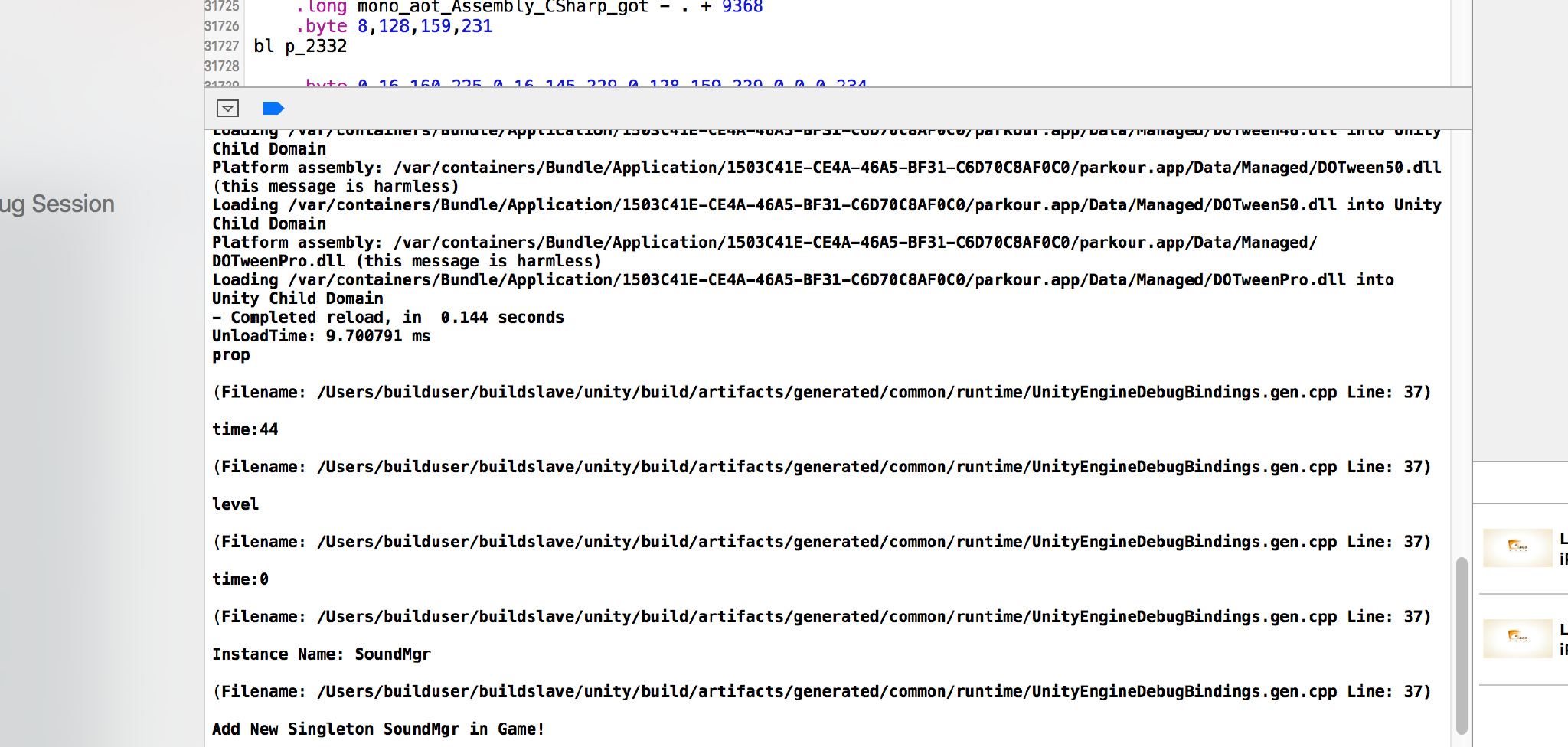
没高亮啊,还有乱七八糟的堆栈信息,好干扰日志查看,好影响心情。
还有就是必须始终连着 usb 线啊,我想要想躺着测试。。。 以上种种原因,QConsole 诞生了。
如何使用?
使用方式和QLog一样,在初始化出调用,简单的一句。
QConsole.Instance();就好了,使用之后效果是这样的。

在 Editor 模式下,F1控制开关。
在真机上需要在屏幕上同时按下五个手指就可以控制开关了。(本来考虑 11 个手指萌一下的)。
实现思路:
- 首先要想办法获取Log,这个和上一篇介绍的 QLog 一样,需要使用 Application.logMessageReceived 这个 api。
- 获取到的 Log 信息要存在一个 Queue 或者 List 中,然后把 Log 输出到屏幕上就 ok 了。
- 输出到屏幕上使用的是 OnGUI 回调和 GUILayout.Window 这个 api, 总共三步。
贴上代码:
QConsole实现
sing UnityEngine;

#if UNITY_EDITOR

using UnityEditor;

#endif

using System.Collections;

using System;

using System.Collections.Generic;

namespace QFramework {

    /// <summary>

    /// 控制台GUI输出类

    /// 包括FPS,内存使用情况,日志GUI输出

    /// </summary>

    public class QConsole : QSingleton<QConsole>

    {

        struct ConsoleMessage

        {

            public readonly string  message;

            public readonly string  stackTrace;

            public readonly LogType    type;

            public ConsoleMessage (string message, string stackTrace, LogType type)

            {

                this.message    = message;

                this.stackTrace    = stackTrace;

                this.type       = type;

            }

        }

        /// <summary>

        /// Update回调

        /// </summary>

        public delegate void OnUpdateCallback();

        /// <summary>

        /// OnGUI回调

        /// </summary>

        public delegate void OnGUICallback();

        public OnUpdateCallback onUpdateCallback = null;

        public OnGUICallback onGUICallback = null;

        /// <summary>

        /// FPS计数器

        /// </summary>

        private QFPSCounter fpsCounter = null;

        /// <summary>

        /// 内存监视器

        /// </summary>

        private QMemoryDetector memoryDetector = null;

        private bool showGUI = true;

        List<ConsoleMessage> entries = new List<ConsoleMessage>();

        Vector2 scrollPos;

        bool scrollToBottom = true;

        bool collapse;

        bool mTouching = false;

        const int margin = 20;

        Rect windowRect = new Rect(margin + Screen.width * 0.5f, margin, Screen.width * 0.5f - (2 * margin), Screen.height - (2 * margin));

        GUIContent clearLabel    = new GUIContent("Clear",    "Clear the contents of the console.");

        GUIContent collapseLabel = new GUIContent("Collapse", "Hide repeated messages.");

        GUIContent scrollToBottomLabel = new GUIContent("ScrollToBottom", "Scroll bar always at bottom");

        private QConsole()

        {

            this.fpsCounter = new QFPSCounter(this);

            this.memoryDetector = new QMemoryDetector(this);

            //        this.showGUI = App.Instance().showLogOnGUI;

            QApp.Instance().onUpdate += Update;

            QApp.Instance().onGUI += OnGUI;

            Application.logMessageReceived += HandleLog;

        }

        ~QConsole()

        {

            Application.logMessageReceived -= HandleLog;

        }

        void Update()

        {

            #if UNITY_EDITOR

            if (Input.GetKeyUp(KeyCode.F1))

                this.showGUI = !this.showGUI;

            #elif UNITY_ANDROID

            if (Input.GetKeyUp(KeyCode.Escape))

                this.showGUI = !this.showGUI;

            #elif UNITY_IOS

            if (!mTouching && Input.touchCount == 4)

            {

                mTouching = true;

                this.showGUI = !this.showGUI;

            } else if (Input.touchCount == 0){

                mTouching = false;

            }

            #endif

            if (this.onUpdateCallback != null)

                this.onUpdateCallback();

        }

        void OnGUI()

        {

            if (!this.showGUI)

                return;

            if (this.onGUICallback != null)

                this.onGUICallback ();

            if (GUI.Button (new Rect (100, 100, 200, 100), "清空数据")) {

                PlayerPrefs.DeleteAll ();

                #if UNITY_EDITOR

                EditorApplication.isPlaying = false;

                #else

                Application.Quit();

                #endif

            }

            windowRect = GUILayout.Window(123456, windowRect, ConsoleWindow, "Console");

        }

        /// <summary>

        /// A window displaying the logged messages.

        /// </summary>

        void ConsoleWindow (int windowID)

        {

            if (scrollToBottom) {

                GUILayout.BeginScrollView (Vector2.up * entries.Count * 100.0f);

            }

            else {

                scrollPos = GUILayout.BeginScrollView (scrollPos);

            }

            // Go through each logged entry

            for (int i = 0; i < entries.Count; i++) {

                ConsoleMessage entry = entries[i];

                // If this message is the same as the last one and the collapse feature is chosen, skip it

                if (collapse && i > 0 && entry.message == entries[i - 1].message) {

                    continue;

                }

                // Change the text colour according to the log type

                switch (entry.type) {

                    case LogType.Error:

                    case LogType.Exception:

                        GUI.contentColor = Color.red;

                        break;

                    case LogType.Warning:

                        GUI.contentColor = Color.yellow;

                        break;

                    default:

                        GUI.contentColor = Color.white;

                        break;

                }

                if (entry.type == LogType.Exception)

                {

                    GUILayout.Label(entry.message + " || " + entry.stackTrace);

                } else {

                    GUILayout.Label(entry.message);

                }

            }

            GUI.contentColor = Color.white;

            GUILayout.EndScrollView();

            GUILayout.BeginHorizontal();

            // Clear button

            if (GUILayout.Button(clearLabel)) {

                entries.Clear();

            }

            // Collapse toggle

            collapse = GUILayout.Toggle(collapse, collapseLabel, GUILayout.ExpandWidth(false));

            scrollToBottom = GUILayout.Toggle (scrollToBottom, scrollToBottomLabel, GUILayout.ExpandWidth (false));

            GUILayout.EndHorizontal();

            // Set the window to be draggable by the top title bar

            GUI.DragWindow(new Rect(0, 0, 10000, 20));

        }

        void HandleLog (string message, string stackTrace, LogType type)

        {

            ConsoleMessage entry = new ConsoleMessage(message, stackTrace, type);

            entries.Add(entry);

        }

    }

}
QFPSCounter
using UnityEngine;

using System.Collections;

namespace QFramework {

    /// <summary>

    /// 帧率计算器

    /// </summary>

    public class QFPSCounter

    {

        // 帧率计算频率

        private const float calcRate = 0.5f;

        // 本次计算频率下帧数

        private int frameCount = 0;

        // 频率时长

        private float rateDuration = 0f;

        // 显示帧率

        private int fps = 0;

        public QFPSCounter(QConsole console)

        {

            console.onUpdateCallback += Update;

            console.onGUICallback += OnGUI;

        }

        void Start()

        {

            this.frameCount = 0;

            this.rateDuration = 0f;

            this.fps = 0;

        }

        void Update()

        {

            ++this.frameCount;

            this.rateDuration += Time.deltaTime;

            if (this.rateDuration > calcRate)

            {

                // 计算帧率

                this.fps = (int)(this.frameCount / this.rateDuration);

                this.frameCount = 0;

                this.rateDuration = 0f;

            }

        }

        void OnGUI()

        {

            GUI.color = Color.black;

            GUI.Label(new Rect(80, 20, 120, 20),"fps:" + this.fps.ToString());

        }

    }

}
QMemoryDetector
using UnityEngine;

using System.Collections;

namespace QFramework {

    /// <summary>

    /// 内存检测器,目前只是输出Profiler信息

    /// </summary>

    public class QMemoryDetector

    {

        private readonly static string TotalAllocMemroyFormation = "Alloc Memory : {0}M";

        private readonly static string TotalReservedMemoryFormation = "Reserved Memory : {0}M";

        private readonly static string TotalUnusedReservedMemoryFormation = "Unused Reserved: {0}M";

        private readonly static string MonoHeapFormation = "Mono Heap : {0}M";

        private readonly static string MonoUsedFormation = "Mono Used : {0}M";

        // 字节到兆

        private float ByteToM = 0.000001f;

        private Rect allocMemoryRect;

        private Rect reservedMemoryRect;

        private Rect unusedReservedMemoryRect;

        private Rect monoHeapRect;

        private Rect monoUsedRect;

        private int x = 0;

        private int y = 0;

        private int w = 0;

        private int h = 0;

        public QMemoryDetector(QConsole console)

        {

            this.x = 60;

            this.y = 60;

            this.w = 200;

            this.h = 20;

            this.allocMemoryRect = new Rect(x, y, w, h);

            this.reservedMemoryRect = new Rect(x, y + h, w, h);

            this.unusedReservedMemoryRect = new Rect(x, y + 2 * h, w, h);

            this.monoHeapRect = new Rect(x, y + 3 * h, w, h);

            this.monoUsedRect = new Rect(x, y + 4 * h, w, h);

            console.onGUICallback += OnGUI;

        }

        void OnGUI()

        {

            GUI.Label(this.allocMemoryRect,

                string.Format(TotalAllocMemroyFormation, Profiler.GetTotalAllocatedMemory() * ByteToM));

            GUI.Label(this.reservedMemoryRect,

                string.Format(TotalReservedMemoryFormation, Profiler.GetTotalReservedMemory() * ByteToM));

            GUI.Label(this.unusedReservedMemoryRect,

                string.Format(TotalUnusedReservedMemoryFormation, Profiler.GetTotalUnusedReservedMemory() * ByteToM));

            GUI.Label(this.monoHeapRect,

                string.Format(MonoHeapFormation, Profiler.GetMonoHeapSize() * ByteToM));

            GUI.Label(this.monoUsedRect,

                string.Format(MonoUsedFormation, Profiler.GetMonoUsedSize() * ByteToM));

        }

    }

}
注意事项:
- 和上一篇介绍的 QLog 一样,需要依赖上上篇文章介绍的QApp。
- QConsole 初步实现来自于开源 Unity 插件 Unity-WWW-Wrapper 中的 Console.cs.在此基础上添加了 ScrollToBottom 选项。因为这个插件的控制台不支持滚动显示 Log,需要拖拽右边的 scrollBar,很不方便。
- Unity-WWW-wrapper 非常不稳定,建议大家不要使用。倒是感兴趣的同学可以研究下实现,贴上地址:https://www.assetstore.unity3d.com/en/#!/content/19116。
欢迎讨论!
转载请注明地址:凉鞋的笔记:liangxiegame.com
更多内容
QFramework 地址:https://github.com/liangxiegame/QFramework
QQ 交流群:623597263
Unity 进阶小班:
- 主要训练内容:
- 框架搭建训练(第一年)
- 跟着案例学 Shader(第一年)
- 副业的孵化(第二年、第三年)
- 权益、授课形式等具体详情请查看《小班产品手册》:https://liangxiegame.com/master/intro
- 主要训练内容:
关注公众号:liangxiegame 获取第一时间更新通知及更多的免费内容。

Unity 游戏框架搭建 (九) 减少加班利器-QConsole的更多相关文章
- Unity 游戏框架搭建 (八) 减少加班利器-QLog
为毛要实现这个工具? 在我小时候,每当游戏到了测试阶段,交给QA测试,QA测试了一会儿拿着设备过来说游戏闪退了....当我拿到设备后测了好久Bug也没有复现,排查了好久也没有头绪,就算接了Bugly拿 ...
- Unity 游戏框架搭建 (七) 减少加班利器-QApp类
本来这周想介绍一些框架中自认为比较好用的小工具的,但是发现很多小工具都依赖一个类----App. App类的职责: 1.接收Unity的生命周期事件. 2.做为游戏的入口. 3.一些框架级别的组件初始 ...
- Unity 游戏框架搭建 (十) QFramework v0.0.2小结
从框架搭建系列的第一篇文章开始到现在有四个多月时间了,这段时间对自己来说有很多的收获,好多小伙伴和前辈不管是在评论区还是私下里给出的建议非常有参考性,在此先谢过各位. 说到是一篇小节,先列出框架的概要 ...
- Unity 游戏框架搭建 2018 (一) 架构、框架与 QFramework 简介
约定 还记得上版本的第二十四篇的约定嘛?现在出来履行啦~ 为什么要重制? 之前写的专栏都是按照心情写的,在最初的时候笔者什么都不懂,而且文章的发布是按照很随性的一个顺序.结果就是说,大家都看完了,都还 ...
- Unity 游戏框架搭建 (十六) v0.0.1 架构调整
背景: 前段时间用Xamarin.OSX开发一些工具,遇到了两个问题. QFramework的大部分的类耦合了Unity的API,这样导致不能在其他CLR平台使用QFramework. QFramew ...
- Unity 游戏框架搭建 (十三) 无需继承的单例的模板
之前的文章中介绍的Unity 游戏框架搭建 (二) 单例的模板和Unity 游戏框架搭建 (三) MonoBehaviour单例的模板有一些问题. 存在的问题: 只要继承了单例的模板就无法再继承其他的 ...
- Unity 游戏框架搭建 (十七) 静态扩展GameObject实现链式编程
本篇本来是作为原来 优雅的QChain的第一篇的内容,但是QChain流产了,所以收录到了游戏框架搭建系列.本篇介绍如何实现GameObject的链式编程. 链式编程的实现技术之一是C#的静态扩展.静 ...
- Unity 游戏框架搭建 2019 (三十九、四十一) 第四章 简介&方法的结构重复问题&泛型:结构复用利器
第四章 简介 方法的结构重复问题 我们在上一篇正式整理完毕,从这一篇开始,我们要再次进入学习收集示例阶段了. 那么我们学什么呢?当然是学习设计工具,也就是在上篇中提到的关键知识点.这些关键知识点,大部 ...
- Unity 游戏框架搭建 (十九) 简易对象池
在Unity中我们经常会用到对象池,使用对象池无非就是解决两个问题: 一是减少new时候寻址造成的消耗,该消耗的原因是内存碎片. 二是减少Object.Instantiate时内部进行序列化和反序列化 ...
随机推荐
- Android4.4 在Framework新增内部资源编译不过的问题
如果在Frameworks新增内部资源,并在Java代码中使用类似形式来引用资源:com.android.internal.R.layout.xxx,需要在frameworks/base/core/r ...
- 关于c3p0连接池连接mysql数据库需要注意的几点
什么是数据库连接池: 用池来管理Connection,这可以重复使用Connection.有了池,所以我们就不用自己来创建Connection,而是通过池来获取Connection对象. 当使用完Co ...
- Python基础 数据类型 (字符串、列表、字典、元组、集合、堆、栈、树)
数据类型有整型.布尔.字符串.列表.字典.元组.集合.堆.栈和树. 1.整型: 整型就是数字 数字表示 python2 64位机器,范围-2^63~2^63-1 超出上述范围,python自动转化为l ...
- Java入门到精通——调错篇之Spring2.5利用aspect实现AOP时报错: error at ::0 can't find referenced pointcut XXX
一.问题描述及原因. 利用Aspect注解实现AOP的时候出现了error at ::0 can't find referenced pointcut XXX.一看我以为注解写错了,结果通过查询相关资 ...
- CSS3中的变形与动画(二)
CSS3动画 过渡属性transiton-property 早期在Web中要实现动画效果,都是依赖于JavaScript或Flash来完成.但在CSS3中新增加了一个新的模块transition,它可 ...
- App后台开发架构实践笔记
1 App后台入门 1.1 App后台的功能 (1)远程存储数据: (2)消息中转. 1.2 App后台架构 架构设计的流程 (1) 根据App的设计,梳理出App的业务流程: (2) 把每个业务流程 ...
- Java—集合框架 Collections.sort()、Comparable接口和Comparator接口
Collentions工具类--java.util.Collections Collentions是Java集合框架中,用来操作集合对象的工具类,也是Java集合框架的成员,与List.Map和Set ...
- BIEE入门(一)架构
BIEE作为Oracle的新的商业智能平台企业版,起源于Oracle所收购的Siebel公司,BIEE原来叫做Siebel Analytic,但是Siebel也不是它的发明者,它是Siebel在200 ...
- jQuery替换已存在于元素element上的事件event
<html><head><script type="text/javascript" src="/jquery/jquery.js" ...
- 开发时复制aspx网页的方法
简单的copy /paste *.aspx网页,所使用的是同一个CodeBehind ,这往往不是我们所想要的!!!我们一般都希望使这两个网页具有各自的 *.cs文件.步骤:①新建一个Web ...