
Scrapy项目 - 源码工程 - 实现豆瓣 Top250 电影信息爬取的爬虫设计
一、项目目录结构
spiders文件夹内包含doubanSpider.py文件,对于项目的构建以及结构逻辑,详见环境搭建篇。
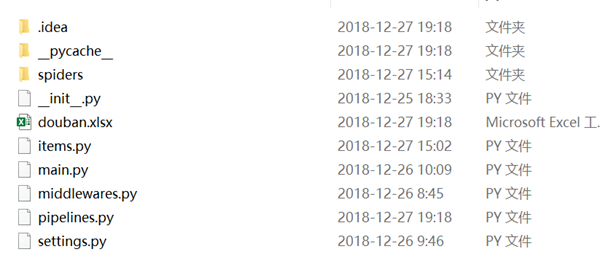
二、项目源码
1.doubanSpider.py
# -*- coding: utf-8 -*-

import scrapy

from douban.items import DoubanItem

#创建爬虫类

class DoubanspiderSpider(scrapy.Spider):

    name = 'doubanSpider'   #爬虫名字

    allowed_domains = ['movie.douban.com']  #容许爬虫的作用范围

    #定义开始的URL

    offset=0

    url='https://movie.douban.com/top250?start='

    start_urls = [url+str(offset)]    #爬虫开始的URL

    def parse(self, response):

         #with open("douban.html","w",encoding="utf-8") as f:

             #f.write(str(response.body,encoding="utf-8"))

        #继承

        item=DoubanItem()

        #根节点

        movies=response.xpath("//div[@class='info']")

        for each in movies:

            #标题

            item['title']=each.xpath(".//span[@class='title'][1]/text()").extract()[0]

            #信息

            #item['info'] = each.xpath(".//div[@class='bd']/p[@class='']/text()[2]").extract()[0]

            item['info'] = each.xpath(".//div[@class='bd']/p[normalize-space(@class)='']/text()[2]").extract()[0]

            # xinxi

            #item['info2'] = each.xpath(".//div[@class='bd']/p[@class='']/text()[2]").extract()[0]

            # 评分

            item['star'] = each.xpath(".//div[@class='bd']/div[@class='star']/span[@class='rating_num']/text()").extract()[0]

            # 简介

            quote = each.xpath(".//div[@class='bd']/p[@class='quote']/span/text()").extract()

            #异常处理

            if len(quote)!=0:

                item['quote']=quote[0]

            print(item)

            yield item

        if self.offset < 255:

            self.offset += 25

            # 每次处理完一页之后,重新发送下一页请求

            # self offset 自增25,同时拼接为新的URL并调用回调函数,self parse 处理response

            yield scrapy.Request(self.url + str(self.offset),callback=self.parse)

        # 通过scrapy 的xpath匹配所有老师的根节点列表集合

        #teacher_list = response.xpath("//div[@class='teacher-text']")

        # 所有列表集合

        #teacherItem = []

        # 遍历根节点的集合

        #for each in teacher_list:

            # Item对象来保存数据

            #item = GecspiderItem()

            # 不加extract() 结果为xpath匹配对象

            #name = each.xpath('./h4/text()').extract()

            # 职位

            #title = each.xpath('./h6/text()').extract()

            # 个人简介

            #info = each.xpath('./p/text()').extract()

            #item['name'] = name[0]

            #item['title'] = title[0]

            #item['info'] = info[0]

            # 上一次运行位置暂停继续运行,病返回

            #   yield item

            #teacherItem.append(item)

            # print(name[0])

            # print(title[0])

            # print(info[0])

        #return teacherItem
2.items.py
# -*- coding: utf-8 -*-

# Define here the models for your scraped items

#

# See documentation in:

# https://doc.scrapy.org/en/latest/topics/items.html

import scrapy

class DoubanItem(scrapy.Item):

    # define the fields for your item here like:

    # name = scrapy.Field()

    #标题

    title = scrapy.Field()

    #信息

    info = scrapy.Field()

    #评分

    star = scrapy.Field()

     #简介

    quote = scrapy.Field()

    pingjia = scrapy.Field()
3.main.py
from scrapy import cmdline

#

cmdline.execute("scrapy crawl doubanSpider ".split())
4.pipelines.py
# -*- coding: utf-8 -*-

# Define your item pipelines here

#

# Don't forget to add your pipeline to the ITEM_PIPELINES setting

# See: https://doc.scrapy.org/en/latest/topics/item-pipeline.html

import json

from openpyxl import Workbook

class DoubanPipeline(object):

    wb = Workbook()

    ws = wb.active

    # 设置表头

    ws.append(['标题','评分','信息','简介'])

    def process_item(self, item, spider):

        # 添加数据

        line = [item['title'],item['star'],item['info'],item['quote']]

        self.ws.append(line)  # 按行添加

        self.wb.save('douban.xlsx')

        return item
5.settings.py
# -*- coding: utf-8 -*-

# Scrapy settings for douban project

#

# For simplicity, this file contains only settings considered important or

# commonly used. You can find more settings consulting the documentation:

#

#     https://doc.scrapy.org/en/latest/topics/settings.html

#     https://doc.scrapy.org/en/latest/topics/downloader-middleware.html

#     https://doc.scrapy.org/en/latest/topics/spider-middleware.html

BOT_NAME = 'douban'

SPIDER_MODULES = ['douban.spiders']

NEWSPIDER_MODULE = 'douban.spiders'

# Crawl responsibly by identifying yourself (and your website) on the user-agent

USER_AGENT = 'Mozilla/5.0 (Windows NT 6.1; WOW64) AppleWebKit/537.36 (KHTML, like Gecko) Chrome/71.0.3578.98 Safari/537.36'

# Obey robots.txt rules

#ROBOTSTXT_OBEY = True

# Configure maximum concurrent requests performed by Scrapy (default: 16)

#CONCURRENT_REQUESTS = 32

# Configure a delay for requests for the same website (default: 0)

# See https://doc.scrapy.org/en/latest/topics/settings.html#download-delay

# See also autothrottle settings and docs

#DOWNLOAD_DELAY = 3

# The download delay setting will honor only one of:

#CONCURRENT_REQUESTS_PER_DOMAIN = 16

#CONCURRENT_REQUESTS_PER_IP = 16

# Disable cookies (enabled by default)

#COOKIES_ENABLED = False

# Disable Telnet Console (enabled by default)

#TELNETCONSOLE_ENABLED = False

# Override the default request headers:

#DEFAULT_REQUEST_HEADERS = {

#   'Accept': 'text/html,application/xhtml+xml,application/xml;q=0.9,*/*;q=0.8',

#   'Accept-Language': 'en',

#}

# Enable or disable spider middlewares

# See https://doc.scrapy.org/en/latest/topics/spider-middleware.html

#SPIDER_MIDDLEWARES = {

#    'douban.middlewares.DoubanSpiderMiddleware': 543,

#}

# Enable or disable downloader middlewares

# See https://doc.scrapy.org/en/latest/topics/downloader-middleware.html

#DOWNLOADER_MIDDLEWARES = {

#    'douban.middlewares.DoubanDownloaderMiddleware': 543,

#}

# Enable or disable extensions

# See https://doc.scrapy.org/en/latest/topics/extensions.html

#EXTENSIONS = {

#    'scrapy.extensions.telnet.TelnetConsole': None,

#}

# Configure item pipelines

# See https://doc.scrapy.org/en/latest/topics/item-pipeline.html

ITEM_PIPELINES = {

    'douban.pipelines.DoubanPipeline': 300,

}

# Enable and configure the AutoThrottle extension (disabled by default)

# See https://doc.scrapy.org/en/latest/topics/autothrottle.html

#AUTOTHROTTLE_ENABLED = True

# The initial download delay

#AUTOTHROTTLE_START_DELAY = 5

# The maximum download delay to be set in case of high latencies

#AUTOTHROTTLE_MAX_DELAY = 60

# The average number of requests Scrapy should be sending in parallel to

# each remote server

#AUTOTHROTTLE_TARGET_CONCURRENCY = 1.0

# Enable showing throttling stats for every response received:

#AUTOTHROTTLE_DEBUG = False

# Enable and configure HTTP caching (disabled by default)

# See https://doc.scrapy.org/en/latest/topics/downloader-middleware.html#httpcache-middleware-settings

#HTTPCACHE_ENABLED = True

#HTTPCACHE_EXPIRATION_SECS = 0

#HTTPCACHE_DIR = 'httpcache'

#HTTPCACHE_IGNORE_HTTP_CODES = []

#HTTPCACHE_STORAGE = 'scrapy.extensions.httpcache.FilesystemCacheStorage'
Scrapy项目 - 源码工程 - 实现豆瓣 Top250 电影信息爬取的爬虫设计的更多相关文章
- Scrapy项目 - 数据简析 - 实现豆瓣 Top250 电影信息爬取的爬虫设计
一.数据分析截图(weka数据分析截图 ) 本例实验,使用Weka 3.7对豆瓣电影网页上所罗列的上映电影信息,如:标题.主要信息(年份.国家.类型)和评分等的信息进行数据分析,Weka 3.7数据分 ...
- Scrapy项目 - 实现豆瓣 Top250 电影信息爬取的爬虫设计
通过使Scrapy框架,掌握如何使用Twisted异步网络框架来处理网络通讯的问题,进行数据挖掘和对web站点页面提取结构化数据,可以加快我们的下载速度,也可深入接触各种中间件接口,灵活的完成各种需求 ...
- Scrapy项目 - 数据简析 - 实现斗鱼直播网站信息爬取的爬虫设计
一.数据分析截图(weka数据分析截图 2-3个图,作业文字描述) 本次将所爬取的数据信息,如:房间数,直播类别和人气,导入Weka 3.7工具进行数据分析.有关本次的数据分析详情详见下图所示: ...
- Scrapy项目 - 实现百度贴吧帖子主题及图片爬取的爬虫设计
要求编写的程序可获取任一贴吧页面中的帖子链接,并爬取贴子中用户发表的图片,在此过程中使用user agent 伪装和轮换,解决爬虫ip被目标网站封禁的问题.熟悉掌握基本的网页和url分析,同时能灵活使 ...
- Scrapy项目 - 实现斗鱼直播网站信息爬取的爬虫设计
要求编写的程序可爬取斗鱼直播网站上的直播信息,如:房间数,直播类别和人气等.熟悉掌握基本的网页和url分析,同时能灵活使用Xmind工具对Python爬虫程序(网络爬虫)流程图进行分析. 一.项目 ...
- Scrapy项目 - 实现腾讯网站社会招聘信息爬取的爬虫设计
通过使Scrapy框架,进行数据挖掘和对web站点页面提取结构化数据,掌握如何使用Twisted异步网络框架来处理网络通讯的问题,可以加快我们的下载速度,也可深入接触各种中间件接口,灵活的完成各种需求 ...
- python 豆瓣top250电影的爬取
我们先看一下豆瓣的robot.txt 然后我们查看top250的网页链接和源代码 通过对比不难发现网页间只是start数字发生了变化. 我们可以知道电影内容都存在ol标签下的 div class属性为 ...
- Scrapy项目 - 项目源码 - 实现腾讯网站社会招聘信息爬取的爬虫设计
1.tencentSpider.py # -*- coding: utf-8 -*- import scrapy from Tencent.items import TencentItem #创建爬虫 ...
- Scrapy项目 - 数据简析 - 实现腾讯网站社会招聘信息爬取的爬虫设计
一.数据分析截图 本例实验,使用Weka 3.7对腾讯招聘官网中网页上所罗列的招聘信息,如:其中的职位名称.链接.职位类别.人数.地点和发布时间等信息进行数据分析,详见如下图: 图1-1 Weka ...
随机推荐
- python 21 面向对象
目录 1. 面向对象初步认识 2. 面向对象的结构 3. 从类名的角度研究类 3.1 类名操作类中的属性 3.2 类名调用类中的方法 4. 从对象的角度研究类 4.1 类名() 4.2 对象操作对象空 ...
- 快应用 吸顶 bug
官网说, 加载页面时,所有元素的appear事件都会被触发一次.因此,需要过滤第一次的appear事件: 但是,即使设置了过滤,也无效 于是,我把show属性改成了if属性,问题就解决 如下图:
- jqGrid根据数据动态设置rowList
superme.rowList = [10,20,50,100]; superme.rowNum = 20; 全局属性 loadComplete : function (data) { if(data ...
- MSIL实用指南-this的生成
C#关键字是非静态方法体内部,用Ldarg_0指代this例子ilGenerator.Emit(OpCodes.Ldarg_0);
- Oracle - Sequences
创建计数器 --最小值1,最大值999999999999999999999999999,从1开始,每次自增1,缓存20 --SQL语句: -- Create sequence create seque ...
- Spring Boot 2.0 教程 | 快速集成整合消息中间件 Kafka
欢迎关注个人微信公众号: 小哈学Java, 每日推送 Java 领域干货文章,关注即免费无套路附送 100G 海量学习.面试资源哟!! 个人网站: https://www.exception.site ...
- 你真的了解Mybatis的${}和#{}吗?是否了解应用场景?
转自:https://www.cnblogs.com/mytzq/p/9321526.html 动态sql是mybatis的主要特性之一.在mapper中定义的参数传到xml中之后,在查询之前myba ...
- HDU - 4305 - Lightning 生成树计数 + 叉积判断三点共线
HDU - 4305 题意: 比较裸的一道生成树计数问题,构造Krichhoof矩阵,求解行列式即可.但是这道题还有一个限制,就是给定的坐标中,两点连线中不能有其他的点,否则这两点就不能连接.枚举点, ...
- 疯狂的bLue
疯狂的bLue Time Limit: 1000MS Memory Limit: 65536KB Submit Statistic Problem Description 众所周知神秘的 ACM 实验 ...
- CH 4302 Interval GCD 题解
题意 给定一个长度为N的数列A,以及M条指令 (N≤5* 10^5, M<=10^5),每条指令可能是以下两种之一: "C l r d",表示把 A[l],A[l+1],-, ...