
Apache Hadoop 2.9.2 的快照管理
Apache Hadoop 2.9.2 的快照管理
作者:尹正杰
版权声明:原创作品,谢绝转载!否则将追究法律责任。
快照相当于对目录做一个备份。并不会立即复制所有文件,而是指向同一个文件。当写入发生时,才会产生新文件。换句话说,快照可以迅速对文件(夹)进行备份,不产生新文件,使用差值存储,默认是禁用状态。因此,想要使用快照功能的话得先启用该功能!我们可以通过“hdfs dfsadmin” 命令来启动或者禁止快照管理。
一.快照的作用
Hadoop从2.1.0版开始提供了HDFS SnapShot的功能。一个snapshot(快照)是一个全部文件系统、或者某个目录在某一时刻的镜像。快照在下面场景下是非常有用:
1>.防止用户的错误操作:
管理员可以通过以滚动的方式周期性设置一个只读的快照,这样就可以在文件系统上有若干份只读快照。如果用户意外地删除了一个文件,就可以使用包含该文件的最新只读快照来进行回复。
2>.备份:
管理员可以根据需求来备份整个文件系统,一个目录或者单一一个文件。管理员设置一个只读快照,并使用这个快照作为整个全量备份的开始点。增量备份可以通过比较两个快照的差异来产生。
3>.试验/测试:
一个用户当想要在数据集上测试一个应用程序。一般情况下,如果不做该数据集的全量拷贝,测试应用程序会覆盖/损坏原来的生产数据集,这是非常危险的。管理员可以为用户设置一个生产数据集的快照(Read write)用于用户测试使用。在快照上的改变不会影响原有数据集。
4>.灾难恢复:
只读快照可以被用于创建一个一致的时间点镜像用于拷贝到远程站点作灾备冗余。
二.基本语法
1>.hdfs dfsadmin -allowSnapshot <path>
功能描述:开启指定目录的快照功能。通过开启快照功能,那么该目录就成为了一个snapshottable的目录。snapshottable下存储的snapshots 最多为65535个,保存在该目录的.snapshot下。
2>.hdfs dfsadmin -disallowSnapshot <path>
功能描述:禁用指定目录的快照功能,默认所有的目录都是禁用状态。
3>.hdfs dfs -createSnapshot <path>
功能描述:对目录创建快照。
4>.hdfs dfs -createSnapshot <path> <snapshotName>
功能描述:对目录创建时指定快照名称。
5>.hdfs dfs -renameSnapshot <path> <oldName> <newName>
功能描述:重命名快照。
6>.hdfs lsSnapshottableDir
功能描述:列出当前用户所有快照目录。
7>.hdfs snapshotDiff <path1> <path2>
功能描述:比较两个快照目录的不同之处。
8>.hdfs dfs -deleteSnapshot <path> <snapshotName>
功能描述:删除快照。
二.快照的基本用法
1>.开启指定目录的快照功能
[root@node101.yinzhengjie.org.cn ~]# hdfs dfsadmin -allowSnapshot /yinzhengjie

Allowing snaphot on /yinzhengjie succeeded

[root@node101.yinzhengjie.org.cn ~]#
2>.禁用指定目录的快照功能
[root@node101.yinzhengjie.org.cn ~]# hdfs dfsadmin -disallowSnapshot /yinzhengjie

Disallowing snaphot on /yinzhengjie succeeded

[root@node101.yinzhengjie.org.cn ~]#
[root@node101.yinzhengjie.org.cn ~]# hdfs dfsadmin -disallowSnapshot /yinzhengjie

disallowSnapshot: The directory /yinzhengjie has snapshot(s). Please redo the operation after removing all the snapshots.

[root@node101.yinzhengjie.org.cn ~]#
[root@node101.yinzhengjie.org.cn ~]# hdfs dfsadmin -disallowSnapshot /yinzhengjie #注意,你已经在开启快照功能的目录创建了快照,是无法禁用的哟!需要先删除快照!
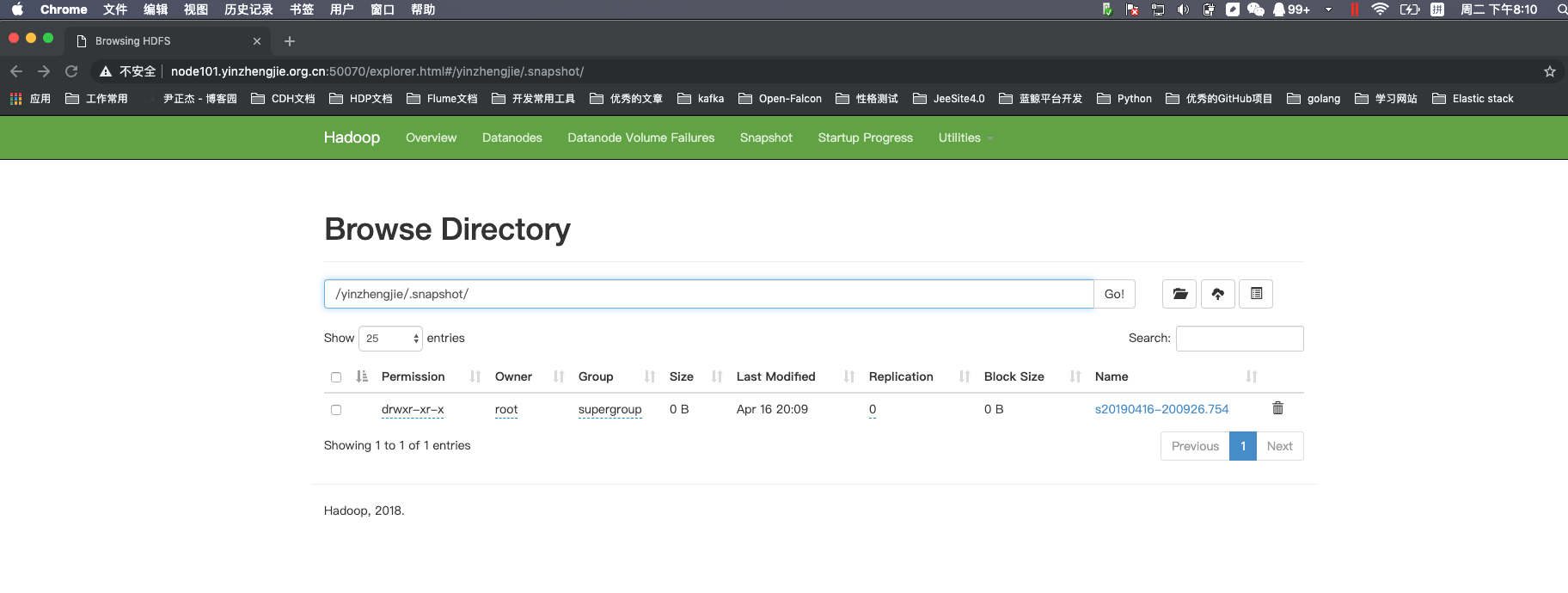
3>.对目录创建快照(创建快照必须得提前开启快照功能)
[root@node101.yinzhengjie.org.cn ~]# hdfs dfs -createSnapshot /yinzhengjie

Created snapshot /yinzhengjie/.snapshot/s20190416-200926.754

[root@node101.yinzhengjie.org.cn ~]#
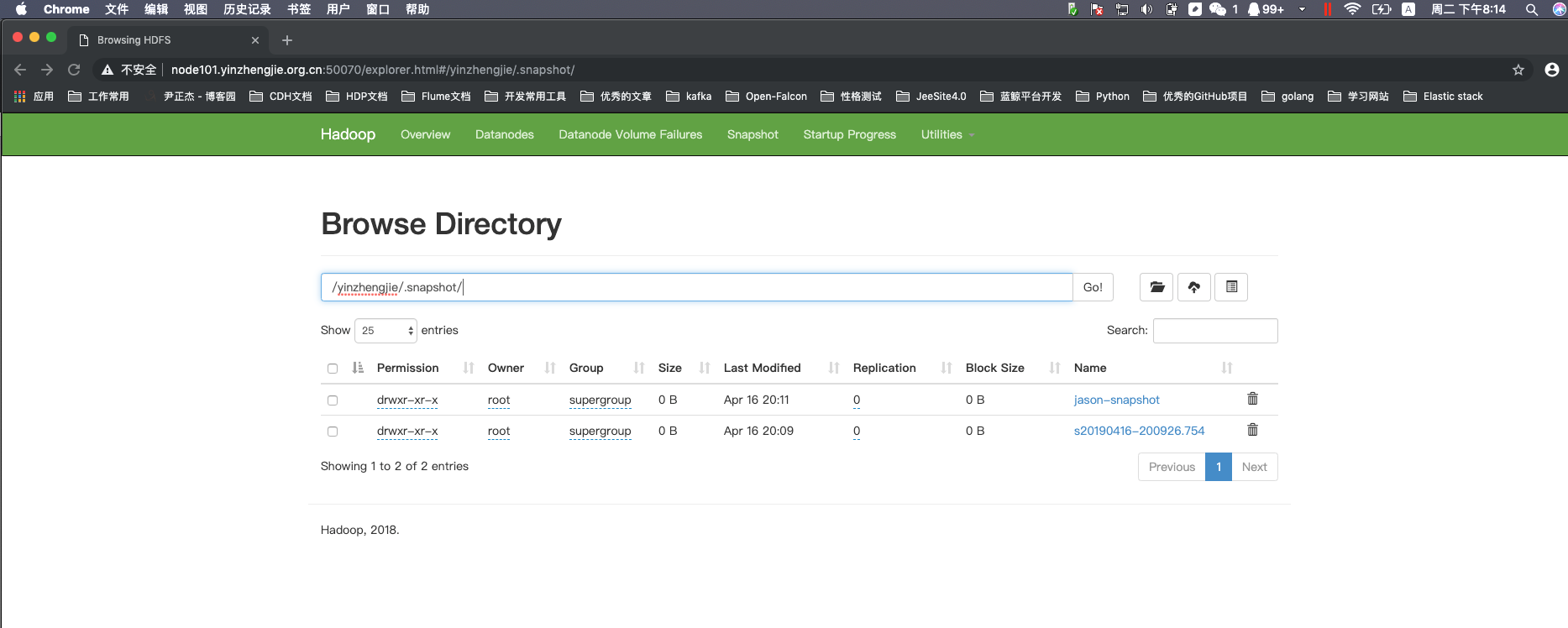
4>.指定名称创建快照
[root@node101.yinzhengjie.org.cn ~]# hdfs dfs -createSnapshot /yinzhengjie jason-snapshot

Created snapshot /yinzhengjie/.snapshot/jason-snapshot

[root@node101.yinzhengjie.org.cn ~]#
5>.重命名快照
[root@node101.yinzhengjie.org.cn ~]# hdfs dfs -ls /yinzhengjie/.snapshot                              #查看/yinzhengjie目录存在的快照信息

Found  items

drwxr-xr-x   - root supergroup           -- : /yinzhengjie/.snapshot/jason-snapshot

drwxr-xr-x   - root supergroup           -- : /yinzhengjie/.snapshot/s20190416-200926.754

[root@node101.yinzhengjie.org.cn ~]#

[root@node101.yinzhengjie.org.cn ~]#

[root@node101.yinzhengjie.org.cn ~]# hdfs dfs -renameSnapshot /yinzhengjie s20190416-200926.754 yzj.snapshot        #我们将/yinzhengjie目录下的s20190416-200926.754这个快照进行重命名为yzj.snapshot

[root@node101.yinzhengjie.org.cn ~]#

[root@node101.yinzhengjie.org.cn ~]# hdfs dfs -ls /yinzhengjie/.snapshot                                            #再次查看/yinzhengjie目录存在的快照信息,我们观察到快照的确被我们重命名成功啦!

Found  items

drwxr-xr-x   - root supergroup           -- : /yinzhengjie/.snapshot/jason-snapshot

drwxr-xr-x   - root supergroup           -- : /yinzhengjie/.snapshot/yzj.snapshot

[root@node101.yinzhengjie.org.cn ~]#

[root@node101.yinzhengjie.org.cn ~]#
6>.列出当前用户所有可快照目录
[root@node101.yinzhengjie.org.cn ~]# hdfs dfs -ls /yinzhengjie/output2019

Found  items

-rw-r--r--    root supergroup        -- : /yinzhengjie/output2019/CentOS-Base.repo

drwxr-xr-x   - root supergroup           -- : /yinzhengjie/output2019/back

drwxr-xr-x   - root supergroup           -- : /yinzhengjie/output2019/default

-rw-r--r--    root supergroup        -- : /yinzhengjie/output2019/epel-testing.repo

-rw-r--r--    root supergroup         -- : /yinzhengjie/output2019/epel.repo

[root@node101.yinzhengjie.org.cn ~]#
[root@node101.yinzhengjie.org.cn ~]# hdfs dfs -ls /yinzhengjie/output2019
[root@node101.yinzhengjie.org.cn ~]# hdfs dfs -ls /yinzhengjie/output2019/default

Found  items

-rw-r--r--    root supergroup        -- : /yinzhengjie/output2019/default/CentOS-Base.repo

-rw-r--r--    root supergroup        -- : /yinzhengjie/output2019/default/CentOS-CR.repo

-rw-r--r--    root supergroup         -- : /yinzhengjie/output2019/default/CentOS-Debuginfo.repo

-rw-r--r--    root supergroup         -- : /yinzhengjie/output2019/default/CentOS-Media.repo

-rw-r--r--    root supergroup        -- : /yinzhengjie/output2019/default/CentOS-Sources.repo

-rw-r--r--    root supergroup        -- : /yinzhengjie/output2019/default/CentOS-Vault.repo

-rw-r--r--    root supergroup         -- : /yinzhengjie/output2019/default/CentOS-fasttrack.repo

[root@node101.yinzhengjie.org.cn ~]#
[root@node101.yinzhengjie.org.cn ~]# hdfs dfs -ls /yinzhengjie/output2019/default
[root@node101.yinzhengjie.org.cn ~]# hdfs dfs -cp -d /yinzhengjie/output2019 /output2019

[root@node101.yinzhengjie.org.cn ~]#

[root@node101.yinzhengjie.org.cn ~]# hdfs dfs -ls /

Found  items

drwxr-xr-x   - root supergroup           -- : /output2019

drwx------   - root supergroup           -- : /tmp

drwxr-xr-x   - root supergroup           -- : /yinzhengjie

[root@node101.yinzhengjie.org.cn ~]#

[root@node101.yinzhengjie.org.cn ~]# hdfs dfs -ls /output2019

Found  items

-rw-r--r--    root supergroup        -- : /output2019/CentOS-Base.repo

drwxr-xr-x   - root supergroup           -- : /output2019/back

drwxr-xr-x   - root supergroup           -- : /output2019/default

-rw-r--r--    root supergroup        -- : /output2019/epel-testing.repo

-rw-r--r--    root supergroup         -- : /output2019/epel.repo

[root@node101.yinzhengjie.org.cn ~]#
[root@node101.yinzhengjie.org.cn ~]# hdfs dfs -cp -d /yinzhengjie/output2019 /output2019
[root@node101.yinzhengjie.org.cn ~]# hdfs dfs -ls /output2019/default

Found  items

-rw-r--r--    root supergroup        -- : /output2019/default/CentOS-Base.repo

-rw-r--r--    root supergroup        -- : /output2019/default/CentOS-CR.repo

-rw-r--r--    root supergroup         -- : /output2019/default/CentOS-Debuginfo.repo

-rw-r--r--    root supergroup         -- : /output2019/default/CentOS-Media.repo

-rw-r--r--    root supergroup        -- : /output2019/default/CentOS-Sources.repo

-rw-r--r--    root supergroup        -- : /output2019/default/CentOS-Vault.repo

-rw-r--r--    root supergroup         -- : /output2019/default/CentOS-fasttrack.repo

[root@node101.yinzhengjie.org.cn ~]#
[root@node101.yinzhengjie.org.cn ~]# hdfs dfs -ls /output2019/default
[root@node101.yinzhengjie.org.cn ~]# hdfs dfs -ls /

Found  items

drwxr-xr-x   - root supergroup           -- : /output2019

drwx------   - root supergroup           -- : /tmp

drwxr-xr-x   - root supergroup           -- : /yinzhengjie

[root@node101.yinzhengjie.org.cn ~]#
[root@node101.yinzhengjie.org.cn ~]# hdfs dfs -ls /
[root@node101.yinzhengjie.org.cn ~]# hdfs dfsadmin -allowSnapshot /output2019

Allowing snaphot on /output2019 succeeded

[root@node101.yinzhengjie.org.cn ~]#
[root@node101.yinzhengjie.org.cn ~]# hdfs dfsadmin -allowSnapshot /output2019
[root@node101.yinzhengjie.org.cn ~]# hdfs lsSnapshottableDir

drwxr-xr-x  root supergroup  -- :   /output2019

drwxr-xr-x  root supergroup  -- :   /yinzhengjie

[root@node101.yinzhengjie.org.cn ~]#
7>.比较两个快照目录的不同之处
[root@node101.yinzhengjie.org.cn ~]# hdfs dfs -ls /yinzhengjie/.snapshot

Found  items

drwxr-xr-x   - root supergroup           -- : /yinzhengjie/.snapshot/jason-snapshot

drwxr-xr-x   - root supergroup           -- : /yinzhengjie/.snapshot/s20190416-200926.754

[root@node101.yinzhengjie.org.cn ~]#
[root@node101.yinzhengjie.org.cn ~]# hdfs dfs -ls /yinzhengjie/.snapshot #查看hdfs中的/yinzhengjie目录相爱存在的快照名称
[root@node101.yinzhengjie.org.cn ~]# hdfs dfs -ls /yinzhengjie

Found  items

-rw-r--r--    root supergroup        -- : /yinzhengjie/edits.xml

-rw-r--r--    root supergroup        -- : /yinzhengjie/fsimage.xml

drwxr-xr-x   - root supergroup           -- : /yinzhengjie/krb5.conf.d

drwxr-xr-x   - root supergroup           -- : /yinzhengjie/output

drwxr-xr-x   - root supergroup           -- : /yinzhengjie/output2019

-rw-r--r--    root supergroup           -- : /yinzhengjie/seen_txid

drwxr-xr-x   - root supergroup           -- : /yinzhengjie/yum.repos.d

[root@node101.yinzhengjie.org.cn ~]#

[root@node101.yinzhengjie.org.cn ~]# hdfs snapshotDiff /yinzhengjie/ . .snapshot/jason-snapshot                #对比/yinzhengjie目录和对该目录做对快照jason-snapshot,很明显发现没有任何差异!

Difference between current directory and snapshot jason-snapshot under directory /yinzhengjie:

[root@node101.yinzhengjie.org.cn ~]#

[root@node101.yinzhengjie.org.cn ~]# hdfs dfs -rm -R /yinzhengjie/krb5.conf.d  /yinzhengjie/output /yinzhengjie/output2019 /yinzhengjie/yum.repos.d      #我们删除/yinzhengjie这个目录的数据

Deleted /yinzhengjie/krb5.conf.d

Deleted /yinzhengjie/output

Deleted /yinzhengjie/output2019

Deleted /yinzhengjie/yum.repos.d

[root@node101.yinzhengjie.org.cn ~]#

[root@node101.yinzhengjie.org.cn ~]# hdfs dfs -ls /yinzhengjie/                                        #确认是否删除成功!

Found  items

-rw-r--r--    root supergroup        -- : /yinzhengjie/edits.xml

-rw-r--r--    root supergroup        -- : /yinzhengjie/fsimage.xml

-rw-r--r--    root supergroup           -- : /yinzhengjie/seen_txid

[root@node101.yinzhengjie.org.cn ~]#

[root@node101.yinzhengjie.org.cn ~]# hdfs dfs -ls /yinzhengjie/.snapshot                                   #查看/yinzhengjie目录中一句存在的快照,以及创建快照的时间,名称等信息!

Found  items

drwxr-xr-x   - root supergroup           -- : /yinzhengjie/.snapshot/jason-snapshot

drwxr-xr-x   - root supergroup           -- : /yinzhengjie/.snapshot/s20190416-200926.754

[root@node101.yinzhengjie.org.cn ~]#

[root@node101.yinzhengjie.org.cn ~]# hdfs snapshotDiff /yinzhengjie/ . .snapshot/jason-snapshot                                   #再次对比/yinzhengjie目录和其对应的快照,发现这次有变化啦!

Difference between current directory and snapshot jason-snapshot under directory /yinzhengjie:

M       .

+       ./krb5.conf.d

+       ./output

+       ./output2019

+       ./yum.repos.d

[root@node101.yinzhengjie.org.cn ~]#

8>.恢复快照
[root@node101.yinzhengjie.org.cn ~]# hdfs dfs -ls /yinzhengjie/

Found  items

-rw-r--r--    root supergroup        -- : /yinzhengjie/edits.xml

-rw-r--r--    root supergroup        -- : /yinzhengjie/fsimage.xml

-rw-r--r--    root supergroup           -- : /yinzhengjie/seen_txid

[root@node101.yinzhengjie.org.cn ~]#
[root@node101.yinzhengjie.org.cn ~]# hdfs dfs -ls /yinzhengjie/
[root@node101.yinzhengjie.org.cn ~]# hdfs snapshotDiff /yinzhengjie/ . .snapshot/jason-snapshot                      #先查看当前目录和快照之间的差距

Difference between current directory and snapshot jason-snapshot under directory /yinzhengjie:

M       .

+       ./krb5.conf.d

+       ./output

+       ./output2019

+       ./yum.repos.d

[root@node101.yinzhengjie.org.cn ~]#

[root@node101.yinzhengjie.org.cn ~]# hdfs dfs -cp -ptopax /yinzhengjie/.snapshot/jason-snapshot/krb5.conf.d /yinzhengjie/       #其实恢复快照的思路就是根据对比当前目录和之前快照的差异,对现有的目录进行相应的操作

[root@node101.yinzhengjie.org.cn ~]#

[root@node101.yinzhengjie.org.cn ~]# hdfs dfs -cp -ptopax /yinzhengjie/.snapshot/jason-snapshot/output /yinzhengjie/

[root@node101.yinzhengjie.org.cn ~]#

[root@node101.yinzhengjie.org.cn ~]# hdfs dfs -cp -ptopax /yinzhengjie/.snapshot/jason-snapshot/output2019 /yinzhengjie/

[root@node101.yinzhengjie.org.cn ~]#

[root@node101.yinzhengjie.org.cn ~]# hdfs dfs -cp -ptopax /yinzhengjie/.snapshot/jason-snapshot/yum.repos.d /yinzhengjie/

[root@node101.yinzhengjie.org.cn ~]#
[root@node101.yinzhengjie.org.cn ~]# hdfs dfs -ls /yinzhengjie/

Found  items

-rw-r--r--    root supergroup        -- : /yinzhengjie/edits.xml

-rw-r--r--    root supergroup        -- : /yinzhengjie/fsimage.xml

drwxr-xr-x   - root supergroup           -- : /yinzhengjie/krb5.conf.d

drwxr-xr-x   - root supergroup           -- : /yinzhengjie/output

drwxr-xr-x   - root supergroup           -- : /yinzhengjie/output2019

-rw-r--r--    root supergroup           -- : /yinzhengjie/seen_txid

drwxr-xr-x   - root supergroup           -- : /yinzhengjie/yum.repos.d

[root@node101.yinzhengjie.org.cn ~]#
[root@node101.yinzhengjie.org.cn ~]# hdfs dfs -ls /yinzhengjie/
9>.快照的删除操作
[root@node101.yinzhengjie.org.cn ~]# hdfs dfs -ls /yinzhengjie/.snapshot

Found  items

drwxr-xr-x   - root supergroup           -- : /yinzhengjie/.snapshot/jason-snapshot

drwxr-xr-x   - root supergroup           -- : /yinzhengjie/.snapshot/yzj.snapshot

[root@node101.yinzhengjie.org.cn ~]#

[root@node101.yinzhengjie.org.cn ~]# hdfs dfs -deleteSnapshot /yinzhengjie/ jason-snapshot

[root@node101.yinzhengjie.org.cn ~]#

[root@node101.yinzhengjie.org.cn ~]# hdfs dfs -ls /yinzhengjie/.snapshot

Found  items

drwxr-xr-x   - root supergroup           -- : /yinzhengjie/.snapshot/yzj.snapshot

[root@node101.yinzhengjie.org.cn ~]#

[root@node101.yinzhengjie.org.cn ~]#
三.验证创建快照后是否产生新的文件
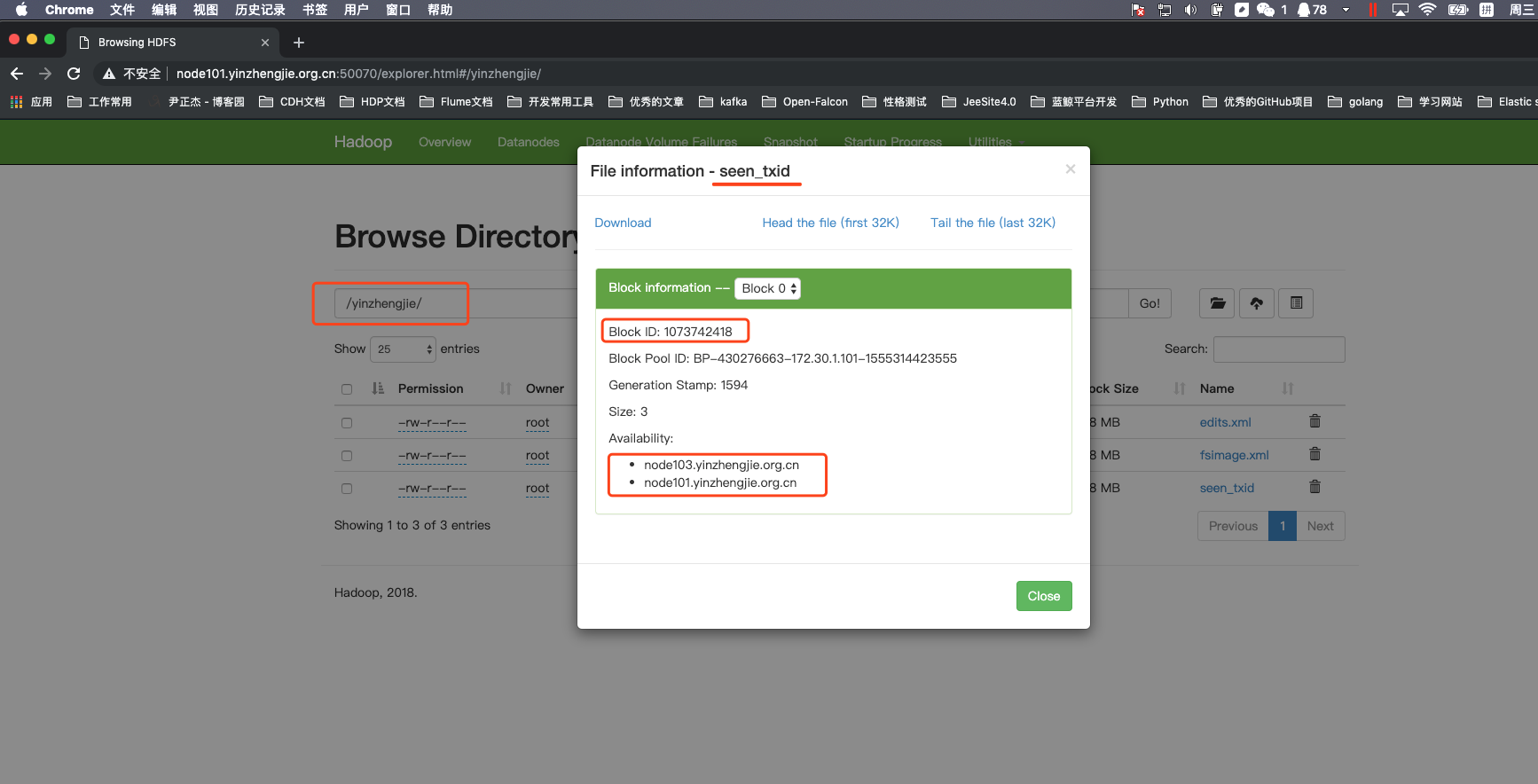
1>.上传测试数据到hdfs集群中到指定目录并查看某文件到存储信息
[root@node101.yinzhengjie.org.cn ~]# hdfs dfs -ls /yinzhengjie/

Found  items

-rw-r--r--    root supergroup        -- : /yinzhengjie/edits.xml

-rw-r--r--    root supergroup        -- : /yinzhengjie/fsimage.xml

-rw-r--r--    root supergroup           -- : /yinzhengjie/seen_txid

[root@node101.yinzhengjie.org.cn ~]#
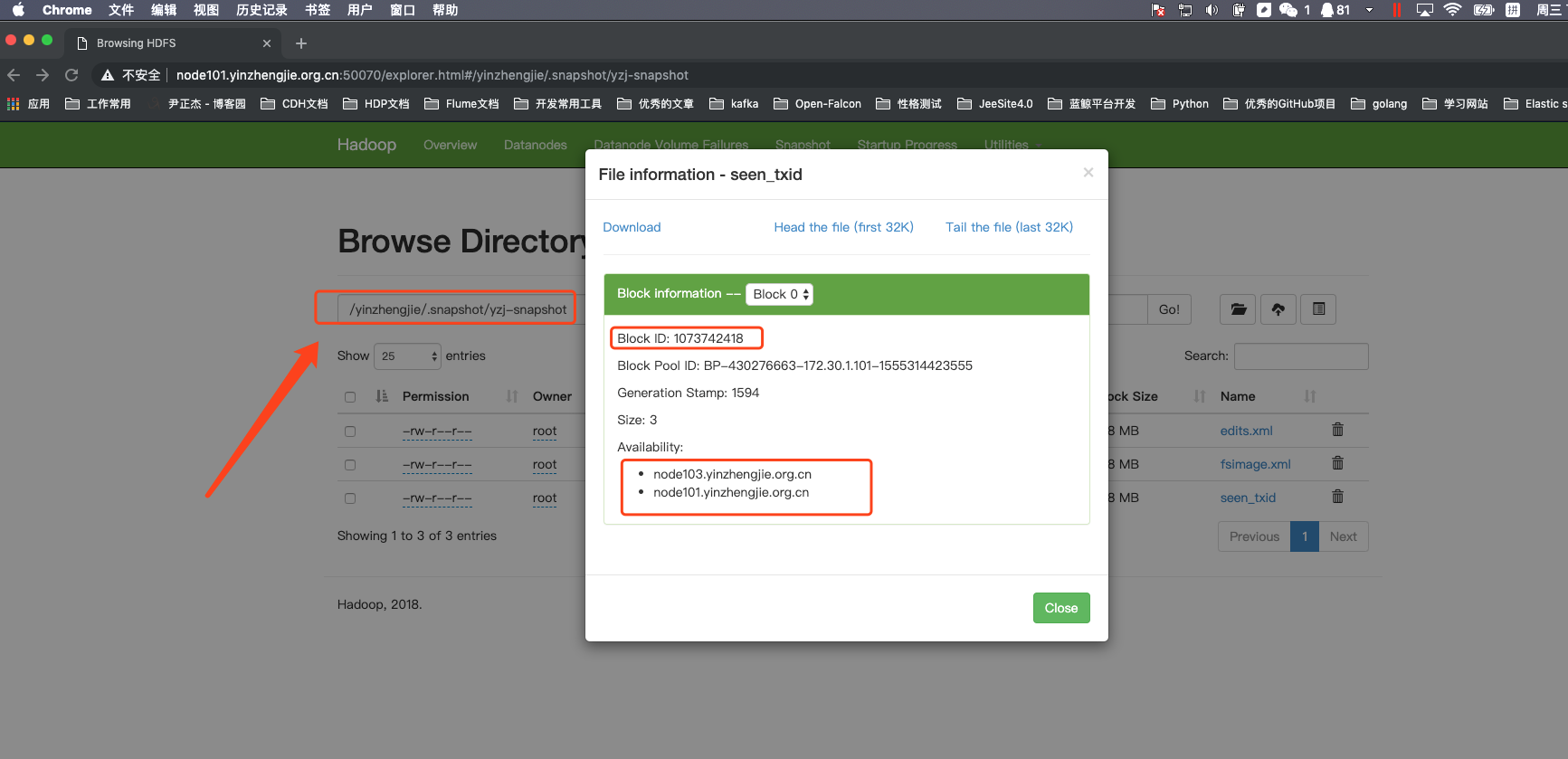
2>.创建快照并查看快照中的文件存储信息(我们最好和上面查看到文件名称一致,这样相对来说更具有可比性)
[root@node101.yinzhengjie.org.cn ~]# hdfs dfsadmin -allowSnapshot /yinzhengjie

Allowing snaphot on /yinzhengjie succeeded

[root@node101.yinzhengjie.org.cn ~]#

[root@node101.yinzhengjie.org.cn ~]# hdfs dfs -createSnapshot /yinzhengjie yzj-snapshot

Created snapshot /yinzhengjie/.snapshot/yzj-snapshot

[root@node101.yinzhengjie.org.cn ~]#

[root@node101.yinzhengjie.org.cn ~]# hdfs dfs -ls /yinzhengjie/.snapshot

Found  items

drwxr-xr-x   - root supergroup           -- : /yinzhengjie/.snapshot/yzj-snapshot

[root@node101.yinzhengjie.org.cn ~]#

[root@node101.yinzhengjie.org.cn ~]# hdfs dfs -ls /yinzhengjie/.snapshot/yzj-snapshot

Found  items

-rw-r--r--    root supergroup        -- : /yinzhengjie/.snapshot/yzj-snapshot/edits.xml

-rw-r--r--    root supergroup        -- : /yinzhengjie/.snapshot/yzj-snapshot/fsimage.xml

-rw-r--r--    root supergroup           -- : /yinzhengjie/.snapshot/yzj-snapshot/seen_txid

[root@node101.yinzhengjie.org.cn ~]#

[root@node101.yinzhengjie.org.cn ~]#
3>.往存储的文件追加一些数据
[root@node101.yinzhengjie.org.cn ~]# hdfs dfs -ls /yinzhengjie/.snapshot/yzj-snapshot/seen_txid

-rw-r--r--    root supergroup           -- : /yinzhengjie/.snapshot/yzj-snapshot/seen_txid

[root@node101.yinzhengjie.org.cn ~]#

[root@node101.yinzhengjie.org.cn ~]#

[root@node101.yinzhengjie.org.cn ~]# hdfs dfs -ls /yinzhengjie/.snapshot/yzj-snapshot/

Found  items

-rw-r--r--    root supergroup        -- : /yinzhengjie/.snapshot/yzj-snapshot/edits.xml

-rw-r--r--    root supergroup        -- : /yinzhengjie/.snapshot/yzj-snapshot/fsimage.xml

-rw-r--r--    root supergroup           -- : /yinzhengjie/.snapshot/yzj-snapshot/seen_txid

[root@node101.yinzhengjie.org.cn ~]#

[root@node101.yinzhengjie.org.cn ~]#

[root@node101.yinzhengjie.org.cn ~]# hdfs dfs -ls /yinzhengjie/

Found  items

-rw-r--r--    root supergroup        -- : /yinzhengjie/edits.xml

-rw-r--r--    root supergroup        -- : /yinzhengjie/fsimage.xml

-rw-r--r--    root supergroup           -- : /yinzhengjie/seen_txid

[root@node101.yinzhengjie.org.cn ~]#

[root@node101.yinzhengjie.org.cn ~]# hdfs dfs -cat /yinzhengjie/seen_txid

[root@node101.yinzhengjie.org.cn ~]#

[root@node101.yinzhengjie.org.cn ~]# hdfs dfs -cat /yinzhengjie/.snapshot/yzj-snapshot/seen_txid

[root@node101.yinzhengjie.org.cn ~]#

[root@node101.yinzhengjie.org.cn ~]# cat blog.txt

https://www.cnblogs.com/yinzhengjie/

[root@node101.yinzhengjie.org.cn ~]#

[root@node101.yinzhengjie.org.cn ~]# hdfs dfs -appendToFile blog.txt  /yinzhengjie/seen_txid

[root@node101.yinzhengjie.org.cn ~]#

[root@node101.yinzhengjie.org.cn ~]# hdfs dfs -cat /yinzhengjie/.snapshot/yzj-snapshot/seen_txid

[root@node101.yinzhengjie.org.cn ~]#

[root@node101.yinzhengjie.org.cn ~]# hdfs dfs -cat /yinzhengjie/seen_txid

https://www.cnblogs.com/yinzhengjie/

[root@node101.yinzhengjie.org.cn ~]#

[root@node101.yinzhengjie.org.cn ~]#
我们发现被快照的文件的内容并没有变化,而实际存储的块却在发生变化哟!但是由于文件较小,还未达到128M,因此存储ID并没有发生变化!

4>.小结快照的特点
一.生成隐藏目录(“.snapshot”)

    创建快照时,会在床快快照的目录下生成一个“.snapshot”的隐藏目录,该目录下保存了一个子目录,这个子目录名称就是快照的名称,该目录下存放的都是创建快照时间节点的数据。

二.快照并不产生新的文件

    这个不产生新的文件指的是不完全克隆一份数据出来,而是将数据都指向了同一个存储的ID啦,从上图我们可以很明显的看出来。

三.修改源文件跟快照无关

    当我们源文件时,快照中保存的数据并不会受到影响,快照保存的诗句还是当时创建快照的时间节点数据。
Apache Hadoop 2.9.2 的快照管理的更多相关文章
- Apache Hadoop 2.9.2 的集群管理之服役和退役
Apache Hadoop 2.9.2 的集群管理之服役和退役 作者:尹正杰 版权声明:原创作品,谢绝转载!否则将追究法律责任. 随着公司业务的发展,客户量越来越多,产生的日志自然也就越来越大来,可能 ...
- Hadoop基础-Hadoop快照管理
Hadoop基础-Hadoop快照管理 作者:尹正杰 版权声明:原创作品,谢绝转载!否则将追究法律责任. 一.快照的作用 快照可以迅速对文件(夹)进行备份,不产生新文件,使用差值存储,默认是禁用状态. ...
- Apache Hadoop 2.9.2 的HDFS High Available模式部署
Apache Hadoop 2.9.2 的HDFS High Available 模式部署 作者:尹正杰 版权声明:原创作品,谢绝转载!否则将追究法律责任. 我们知道,当NameNode进程挂掉后,可 ...
- 安装部署Apache Hadoop (本地模式和伪分布式)
本节内容: Hadoop版本 安装部署Hadoop 一.Hadoop版本 1. Hadoop版本种类 目前Hadoop发行版非常多,有华为发行版.Intel发行版.Cloudera发行版(CDH)等, ...
- Ubuntu14.04用apt在线/离线安装CDH5.1.2[Apache Hadoop 2.3.0]
目录 [TOC] 1.CDH介绍 1.1.什么是CDH和CM? CDH一个对Apache Hadoop的集成环境的封装,可以使用Cloudera Manager进行自动化安装. Cloudera-Ma ...
- org.apache.hadoop.conf-Configuration
终于遇到第一块硬骨头 Hadoop没有使用java.util.Properties管理配置文件,而是自己定义了一套配置文件管理系统和自己的API. package org.apache.hadoop. ...
- 【Hadoop学习】Apache Hadoop ResourceManager HA
简介 本向导简述了YARN资源管理器的HA,并详述了如何配置并使用该特性.RM负责追踪集群中的资源,并调度应用程序(如MapReduce作业).Hadoop2.4以前,RM是YARN集群中的单点故障. ...
- Apache Hadoop最佳实践和反模式
摘要:本文介绍了在Apache Hadoop上运行应用程序的最佳实践,实际上,我们引入了网格模式(Grid Pattern)的概念,它和设计模式类似,它代表运行在网格(Grid)上的应用程序的可复用解 ...
- Apache Hadoop 2.9.2 的Federation架构设计
Apache Hadoop 2.9.2 的Federation架构设计 作者:尹正杰 版权声明:原创作品,谢绝转载!否则将追究法律责任. 能看到这篇文件,说明你对NameNode的工作原理想必已经了如 ...
随机推荐
- iOS---------获取当前年份
NSDate * senddate=[NSDate date]; NSDateFormatter *dateformatter=[[NSDateFormatter alloc] init]; [d ...
- jQuery元素操作
jQuery中创建元素及追加元素 DOM中可以动态创建元素:document.createElement(“标签的名字”); jQuery中同样可以创建元素标签,并且返回的就是jQuery对象,可以直 ...
- SQL Server数据库文件与文件组总结
文件和文件组概念 关于文件与文件组,简单概括如下,详情请参考官方文档"数据库文件和文件组Database Files and Filegroups"或更多相关资料: 数据文件概念: ...
- python使用rabbitMQ介绍四(路由模式)
一.模式介绍 路由模式,与发布-订阅模式一样,消息发送到exchange中,消费者把队列绑定到exchange上. 这种模式在exchange上添加添加了一个路由键(routing-key),生产者发 ...
- python类的继承、封装和多态
摘自https://www.cnblogs.com/evablogs/p/6724477.html 继承 1 2 3 4 5 6 7 8 class Person(object): def _ ...
- Vue.js02:数据绑定v-model用法
<!-- v-model 实现数据的双向绑定 --> <!-- v-model 只能用在表单元素中 --> 示例: <!DOCTYPE html> <!-- ...
- k8s部署dashboard:v1.5.1
1.准备dashboard.yaml文件 apiVersion: extensions/v1beta1 kind: Deployment metadata: # Keep the name in sy ...
- Python之爬虫的理解
# -*- coding: utf-8 -*- 中文用户一定先用这行来声明编码方式 爬虫: 爬虫是自动访问互联网,并且提取数据的程序 (从网络上获取非结构化的数据,ETL将这些数据转换为结构化数 ...
- php中curl返回false的解决办法
本文介绍一下自己在使用curl中遇到的问题解决办法.希望可以帮助到大家. 原文地址:代码汇个人博客 http://www.codehui.net/info/37.html 首先来看一个封装的curl函 ...
- June. 25th 2018, Week 26th. Monday
Change in all things is sweet. 有改变就会有美好. From Aristole. Change is always good, but embracing change ...