
Sound.loadCompressedDataFromByteArray
前不久Adobe发布了Flash Player 11的release版本, Flash Player 11 带来了很多新特性, 最最红火的就是Stage3D了,但是这里讲的是这个版本的另一个新特性, 直接播放MP3数据 Sound.loadCompressedDataFromByteArray.
以往我们要播放一个mp3,必须要有一个路径才能播放, 每次想要将声音文件缓存起来,就不方便.现在Flash 提供了直接播放bytearray的API,那么就方便多了。
Sound.loadCompressedDataFromByteArray带来的便利
- 直接播放bytearray,而不再需要url地址.
- 可以方便的播放音频片段,而不必加载完整的mp3文件.
- 结合URLStream类,可以方便的实现边听边存功能.
- 可以对保存的音乐进行加密,从而保护版权. 目前只想到以上几点,不过结合这个API肯定能做更多的事。
使用FlahsPlayer11的新特性注意事项
一定要在编译器选项里添加 -swf-version=13 . 否则会运行时报错,找不到相关的API。
在FlashDevelop里设置:
Project菜单 => Properties..子菜单, 打开 Properties面板。
Compiler Options选项卡 => Additional Compiler Options。
输入 -swf-version=13 , 一路确定着出来就行了。
FlashDevelop里设置Flashplayer11编译器选项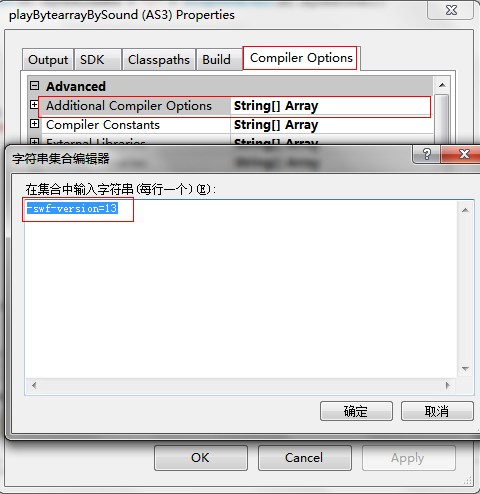
在FlashBuilder里设置:
Project菜单 => Properties..子菜单, 打开 Properties面板。
Flex编译器选项 => 附加的编译器参数。
添加 -swf-version=13 ,一路确定着出来就行了。
FlashBuilder里设置Flashplayer11编译器选项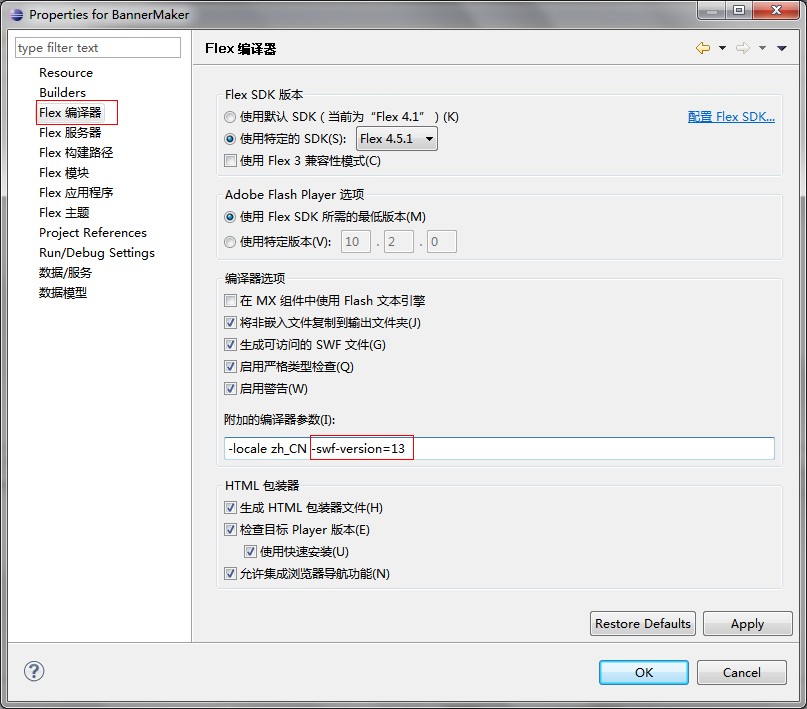
示例
请确保声卡驱动已经安装好,并且能播放声音。

源代码
package

{

    import fl.controls.TextInput;

    import fl.events.ComponentEvent;

    import flash.display.Sprite;

    import flash.events.Event;

    import flash.events.IOErrorEvent;

    import flash.events.ProgressEvent;

    import flash.events.SecurityErrorEvent;

    import flash.media.Sound;

    import flash.media.SoundChannel;

    import flash.net.URLRequest;

    import flash.net.URLStream;

    import flash.text.TextField;

    import flash.utils.ByteArray;

    import flash.utils.setTimeout;

    /**

     * Sound.loadCompressedDataFromByteArray

     * @author lite3

     * @link http://www.litefeel.com

     */

    [SWF(width = 600, height = 170)]

    public class Main extends Sprite

    {

        private const SOUND_URL:String = "http://www.sqcbbs.net/data/attachment/forum/music/suyan.mp3";

        private var sound:Sound;

        private var stream:URLStream;

        private var isPlaying:Boolean;

        private var sc:SoundChannel;

        private var txt:TextField;

        private var input:TextInput;

        public function Main():void

        {

            initUI();

            sound = new Sound();

            stream = new URLStream();

            stream.addEventListener(Event.COMPLETE, streamHandler);

            stream.addEventListener(ProgressEvent.PROGRESS, streamHandler);

            stream.addEventListener(IOErrorEvent.IO_ERROR, streamHandler);

            stream.addEventListener(SecurityErrorEvent.SECURITY_ERROR, streamHandler);

            var url:String = loaderInfo.parameters.soundURL ? loaderInfo.parameters.soundURL : SOUND_URL;

            input.text = url;

            loadSound(null);

            input.addEventListener(ComponentEvent.ENTER, loadSound);

        }

        private function loadSound(e:ComponentEvent):void

        {

            if (!input.text) return;

            if (sc != null)

            {

                sc.removeEventListener(Event.SOUND_COMPLETE, soundCompleteHandler);

                sc.stop();

                sc = null;

            }

            try {

                stream.close();

            }catch (e:Error) { }

            stream.load(new URLRequest(input.text));

            showText("开始加载");

        }

        private function streamHandler(e:Event):void

        {

            switch(e.type)

            {

                case Event.COMPLETE :

                    showText("加载完成,播放中...");

                    var byte:ByteArray = new ByteArray();

                    stream.readBytes(byte, 4000, stream.bytesAvailable/10);

                    sound.loadCompressedDataFromByteArray(byte, byte.length/2);

                    playSound();

                    break;

                case ProgressEvent.PROGRESS :

                    showText("加载进度:" + ProgressEvent(e).bytesLoaded + "/" + ProgressEvent(e).bytesTotal);

                    break;

                case IOErrorEvent.IO_ERROR :

                    showText("加载失败");

                    break;

                case SecurityErrorEvent.SECURITY_ERROR :

                    showText("安全沙箱限制,不能从目标网站加载数据");

                    break;

            }

        }

        private function playSound():void

        {

            isPlaying = true;

            showText("isPlaying: " +isPlaying);

            sc = sound.play();

            sc.addEventListener(Event.SOUND_COMPLETE, soundCompleteHandler);

        }

        private function soundCompleteHandler(e:Event):void

        {

            isPlaying = false;

            showText("isPlaying: " +isPlaying);

            setTimeout(playSound, 1000);

        }

        private function showText(text:String):void

        {

            txt.text = text;

        }

        private function initUI():void

        {

            txt = new TextField();

            txt.mouseEnabled = false;

            txt.text = "Sound.loadCompressedDataFromByteArray For Flash Player 11";

            txt.width = 600;

            txt.height = txt.textHeight + 4;

            txt.mouseEnabled = false;

            txt.autoSize = "center";

            txt.y = 10;

            addChild(txt);

            txt = new TextField();

            txt.text = "请输入MP3地址并回车,以更换MP3.";

            txt.mouseEnabled = false;

            txt.width = txt.textWidth + 4;

            txt.height = txt.textHeight + 4;

            txt.x = 10;

            txt.y = 100;

            addChild(txt);

            input = new TextInput();

            input.width = 550;

            input.x = 10;

            input.y = 120;

            addChild(input);

            txt = new TextField();

            txt.mouseEnabled = false;

            txt.width = 300;

            txt.height = 40;

            txt.x = 100;

            txt.y = 50;

            addChild(txt);

        }

    }

}
Sound.loadCompressedDataFromByteArray的更多相关文章
- java sound初探
网上关于java sound的正规资源讲解的非常好,本文不再给出示例,主要提供一些好的资源,并说说我的一些理解,用于形成对java sound的整体认识. 一.几个词汇 TTS:text-to-spe ...
- TeamViewer 12.0.71503 Patch By.Sound
TeamViewer - the All-In-One Software for Remote Support and Online Meetings - Remote control any com ...
- Principles of measurement of sound intensity
Introduction In accordance with the definition of instantaneous sound intensity as the product of th ...
- ASM:《X86汇编语言-从实模式到保护模式》越计卷:实模式下对DMA和Sound Blaster声卡的控制
说实话越计卷作者用了16页(我还是删过的),来讲怎么控制声卡,其实真正归纳起来就那么几点. ★PART1:直接存储访问 1. 总线控制设备(bus master) 在硬件技术不发达的早期,处理器是最重 ...
- System Sounds: Alerts and Sound Effects
#include <AudioToolbox/AudioToolbox.h> #include <CoreFoundation/CoreFoundation.h> // Def ...
- Sound Generator 原理
Sound Generator 原理 旨在简单的阐述声音如何通过单片机模块来产生. 声音 声音的种类有千千万,但归根到底还是属于波.在对声音进行模拟转数字的时候,采样越高, 声音被还原的越逼真. 声音 ...
- Opensuse enable sound and mic card
Install application pavucontrol Run pavucontrol You will see the configuration about sound card and ...
- I2S (Inter—IC Sound) 总线
I2S I2S(Inter—IC Sound)总线, 又称 集成电路内置音频总线,是飞利浦公司为数字音频设备之间的音频数据传输而制定的一种总线标准,该总线专责于音频设备之间的数据传输,广泛应用于各种多 ...
- 微软Hololens学院教程-Hologram 220-空间声音(Spatial sound )【本文是老版本,与最新的微软教程有出入】
这是老版本的教程,为了不耽误大家的时间,请直接看原文,本文仅供参考哦! 原文链接https://developer.microsoft.com/EN-US/WINDOWS/HOLOGRAPHIC/ho ...
随机推荐
- hive的窗口函数ntile、row_number、rank
一.ntile 序列函数不支持window子句 数据准备: cookie1,--, cookie1,--, cookie1,--, cookie1,--, cookie1,--, cookie1,-- ...
- 如何设计一个基于Node.js和Express的网站架构?
前言 今年七月份,我和几个小伙伴们合伙建立了一个开发团队.业务开展如火如荼的同时,团队宣传就提上了日程,所以迫切需要搭建公司网站出来.确定目标后我们就开始考虑如果构建一个企业网站.先是进行业内调查,看 ...
- DER编码简介
概念:DER是BER的子集,它为每一个ASN.1类型定义一种唯一的编码方案. DER与BER的区别:DER在BER的基础上增加了如下限制:长度小于等于127,必须使用短型长度表示法.长度大于127,必 ...
- Java 中可变参数
可变参数 Java 中可变参数 现在需要编写一个求和的功能,但是不知道有几个参数,在调用的时候才知道有几个参数,请问这如何实现呢? Java 给我们提供了一个 JDK 1.5 的新特性---可变参数 ...
- jquery通配符说明
按姓名匹配 1,name前缀为aa的所有div的jquery对象 Js代码 收藏代码$("div[name^='aa']"); 2,name后缀为aa的所有div的jquery对象 ...
- Underscore.js-精巧而强大实用功能库
前言 从其他语言转向Javascript时,通常都会遇到一些困惑性问题.比如,Java中的HashMap在Javascript中如何实现?Javascript面向对象式编程如何实现继承?如何实现通用的 ...
- 转:Exploiting Windows 10 in a Local Network with WPAD/PAC and JScript
转:https://googleprojectzero.blogspot.com/2017/12/apacolypse-now-exploiting-windows-10-in_18.html aPA ...
- Mybatis使用入门
一.Mybatis简介 1.传统JDBC的不足 我们首先看一下JDBC的一般操作流程.比如,我想从user表中获取根据name获取数据,下面是传统JDBC代码: package lkb.webchat ...
- iOS 9的新的改变 iOS SDK Release Notes for iOS 9 说了些改变
iOS 9的新的改变 iOS SDK Release Notes for iOS 9 说了些改变 看了下还算能理解!!!有兴趣可以看看哈!!!不喜勿喷!!后面的对于废除的方法什么有用感觉!!! ...
- codevs 1214 线段覆盖
1214 线段覆盖 时间限制: 1 s 空间限制: 128000 KB 题目等级 : 黄金 Gold 题目描述 Description 给定x轴上的N(0<N<100)条线段,每个线段 ...