
DEVOPS技术实践_21:Pipeline的嵌套以及流程控制的if和case语句
1 if控制语句
使用一个简单的If控制语句
pipeline {

    agent any

    stages {

        stage('flow control') {

            steps {

                script {

                    if (  == ) {

                        println "pass"

                    }else {

                        println "failed"

                    }

                }

            }

        }

    }

}
构建结果

控制台输出
Started by user darren ning

Running in Durability level: MAX_SURVIVABILITY

[Pipeline] Start of Pipeline

[Pipeline] node

Running on Jenkins in /root/.jenkins/workspace/jenkins_pipeline_demo

[Pipeline] {

[Pipeline] stage

[Pipeline] { (flow control)

[Pipeline] script

[Pipeline] {

[Pipeline] echo

pass

[Pipeline] }

[Pipeline] // script

[Pipeline] }

[Pipeline] // stage

[Pipeline] }

[Pipeline] // node

[Pipeline] End of Pipeline

Finished: SUCCESS
2 多个stage嵌套的语法
   pipeline {

    agent any

    stages {

        stage('Non-Parallel Stage') {

            steps {

                echo 'This stage will be executed first.'

            }

        }

        stage('Parallel Stage') {

            failFast true

            parallel {

                stage('并行一') {

                    steps {

                        echo "并行一"

                    }

                }

                stage('并行二') {

                    steps {

                        echo "并行二"

                    }

                }

                stage('并行三') {

                    stages {

                        stage('Nested 1') {

                            steps {

                                echo "In stage Nested 1 within Branch C"

                            }

                        }

                        stage('Nested 2') {

                            steps {

                                echo "In stage Nested 2 within Branch C"

                            }

                        }

                    }

                }

            }

        }

    }

}
执行

控制台输出
Started by user darren ning

Obtained when.jenkinsfile from git http://192.168.132.132/root/pipeline-parameter-test.git

Running in Durability level: MAX_SURVIVABILITY

[Pipeline] Start of Pipeline

[Pipeline] node

Running on Jenkins in /root/.jenkins/workspace/pipeline_parameter_project

[Pipeline] {

[Pipeline] stage

[Pipeline] { (Declarative: Checkout SCM)

[Pipeline] checkout

No credentials specified

 > git rev-parse --is-inside-work-tree # timeout=

Fetching changes from the remote Git repository

 > git config remote.origin.url http://192.168.132.132/root/pipeline-parameter-test.git # timeout=10

Fetching upstream changes from http://192.168.132.132/root/pipeline-parameter-test.git

 > git --version # timeout=

 > git fetch --tags --progress http://192.168.132.132/root/pipeline-parameter-test.git +refs/heads/*:refs/remotes/origin/*

 > git rev-parse refs/remotes/origin/master^{commit} # timeout=

 > git rev-parse refs/remotes/origin/origin/master^{commit} # timeout=

Checking out Revision 839c98003111f56e628fa806d80f0e8f2a97349b (refs/remotes/origin/master)

 > git config core.sparsecheckout # timeout=

 > git checkout -f 839c98003111f56e628fa806d80f0e8f2a97349b

Commit message: "Update when.jenkinsfile"

 > git rev-list --no-walk 839c98003111f56e628fa806d80f0e8f2a97349b # timeout=

[Pipeline] }

[Pipeline] // stage

[Pipeline] withEnv

[Pipeline] {

[Pipeline] stage

[Pipeline] { (Non-Parallel Stage)

[Pipeline] echo

This stage will be executed first.

[Pipeline] }

[Pipeline] // stage

[Pipeline] stage

[Pipeline] { (Parallel Stage)

[Pipeline] parallel

[Pipeline] { (Branch: 并行一)

[Pipeline] { (Branch: 并行二)

[Pipeline] { (Branch: 并行三)

[Pipeline] stage

[Pipeline] { (并行一)

[Pipeline] stage

[Pipeline] { (并行二)

[Pipeline] stage

[Pipeline] { (并行三)

[Pipeline] stage

[Pipeline] { (Nested )

[Pipeline] echo

并行一

[Pipeline] }

[Pipeline] echo

并行二

[Pipeline] }

[Pipeline] // stage

[Pipeline] // stage

[Pipeline] }

[Pipeline] }

[Pipeline] echo

In stage Nested  within Branch C

[Pipeline] }

[Pipeline] // stage

[Pipeline] stage

[Pipeline] { (Nested )

[Pipeline] echo

In stage Nested  within Branch C

[Pipeline] }

[Pipeline] // stage

[Pipeline] }

[Pipeline] // stage

[Pipeline] }

[Pipeline] // parallel

[Pipeline] }

[Pipeline] // stage

[Pipeline] }

[Pipeline] // withEnv

[Pipeline] }

[Pipeline] // node

[Pipeline] End of Pipeline

Finished: SUCCESS
3 case语句
pipeline脚本
pipeline {

    agent any

    stages {

        stage('Case lab') {

            steps {

                echo 'This stage will be executed first.'

                script{

                    switch("$contraller"){

                    case "Job1":

                        println "This is Job1"

                    break

                    case "Job2":

                        println "This is Job2"

                    break

                    case "Job3":

                        println "This is Job3"

                    break

                    default:

                        echo "############ wrong Job name ############"

                    break

                }

            }

        }

    }

}

}
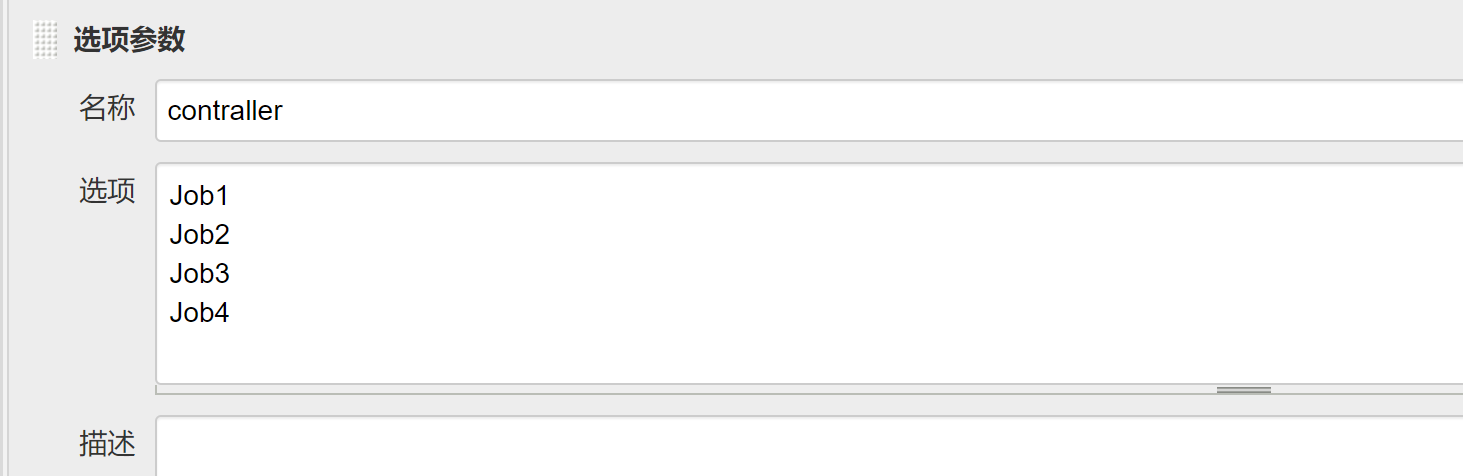
在job配置几个参数
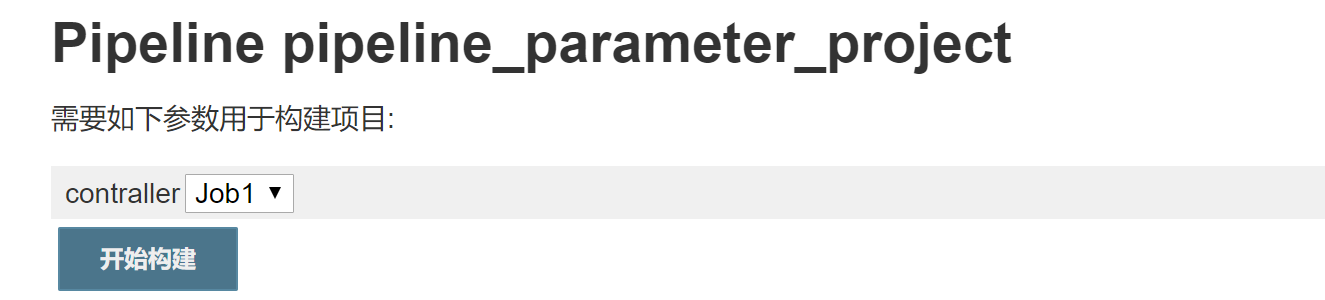
选择Job1构建
控制台输出
Started by user darren ning

Obtained when.jenkinsfile from git http://192.168.132.132/root/pipeline-parameter-test.git

Running in Durability level: MAX_SURVIVABILITY

[Pipeline] Start of Pipeline

[Pipeline] node

Running on Jenkins in /root/.jenkins/workspace/pipeline_parameter_project

[Pipeline] {

[Pipeline] stage

[Pipeline] { (Declarative: Checkout SCM)

[Pipeline] checkout

No credentials specified

 > git rev-parse --is-inside-work-tree # timeout=

Fetching changes from the remote Git repository

 > git config remote.origin.url http://192.168.132.132/root/pipeline-parameter-test.git # timeout=10

Fetching upstream changes from http://192.168.132.132/root/pipeline-parameter-test.git

 > git --version # timeout=

 > git fetch --tags --progress http://192.168.132.132/root/pipeline-parameter-test.git +refs/heads/*:refs/remotes/origin/*

 > git rev-parse refs/remotes/origin/master^{commit} # timeout=

 > git rev-parse refs/remotes/origin/origin/master^{commit} # timeout=

Checking out Revision ad52c819b4e74df5566cc767b8d580ccea363470 (refs/remotes/origin/master)

 > git config core.sparsecheckout # timeout=

 > git checkout -f ad52c819b4e74df5566cc767b8d580ccea363470

Commit message: "Update when.jenkinsfile"

 > git rev-list --no-walk 839c98003111f56e628fa806d80f0e8f2a97349b # timeout=

[Pipeline] }

[Pipeline] // stage

[Pipeline] withEnv

[Pipeline] {

[Pipeline] stage

[Pipeline] { (Case lab)

[Pipeline] echo

This stage will be executed first.

[Pipeline] script

[Pipeline] {

[Pipeline] echo

This is Job1

[Pipeline] }

[Pipeline] // script

[Pipeline] }

[Pipeline] // stage

[Pipeline] }

[Pipeline] // withEnv

[Pipeline] }

[Pipeline] // node

[Pipeline] End of Pipeline

Finished: SUCCESS
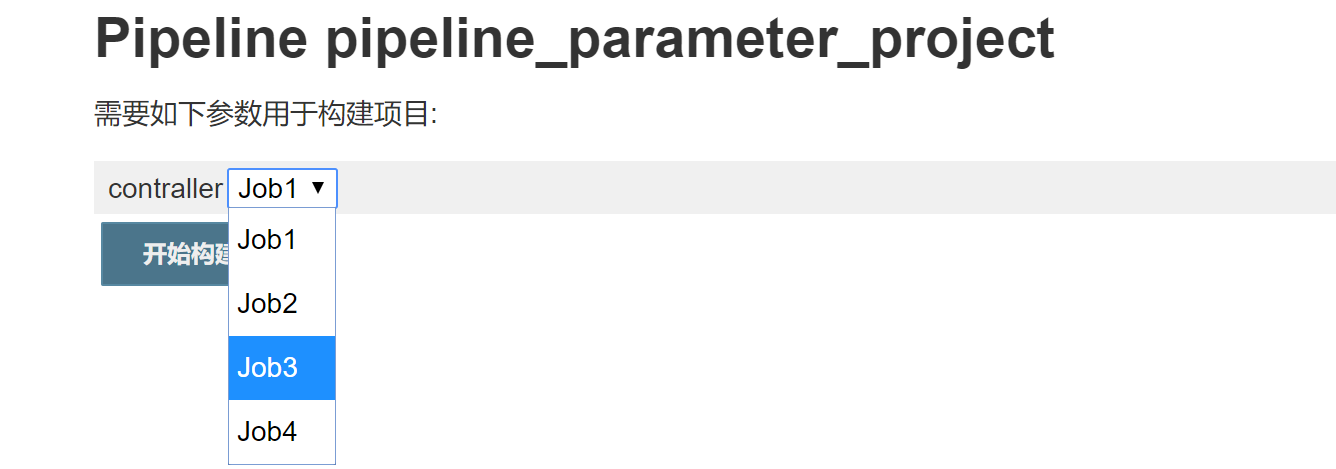
选择Job3
控制台输出
Started by user darren ning

Obtained when.jenkinsfile from git http://192.168.132.132/root/pipeline-parameter-test.git

Running in Durability level: MAX_SURVIVABILITY

[Pipeline] Start of Pipeline

[Pipeline] node

Running on Jenkins in /root/.jenkins/workspace/pipeline_parameter_project

[Pipeline] {

[Pipeline] stage

[Pipeline] { (Declarative: Checkout SCM)

[Pipeline] checkout

No credentials specified

 > git rev-parse --is-inside-work-tree # timeout=

Fetching changes from the remote Git repository

 > git config remote.origin.url http://192.168.132.132/root/pipeline-parameter-test.git # timeout=10

Fetching upstream changes from http://192.168.132.132/root/pipeline-parameter-test.git

 > git --version # timeout=

 > git fetch --tags --progress http://192.168.132.132/root/pipeline-parameter-test.git +refs/heads/*:refs/remotes/origin/*

 > git rev-parse refs/remotes/origin/master^{commit} # timeout=

 > git rev-parse refs/remotes/origin/origin/master^{commit} # timeout=

Checking out Revision ad52c819b4e74df5566cc767b8d580ccea363470 (refs/remotes/origin/master)

 > git config core.sparsecheckout # timeout=

 > git checkout -f ad52c819b4e74df5566cc767b8d580ccea363470

Commit message: "Update when.jenkinsfile"

 > git rev-list --no-walk ad52c819b4e74df5566cc767b8d580ccea363470 # timeout=

[Pipeline] }

[Pipeline] // stage

[Pipeline] withEnv

[Pipeline] {

[Pipeline] stage

[Pipeline] { (Case lab)

[Pipeline] echo

This stage will be executed first.

[Pipeline] script

[Pipeline] {

[Pipeline] echo

This is Job3

[Pipeline] }

[Pipeline] // script

[Pipeline] }

[Pipeline] // stage

[Pipeline] }

[Pipeline] // withEnv

[Pipeline] }

[Pipeline] // node

[Pipeline] End of Pipeline

Finished: SUCCESS
选择Job4
在pipeline的脚本里,并没有Job4的选项,看一下构建的结果
Started by user darren ning

Obtained when.jenkinsfile from git http://192.168.132.132/root/pipeline-parameter-test.git

Running in Durability level: MAX_SURVIVABILITY

[Pipeline] Start of Pipeline

[Pipeline] node

Running on Jenkins in /root/.jenkins/workspace/pipeline_parameter_project

[Pipeline] {

[Pipeline] stage

[Pipeline] { (Declarative: Checkout SCM)

[Pipeline] checkout

No credentials specified

 > git rev-parse --is-inside-work-tree # timeout=

Fetching changes from the remote Git repository

 > git config remote.origin.url http://192.168.132.132/root/pipeline-parameter-test.git # timeout=10

Fetching upstream changes from http://192.168.132.132/root/pipeline-parameter-test.git

 > git --version # timeout=

 > git fetch --tags --progress http://192.168.132.132/root/pipeline-parameter-test.git +refs/heads/*:refs/remotes/origin/*

 > git rev-parse refs/remotes/origin/master^{commit} # timeout=

 > git rev-parse refs/remotes/origin/origin/master^{commit} # timeout=

Checking out Revision ad52c819b4e74df5566cc767b8d580ccea363470 (refs/remotes/origin/master)

 > git config core.sparsecheckout # timeout=

 > git checkout -f ad52c819b4e74df5566cc767b8d580ccea363470

Commit message: "Update when.jenkinsfile"

 > git rev-list --no-walk ad52c819b4e74df5566cc767b8d580ccea363470 # timeout=

[Pipeline] }

[Pipeline] // stage

[Pipeline] withEnv

[Pipeline] {

[Pipeline] stage

[Pipeline] { (Case lab)

[Pipeline] echo

This stage will be executed first.

[Pipeline] script

[Pipeline] {

[Pipeline] echo

############ wrong Job name ############      #使用的dedault的输出

[Pipeline] }

[Pipeline] // script

[Pipeline] }

[Pipeline] // stage

[Pipeline] }

[Pipeline] // withEnv

[Pipeline] }

[Pipeline] // node

[Pipeline] End of Pipeline

Finished: SUCCESS
上面就是嵌套语句以及使用if和case语句进行流程控制的几个实验
DEVOPS技术实践_21:Pipeline的嵌套以及流程控制的if和case语句的更多相关文章
- DEVOPS技术实践_22:根据参数传入条件控制执行不同stage
前面学习了参数的传递和调用,下面研究一下根据参数作为条件执行不同的stage 使用叫when 和expression控制某一个stage的运行, 运行场景例如写了多个stage,这个pipeline脚 ...
- JAVA之旅(二)——if,switch,for,while,do while,语句嵌套,流程控制break , continue ,函数,重载的示例总结
JAVA之旅(二)--if,switch,for,while,do while,语句嵌套,流程控制break , continue ,函数,重载的示例总结 JAVA的思想真的很重要,所以要专心的学-- ...
- DEVOPS技术实践_23:判断文件下载成功作为执行条件
在实际生产中,我们经常会需要通过判断一个结果作为一个条件去执行另一个内容,比如判断一个文件是否存在,判官一个命令是否执行成功等等 现在我们选择其中一个场景进行实验,当某个目录下存在,则执行操作 1. ...
- DEVOPS技术实践_19:Pipeline的多参数json调用
在上一篇学习了把参数写进Json文件,然后通过去Json文件,调用参数的方法 1. 三元运算符介绍 调用的方法是通过一个三元运算符实现的 gender = prop.GENDER? prop.GEND ...
- DEVOPS技术实践_06:sonar与Jenksin集成
代码质量管理平台 一.checkout和打包功能 1.1 gitlab在新建一个文件 后续在写入内容 1.2 Jenkins新建一个任务 两个参数 1.3 流水线配置 copy仓库地址: http:/ ...
- DEVOPS技术实践_04:Jenkins参数化构建
一.参数化构建 1.1 各个参数的信息 凭据参数存储一个用户的账号密码信息,等等,运用最多的是选项参数 1.2 使用选项参数 构建已经变成参数化构建 1.3 获取这个值,修改Jenkinsfile文件 ...
- DEVOPS技术实践_03:Jenkins自动构建
一.提交代码自动构建 当开发人员在gitlab提交代码后,会自动触发jenkin构建 点击项目---->点击diy_maven-TEST----->点击配置--->构建触发器---- ...
- DEVOPS技术实践_20:串联多个job执行
在jenkins可能会有战役中场景,就是在一个job执行完之后,把这个执行结果作为另一个job的执行条件 比如A执行完,如果A执行成功,则执行B,如果失败则执行C 1 前期准备 A任务 import ...
- DEVOPS技术实践_18:Jenkins的Pinpeline对于参数的使用
因为最近使用Pipeline声明式语法构建项目,但是最近项目的参数设置较多,特地的来学习一下关于参数的调用和测试,主要式从一个大神那里学习的,结尾回贴上大神的博客链接 1 构建一个pipeline项目 ...
随机推荐
- 坚守安全第一准则!阿里云接连通过等保2.0测评、ISO国际认证
斩获新资质 数字时代,数据的安全对于互联网用户来说显得尤为重要.阿里云更是一直坚持“安全第一准则”,致力于为客户的数据安全搭建更健全机制. 2019年5月,阿里云“电子政务云平台系统”正式通过网络安全 ...
- 解决uploadify插件不同浏览器下的兼容性问题
http://www.thinkphp.cn/code/2138.html uploadify在部分浏览器上没法使用,或者各种报错的解决方法.uploadify插件上传图片是很爽的体验. 如果用chr ...
- Libev源码分析04:Libev中的相对时间定时器
Libev中的超时监视器ev_timer,就是简单的相对时间定时器,它会在给定的时间点触发超时事件,还可以在固定的时间间隔之后再次触发超时事件. 所谓的相对时间,指的是如果你注册了一个1小时的超时事件 ...
- @bzoj - 5219@ [Lydsy2017省队十连测]最长路径
目录 @description@ @solution@ @accepted code@ @details@ @description@ 在Byteland一共有n个城市,编号依次为1到n,形成一个n个 ...
- Laravel如何引用第三方(自定义)库
想做一个网页抓取的功能,底层使用php的laravel框架. 这里使用phpQuery库来实现网页抓取,这里不做介绍. 需要了解的可以百度,或者等我填坑. 下载最新版本可以前往https://code ...
- H3C Telnet配置例子
- H3C 星型以太网拓扑扩展
- jq常用事件
https://www.cnblogs.com/sandraryan/ click(); 点击事件 dblclick(); 双击事件 $('.box').dblclick(function(){ al ...
- Python--day26--反射
反射对象的属性:(非常重要) getattr(类名,‘属性名’):获得属性值 使用getattr的好处:需要查看某个属性值的时候,不用再在代码中用if else elif 去判断输入(input函数) ...
- scrapdy部署爬虫项目
原文:https://blog.csdn.net/JLaiRen/article/details/82902321 scrapyd安装 打开命令行工具输入命令:pip install scrapyd ...