
数学之路-python计算实战(21)-机器视觉-拉普拉斯线性滤波
拉普拉斯线性滤波,.边缘检測
Laplacian
Calculates the Laplacian of an image.
- C++: void Laplacian(InputArray src, OutputArray dst, int ddepth, int ksize=1, double scale=1, double delta=0, int borderType=BORDER_DEFAULT )
- Python: cv2.Laplacian(src, ddepth[, dst[, ksize[, scale[, delta[, borderType]]]]]) → dst
- C: void cvLaplace(const CvArr* src, CvArr* dst, int aperture_size=3 )
highlight=laplace#void cvLaplace(const CvArr* src, CvArr* dst, int aperture_size)" title="Permalink to this definition" style="color: rgb(101, 161, 54); text-decoration: none; visibility: hidden; font-size: 0.8em; padding: 0px 4px;">
- Python: cv.Laplace(src, dst, apertureSize=3) → None
-
Parameters: - src – Source image.
- dst – Destination image of the same size and the same number of channels as src .
- ddepth – Desired depth of the destination image.
- ksize – Aperture size used to compute the second-derivative filters. See getDerivKernels() for details. The size must be positive and odd.
- scale – Optional scale factor for the computed Laplacian values. By default, no scaling is applied. See
highlight=laplace#void getDerivKernels(OutputArray kx, OutputArray ky, int dx, int dy, int ksize, bool normalize, int ktype)" title="void getDerivKernels(OutputArray kx, OutputArray ky, int dx, int dy, int ksize, bool normalize, int ktype)" style="color: rgb(0, 144, 217); text-decoration: none;">getDerivKernels()
for details. - delta – Optional delta value that is added to the results prior to storing them in dst .
- borderType – Pixel extrapolation method. See
highlight=laplace#int borderInterpolate(int p, int len, int borderType)" title="int borderInterpolate(int p, int len, int borderType)" style="color: rgb(0, 144, 217); text-decoration: none;">borderInterpolate()
for details.
The function calculates the Laplacian of the source image by adding up the second x and y derivatives calculated using the Sobel operator:

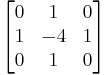
This is done when ksize > 1 . When ksize == 1 , the Laplacian is computed by filtering the image with the following  aperture:

Laplace
计算图像的 Laplacian 变换
void cvLaplace( const CvArr* src, CvArr* dst, int aperture_size=3 );
- src
- 输入图像.
- dst
- 输出图像.
- aperture_size
- 核大小 (与 cvSobel 中定义一样).
函数 cvLaplace 计算输入图像的 Laplacian变换,方法是先用 sobel 算子计算二阶 x- 和 y- 差分,再求和:
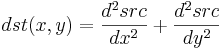
对 aperture_size=1 则给出最快计算结果,相当于对图像採用例如以下内核做卷积:
本博客全部内容是原创,假设转载请注明来源
http://blog.csdn.net/myhaspl/
# -*- coding: utf-8 -*-

#线性锐化滤波,拉普拉斯图像变换

#code:myhaspl@myhaspl.com

import cv2

fn="test6.jpg"

myimg=cv2.imread(fn)

img=cv2.cvtColor(myimg,cv2.COLOR_BGR2GRAY)

jgimg=cv2.Laplacian(img,-1)

cv2.imshow('src',img)

cv2.imshow('dst',jgimg)

cv2.waitKey()

cv2.destroyAllWindows()

本博客全部内容是原创,假设转载请注明来源
http://blog.csdn.net/myhaspl/
数学之路-python计算实战(21)-机器视觉-拉普拉斯线性滤波的更多相关文章
- 数学之路-python计算实战(20)-机器视觉-拉普拉斯算子卷积滤波
拉普拉斯算子进行二维卷积计算,线性锐化滤波 # -*- coding: utf-8 -*- #线性锐化滤波-拉普拉斯算子进行二维卷积计算 #code:myhaspl@myhaspl.com impor ...
- 数学之路-python计算实战(17)-机器视觉-滤波去噪(中值滤波)
Blurs an image using the median filter. C++: void medianBlur(InputArray src, OutputArray dst, int ks ...
- 数学之路-python计算实战(15)-机器视觉-滤波去噪(归一化块滤波)
# -*- coding: utf-8 -*- #code:myhaspl@myhaspl.com #归一化块滤波 import cv2 import numpy as np fn="tes ...
- 数学之路-python计算实战(14)-机器视觉-图像增强(直方图均衡化)
我们来看一个灰度图像,让表示灰度出现的次数,这样图像中灰度为 的像素的出现概率是 是图像中全部的灰度数, 是图像中全部的像素数, 实际上是图像的直方图,归一化到 . 把 作为相应于 的累计概率 ...
- 数学之路-python计算实战(19)-机器视觉-卷积滤波
filter2D Convolves an image with the kernel. C++: void filter2D(InputArray src, OutputArray dst, int ...
- 数学之路-python计算实战(9)-机器视觉-图像插值仿射
插值 Python: cv2.resize(src, dsize[, dst[, fx[, fy[, interpolation]]]]) → dst interpolation – interpol ...
- 数学之路-python计算实战(13)-机器视觉-图像增强
指数变换的基本表达式为:y=bc(x-a)-1 当中參数b.c控制曲线的变换形状,參数a控制曲线的位置. 指数变换的作用是扩展图像的高灰度级.压缩低灰度级.能够用于亮度过高的图像 本博客全部内容是原创 ...
- 数学之路-python计算实战(16)-机器视觉-滤波去噪(邻域平均法滤波)
# -*- coding: utf-8 -*- #code:myhaspl@myhaspl.com #邻域平均法滤波,半径为2 import cv2 import numpy as np fn=&qu ...
- 数学之路-python计算实战(18)-机器视觉-滤波去噪(双边滤波与高斯滤波 )
高斯滤波就是对整幅图像进行加权平均的过程.每个像素点的值,都由其本身和邻域内的其它像素值经过加权平均后得到.高斯滤波的详细操作是:用一个模板(或称卷积.掩模)扫描图像中的每个像素.用模板确定的邻域内像 ...
随机推荐
- E. String Multiplication
E. String Multiplication time limit per test 2 seconds memory limit per test 256 megabytes input sta ...
- 聚类和EM算法——K均值聚类
python大战机器学习——聚类和EM算法 注:本文中涉及到的公式一律省略(公式不好敲出来),若想了解公式的具体实现,请参考原著. 1.基本概念 (1)聚类的思想: 将数据集划分为若干个不想交的子 ...
- 诊断:RHEL7安装11.2RAC时root.sh错误ohasd failed to start
RHEL 7.5中安装11gRAC时,在grid infrastructure的root.sh执行时,报错: # /oracle/product/11g/grid/root.sh ... Adding ...
- CF1029E Tree with Small Distances
题目描述 给定一棵树.要求往树中加入一些边使得从1到其他节点的距离至多是2 . 输出加入边的最小数量.(边全部都是无向的) 题解:好多人都说是贪心,但是我写的是树形dp. (这道题实在太像小胖守皇宫了 ...
- Git的入门
Git的基本介绍: Git:是一个版本控制工具. Github:是非常有名的在线版本管理网站(速度比较慢). Oschina:中国版本的github,(旗下的的码云地址:gitee.com,速度快) ...
- python_流程控制
1.if...else 语句 单分支 if 条件: 满足条件后要执行的代码 双分支: """ if 条件: 满足条件执行代码 else: if条件不满足就走这段 & ...
- Jquery validate自定义验证
http://www.runoob.com/jquery/jquery-plugin-validate.html addMethod(name,method,message)方法 参数 name 是添 ...
- 记一次C++编程引用obj文件作为静态库文件
简介 常用静态库文件的名字一般是 ***.lib ,例如 nisyscfg.lib 就是一个静态库文件,但是一个例程居然是引用 **.obj 文件作为静态库,有点非常规啊. 这是一个NI488.2 的 ...
- 2017 计蒜之道 初赛 第一场 A 阿里的新游戏
题链:https://nanti.jisuanke.com/t/15499 这题观察图纸可知成三线段上的相邻点之间的距离有1,2,3三种情况的,同时要成线段必然是同横坐标或者纵坐标,然后我们排除掉穿过 ...
- python——进制间的转换
int(string_num, n) string_num表示某种进制的字符串,n表示string_num是什么进制数 2.8.16 进制转为10进制:使用int()或者eval() 10 进制转为 ...