
JS框架_(JQuery.js)圆形多选菜单选项
百度云盘 传送门 密码:zb1c
圆形多选菜单选项效果:
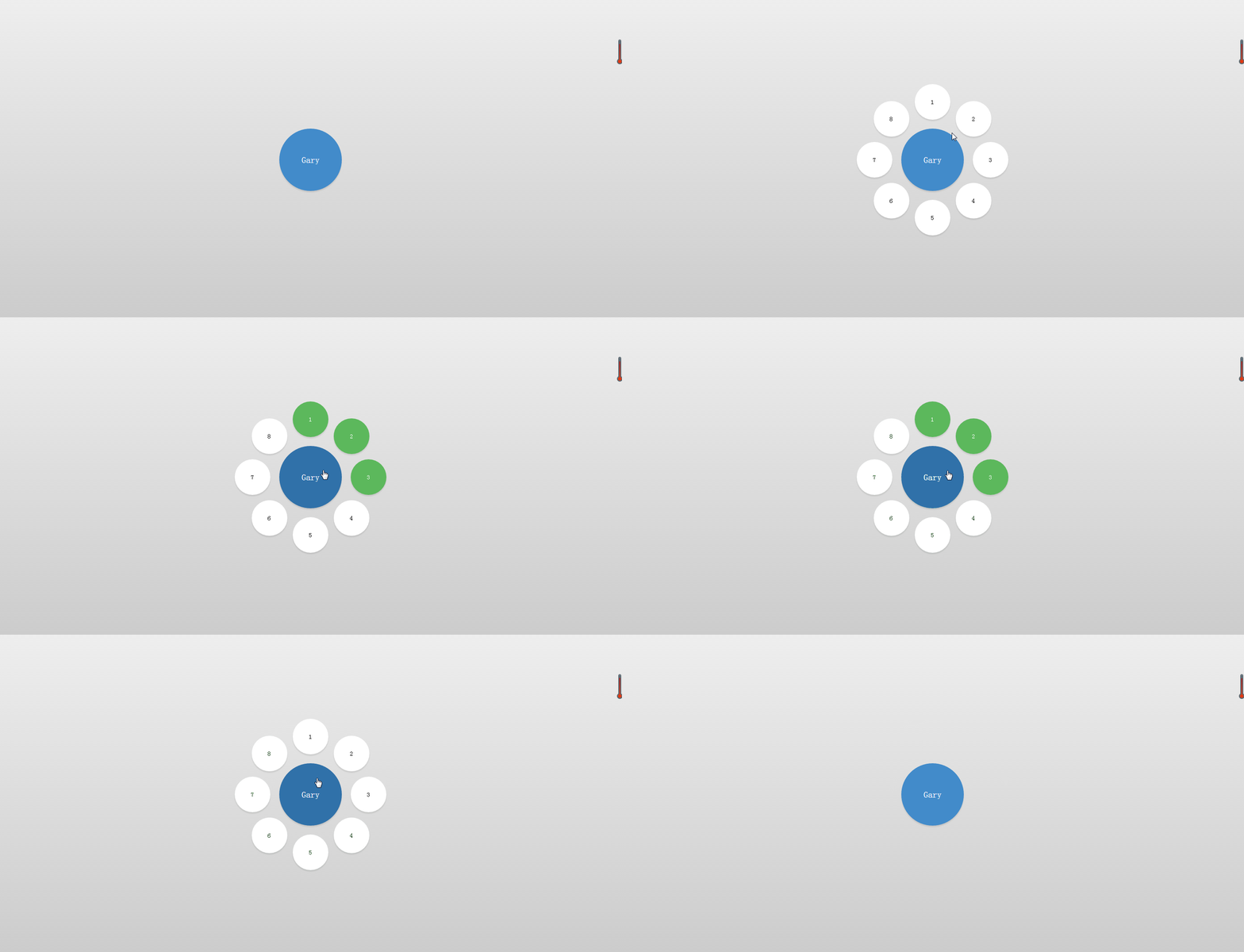
<!DOCTYPE html>

<html lang="en" >

<head>

<meta charset="UTF-8">

<title>jQuery圆形多选菜单选项DEMO演示</title>

<link rel="stylesheet" href="css/style.css">

</head>

<body>

<div class='selector'>

  <ul>

    <li>

      <input id='1' type='checkbox'>

      <label for='1'>1</label>

    </li>

    <li>

      <input id='2' type='checkbox'>

      <label for='2'>2</label>

    </li>

    <li>

      <input id='3' type='checkbox'>

      <label for='3'>3</label>

    </li>

    <li>

      <input id='4' type='checkbox'>

      <label for='4'>4</label>

    </li>

    <li>

      <input id='5' type='checkbox'>

      <label for='5'>5</label>

    </li>

    <li>

      <input id='6' type='checkbox'>

      <label for='6'>6</label>

    </li>

    <li>

      <input id='7' type='checkbox'>

      <label for='7'>7</label>

    </li>

    <li>

      <input id='8' type='checkbox'>

      <label for='8'>8</label>

    </li>

  </ul>

  <button>Gary</button>

</div>

<script src="http://www.jq22.com/jquery/jquery-1.10.2.js"></script>

<script  src="js/index.js"></script>

</body>

</html>
index.html
var angleStart = -360;

function rotate(li,d) {

    $({d:angleStart}).animate({d:d}, {

        step: function(now) {

            $(li)

               .css({ transform: 'rotate('+now+'deg)' })

               .find('label')

                  .css({ transform: 'rotate('+(-now)+'deg)' });

        }, duration: 0

    });

}

function toggleOptions(s) {

    $(s).toggleClass('open');

    var li = $(s).find('li');

    var deg = $(s).hasClass('half') ? 180/(li.length-1) : 360/li.length;

    for(var i=0; i<li.length; i++) {

        var d = $(s).hasClass('half') ? (i*deg)-90 : i*deg;

        $(s).hasClass('open') ? rotate(li[i],d) : rotate(li[i],angleStart);

    }

}

$('.selector button').click(function(e) {

    toggleOptions($(this).parent());

});

setTimeout(function() { toggleOptions('.selector'); }, 100);
index.js
html, body {

  height: 100%;

}

body {

  margin: 0;

  background: linear-gradient(#eee, #ccc);

  overflow: hidden;

}

.selector {

  position: absolute;

  left: 50%;

  top: 50%;

  width: 140px;

  height: 140px;

  margin-top: -70px;

  margin-left: -70px;

}

.selector, .selector button {

  font-family: 'Oswald', sans-serif;

  font-weight: 300;

}

.selector button {

  position: relative;

  width: 100%;

  height: 100%;

  padding: 10px;

  background: #428bca;

  border-radius: 50%;

  border: 0;

  color: white;

  font-size: 20px;

  cursor: pointer;

  box-shadow: 0 3px 3px rgba(0, 0, 0, 0.1);

  transition: all .1s;

}

.selector button:hover {

  background: #3071a9;

}

.selector button:focus {

  outline: none;

}

.selector ul {

  position: absolute;

  list-style: none;

  padding: 0;

  margin: 0;

  top: -20px;

  right: -20px;

  bottom: -20px;

  left: -20px;

}

.selector li {

  position: absolute;

  width: 0;

  height: 100%;

  margin: 0 50%;

  -webkit-transform: rotate(-360deg);

  transition: all 0.8s ease-in-out;

}

.selector li input {

  display: none;

}

.selector li input + label {

  position: absolute;

  left: 50%;

  bottom: 100%;

  width: 0;

  height: 0;

  line-height: 1px;

  margin-left: 0;

  background: #fff;

  border-radius: 50%;

  text-align: center;

  font-size: 1px;

  overflow: hidden;

  cursor: pointer;

  box-shadow: none;

  transition: all 0.8s ease-in-out, color 0.1s, background 0.1s;

}

.selector li input + label:hover {

  background: #f0f0f0;

}

.selector li input:checked + label {

  background: #5cb85c;

  color: white;

}

.selector li input:checked + label:hover {

  background: #449d44;

}

.selector.open li input + label {

  width: 80px;

  height: 80px;

  line-height: 80px;

  margin-left: -40px;

  box-shadow: 0 3px 3px rgba(0, 0, 0, 0.1);

  font-size: 14px;

}
style.css
实现过程
CSS
选择 按钮
.selector button {

  position: relative;

  width: 100%;

  height: 100%;

  padding: 10px;

  background: #428bca;

  border-radius: 50%;

  border: 0;

  color: white;

  font-size: 20px;

  cursor: pointer;

  box-shadow: 0 3px 3px rgba(0, 0, 0, 0.1);

  transition: all .1s;

}
cursor 属性规定要显示的光标的类型(pointer 光标呈现为指示链接的指针)
选择 标签
.selector li {

  position: absolute;

  width: 0;

  height: 100%;

  margin: 0 50%;

  -webkit-transform: rotate(-360deg);

  transition: all 0.8s ease-in-out;

}
transition-property 属性规定应用过渡效果的 CSS 属性的名称
all 所有属性都将获得过渡效果
0.8s 属性过渡时间
ease-in-out 规定以慢速开始和结束的过渡效果
鼠标触碰按钮时变化颜色
.selector button:hover {

  background: #3071a9;

}
子标签初始化旋转效果
.selector li input + label {

  position: absolute;

  left: 50%;

  bottom: 100%;

  width: 0;

  height: 0;

  line-height: 1px;

  margin-left: 0;

  background: #fff;

  border-radius: 50%;

  text-align: center;

  font-size: 1px;

  overflow: hidden;

  cursor: pointer;

  box-shadow: none;

  transition: all 0.8s ease-in-out, color 0.1s, background 0.1s;

}
鼠标触碰子标签时显示的颜色
.selector li input + label:hover {

  background: #f0f0f0;

}
子标签的颜色
.selector li input:checked + label:hover {

  background: #449d44;

}
子标签文字的颜色
.selector li input:checked + label {

  background: #5cb85c;

  color: white;

}
JS
设置标签旋转度数
var angleStart = -360;
多选菜单旋转动画
function rotate(li,d) {

    $({d:angleStart}).animate({d:d}, {

        step: function(now) {

            $(li)

               .css({ transform: 'rotate('+now+'deg)' })

               .find('label')

                  .css({ transform: 'rotate('+(-now)+'deg)' });

        }, duration: 0

    });

}
duration :返回动画当前时间长度
显示/影藏多选菜单
function toggleOptions(s) {

    $(s).toggleClass('open');

    var li = $(s).find('li');

    var deg = $(s).hasClass('half') ? 180/(li.length-1) : 360/li.length;

    for(var i=0; i<li.length; i++) {

        var d = $(s).hasClass('half') ? (i*deg)-90 : i*deg;

        $(s).hasClass('open') ? rotate(li[i],d) : rotate(li[i],angleStart);

    }

}
find() 方法获得当前元素集合中每个元素的后代(获得全部的li标签)
hasClass() 方法检查被选元素是否包含指定的 class
(找到了子标签旋转出来,没找到子标签旋转回去)
点击按钮调用toggleOptions(s)函数
$('.selector button').click(function(e) {

    toggleOptions($(this).parent());

});
parent() 获得当前匹配元素集合中每个元素 (获得元素全部标签)
设置动作时间
setTimeout(function() { toggleOptions('.selector'); }, 100);
DOM
<div class='selector'>

  <ul>

    <li>

      <input id='1' type='checkbox'>

      <label for='1'>1</label>

    </li>

    <li>

      <input id='2' type='checkbox'>

      <label for='2'>2</label>

    </li>

    <li>

      <input id='3' type='checkbox'>

      <label for='3'>3</label>

    </li>

    <li>

      <input id='4' type='checkbox'>

      <label for='4'>4</label>

    </li>

    <li>

      <input id='5' type='checkbox'>

      <label for='5'>5</label>

    </li>

    <li>

      <input id='6' type='checkbox'>

      <label for='6'>6</label>

    </li>

    <li>

      <input id='7' type='checkbox'>

      <label for='7'>7</label>

    </li>

    <li>

      <input id='8' type='checkbox'>

      <label for='8'>8</label>

    </li>

  </ul>

  <button>Gary</button>

</div>
JS框架_(JQuery.js)圆形多选菜单选项的更多相关文章
- JS框架_(JQuery.js)绚丽的3D星空动画
百度云盘: 传送门 密码:8ft8 绚丽的3D星空动画效果(纯CSS) (3D星空动画可以用作网页背景,Gary为文本文字) <!doctype html> <html lang=& ...
- JS框架_(JQuery.js)Tooltip弹出式按钮插件
百度云盘 传送门 密码:7eh5 弹出式按钮效果 <!DOCTYPE html> <html > <head> <meta charset="UTF ...
- JS框架_(JQuery.js)文章全屏动画切换
百度云盘 传送门 密码:anap 文章全屏动画切换效果 <!doctype html> <html lang="zh"> <head> < ...
- JS框架_(JQuery.js)图片相册掀开切换效果
百度云盘 传送门 密码:y0dk 图片掀开切换效果: <!DOCTYPE html PUBLIC "-//W3C//DTD XHTML 1.0 Transitional//EN&quo ...
- JS框架_(JQuery.js)夜晚天空满天星星闪烁动画
百度云盘 传送门 密码:xftr 满天星星闪烁动画效果: (可用星空动画来作为页面背景,白色文字改为文章或者其他的O(∩_∩)O) <!doctype html> <html> ...
- JS框架_(JQuery.js)网页文字评论弹幕
百度云盘 传送门 密码:3azl jQuery网页右下角文字评论弹幕效果 <!DOCTYPE html> <html> <head> <title>jQ ...
- JS框架_(JQuery.js)高德地图api
百度云盘 传送门 密码 :ko30 高德地图api效果 <!doctype html> <html> <head> <meta charset="u ...
- JS框架_(JQuery.js)动画效果鼠标跟随
百度云盘 传送门 密码 :4n9u 火狐浏览器上纯CSS_动画效果鼠标跟随效果: (作者:lily_lcj 传送门) <!DOCTYPE html PUBLIC "-//W3C//DT ...
- JS框架_(JQuery.js)点赞按钮动画
百度云盘 传送门 密码: 0ihy 点赞按钮动画效果: (点击一次随机生成一颗小爱心,作为点赞动画~) <!doctype html> <html lang="en&quo ...
随机推荐
- spring boot jpa @PreUpdate结合@DynamicUpdate使用的局限性
通常给实体添加audit审计字段是一种常用的重构方法,如下: @Embeddable @Setter @Getter @ToString public class Audit { /** * 操作人 ...
- nginx相关知识点
1.nginx -V 可以查看nginx的安装目录等目录信息 2.nginx -v 查看版本 3.路径 /usr/local/etc/nginx/nginx.conf (配置文件路径) /usr/lo ...
- ajax的交互原理,同步和异步的区别
ajax的交互原理分别为: 创建对象——建立连接——发送数据——注册回调——执行回调 var xhr=new XMLHttpRequest()//创建对象 xhr.open(请求,url,true或者 ...
- Vue之动态class写法总结
对象方法 最简单的绑定 :class="{ 'active': isActive }" 判断是否绑定一个active :class="{'active':isActive ...
- node.js学习之路(1)
node.js 属于后台语言,后台语言还有php,java等. 优势:1.性能好 node.js VS php 86倍 2.跟前台JS配合方便 3.node.js便于前端学习 https:// ...
- TensorFlow入门——bazel编译(带GPU)
这一系列基本上是属于我自己进行到了那个步骤就做到那个步骤的 由于新装了GPU (GTX750ti)和CUDA9.0.CUDNN7.1版本的软件,所以希望TensorFlow能在GPU上运行,也算上补上 ...
- Java操作FTP,从FTP上读取指定文件,把指定文件上传到FTP
需要添加的依赖 <!-- https://mvnrepository.com/artifact/commons-net/commons-net --> <dependency> ...
- LVS DR模型RS端修改配置脚本
#!/bin/bash vip=x.x.x.x in start) > /proc/sys/net/ipv4/conf/all/arp_ignore > /proc/sys/net/ipv ...
- QT textbroswer textedite Qlist的常用的操作函数
Textbrowser: 一.添加函数 1.insertPlainText():这个函数特别好用,括号里面的参数是QString,可以用QString(“%1%2”).arg(QString变量).a ...
- linux工具之pmap
1.pmap简介 pmap命令用来报告一个进程或多个进程的内存映射.可以使用这个工具确定系统是如何为服务器上的进程分配内存的. 例如查看ssh进程的内存映射: