
Android笔记(十五) Android中的基本组件——单选框和复选框
单选框和多选框通常用来在设置用户个人资料时候,选择性别、爱好等,不需要用户直接输入,直接在备选选项中选择,简单方便。
直接看代码:
<?xml version="1.0" encoding="utf-8"?>

<TableLayout

    xmlns:android="http://schemas.android.com/apk/res/android"

    android:orientation="vertical"

    android:layout_width="match_parent"

    android:layout_height="match_parent"

    >

    <TableRow>

        <TextView

            android:layout_width="wrap_content"

            android:layout_height="wrap_content"

            android:text="性别"

            android:textSize="16pt"

            />

        <!-- 定义一组单选按钮 -->

        <RadioGroup

            android:orientation="horizontal"

            android:layout_gravity="center_horizontal"

            >

            <RadioButton

                android:layout_width="wrap_content"

                android:layout_height="wrap_content"

                android:text="男"

                android:textSize="16pt"

                android:checked="true"/>

            <RadioButton

                android:layout_width="wrap_content"

                android:layout_height="wrap_content"

                android:text="女"

                android:textSize="16pt"/>

        </RadioGroup>

    </TableRow>

        <TableRow>

            <TextView

                android:layout_width="wrap_content"

                android:layout_height="wrap_content"

                android:text="爱好"

                android:textSize="16pt"

                />

            <!-- 定义一个垂直的线性布局 -->

            <LinearLayout

                android:layout_gravity="center_horizontal"

                android:orientation="vertical"

                android:layout_width="wrap_content"

                android:layout_height="wrap_content"

                >

                <!-- 定义三个复选框 -->

                <CheckBox

                    android:layout_width="wrap_content"

                    android:layout_height="wrap_content"

                    android:text="唱歌"

                    android:textSize="16pt"

                    android:checked="true"/>

                <CheckBox

                    android:layout_width="wrap_content"

                    android:layout_height="wrap_content"

                    android:textSize="16pt"

                    android:text="看书"/>

                <CheckBox

                    android:layout_width="wrap_content"

                    android:layout_height="wrap_content"

                    android:textSize="16pt"

                    android:text="购物"/>

            </LinearLayout>

    </TableRow>

</TableLayout>
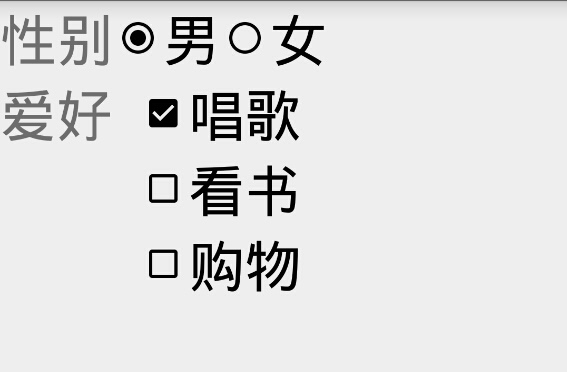
运行结果:
Android笔记(十五) Android中的基本组件——单选框和复选框的更多相关文章
- Selenium2学习(十五)-- 单选框和复选框(radiobox、checkbox)
本篇主要介绍单选框和复选框的操作 一.认识单选框和复选框 1.先认清楚单选框和复选框长什么样 2.各位小伙伴看清楚哦,上面的单选框是圆的:下图复选框是方的,这个是业界的标准,要是开发小伙伴把图标弄错了 ...
- CSS学习笔记三:自定义单选框,复选框,开关
一点一点学习CCS,这次学习了如何自定义单选框,复选框以及开关. 一.单选框 1.先写好body里面的样式,先写几个框 <body> <div class="radio-1 ...
- Android课程---单选框与复选框的实现
<?xml version="1.0" encoding="utf-8"?> <manifest xmlns:android="ht ...
- Android学习使用基本界面组件(下拉框,单选框,复选框,数字转轮,滚动条)
(一)建立单选框按钮 RadioGroup和RadioButton建立单选框按钮 字符串资源文件: <resources> <string name="app_name&q ...
- 【MFC学习笔记-作业5-小数据库】【单选框,复选框,滚动条,列表框】
界面已经实现完毕. 要完成的操作就是1.性别分组(2选1) 2.属性勾选 3.年龄通过滚动条调整 4.职称通过下方的列表框选择 5.输入姓名 6.存入左方的列表框 7.当选择左方列表框的人时,可以显示 ...
- ASP.NET从数据库中取出数据,有数据的复选框为选中
在KS系统中在更新菜单的时候,当查出菜单的时候要查出菜单下面已经有了哪些界面了我用了一下的方法弄的.代码如下: 界面代码: <%@ Page Language="C#" Au ...
- NopCommerce 3.4中商品详情页面单选框、复选框的美化
先上图给大家看看效果,点这里打开网站(后期可能会找不到这个商品,现在再测试阶段) 现在你能看到的这个页面中,尺寸.文本描述是单选框(属性是我乱写的名字),上门安装是复选框.效果就看到这里,请君跳过图片 ...
- jquery中attr和prop的区别—判断复选框选中状态
最近项目中需要用jquery判断input里checkbox是否被选中,发现用attr()获取不到复选框改变后的状态,最后查资料发现jQuery 1.6以后新增加了prop()方法,借用官方的一段描述 ...
- android单选框和复选框(练习)
<?xml version="1.0" encoding="utf-8"?> <LinearLayout xmlns:android=&quo ...
随机推荐
- Python 初级 5 判断再判断(二)
复习: 分支:完成测试并根据结果做出判断称为分支. 代码块:一行或放在一起的多行代码 缩进:一个代码行稍稍靠右一点 关系操作符(比较操作符):==, >, >=, <, <=, ...
- 【440】Tweet 元素意义
参考:Tweet Object 参考:Geo Objects 参考:User Object Ref: Place data dictionary Tweet Object Attribut ...
- 使用SoapUI测试wsdl
webservice服务wsdl地址:http://localhost:8080/services/HelloWorld?wsdl new project: new soap project: 调用测 ...
- axios发了两次请求
一.问题描述 用axios发post请求,却出现了options请求和post请求,options请求哪里来的? 二.问题分析 1.先温习一下跨域的知识 2.axios默认类型是Content-Typ ...
- jvm(1)---java内存结构
jvm主要由三个子系统构成:类加载子系统,运行时数据区,执行引擎 运行时数据区主要包括: 1.本地方法栈:登记native方法,执行时加载本地方法库 2.程序计数器:就是一个指针,用来存储指向下一条执 ...
- [转帖]nginx基础整理
nginx基础整理 https://www.cnblogs.com/guigujun/p/6588545.html 目录结构如下: Nginx基础知识 Nginx HTTP服务器的特色及优点 Ngin ...
- git config 介绍
转载. https://blog.csdn.net/liuxiao723846/article/details/83113317 Git的三个重要配置文件分别是/etc/gitconfig,${HOM ...
- Cookie,Session,Token详解
Cookie,Session,Token详解 Cookie : 是一个非常具体的东西,指的就是浏览器里面能永久存储的一种数据,仅仅是浏览器实现的一种数据存储功能. Cookie由服务器生成,发 ...
- PAT甲级题分类汇编——计算
本文为PAT甲级分类汇编系列文章. 计算类,指以数学运算为主或为背景的题. 题号 标题 分数 大意 1058 A+B in Hogwarts 20 特殊进制加法 1059 Prime Factors ...
- Linux or Mac 重启网络
Mac sudo ifconfig en0 down sudo ifconfig en0 up Linux /etc/init.d/networking restart