
Android笔记(十五) Android中的基本组件——单选框和复选框
单选框和多选框通常用来在设置用户个人资料时候,选择性别、爱好等,不需要用户直接输入,直接在备选选项中选择,简单方便。
直接看代码:
<?xml version="1.0" encoding="utf-8"?>

<TableLayout

    xmlns:android="http://schemas.android.com/apk/res/android"

    android:orientation="vertical"

    android:layout_width="match_parent"

    android:layout_height="match_parent"

    >

    <TableRow>

        <TextView

            android:layout_width="wrap_content"

            android:layout_height="wrap_content"

            android:text="性别"

            android:textSize="16pt"

            />

        <!-- 定义一组单选按钮 -->

        <RadioGroup

            android:orientation="horizontal"

            android:layout_gravity="center_horizontal"

            >

            <RadioButton

                android:layout_width="wrap_content"

                android:layout_height="wrap_content"

                android:text="男"

                android:textSize="16pt"

                android:checked="true"/>

            <RadioButton

                android:layout_width="wrap_content"

                android:layout_height="wrap_content"

                android:text="女"

                android:textSize="16pt"/>

        </RadioGroup>

    </TableRow>

        <TableRow>

            <TextView

                android:layout_width="wrap_content"

                android:layout_height="wrap_content"

                android:text="爱好"

                android:textSize="16pt"

                />

            <!-- 定义一个垂直的线性布局 -->

            <LinearLayout

                android:layout_gravity="center_horizontal"

                android:orientation="vertical"

                android:layout_width="wrap_content"

                android:layout_height="wrap_content"

                >

                <!-- 定义三个复选框 -->

                <CheckBox

                    android:layout_width="wrap_content"

                    android:layout_height="wrap_content"

                    android:text="唱歌"

                    android:textSize="16pt"

                    android:checked="true"/>

                <CheckBox

                    android:layout_width="wrap_content"

                    android:layout_height="wrap_content"

                    android:textSize="16pt"

                    android:text="看书"/>

                <CheckBox

                    android:layout_width="wrap_content"

                    android:layout_height="wrap_content"

                    android:textSize="16pt"

                    android:text="购物"/>

            </LinearLayout>

    </TableRow>

</TableLayout>
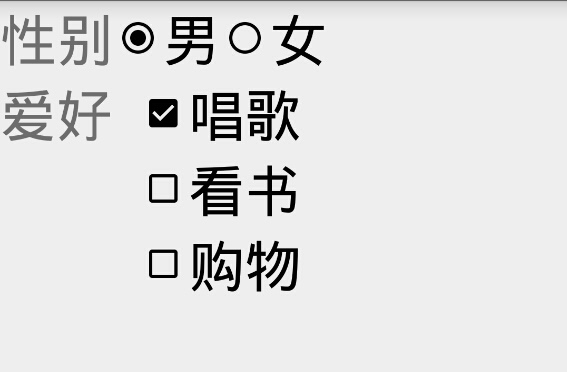
运行结果:
Android笔记(十五) Android中的基本组件——单选框和复选框的更多相关文章
- Selenium2学习(十五)-- 单选框和复选框(radiobox、checkbox)
本篇主要介绍单选框和复选框的操作 一.认识单选框和复选框 1.先认清楚单选框和复选框长什么样 2.各位小伙伴看清楚哦,上面的单选框是圆的:下图复选框是方的,这个是业界的标准,要是开发小伙伴把图标弄错了 ...
- CSS学习笔记三:自定义单选框,复选框,开关
一点一点学习CCS,这次学习了如何自定义单选框,复选框以及开关. 一.单选框 1.先写好body里面的样式,先写几个框 <body> <div class="radio-1 ...
- Android课程---单选框与复选框的实现
<?xml version="1.0" encoding="utf-8"?> <manifest xmlns:android="ht ...
- Android学习使用基本界面组件(下拉框,单选框,复选框,数字转轮,滚动条)
(一)建立单选框按钮 RadioGroup和RadioButton建立单选框按钮 字符串资源文件: <resources> <string name="app_name&q ...
- 【MFC学习笔记-作业5-小数据库】【单选框,复选框,滚动条,列表框】
界面已经实现完毕. 要完成的操作就是1.性别分组(2选1) 2.属性勾选 3.年龄通过滚动条调整 4.职称通过下方的列表框选择 5.输入姓名 6.存入左方的列表框 7.当选择左方列表框的人时,可以显示 ...
- ASP.NET从数据库中取出数据,有数据的复选框为选中
在KS系统中在更新菜单的时候,当查出菜单的时候要查出菜单下面已经有了哪些界面了我用了一下的方法弄的.代码如下: 界面代码: <%@ Page Language="C#" Au ...
- NopCommerce 3.4中商品详情页面单选框、复选框的美化
先上图给大家看看效果,点这里打开网站(后期可能会找不到这个商品,现在再测试阶段) 现在你能看到的这个页面中,尺寸.文本描述是单选框(属性是我乱写的名字),上门安装是复选框.效果就看到这里,请君跳过图片 ...
- jquery中attr和prop的区别—判断复选框选中状态
最近项目中需要用jquery判断input里checkbox是否被选中,发现用attr()获取不到复选框改变后的状态,最后查资料发现jQuery 1.6以后新增加了prop()方法,借用官方的一段描述 ...
- android单选框和复选框(练习)
<?xml version="1.0" encoding="utf-8"?> <LinearLayout xmlns:android=&quo ...
随机推荐
- 123457123456#3#----com.ppGame.konglongPuzzle78--前拼后广--konglongPT游戏_pp
com.ppGame.konglongPuzzle78--前拼后广--konglongPT游戏_pp
- PAT 甲级 1068 Find More Coins (30 分) (dp,01背包问题记录最佳选择方案)***
1068 Find More Coins (30 分) Eva loves to collect coins from all over the universe, including some ...
- GNU C之__attribute__
__attribute__可以设置函数属性(Function Attribute).变量属性(Variable Attribute)和类型属性(Type Attribute) __attribute_ ...
- 【Leetcode_easy】929. Unique Email Addresses
problem 929. Unique Email Addresses solution: class Solution { public: int numUniqueEmails(vector< ...
- 【ARTS】01_45_左耳听风-201900916~201900922
ARTS: Algrothm: leetcode算法题目 Review: 阅读并且点评一篇英文技术文章 Tip/Techni: 学习一个技术技巧 Share: 分享一篇有观点和思考的技术文章 Algo ...
- Python机器学习基础教程-第2章-监督学习之决策树集成
前言 本系列教程基本就是摘抄<Python机器学习基础教程>中的例子内容. 为了便于跟踪和学习,本系列教程在Github上提供了jupyter notebook 版本: Github仓库: ...
- [BJOI2019] 奥术神杖 [取log+AC自动机+dp]
题面 传送门 思路 首先,看到这个乘起来开根号的形式,应该能想到用取$\log$的方式做一个转化: $\sqrt[n]{\prod_i a_i}=\frac{1}{n}\sum_i \log_b a_ ...
- c++ 在Ubuntu系统中使用access函数
include<iostream> #include<stdlib.h> #include<stdio.h> #include<unistd.h> us ...
- 《ucore lab1 exercise6》实验报告
资源 ucore在线实验指导书 我的ucore实验代码 题目:完善中断初始化和处理 请完成编码工作和回答如下问题: 中断描述符表(也可简称为保护模式下的中断向量表)中一个表项占多少字节?其中哪几位代表 ...
- Java中常用的设计模式代码与理解
Java中常用的设计模式代码与理解 一.单例模式 1.饿汉式 (太饿了,类加载的时候就创建实例) /** * 饿汉式单例模式 */ public class HungrySingleInstance ...