
Dynamics 365使用代码发送邮件给指定邮箱地址
摘要: 微软动态CRM专家罗勇 ,回复303或者20190213可方便获取本文,同时可以在第一间得到我发布的最新博文信息,follow me!我的网站是 www.luoyong.me 。
当然,首先要确认 【设置】> 【电子邮件配置】 > 【电子邮件配置设置】中的 【允许在尚有未解析的电子邮件收件人的情况下发送邮件】设置为是,还有就是连接CRM使用的用户邮箱已经配置好,外发邮件已经测试通了,可以发邮件。

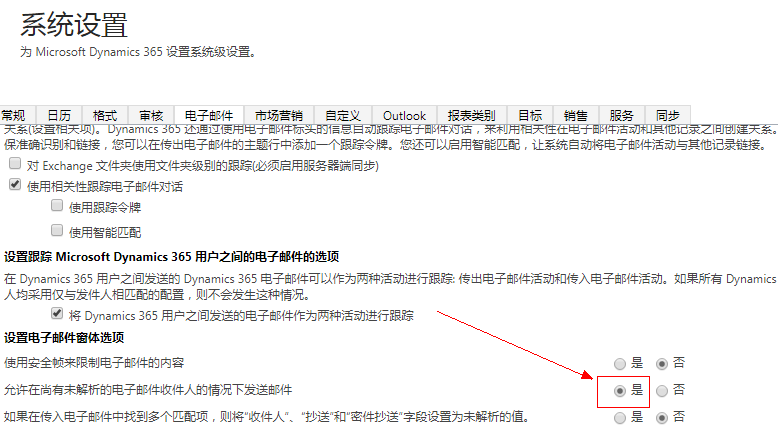
不多说了,上代码:
using Microsoft.Crm.Sdk.Messages;

using Microsoft.Xrm.Sdk;

using Microsoft.Xrm.Sdk.Client;

using Microsoft.Xrm.Sdk.Messages;

using Microsoft.Xrm.Sdk.Metadata;

using System;

using System.Collections.Generic;

using System.Configuration;

using System.Net;

using System.ServiceModel.Description;

namespace SendEmailToEmailAddrs

{

    class Program

    {

        static void Main(string[] args)

        {

            try

            {

                string inputKey;

                ServicePointManager.SecurityProtocol = SecurityProtocolType.Ssl3 | SecurityProtocolType.Tls | SecurityProtocolType.Tls11 | SecurityProtocolType.Tls12;

                IServiceManagement<IOrganizationService> orgServiceMgr = ServiceConfigurationFactory.CreateManagement<IOrganizationService>(new Uri(ConfigurationManager.AppSettings["orgUrl"]));

                AuthenticationCredentials orgAuCredentials = new AuthenticationCredentials();

                orgAuCredentials.ClientCredentials.UserName.UserName = ConfigurationManager.AppSettings["userName"];

                orgAuCredentials.ClientCredentials.UserName.Password = ConfigurationManager.AppSettings["passWord"];

                string needConfirm = ConfigurationManager.AppSettings["needConfirm"];

                using (var orgSvc = GetProxy<IOrganizationService, OrganizationServiceProxy>(orgServiceMgr, orgAuCredentials))

                {

                    WhoAmIRequest whoReq = new WhoAmIRequest();

                    var whoRsp = orgSvc.Execute(whoReq) as WhoAmIResponse;

                    var userEntity = orgSvc.Retrieve("systemuser", whoRsp.UserId, new Microsoft.Xrm.Sdk.Query.ColumnSet("fullname"));

                    Console.WriteLine(string.Format("欢迎【{0}】登陆到【{1}】", userEntity.GetAttributeValue<string>("fullname"), ConfigurationManager.AppSettings["orgUrl"]));

                    Console.WriteLine("本程序用于向指定邮箱发送邮件!");

                    if (needConfirm == "Y")

                    {

                        Console.WriteLine("当前处于需要确认才会继续的模式,若要继续请输入Y然后回车确认!");

                        inputKey = Console.ReadLine();

                        if (inputKey.ToUpper() == "Y")

                        {

                            RetrieveAlternateKeys(orgSvc,whoRsp.UserId);

                        }

                        else

                        {

                            Console.WriteLine("你选择了取消运行!");

                        }

                    }

                    else

                    {

                        RetrieveAlternateKeys(orgSvc,whoRsp.UserId);

                    }

                }

                Console.Write("程序运行完成,按任意键退出." + DateTime.Now.ToString());

                Console.ReadLine();

            }

            catch (Exception ex)

            {

                Console.WriteLine("程序运行出错:" + ex.Message + ex.StackTrace);

                Console.ReadLine();

            }

        }

        private static void RetrieveAlternateKeys(OrganizationServiceProxy orgSvc,Guid userId)

        {

            const string functionName = "用于向指定邮箱发送邮件";

            var EmailAddrs = ConfigurationManager.AppSettings["EmailAddrs"];

            if (string.IsNullOrEmpty(EmailAddrs))

            {

                Console.WriteLine("收件邮箱列表为空!");

                return;

            }

            Console.WriteLine(string.Format("开始 {0} - {1}", functionName, DateTime.Now.ToString()));

            try

            {

                Entity emailEntity = new Entity("email");

                var newtoPartyList = new List<Entity>();

                var fromEntity = new Entity("activityparty");

                fromEntity["partyid"] = new EntityReference("systemuser", userId);

                emailEntity["from"] = new Entity[] { fromEntity };

                foreach (var item in EmailAddrs.Split(';'))

                {

                    var toEntity = new Entity("activityparty");

                    toEntity["paricipationtypemask"] = new OptionSetValue();

                    toEntity["addressused"] = item;

                    newtoPartyList.Add(toEntity);

                }

                emailEntity["to"] = newtoPartyList.ToArray();

                emailEntity["subject"] = ConfigurationManager.AppSettings["subject"];

                emailEntity["description"] = ConfigurationManager.AppSettings["description"];

                //emailEntity["regardingobjectid"] = new EntityReference("systemuser", userid);

                Guid emailGuid = orgSvc.Create(emailEntity);

                Console.WriteLine(string.Format("创建的邮件ID是{0}", emailGuid));

                SendEmailRequest sendEmailRequest = new SendEmailRequest

                {

                    EmailId = emailGuid,

                    TrackingToken = string.Empty,

                    IssueSend = true

                };

                orgSvc.Execute(sendEmailRequest);

                Console.WriteLine("执行发送邮件消息成功!");

            }

            catch (Exception ex)

            {

                Console.WriteLine(string.Format("运行 {0} 出现异常:{1}", functionName, ex.Message + ex.StackTrace));

            }

            Console.WriteLine(string.Format("结束 {0} - {1}", functionName, DateTime.Now.ToString()));

            Console.WriteLine("================================================");

        }

        private static TProxy GetProxy<TService, TProxy>(

IServiceManagement<TService> serviceManagement,

AuthenticationCredentials authCredentials)

            where TService : class

            where TProxy : ServiceProxy<TService>

        {

            Type classType = typeof(TProxy);

            if (serviceManagement.AuthenticationType !=

                AuthenticationProviderType.ActiveDirectory)

            {

                AuthenticationCredentials tokenCredentials =

                    serviceManagement.Authenticate(authCredentials);

                return (TProxy)classType

                    .GetConstructor(new Type[] { typeof(IServiceManagement<TService>), typeof(SecurityTokenResponse) })

                    .Invoke(new object[] { serviceManagement, tokenCredentials.SecurityTokenResponse });

            }

            return (TProxy)classType

                .GetConstructor(new Type[] { typeof(IServiceManagement<TService>), typeof(ClientCredentials) })

                .Invoke(new object[] { serviceManagement, authCredentials.ClientCredentials });

        }

    }

}
Dynamics 365使用代码发送邮件给指定邮箱地址的更多相关文章
- html实现邮箱发送邮件_js发送邮件至指定邮箱功能
在前端开发中,JavaScript并没有提供直接操作Email邮箱的功能方法,但是遇到这样的需求,我们应该如何实现js发送邮件至指定邮箱功能呢?下面列举能够在通过前端实现邮件发送的几种方式: 方式一: ...
- Android 调用系统邮件,发送邮件到指定邮箱
在项目中,最后有一个联络我们,要求是点击号码还有邮箱地址能够发送邮件,这时候解决的方案其实有两种,一种是调用系统发邮件的软件,可以添加邮箱账号就可以发送邮件:第二种是使用javamail来发送邮件.在 ...
- python (18)在linux中如何实现定时发送邮件到指定邮箱,监测任务
最近要用到,定时发送邮件功能: 如何定时,当然要用到linux中crontab了 如下的代码能够定时发送邮件 #!/usr/bin/env python # -*- coding=utf-8 -*- ...
- Linux实战(17):Linux配置用户登陆时发送邮件到指定邮箱
参考其他文章,正好有这个需求,记一笔做个记录,以防丢失. 参考链接 #!/bin/bash yum install -y mailx cat >> /etc/mail.rc<< ...
- 《JavaWeb从入门到改行》注册时向指定邮箱发送邮件激活
javaMail API javaMail是SUN公司提供的针对邮件的API . 两个jar包 mail.jar 和 activation.jar java mail中主要类:javax.mail. ...
- Dynamics 365创建电子邮箱字段包含值的联系人同时更改负责人的方法。
摘要: 本人微信和易信公众号: 微软动态CRM专家罗勇 ,回复267或者20171129可方便获取本文,同时可以在第一间得到我发布的最新的博文信息,follow me!我的网站是 www.luoyon ...
- Dynamics 365客户端编程示例:获取当前用户的信息,表单级通知/提示,表单OnLoad事件执行代码
我是微软Dynamics 365 & Power Platform方面的工程师罗勇,也是2015年7月到2018年6月连续三年Dynamics CRM/Business Solutions方面 ...
- 通过C#代码调用Dynamics 365 Web API执行批量操作
我是微软Dynamics 365 & Power Platform方面的工程师罗勇,也是2015年7月到2018年6月连续三年Dynamics CRM/Business Solutions方面 ...
- 十、.NET使用本地Outlook邮箱指定邮箱用户名和密码发送邮件
十..NET使用本地Outlook邮箱指定邮箱用户名和密码发送邮件 1.添加Microsoft.Office.Interop.Outlook引用 2.封装发送邮件方法 using System; us ...
随机推荐
- LeetCode题解39.Combination Sum
39. Combination Sum Given a set of candidate numbers (C) (without duplicates) and a target number (T ...
- 吴恩达机器学习笔记56-多元高斯分布及其在误差检测中的应用(Multivariate Gaussian Distribution & Anomaly Detection using the Multivariate Gaussian Distribution)
一.多元高斯分布简介 假使我们有两个相关的特征,而且这两个特征的值域范围比较宽,这种情况下,一般的高斯分布模型可能不能很好地识别异常数据.其原因在于,一般的高斯分布模型尝试的是去同时抓住两个特征的偏差 ...
- [Swift]LeetCode371. 两整数之和 | Sum of Two Integers
Calculate the sum of two integers a and b, but you are not allowed to use the operator + and -. Exam ...
- [Swift]LeetCode553. 最优除法 | Optimal Division
Given a list of positive integers, the adjacent integers will perform the float division. For exampl ...
- Spring MVC知识
f-sm-1. 讲下SpringMvc和Struts1,Struts2的比较的优势 性能上Struts1>SpringMvc>Struts2 开发速度上SpringMvc和Struts2差 ...
- [树莓派]启用root账户
树莓派使用的linux是debian系统,所以树莓派启用root和debian是相同的. debian里root账户默认没有密码,但账户锁定. 当需要root权限时,由默认账户经由sudo执行,Ras ...
- so库链接和运行时选择哪个路径下的库?
总结今天遇到的一个so库链接.运行问题. 这几天修改了xapian的源码,重新编译so库,再重新编译之前的demo程序,跑起来后却发现执行的函数并非我修改过的,使用的还是老版本.折腾了一会儿,发现是因 ...
- 【Spark篇】---Spark中transformations算子二
一.前述 今天继续整理几个Transformation算子如下: mapPartitionWithIndex repartition coalesce groupByKey zip zipWithIn ...
- “吃人”的那些Java名词:对象、引用、堆、栈
记得中学的课本上,有一篇名为<狂人日记>课文:那时候根本理解不了鲁迅写这篇文章要表达的中心思想,只觉得满篇的“吃人”令人心情压抑:老师在讲台上慷慨激昂的讲,大多数的同学同我一样,在课本面前 ...
- .NET Core实战项目之CMS 第八章 设计篇-内容管理极简设计全过程
写在前面 上一篇文章中我带着大家进行了权限部分的极简设计,也仅仅是一个基本的权限设计.不过你完全可以基于这套权限系统设计你的更复杂的权限系统,当然更复杂的权限系统要根据你的业务来进行,因为任何脱离实际 ...