
【原创】大数据基础之Marathon(1)简介、安装、使用
marathon 1.6.322

官方:https://mesosphere.github.io/marathon/
一 简介
Marathon is a production-grade container orchestration platform for Mesosphere’s Datacenter Operating System (DC/OS) and Apache Mesos.\
marathon是一个DC/OS和mesos上的容器编排平台;
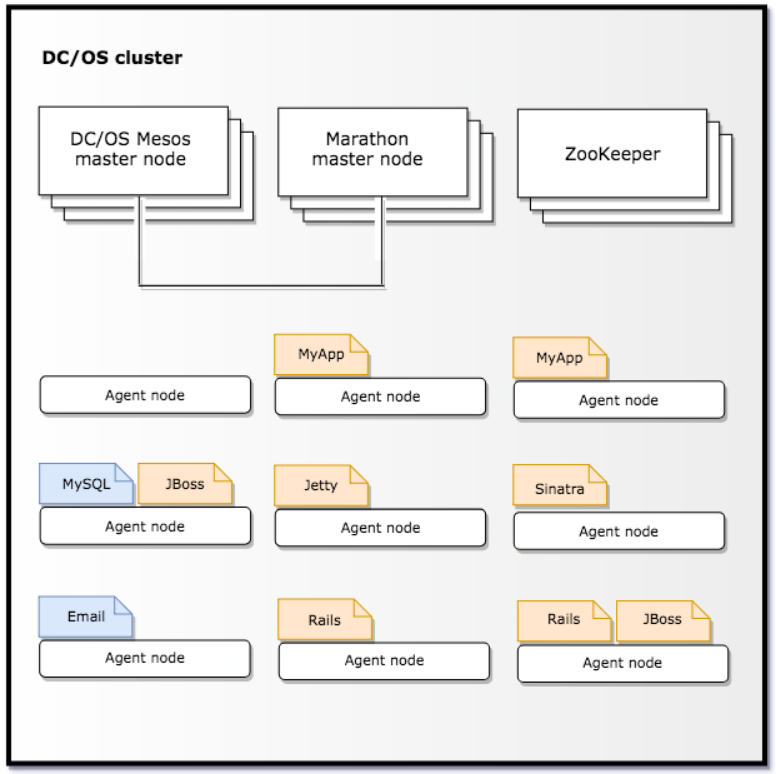
Features
- High Availability. Marathon runs as an active/passive cluster with leader election for 100% uptime.
- Multiple container runtimes. Marathon has first-class support for both Mesos containers (using cgroups) and Docker.
- Stateful apps. Marathon can bind persistent storage volumes to your application. You can run databases like MySQL and Postgres, and have storage accounted for by Mesos.
- Beautiful and powerful UI.
- Constraints. These allow to e.g. place only one instance of an application per rack, node, etc.
- Service Discovery & Load Balancing. Several methods available.
- Health Checks. Evaluate your application’s health using HTTP or TCP checks.
- Event Subscription. Supply an HTTP endpoint to receive notifications - for example to integrate with an external load balancer.
- Metrics. Query them at /metrics in JSON format or push them to systems like graphite, statsd and Datadog.
- Complete REST API for easy integration and scriptability.
特点:高可用、支持多种容器运行时环境、支持状态应用、UI、支持部署限制、服务发现&负载均衡、健康检查、事件订阅、日志收集、REST API;
DC/OS features
Running on DC/OS, Marathon gains the following additional features:
- Virtual IP routing. Allocate a dedicated, virtual address to your app. Your app is now reachable anywhere in the cluster, wherever it might be scheduled. Load balancing and rerouting around failures are done automatically.
- Authorization (DC/OS Enterprise Edition only). True multitenancy with each user or group having access to their own applications and groups.
在DC/OS上还提供虚ip和认证;
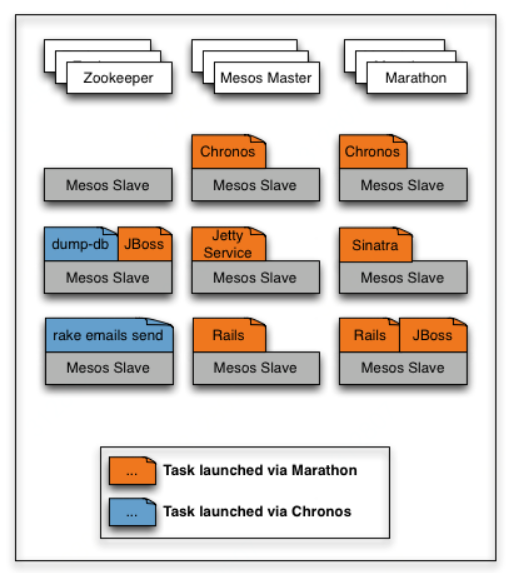
二 安装
1 官方tar包安装
$ curl -O https://downloads.mesosphere.com/marathon/releases/1.6.322/marathon-1.6.322-2bf46b341.tgz
$ tar xzf marathon-1.6.322-2bf46b341.tgz
$ cd marathon-1.6.322-2bf46b341
$ ls bin
backup backup.bat marathon marathon.bat restore restore.bat
启动
$ ./bin/mathon --master zk://$zk1:2181,$zk2:2181/mesos --zk zk://$zk1:2181,$zk2:2181/marathon --http_port 8090
默认的8080很容易冲突
2 官方yum安装
# rpm -ivh http://repos.mesosphere.com/el/7/noarch/RPMS/mesosphere-el-repo-7-1.noarch.rpm
# yum install marathon
3 离线安装
# rpm -ivh http://repos.mesosphere.com/el/7/noarch/RPMS/mesosphere-el-repo-7-1.noarch.rpm
# yum install --downloadonly --downloaddir=/path/to/rpm/marathon marathon
# ls -l /path/to/rpm/marathon
total 75276
-rw-r--r-- 1 root root 77071702 Jan 29 07:41 marathon-1.7.189-0.1.20190125223314.el7.noarch.rpm# rpm -ivh marathon-1.7.189-0.1.20190125223314.el7.noarch.rpm
安装目录
# ls /usr/share/marathon/bin
backup backup.bat marathon marathon.bat restore restore.bat
修改配置
# vi /etc/default/marathon
MARATHON_MASTER=zk://$zk1:2181,$zk2:2181/mesos
MARATHON_ZK=zk://$zk1:2181,$zk2:2181/marathon
MARATHON_HTTP_PORT=8090
启动
# service marathon start
or
# systemctl start marathon
开机启动
# systemctl enable marathon
查看状态
# service marathon status
or
# systemctl status marathon
如果有报错查看日志
# journalctl -u marathon -r
三 使用
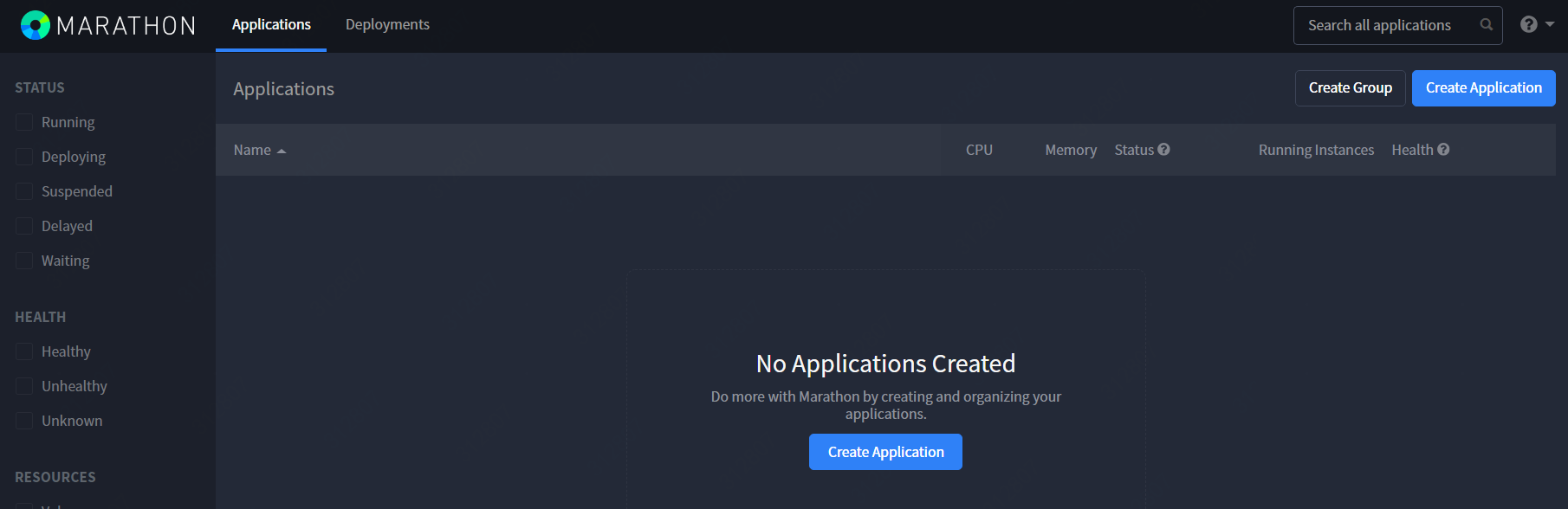
http接口
访问 http://$marathon_server:8090
api接口
$ curl http://$marathon_server:8090/v2/apps
添加app
# curl -X POST http://$marathon_ip:8080/v2/apps -d@/path/to/app.json -H 'Content-type:application/json'
查看app
# curl http://$marathon_ip:8080/v2/apps/$app_id
删除app
# curl -X DELETE http://$marathon_ip:8080/v2/apps/$app_id
重启app
# curl -XPOST http://$marathon_ip:8080/v2/apps/$app_id/restart
具体参考:http://mesosphere.github.io/marathon/api-console/index.html
参考:https://mesosphere.github.io/marathon/docs/
【原创】大数据基础之Marathon(1)简介、安装、使用的更多相关文章
- 【原创】大数据基础之Marathon(2)marathon-lb
marathon-lb 官方:https://github.com/mesosphere/marathon-lb 一 简介 Marathon load balancer (Marathon-LB) i ...
- 大数据基础环境--jdk1.8环境安装部署
1.环境说明 1.1.机器配置说明 本次集群环境为三台linux系统机器,具体信息如下: 主机名称 IP地址 操作系统 hadoop1 10.0.0.20 CentOS Linux release 7 ...
- 【原创】大数据基础之Zookeeper(2)源代码解析
核心枚举 public enum ServerState { LOOKING, FOLLOWING, LEADING, OBSERVING; } zookeeper服务器状态:刚启动LOOKING,f ...
- CentOS6安装各种大数据软件 第八章:Hive安装和配置
相关文章链接 CentOS6安装各种大数据软件 第一章:各个软件版本介绍 CentOS6安装各种大数据软件 第二章:Linux各个软件启动命令 CentOS6安装各种大数据软件 第三章:Linux基础 ...
- 大数据应用日志采集之Scribe 安装配置指南
大数据应用日志采集之Scribe 安装配置指南 大数据应用日志采集之Scribe 安装配置指南 1.概述 Scribe是Facebook开源的日志收集系统,在Facebook内部已经得到大量的应用.它 ...
- 【原创】大数据基础之Impala(1)简介、安装、使用
impala2.12 官方:http://impala.apache.org/ 一 简介 Apache Impala is the open source, native analytic datab ...
- 【原创】大数据基础之Benchmark(2)TPC-DS
tpc 官方:http://www.tpc.org/ 一 简介 The TPC is a non-profit corporation founded to define transaction pr ...
- 【原创】大数据基础之词频统计Word Count
对文件进行词频统计,是一个大数据领域的hello word级别的应用,来看下实现有多简单: 1 Linux单机处理 egrep -o "\b[[:alpha:]]+\b" test ...
- 大数据基础知识:分布式计算、服务器集群[zz]
大数据中的数据量非常巨大,达到了PB级别.而且这庞大的数据之中,不仅仅包括结构化数据(如数字.符号等数据),还包括非结构化数据(如文本.图像.声音.视频等数据).这使得大数据的存储,管理和处理很难利用 ...
随机推荐
- redis--小白博客
概述 redis是一种nosql数据库,他的数据是保存在内存中,同时redis可以定时把内存数据同步到磁盘,即可以将数据持久化,并且他比memcached支持更多的数据结构(string,list列表 ...
- pyspider安装出现问题参考
File "c:\users\13733\appdata\local\programs\python\python37\lib\site-packages\pyspider\run.py&q ...
- 【学习总结】GirlsInAI ML-diary day-18-下载/保存excel
[学习总结]GirlsInAI ML-diary 总 原博github链接-day18 使用Python来操作excel文件 Excel的处理与DataFrame格式是分不开的 可以理解为DataFr ...
- fiddler抓包App数据
在做手机或移动端APP的接口测试时,需要从开发人员那里获取接口文档,接口文档应该包括完整的功能接口.接口请求方式.接口请求URL.接口请求参数.接口返回参数.如果当前项目没有接口文档,则可以使用fid ...
- 【转】How to create a new user and grant permissions in MySQL
MySQL is one of the most popular database management systems. In this tutorial we will cover the ste ...
- SUCTF 2016 : dMd
这个题可以说是比较坑了(还不是我很弱...) Linux跑一下: 要输密码 ida打开看看: int __cdecl main(int argc, const char **argv, const c ...
- Python——使用Pycharm连接数据库
- MT【320】依次动起来
已知$ BC=6,AC=2AB, $点$ D $满足$ \overrightarrow{AD}=\dfrac{2x}{x+y}\overrightarrow{AB}+\dfrac{y}{2(x+y)} ...
- c++三种继承方式public,protect,private
C++中的三种继承public,protected,private 三种访问权限 public:可以被任意实体访问 protected:只允许子类及本类的成员函数访问 private:只允许本类的成员 ...
- 2019南昌邀请赛网络预选赛 I. Max answer(单调栈+暴力??)
传送门 题意: 给你你一序列 a,共 n 个元素,求最大的F(l,r): F(l,r) = (a[l]+a[l+1]+.....+a[r])*min(l,r); ([l,r]的区间和*区间最小值,F( ...