
WPF 之命令(七)
一、前言
事件的作用是发布和传播一些消息,消息送达接收者,事件的使命也就完成了,至于消息响应者如何处理发送来的消息并不做规定,每个接收者可以使用自己的行为来响应事件。即事件不具有约束力。
命令就有约束力,不仅可以约束代码,还可以约束步骤逻辑。
二、WPF 的 命令系统
WPF 中,命令系统由以下元素构成:
命令(Command):实现 ICommand 接口。表示一个程序任务,并可跟踪该任务是否完成。
命令源(Commannd Source):命令的发送者。需实现 ICommandSource 接口。
命令目标(Command Target):命令的接收者。需实现 IInputElment 接口的类。
命令关联(Command Binding):负责把外围逻辑和命令关联起来。
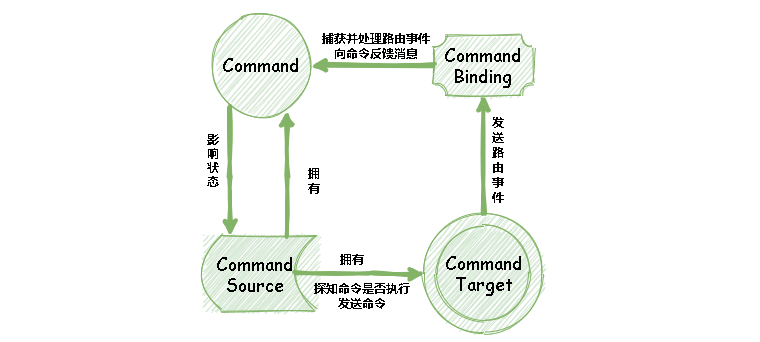
WPF中提供了一组已定义命令,命令包括以下类:ApplicationCommands、NavigationCommands、MediaCommands、EditingCommands 以及ComponentCommands。 这些类提供诸如 Cut、BrowseBack、BrowseForward、Play、Stop 和 Pause 等命令。下面我们使用 ApplicationCommands 进行以下测试:
        // 命令执行具体操作

        private void CommandBinding_OnExecuted(object sender, ExecutedRoutedEventArgs e)

        {

            MessageBox.Show($"New 命令被触发了,命令源是:{e.Source}");

        }
  <Window.CommandBindings>

        <CommandBinding Command="ApplicationCommands.New" Executed="CommandBinding_OnExecuted"></CommandBinding>

    </Window.CommandBindings>

    <StackPanel Margin="20">

        <Button Margin="10" Height="50" Content="New" Command="New"></Button>

    </StackPanel>
点击按钮后,输出结果为:
New 命令被触发了,命令源是:System.Windows.Controls.Button: New
三、自定义命令
例如,我们需要增加一个数据的查库与上传数据操作,那么需要实现 Query 和 Insert 命令,为了能够直接供 UI 使用,我们声明 RoutedUICommand 命令,具体如下:
    public class DatabaseCommands

    {

        private static RoutedUICommand _query;

        private static RoutedUICommand _insert;

        static DatabaseCommands()

        {

            InputGestureCollection inputs = new InputGestureCollection();

            inputs.Add(new KeyGesture(Key.Q ,ModifierKeys.Control, "Ctrl+R"));

            _query = new RoutedUICommand(

                "Query", "Query", typeof(DatabaseCommands), inputs);

            inputs.Add(new KeyGesture(Key.D, ModifierKeys.Control, "Ctrl+D"));

            _insert = new RoutedUICommand(

                "Add", "Add", typeof(DatabaseCommands), inputs);

        }

        public static RoutedUICommand Query

        {

            get { return _query; }

        }

        public static RoutedUICommand Insert

        {

            get { return _insert; }

        }

    }
命令实现与绑定到 UI 上的操作如下:
        // 命令执行具体操作

        private void DatabaseCommandsQuery_OnExecuted(object sender, ExecutedRoutedEventArgs e)

        {

            MessageBox.Show($"Query 命令被触发了,命令源是:{e.Source}");

        }

        private void DatabaseCommandsAdd_OnExecuted(object sender, ExecutedRoutedEventArgs e)

        {

            MessageBox.Show($"Add 命令被触发了,命令源是:{e.Source}");

        }
 <Window.CommandBindings>

        <CommandBinding Command="local:DatabaseCommands.Query" Executed="DatabaseCommandsQuery_OnExecuted"></CommandBinding>

        <CommandBinding Command="local:DatabaseCommands.Insert" Executed="DatabaseCommandsAdd_OnExecuted">

        </CommandBinding>

    </Window.CommandBindings>

    <StackPanel Margin="20">

        <Button Margin="10" Height="50" Content="New" Command="New"></Button>

        <Button Margin="10" Height="50" Content="Query" Command="local:DatabaseCommands.Query"></Button>

        <Button Margin="10" Height="50" Content="Insert" Command="local:DatabaseCommands.Insert"></Button>

    </StackPanel>
当我们点击 Query 和 Insert 操作时,分别执行对应的操作。上述例子中,Command 的执行代码是在 XAML 中声明的,那我们把命令的执行代码进行代码后置,且为了满足不同的条件,我们声明一个 RelayCommand 基类进行封装,具体如下:
    /// <summary>

    /// The base implementation of a command.

    /// </summary>

    abstract class CommandBase : ICommand

    {

        /// <summary>

        /// Occurs when changes occur that affect whether or not the command should execute.

        /// </summary>

        public event EventHandler CanExecuteChanged

        {

            add { System.Windows.Input.CommandManager.RequerySuggested += value; }

            remove { System.Windows.Input.CommandManager.RequerySuggested -= value; }

        }

        /// <summary>

        /// Raises the <see cref="CanExecuteChanged" /> event.

        /// </summary>

        public void OnCanExecuteChanged()

        {

            System.Windows.Input.CommandManager.InvalidateRequerySuggested();

        }

        /// <summary>

        /// Defines the method that determines whether the command can execute in its current state.

        /// </summary>

        /// <param name="parameter">Data used by the command.  If the command does not require data to be passed, this object can be set to null.</param>

        /// <returns>

        /// true if this command can be executed; otherwise, false.

        /// </returns>

        public virtual bool CanExecute(object parameter)

        {

            return true;

        }

        /// <summary>

        /// Defines the method to be called when the command is invoked.

        /// </summary>

        /// <param name="parameter">Data used by the command.  If the command does not require data to be passed, this object can be set to null.</param>

        public void Execute(object parameter)

        {

            if (!CanExecute(parameter))

            {

                return;

            }

            OnExecute(parameter);

        }

        /// <summary>

        /// Executes the command.

        /// </summary>

        /// <param name="parameter">The parameter.</param>

        protected abstract void OnExecute(object parameter);

    }

    /// <summary>

    /// The command that relays its functionality by invoking delegates.

    /// </summary>

    class RelayCommand : CommandBase

    {

        private readonly Action<object> _execute;

        private readonly Func<object, bool> _canExecute;

        /// <summary>

        /// Initializes a new instance of the <see cref="RelayCommand"/> class.

        /// </summary>

        /// <param name="execute">The execute.</param>

        /// <param name="canExecute">The can execute.</param>

        public RelayCommand(Action<object> execute, Func<object, bool> canExecute = null)

        {

            if (canExecute == null)

            {

                // no can execute provided, then always executable

                canExecute = (o) => true;

            }

            this._execute = execute;

            this._canExecute = canExecute;

        }

        /// <summary>

        /// Defines the method that determines whether the command can execute in its current state.

        /// </summary>

        /// <param name="parameter">Data used by the command. If the command does not require data to be passed, this object can be set to null.</param>

        /// <returns>

        /// true if this command can be executed; otherwise, false.

        /// </returns>

        public override bool CanExecute(object parameter)

        {

            return _canExecute == null || _canExecute.Invoke(parameter);

        }

        /// <summary>

        /// Executes the command.

        /// </summary>

        /// <param name="parameter">The parameter.</param>

        protected override void OnExecute(object parameter)

        {

            _execute?.Invoke(parameter);

        }

    }
然后,我们实现一个示例,点击 Clear 按钮时,清空 TextBox 中的所有内容,那么需要声明一个 Model 和 ViewModel ,具体实现可以阅读 WPF 之 INotifyPropertyChanged 接口的使用 (一):
    class Student

    {

        public  string Id { get; set; }

        public string Name { get; set; }

        public string Email { get; set; }

        public string Phone { get; set; }

    }

    class MainWindowVM : NotifyProperty

    {

        private Student _student;

        public Student Student

        {

            get => _student;

            set => SetProperty(ref _student, value);

        }

        public ICommand Clear { get; set; }

        private void ClearCommand(object args)

        {

            Student = new Student();

        }

        public MainWindowVM()

        {

            _student = new Student()

            {

                Id = "01",

                Name = "Dwayne",

                Email = "974608610@qq.com",

                Phone = "180888888888",

            };

            Clear=new RelayCommand(ClearCommand,null);

        }

    }
最后,我们把该 ViewModel 绑定到 XAML 上,具体如下:
  <StackPanel Margin="20">

        <Button Margin="10" Height="50" Content="Clear" Command="{Binding Path=Clear}"></Button>

        <TextBox Text="{Binding Student.Id}" Height="50" VerticalContentAlignment="Center" Margin="10" BorderBrush="Black"></TextBox>

        <TextBox Text="{Binding Student.Name}" Height="50" VerticalContentAlignment="Center" Margin="10" BorderBrush="Black"></TextBox>

        <TextBox Text="{Binding Student.Email}" Height="50" VerticalContentAlignment="Center" Margin="10" BorderBrush="Black"></TextBox>

        <TextBox Text="{Binding Student.Phone}" Height="50" VerticalContentAlignment="Center" Margin="10" BorderBrush="Black"></TextBox>

    </StackPanel>
当我们点击 Clear 按钮时,所有的 TextBox 就被清空了显示。其实,上述这个例子就是一个简单的 MVVM 示例,它让逻辑代码和 UI 完全分离。对于 Command 来说,当我们要执行 TextChanged 事件时,需要添加 “System.Windows.Interactivity” ,然后在 XAML 中添加如下引用:
xmlns:i="http://schemas.microsoft.com/expression/2010/interactivity"
  <TextBox Text="改变内容即可删除" Height="50" VerticalContentAlignment="Center" Margin="10" BorderBrush="Black" >

            <i:Interaction.Triggers>

                <i:EventTrigger EventName="TextChanged">

                    <i:InvokeCommandAction Command="{Binding Clear}" CommandParameter="{Binding Path=Student}"/>

                </i:EventTrigger>

            </i:Interaction.Triggers>

        </TextBox>
当我们改变该文本框的内容时,也可执行 Clear 命令。
WPF 之命令(七)的更多相关文章
- WPF之命令浅谈
一.认识命令 1.1命令的特点 提到“命令”,我们应该想到命令的发出者,命令的接受者,命令的内容,准备工作,完成任务,回报工作...与事件中的发送者,接受者,消息,处理,处理,处理一一对应,如果是单纯 ...
- WPF C# 命令的运行机制
1.概述 1.1 WPF C# 命令的本质 命令是 WPF 中的输入机制,它提供的输入处理比设备输入具有更高的语义级别. 例如,在许多应用程序中都能找到的“复制”.“剪切”和“粘贴”操作就是命令. W ...
- WPF 的命令的自动刷新时机——当你 CanExecute 会返回 true 但命令依旧不可用时可能是这些原因
原文:WPF 的命令的自动刷新时机--当你 CanExecute 会返回 true 但命令依旧不可用时可能是这些原因 在 WPF 中,你可以使用 Command="{Binding Walt ...
- WPF Demo19 命令、UC
命令系统的基本元素和关系WPF命令系统的组成要素:A.命令(command):WPF命令实际上就是实习了ICommand接口的类.平时使用最多的就是RoutedCommand类.B.命令源(comma ...
- WPF 跟踪命令和撤销命令(复原)
WPF 命令模型缺少一个特性是复原命令.尽管提供了一个 ApplicationCommands.Undo 命令,但是该命令通常被用于编辑控件(如 TextBox 控件),以维护它们自己的 Undo 历 ...
- WPF 自定义命令 以及 命令的启用与禁用
自定义命令: 在WPF中有5个命令类(ApplicationCommands.NavigationCommands.EditingCommands.ComponentCommands 以及 M ...
- WPF自定义命令
WPF的自定义命令实现过程包括三个部分,定义命令.定义命令源.命令调用,代码实现如下: public partial class MainWindow : Window { public MainWi ...
- 按键(ESC ,F1,F2等)——wpf的命令处理方法
WPF窗体的命令绑定 方法一:使用代码 <WpfUI:View.CommandBindings> <CommandBinding Command="Help" ...
- WPF——执行命令清空文本框
一.造一个窗体,在窗体里面先造一个StackPanel,然后再StackPanel里面放好按钮和文本框,注意给所有的控件和容器起名字 <Grid> <StackPanel Name= ...
随机推荐
- 【Problem】前端项目运行:Module build failed:Error Node Sass does not yet support my current environmen
我在运行renren-fast-vue前端项目时,安装完依赖cnpm install 启动服务npm run dev 出现问题. Module build failed: Error: Node Sa ...
- 怎么判断innodb 日志缓冲区该设置为多大呢
怎么判断innodb 日志缓冲区该设置为多大呢
- 【RAC】双节点RAC搭建
本文主要是双节点的RAC进行搭建,根据黄伟老师的视频进行总结和使用. 搭建环境: 1.两台安装好Linux_x64系统的服务器 2.IP设置 注意:Priv-IP的IP是自己一个网段,而剩下的SCAN ...
- SAP 摘录数据集
要在报表中创建并填充摘录数据集,需要执行三步骤:1.将要在摘录数据集中使用的记录类型定义为字段组FIELD-GROUPS该语句定义了字段组,字段组可以将几个字段组合到一个名称下,字段组不为字段保留存储 ...
- 别再问我们用什么画图的了!问就是excalidraw
每次发 https://github.com/tal-tech/go-zero 相关文章时,都会有读者问我们用什么画图的. 这图什么工具画的呀?好看! 这个手绘风格真好看,用啥工具画的呀? 可不可以介 ...
- uni-app开发经验分享二十: 微信小程序 授权登录 获取详细信息 获取手机号
授权页面 因为微信小程序提供的 权限弹窗 只能通用户确认授权 所以可以 写一个授权页面,让用户点击 来获取用户相关信息 然后再配合后台就可以完成登录 <button class="bt ...
- JVM学习-运行时数据区域
目录 前言 运行时数据区 程序计数器 Java虚拟机栈 局部变量表 基础数据类型 对象引用 returnAddress 操作数栈 动态链接 方法返回地址 Java堆 方法区 类型信息 字段描述符 方法 ...
- Go 语言编译过程
走进Golang之编译器原理_大愚Talk-CSDN博客 https://blog.csdn.net/hel12he/article/details/103061921 go编译器 - 知乎 http ...
- nginx proxy pass redirects ignore port
nginx proxy pass redirects ignore port $host in this order of precedence: host name from the request ...
- Git轻松入门2:分支篇
什么是分支 在玩剧情类游戏时,不同的选择会触发不同的剧情路线,每条剧情路线都会独立发展,最终走向不同的结局. Git中所谓的"分支(branch)"就如同游戏中的剧情路线,用户可以 ...