
[Xamarin] 製作吐司(Toast)以及圖文並茂的Toast (转帖)
最近在看Xamarin使用C#來撰寫Android App .
紀錄一下,順便給之後有需要的人可以有所參考 :)
今天要來聊的是關於Toast 這東西,這在以前Android 上面我是很常使用
拿來log 做debug 或是做一些給User 的簡單提示都是非常方便的.
Toast樣貌:
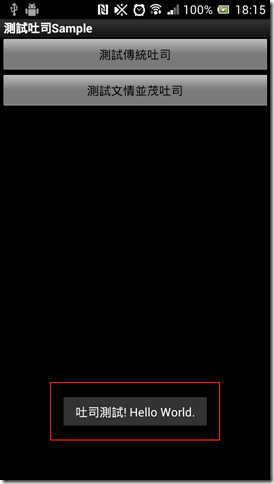
首先規劃兩個按鈕一個點擊後就是顯示傳統的Toast ,
另外一個我們來測試有點變化圖片+文字的Toast 首先看一下主畫面 Main.axml
<?xml version="1.0" encoding="utf-8"?>
<LinearLayout xmlns:android="http://schemas.android.com/apk/res/android"
android:orientation="vertical"
android:layout_width="fill_parent"
android:layout_height="fill_parent">
<Button
android:id="@+id/btnToast1"
android:layout_width="fill_parent"
android:layout_height="wrap_content"
android:text="測試傳統吐司" />
<Button
android:id="@+id/btnToast2"
android:layout_width="fill_parent"
android:layout_height="wrap_content"
android:text="測試文情並茂吐司" />
</LinearLayout>
其實也沒啥好解釋的兩顆按鈕,第一顆 bntToast1,按下去後就會顯示傳統的Toast
第二顆按鈕按下去後就是出現有圖文加在一起的Toast
來看Code.
Activity1.cs:
using Android.App;
using Android.Widget;
using Android.OS;
namespace XamarinToastSamle
{
[Activity(Label = "測試吐司Sample", MainLauncher = true, Icon = "@drawable/icon")]
public class Activity1 : Activity
{
protected override void OnCreate(Bundle bundle)
{
base.OnCreate(bundle);
SetContentView(Resource.Layout.Main);
//取得btnToast1
var btnToast1 = FindViewById<Button>(Resource.Id.btnToast1);
//設定其Click 事件
btnToast1.Click += delegate
{
Toast.MakeText(this, "Hello World.Xamarin", ToastLength.Short).Show();
};
}
}
}
傳統Toast非常的簡單,只要
Toast.MakeText(預被掛載的Context通常是Activity 或是Application , 顯示文字 , 顯示時間的長短)
結果:
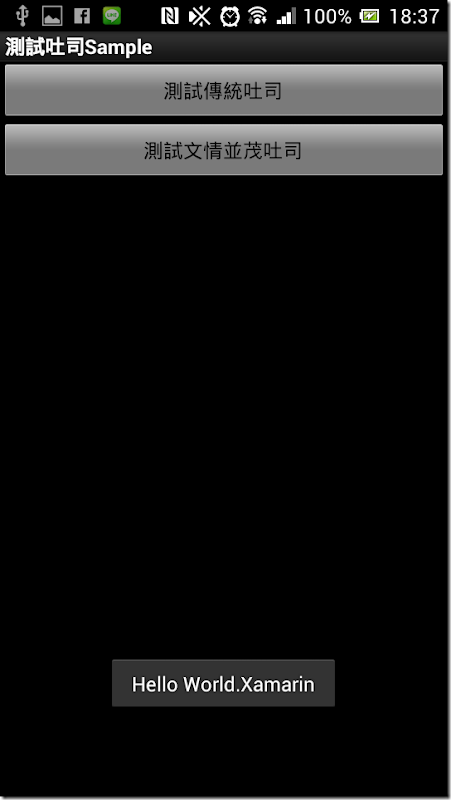
很簡單吧,再來我們要如何顯示圖文並茂的Toast
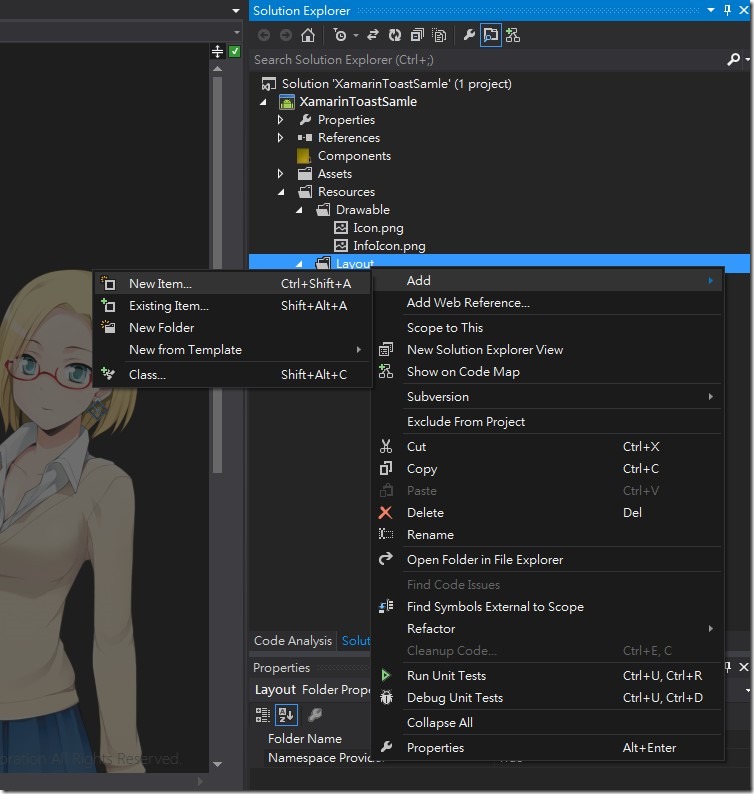
首先我們要先建立一個Layout來幫忙,首先我們在 Resources 的Layout中加入一個TaostPopItem.axml
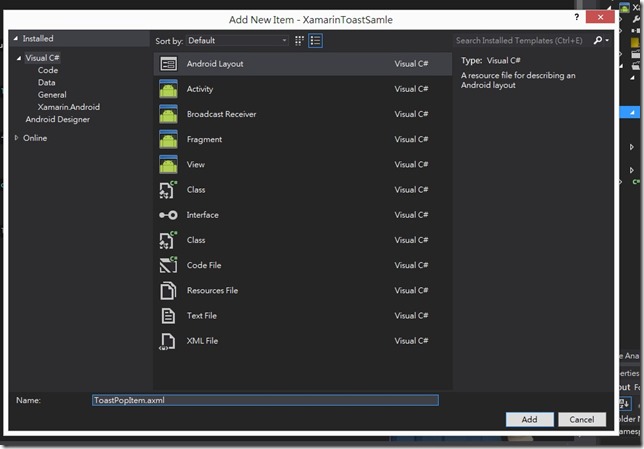
首先看一下畫面:
看一下它的原始XML
<?xml version="1.0" encoding="utf-8"?>
<LinearLayout xmlns:android="http://schemas.android.com/apk/res/android"
android:orientation="vertical"
android:layout_width="fill_parent"
android:layout_height="fill_parent" />
他預設為 LinearLayout 但是因為排版關係,我將原始的LinearLayout 改成 我需要的 RelativeLayout
關於這些Android Layout 設計哲學 可以參考這裡 : http://developer.android.com/guide/topics/ui/declaring-layout.html
我就將不贅述再來我們透過左邊工具箱,拉入ImageView 還有TextView
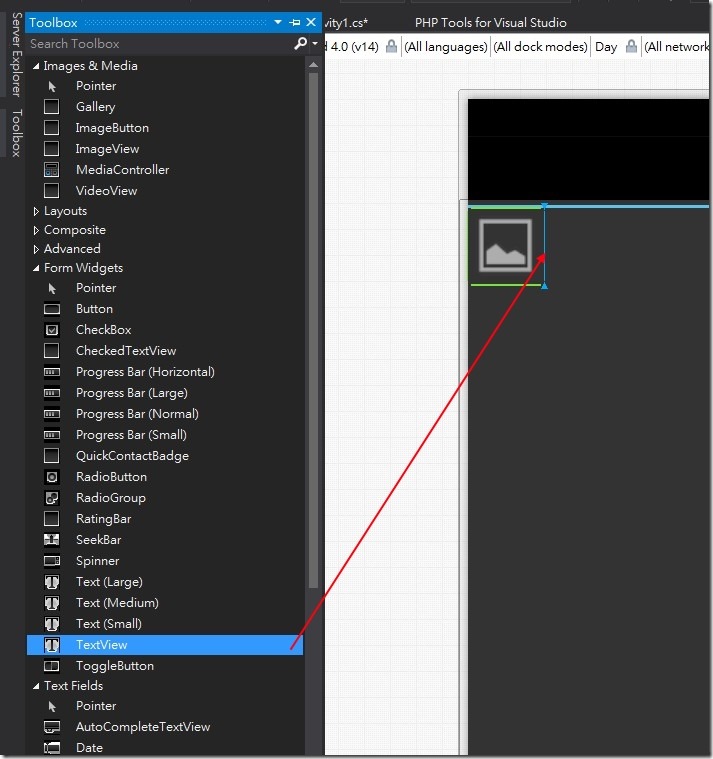
在拉TextView的時候有一個小技巧,如果拉在ImageView旁邊的藍線位置他的預設 layout_toRightOf 的property 會是該物件
之後我們調整一下一些Property 修正一下使得結果如下
ToastPopItem.axml:
<?xml version="1.0" encoding="utf-8"?>
<RelativeLayout xmlns:android="http://schemas.android.com/apk/res/android"
android:orientation="vertical"
android:layout_width="fill_parent"
android:layout_height="fill_parent">
<ImageView
android:src="@android:drawable/ic_menu_gallery"
android:layout_width="50dp"
android:layout_height="50dp"
android:id="@+id/imageView1" />
<TextView
android:text="Text"
android:layout_width="wrap_content"
android:layout_height="wrap_content"
android:layout_toRightOf="@id/imageView1"
android:id="@+id/textView1"
android:paddingTop="15dp" />
</RelativeLayout>
畫面:
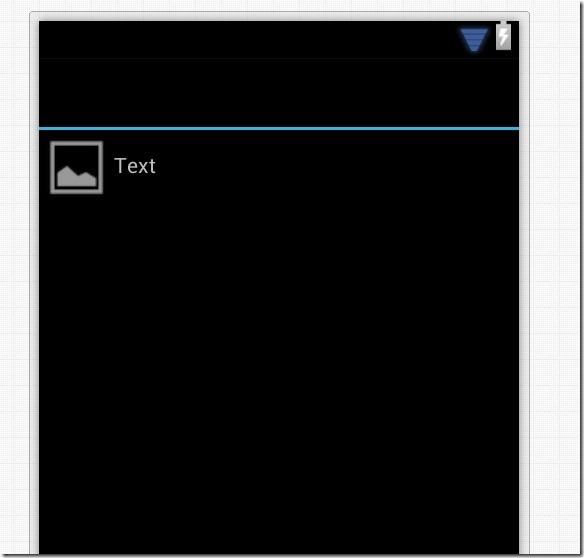
因為我們需要用到一張圖片,所以我複製一張InfoIcon.png 的圖片至 Resource > Drawable > InfoIcon.png 之下
之後給程式呼叫用再來回到主Activity :
加上btnToast2 的Click 使得Code 為:
using Android.App;
using Android.Widget;
using Android.OS;
namespace XamarinToastSamle
{
[Activity(Label = "測試吐司Sample", MainLauncher = true, Icon = "@drawable/icon")]
public class Activity1 : Activity
{
protected override void OnCreate(Bundle bundle)
{
base.OnCreate(bundle);
SetContentView(Resource.Layout.Main);
//取得btnToast1
var btnToast1 = FindViewById<Button>(Resource.Id.btnToast1);
//設定其Click 事件
btnToast1.Click += delegate
{
Toast.MakeText(this, "Hello World.Xamarin", ToastLength.Short).Show();
};
//取得btnToast2
var btnToast2 = FindViewById<Button>(Resource.Id.btnToast2);
//設定其Click事件
btnToast2.Click += delegate
{
var view = LayoutInflater.Inflate(Resource.Layout.ToastPopItem, null);
var imgMain = view.FindViewById<ImageView>(Resource.Id.imageView1);
var txt = view.FindViewById<TextView>(Resource.Id.textView1);
//載入Drawable 中的 InfoIcon.png
imgMain.SetImageResource(Resource.Drawable.InfoIcon);
txt.Text = "圖文並茂的吐司";
var toast = new Toast(this);
//設定該View
toast.View = view;
toast.Show();
};
}
}
}
結果:
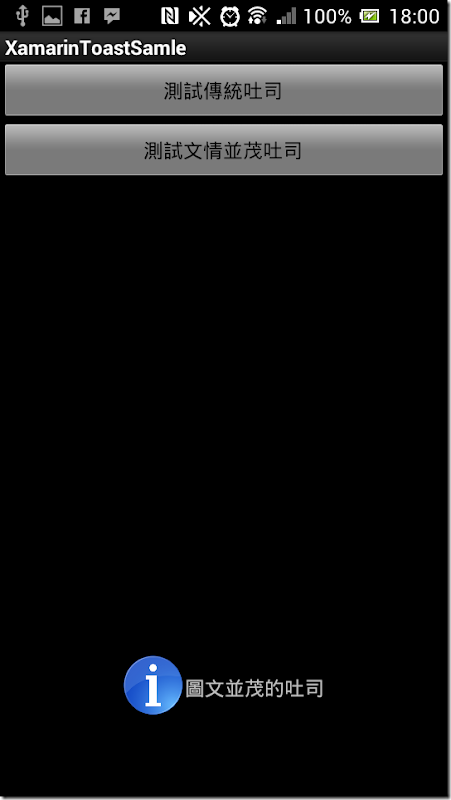
[Xamarin] 製作吐司(Toast)以及圖文並茂的Toast (转帖)的更多相关文章
- [Xamarin] 製作Options Menu、Intent 呼叫網址和Market (转帖)
Android的設計如果沒意外的話通常有三棵按鈕,BACK,HOME,OPTION (圖片來源:http://developer.android.com/design/index.html) 在OPT ...
- [Xamarin] 用Service 來製作一個Notification的時鐘 (转帖)
這篇利用來製作一個會出現在Notification的時鐘,來敘述一下 Service,在你製作的App被關閉時,可以透過Service繼續運行你想處理的部分,當然Service 也有其生命周期 接下來 ...
- Android Toast 设置到屏幕中间,自定义Toast的实现方法,及其说明
http://blog.csdn.net/wangfayinn/article/details/8065763 Android Toast用于在手机屏幕上向用户显示一条信息,一段时间后信息会自动消失. ...
- [Xamarin] 透過 intent-filter 來接管 http ,製作偽瀏覽器 (转帖)
使用Android 的朋友一定對這畫面不陌生在開啟網址的時候,或是Youtube連結的時候,因為Android 發現,你手機安裝的App有哪些可以支援這些東西的瀏覽 所以,就可以使用甚麼東西來進行開啟 ...
- CSS製作動畫效果(Transition、Animation、Transform)
CSS 2D Transforms https://www.w3schools.com/css/css3_2dtransforms.asp CSS 3D Transforms https://www. ...
- yii框架製作簡易RBAC權限管理
控制器源碼 <?php namespace app\controllers; use yii; use yii\web\Controller; class PowerController ext ...
- [Xamarin] 啟動拍照並且儲存 (转帖)
拍照對手機來說是很常用到的功能,許多App都基於在拍照上面,這篇文章主要大部分是在翻譯官方文件 (http://docs.xamarin.com/recipes/android/other_ux/ca ...
- JavaFX結合 JDBC, Servlet, Swing, Google Map及動態產生比例圖 (1):NetBeans 寫 Servlet (转帖)
JavaFX結合 JDBC, Servlet, Swing, Google Map及動態產生比例圖 (1):NetBeans 寫 Servlet 功能:這支程式的主要功能是將 javafx 與 swi ...
- JavaScript從剪切板中獲取圖片並在光標處插入
edit_content_text.addEventListener('paste', function (ev) { var clipboardData, items, item; co ...
随机推荐
- Mybatis的map用法
当Mybatis传过来的值是map类型的时候,有两种处理方法 1.将数值装入类封装起来 public interface IStudentDao { // 根据姓名和年龄查询 List<Stud ...
- 用JQ去实现一个轮播效果
前提:用JQ去实现轮播效果一步步的做一个梳理. 首先肯定是轮播的HTML和CSS样式了: <body> <div class="pic"> <div ...
- kalilinux、parrotsecos没有声音
Kali Linux系统默认状态下,root用户是无法使用声卡的,也就没有声音.启用的方法如下: (1)在终端执行命令:systemctl --user enable pulseaudio (2)在/ ...
- jmeter 各种配置修修改(后续增加)
1.修改物理内存 使用jmeter进行压力测试时遇到一段时间后报内存溢出outfmenmory错误,导致jmeter卡死了,先尝试在jmeter.bat中增加了JVM_ARGS="-Xmx ...
- .NET 匿名方法的BUG,请专家解答
匿名方法是.NET 3.5之后的一个好东东,很多人使用,但是我在最近的工作当中发现了一个问题. 请专家解答 //list里存放10个数字 List<); ; i < ; i++) { li ...
- 自己从0开始学习Unity的笔记 VIII (C#中类继承练习 II)
自己写了一个关于兵种的,因为一直在测试,到底面向对象是个什么玩意...然后就做了这个 namespace 兵种 { class Role //作为父类,构建一个普通角色属性用于继承 { protect ...
- wpf(怎么跨线程访问wpf控件)
在编写代码时,我们经常会碰到一些子线程中处理完的信息,需要通知另一个线程(我这边处理完了,该你了). 但是当我们通知WPF的UI线程时需要用到Dispatcher. 首先我们需要想好在UI控件上需要显 ...
- 浅谈TCP通讯
基于Tcp协议的Socket通讯类似于B/S架构,面向连接,但不同的是服务器端可以向客户端主动推送消息. 使用Tcp协议通讯需要具备以下几个条件: (1).建立一个套接字(Socket) (2).绑定 ...
- django系列3.3--view视图函数, render, reverse(未完待续)
1.view视图函数 urls分发之后所用到的处理函数 2.render 用于渲染页面 在views.py中常用 from django.shortcuts import render, HttpRe ...
- iOS Socket编程(一)基本概念
1.Socket的解释 Socket翻译过来中文称为套接字, 这里我找到了一段比较官方的解释Socket是什么东西: Socket是通信的基石,是支持TCP/IP协议的网络通信的基本操作单元,包含进行 ...