
IP-Address TextBox
http://www.codeproject.com/Articles/4693/IP-Address-TextBox
可以下载试用效果。个人感觉功能很强大,但输入时让人不太舒服。可以参考。
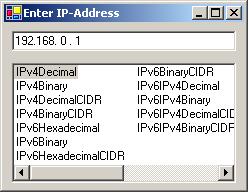
ntroduction
Problem was, I didn't find a solution to edit an IP address like in Windows network environment, for C#. Although there are some controls for masked edit fields, I wanted to write my own, and if so I wanted it to behave like the controls from MFC library or Windows network environment and maybe a little more.
Problems to solve
The heaviest problem at writing the control was to catch the inputs of backspace and delete keys, to delete characters from the input field. I tried a lot with overridden event handlers, OnKeyDown and OnKeyUp but it didn't work like it should.
Then I remembered that another developer had overridden the PreProsessMessage method to catch keyboard inputs and handle it in own ways. So I implemented an override for PreProcessMessage to handle all the backspaces and delete key presses and used OnKeyUp, OnKeyPress and OnKeyDown to handle the inputs of dots and slashes and set the input cursor to the right position.
OnKeyDown event
/// <summary>

/// Override standard KeyDownEventHandler

/// Catches Inputs of "." and "/" to jump to next positions

/// </summary>

/// <param name="e">KeyEventArgument</param>

protected override void OnKeyDown(KeyEventArgs e)

{

   //Zeichen an die richtige stelle schreiben

   int iPos = this.SelectionStart;

   char[] cText = this.Text.ToCharArray();

   if(e.Modifiers == Keys.None)

   {

       if((char.IsLetterOrDigit(Convert.ToChar(e.KeyValue)) ||

          e.KeyCode == Keys.NumPad0)//Numpad0=96 --> `

          && iPos < this.TextLength)

       {

           if(cText[iPos] == '.' || cText[iPos] == ':'

                            || cText[iPos] == '/')

               iPos+=;

           this.SelectionStart = iPos;

           if(this.OverWriteMode)

           {

               if(cText[iPos] != ' ')

               this.SelectionLength = ;

           }

           else

           {

                if(iPos < this.TextLength)

                   if(cText[iPos] == ' ')

                       this.SelectionLength = ;

           }

       }

   }

   base.OnKeyDown (e);

}
OnKeyUp event
/// <summary>

/// Override standard KeyUpEventHandler

/// Catches Inputs of "." and "/" to jump to next positions

/// </summary>

/// <param name="e">KeyEventArgument</param>

protected override void OnKeyUp(KeyEventArgs e)

{

     //Zeichen an die richtige stelle schreiben

     int iPos = this.SelectionStart;

     char[] cText = this.Text.ToCharArray();

     //Cursor hintern Punkt setzen

     if((char.IsLetterOrDigit(Convert.ToChar(e.KeyValue)) ||

             e.KeyCode == Keys.NumPad0)//Numpad0=96 --> `

               && iPos < this.TextLength)

     {

          if(cText[iPos] == '.' || cText[iPos] == ':'

                               || cText[iPos] == '/')

            iPos+=;

          this.SelectionStart = iPos;

     }

     base.OnKeyUp (e);

}
OnKeyPress event
/// <summary>

/// Override standard KeyPressEventHandler

/// Catches Inputs of "." and "/" to jump to next positions

/// </summary>

/// <param name="e">KeyPressEventArgument</param>

protected override void OnKeyPress(KeyPressEventArgs e)

{

    //Zulassige Zeichen

    if(char.IsControl(e.KeyChar) ||

         m_regexValidNumbers.IsMatch(e.KeyChar.ToString()))

    {

         e.Handled = false;

    }

    else

    {

         switch(e.KeyChar)

         {

              case '/':

                 this.JumpToSlash();

                  break;

              case '.':

                  this.JumpToNextDot();

                  break;

              default:

                  break;

         }

         e.Handled = true;

    }

    base.OnKeyPress(e);

}
PreProcessMessage
/// <summary>

/// Override standard PreProcessMessage

/// Catches Inputs of BackSpace and Deletes

/// </summary>

/// <param name="msg">PreProcessMessage</param>

public override bool PreProcessMessage(ref Message msg)

{

    if (msg.Msg == WM_KEYDOWN)

    {

        Keys keyData = ((Keys) (int) msg.WParam) |ModifierKeys;

        Keys keyCode = ((Keys) (int) msg.WParam);

        int iPos = this.SelectionStart;

        char[] cText = this.Text.ToCharArray();

        switch(keyCode)

        {

            case Keys.Delete:

                if(iPos < this.TextLength)

                {

                    while(cText[iPos] == '.' ||

                       cText[iPos] == ':' ||

                       cText[iPos] == '/')

                    {

                        if((iPos+=) >= cText.Length)

                            break;

                    }

                    if(iPos < this.TextLength)

                    {

                        base.Text = this.Text.Substring(,iPos) +

                                " " + this.Text.Substring(iPos+);

                        this.SelectionStart = iPos+;

                    }

                    else

                        this.SelectionStart = this.TextLength-;

                }

                   return true;

            case Keys.Back:

                if(iPos > )

                {

                    while(cText[iPos-] == '.' ||

                        cText[iPos-] == ':' ||

                        cText[iPos-] == '/')

                    {

                        if((iPos-=)<=)

                            break;

                    }

                    if(iPos>)

                    {

                        base.Text = this.Text.Substring(,iPos-)

                                    + " " + this.Text.Substring(iPos);

                        this.SelectionStart = iPos-;

                    }

                    else

                        this.SelectionStart = ;

                }

                return true;

            default:

                break;

        }

    }

    return base.PreProcessMessage (ref msg);

}
Another problem was the input of numbers via the numpad. Especially the 0 key was not recognized, because it's char value is neither a letter nor a digit, so I had to ask for Keys.NumPad0 hard coded.
if((char.IsLetterOrDigit(Convert.ToChar(e.KeyValue)) ||

    e.KeyCode == Keys.NumPad0)//Numpad0=96 --> `

    iPos < this.TextLength)

{[...]}
At least...
...I have a control that looks like a TextBox with dots, where I can input numbers, type dots to jump to next IP parts, and get its contents via the Text property.
Using the code
Include the IPAddressTextBox.cs in your project. Set a TextBox in your form or user control and clear its contents. Change the type of this TextBox from System.Windows.Forms.TextBox to rj2_cs.IPAddressTextBox in code editor. Then you can change the properties of the IP textbox like you want.
IP-Address TextBox的更多相关文章
- ERROR 2003 (HY000): Can't connect to MySQL server on 'ip address' (111)的处理办法
远程连接mysql数据库时可以使用以下指令 mysql -h 192.168.1.104 -u root -p 如果是初次安装mysql,需要将所有/etc/mysql/内的所有配置文件的bind-a ...
- oracle 11g RAC安装节点二执行结果错误CRS-5005: IP Address: 192.168.1.24 is already in use in the network
[root@testdb11b ~]# /u01/app/oraInventory/orainstRoot.sh Changing permissions of /u01/app/oraInvento ...
- Assign an Elastic IP Address to Your Instance
By default, an instance in a nondefault VPC is not assigned a public IP address, and is private.You ...
- Ubuntu setup Static IP Address
Change Ubuntu Server from DHCP to a Static IP Address If the Ubuntu Server installer has set your se ...
- How to configure a static IP address on CentOS 7(CentOS7静态IP地址设置)
Question: On CentOS 7, I want to switch from DHCP to static IP address configuration with one of my ...
- Azure China (8) 使用Azure PowerShell创建虚拟机,并设置固定Virtual IP Address和Private IP
<Windows Azure Platform 系列文章目录> 本文介绍的是由世纪互联运维的Windows Azure China. 相比于Global Azure (http://www ...
- Windows Azure Cloud Service (44) 将Cloud Service加入Virtual Network Subnet,并固定Virtual IP Address(VIP)
<Windows Azure Platform 系列文章目录> 在之前的文章中,笔者已经详细介绍了如何将Virtual Machine加入Virtual Network,并且绑定固定的Pr ...
- [New Portal]Windows Azure Virtual Machine (19) 关闭Azure Virtual Machine与VIP Address,Internal IP Address的关系(1)
<Windows Azure Platform 系列文章目录> 默认情况下,通过Azure Management Portal创建的Public IP和Private IP都是随机分配的. ...
- [New Portal]Windows Azure Virtual Machine (20) 关闭Azure Virtual Machine与VIP Address,Internal IP Address的关系(2)
<Windows Azure Platform 系列文章目录> 默认情况下,通过Azure Management Portal创建的Public IP和Private IP都是随机分配的. ...
- Windows Azure Virtual Machine (28) 使用Azure实例级别IP,Instance-Level Public IP Address (PIP)
<Windows Azure Platform 系列文章目录> 本文介绍的是国内由世纪互联运维的Azure China 熟悉Azure平台的读者都知道,我们在使用Azure Virtual ...
随机推荐
- 1025关于explain的补充1
https://segmentfault.com/q/1010000004195469 我的困惑 http://www.cnblogs.com/BeginMan/p/3754322.html 可以指定 ...
- oracle递归查询树的SQL语句
来自互联网 SELECT * FROM a_ParkingLot AWHERE A.REGIONID IN( SELECT r.ID FROM a_region r START WITH ...
- js 对象数组根据对象中的属性排序
function createComparisonFunction(propertyName){ return function(object1,object2){ var value1 = obje ...
- mybatis和ibatis控制台打印sql语句方法
#将ibatis log4j运行级别调到DEBUG可以在控制台打印出ibatis运行的sql语句 log4j.rootLogger=debug,stdout,logfile### 把日志信息输出到控制 ...
- [转]Java中怎样判断一个字符串能否转成数字
原文地址:http://blog.sina.com.cn/s/blog_7bac470701014mjf.html 判断字符串是否为数字 //1.正则表达式 public static boolea ...
- Android 横屏不让输入法全屏显示
记录学习之用 查找资料参考记录的 在源码里进行修改. frameworks/base/core/Java/Android/inputmethodservice/InputMethodService. ...
- mysql查询所有记录,并去掉重复的记录
select * from tablename group by name;如果是select * from tablename group by name,age;那么查询的是满足name和age都 ...
- Android Studio构建系统基础
基础知识 项目创建成功后会自动下载Gradle,这个过程特别慢,建议FQ.下载的Gradle在Windows平台会默认在 C:\Documents and Settings\<用户名>.g ...
- mac下搭建java开发环境:eclipse+tomcat+maven
一.安装eclipse 直接下载 二.安装JDK 下载mac版专用的jdk1.7,地址如下:http://jdk7.java.net/macportpreview/, 确认java使用的版本:开一个终 ...
- js 通过身份证识别生日、年龄、性别
<script>function IdCard(UUserCard,num){ if(num==1){ //获取出生日期 birth=UUserCard.sub ...