
Salesforce LWC学习(九) Quick Action in LWC
我们在lightning开发中,quick action是一个常用的功能,很可惜的是,lwc目前还不支持单独的custom quick action操作,只能嵌套在aura中使用才能发挥作用。
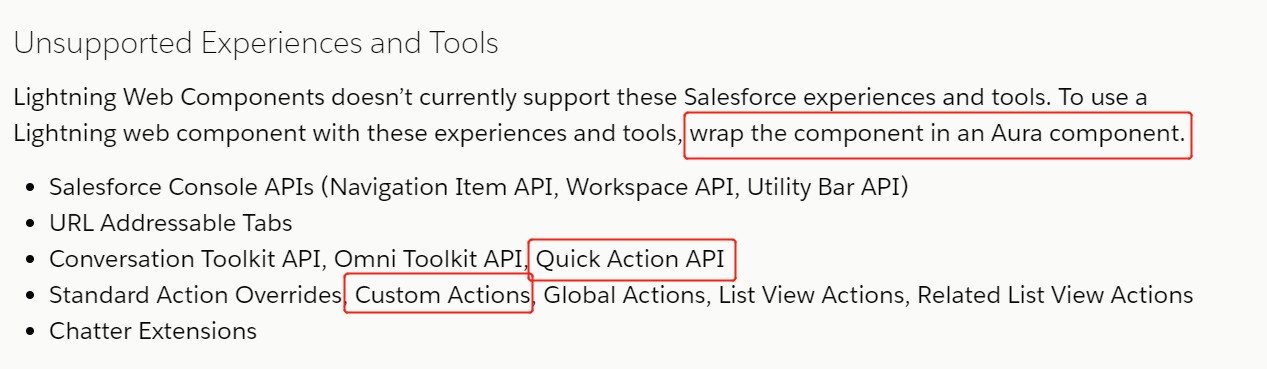
官方也给我们提供了如何进行嵌套,简单代码嵌套如下所示:
<aura:component implements="force:lightningQuickActionWithoutHeader,force:hasRecordId,flexipage:availableForRecordHome">

    <!--This is a lwc component-->

    <c:testComponentForLwc>

</aura:component>
我们只需要声明一个aura的components然后实现force:lightningQuickAction/force:lightningQuickActionWithoutHeader并且使用c:引入相关的lwc即可。这里可能会提到两个问题:
- 一个对象可能有多个quick action对应多个lwc component,是否需要对应多个aura component还是一个就可以搞定?
- lwc不支持quick action所以没法关闭或者调用aura中关闭quick action的方法,那么lwc中如何去关闭quick action弹出的modal?
- lwc quick action更新某个字段以后没法及时刷新父的详情页面,如何去解决?
针对这两个问题,我们一个一个进行解决。
针对第一个问题,我们使用lightning:quickActionAPI 组件,然后调用其getSelectedActions方法获取Promise然后解析即可实现。当然此组件还有很多经常用到的好用的功能,感兴趣的小伙伴自己读一下:https://developer.salesforce.com/docs/component-library/bundle/lightning:quickActionAPI/documentation
针对第二/三个问题,尽管lwc没法获取或者关闭quick action,但是aura component是可以的,我们只需要在aura中进行事件监听,然后在Lwc component中注册事件即可实现。因为aura的事件监听处理可以捕捉到lwc的事件注册。 OK,那我们开始直接上代码:
quickActionService.cmp:引入lightning:quickActionAPI从而可以获得当前选择的quick action name,然后根据quick action name去决定显示哪个lwc组件,并且对testLookUpFowLwc组件进行了两个事件监听处理,分别是refreshview以及closemodal。
<aura:component implements="force:lightningQuickActionWithoutHeader,force:hasRecordId,flexipage:availableForRecordHome">

    <aura:attribute name="quickActionName" type="String"/>

    <lightning:quickActionAPI aura:id="quickActionAPI" />

    <aura:handler name="init" value="this" action="{!c.doInit}"/>

    <aura:if isTrue="{!v.quickActionName == 'Account.test_another'}">

        <c:testLookUpForLwc onrefreshview="{c.refreshView}" onclosemodal="{!c.closeModal}"/>

    </aura:if>

    <aura:if isTrue="{!v.quickActionName == 'Account.test_action'}">

        show area with test action

    </aura:if>

</aura:component>
quickActionServiceController.js:对getSelectedActions进行解析,对事件调用force:event事件进行refresh view以及close action。
({

    doInit : function(component, event, helper) {

        var actionAPI = component.find("quickActionAPI");

        actionAPI.getSelectedActions().then(function(result){

            console.log(JSON.stringify(result));

            if(result) {

                console.log(result.actions[0]);

                var actionName = result.actions[0].actionName;

                component.set('v.quickActionName',actionName);

            }

        }).catch(function(e){

        });

    },

    refreshView : function(component,event,helper) {

        $A.get('e.force:refreshView').fire();

    },

    closeModal : function(component,event,helper) {

        $A.get("e.force:closeQuickAction").fire()

    }

})
testLookUpForLwc.html:展示button,点击button按钮执行handleClose
<template>

    <lightning-button type="button" label="submit and close" variant="brand" onclick={handleClose}></lightning-button>

</template>
testLookUpForLwc.js:方法注册refreshview以及closemodal事件,从而让父去监听以及执行事件。
import { LightningElement,track } from 'lwc';

export default class TestLookUpForLwc extends LightningElement {

    handleClose(event) {

        this.dispatchEvent(new CustomEvent('refreshview'));

        this.dispatchEvent(new CustomEvent('closemodal'));

    }

}
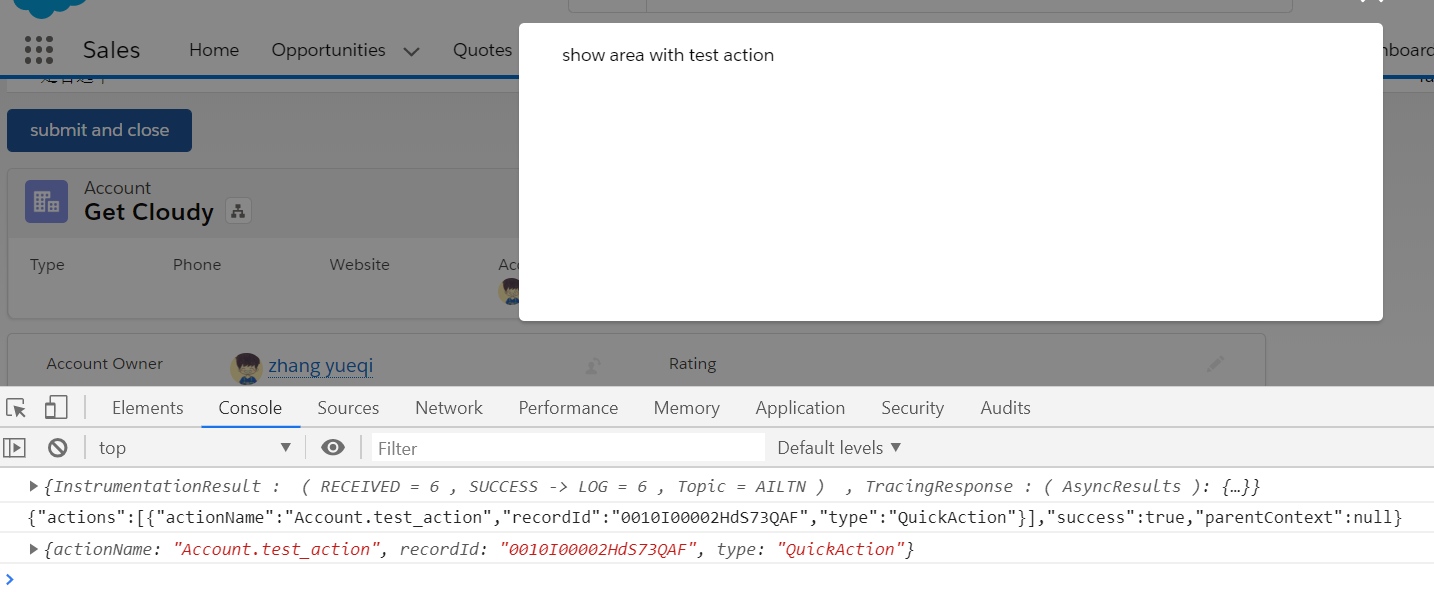
显示效果:我们在account上创建两个quick action,分别是test_action以及test_another,分别绑定了这个aura,当我们点击以后test_action以后,打印出来的日志结果。
总结:篇中主要讲述lwc如何配合aura实现quick action以及相关的refresh / close 的功能,针对refresh / close不止针对quick action,针对其他的lwc的设计同样有效。篇中有错误地方欢迎指出,有问题欢迎留言。
Salesforce LWC学习(九) Quick Action in LWC的更多相关文章
- Salesforce LWC学习(三十九) lwc下quick action的recordId的问题和解决方案
本篇参考: https://developer.salesforce.com/docs/component-library/bundle/force:hasRecordId/documentation ...
- Salesforce LWC学习(三十一) Quick Action适配
本篇参考:https://www.lightningdesignsystem.com/components/modals/ 随着salesforce lwc的优化,越来越多的项目从aura转到了lwc ...
- Salesforce LWC学习(三十六) Quick Action 支持选择 LWC了
本篇参考: https://developer.salesforce.com/docs/component-library/documentation/en/lwc/lwc.use_quick_act ...
- Salesforce LWC学习(二十九) getRecordNotifyChange(LDS拓展增强篇)
本篇参考: https://developer.salesforce.com/docs/component-library/documentation/en/lwc/data_ui_api https ...
- Salesforce LWC学习(四) 父子component交互 / component声明周期管理 / 事件处理
我们在上篇介绍了 @track / @api的区别.在父子 component中,针对api类型的变量,如果声明以后就只允许在parent修改,son component修改便会导致报错. sonIt ...
- Salesforce LWC学习(十八) datatable展示 image
本篇参看: https://developer.salesforce.com/docs/component-library/bundle/lightning-datatable/documentati ...
- Salesforce LWC学习(三十) lwc superbadge项目实现
本篇参考:https://trailhead.salesforce.com/content/learn/superbadges/superbadge_lwc_specialist 我们做lwc的学习时 ...
- Salesforce LWC学习(三) import & export / api & track
我们使用vs code创建lwc 时,文件会默认生成包含 template作为头的html文件,包含了 import LightningElement的 js文件以及对应的.js-meta.xml文件 ...
- Salesforce LWC学习(十七) 前端知识之 onclick & onblur & onmousedown
在Salesforce LWC学习(八) Look Up组件实现篇中,我们实现了公用的lookup组件,使用的过程中,会发现当我们输入内容以后,搜索出来的列表便无法被清空. 针对此种情况我们打算优化一 ...
随机推荐
- 三星Q470c Logo界面无限掉电重启,变砖后的挽救过程
背景 三星笔记本的部分型号如:NP530 Q470等 安装win8后再次重装系统(我弄了个Ubuntu18)会导致无法进入BIOS菜单页面的问题.启动显示logo页面后,能够听到明显啪的一声(硬盘掉电 ...
- Cannot debug in IntellijIdea on Linux
OS: Deepin LinuxIDE: Intellij IdeaProject: SpringBoot based maven project Issue: cannot debug in Ide ...
- NLP学习(2)----文本分类模型
实战:https://github.com/jiangxinyang227/NLP-Project 一.简介: 1.传统的文本分类方法:[人工特征工程+浅层分类模型] (1)文本预处理: ①(中文) ...
- javascript如何处理字符串中的\u
问题: 字符串在页面显示的时候,有\u,如:Tesla\u8fc1\u79fb ,想要显示它的原文 let a = 'Tesla\u8fc1\u79fb' //显示 Tesla迁移 alert( un ...
- Oracle自动化安装脚本-part01-亲试ok
#!/bin/bash node_num=$1 base_config=./network.conf 网络配置文件 software_config=./software.conf 软件包 ...
- php文件更新后不生效?亲测有效!
1,问题描述 一台windows Server2008 服务器上运行了iis7,其中存在php5.3和php5.5引擎的网页服务. 但实际使用中发现,修改php文件后,访问该文件的结果经常不能实时刷新 ...
- 7月新的开始 - Axure学习01 - 元件库、元件交互样式设置
解释: Axure 属于原型制作里的霸道总裁 1.原型:原型模拟真实产品的功能与设计.用于在初期阶段测试产品的可行性与效果.来节省开发成本与周期. 2.线框图:在初期实现对产品的了解.实现产品的基本结 ...
- swoole组件----mysql查询,插入数据
注意!任何swoole函数都应该包含在go(function(){}) 经典查询方法query() go(function (){ $swoole_mysql = new Swoole\Corouti ...
- Java8-Synchronized-No.02
import java.util.concurrent.ExecutorService; import java.util.concurrent.Executors; import java.util ...
- SEERC 2018 B. Broken Watch (CDQ分治)
题目链接:http://codeforces.com/gym/101964/problem/B 题意:q 种操作,①在(x,y)处加一个点,②加一个矩阵{(x1,y1),(x2,y2)},问每次操作后 ...