
Flutter AspectRatio、Card 卡片组件
Flutter AspectRatio 组件
AspectRatio 的作用是根据设置调整子元素 child 的宽高比。
AspectRatio 首先会在布局限制条件允许的范围内尽可能的扩展,widget 的高度是由宽 度和比率决定的,类似于 BoxFit 中的 contain,按照固定比率去尽量占满区域。
如果在满足所有限制条件过后无法找到一个可行的尺寸,AspectRatio 最终将会去优先 适应布局限制条件,而忽略所设置的比率。
|
属性 |
说明 |
|
aspectRatio |
宽高比,最终可能不会根据这个值去布局, 具体则要看综合因素,外层是否允许按照这 种比率进行布局,这只是一个参考值 |
|
child |
子组件 |
import 'package:flutter/material.dart';

import 'res/listData.dart';

void main() => runApp(MyApp());

class MyApp extends StatelessWidget {

  @override

  Widget build(BuildContext context) {

    // TODO: implement build

    return MaterialApp(

        home: Scaffold(

        appBar: AppBar(title: Text('FlutterDemo')),

        body: LayoutDemo(),

      ));

  }

}

class LayoutDemo extends StatelessWidget {

 @override

  Widget build(BuildContext context) {

    // TODO: implement build

    return Container(

      width: 200,

      child: AspectRatio(

        aspectRatio: 2.0/1.0,

        child: Container(

          color: Colors.red,

        ),

      ),

    );

  }

}
import 'package:flutter/material.dart';

import 'res/listData.dart';

void main() => runApp(MyApp());

class MyApp extends StatelessWidget {

  @override

  Widget build(BuildContext context) {

    // TODO: implement build

    return MaterialApp(

        home: Scaffold(

        appBar: AppBar(title: Text('FlutterDemo')),

        body: LayoutDemo(),

      ));

  }

}

class LayoutDemo extends StatelessWidget {

 @override

  Widget build(BuildContext context) {

    // TODO: implement build

    return AspectRatio(

        aspectRatio: 3.0/1.0,

        child: Container(

          color: Colors.red,

        ),

    );

  }

}
Flutter Card 组件
Card 是卡片组件块,内容可以由大多数类型的 Widget 构成,Card 具有圆角和阴影,这让它 看起来有立体感。
|
属性 |
说明 |
|
margin |
外边距 |
|
child |
子组件 |
|
Shape |
Card 的阴影效果,默认的阴影效果为圆角的 长方形边。 |
import 'package:flutter/material.dart';

import 'package:flutter/painting.dart';

import 'res/listData.dart';

void main() => runApp(MyApp());

class MyApp extends StatelessWidget {

  @override

  Widget build(BuildContext context) {

    // TODO: implement build

    return MaterialApp(

        home: Scaffold(

        appBar: AppBar(title: Text('FlutterDemo')),

        body: LayoutDemo(),

      ));

  }

}

class LayoutDemo extends StatelessWidget {

 @override

  Widget build(BuildContext context) {

    // TODO: implement build

    return ListView(

      children: <Widget>[

          Card(

            margin: EdgeInsets.all(10),

            child: Column(

              children: <Widget>[

                ListTile(

                  title:Text("张三",style: TextStyle(fontSize: 28)) ,

                  subtitle: Text("高级工程师"),

                ),

                 ListTile(

                  title:Text("电话:xxxxx") ,

                ),

                ListTile(

                  title:Text("地址:xxxxxx") ,

                )

              ],

            ),

          ),Card(

            margin: EdgeInsets.all(10),

            child: Column(

              children: <Widget>[

                ListTile(

                  title:Text("李四",style: TextStyle(fontSize: 28)) ,

                  subtitle: Text("高级工程师"),

                ),

                 ListTile(

                  title:Text("电话:xxxxx") ,

                ),

                ListTile(

                  title:Text("地址:xxxxxx") ,

                )

              ],

            ),

          ),

          Card(

            margin: EdgeInsets.all(10),

            child: Column(

              children: <Widget>[

                ListTile(

                  title:Text("王五",style: TextStyle(fontSize: 28)) ,

                  subtitle: Text("高级工程师"),

                ),

                 ListTile(

                  title:Text("电话:xxxxx") ,

                ),

                ListTile(

                  title:Text("地址:xxxxxx") ,

                )

              ],

            ),

          )

      ],

    );

  }

}
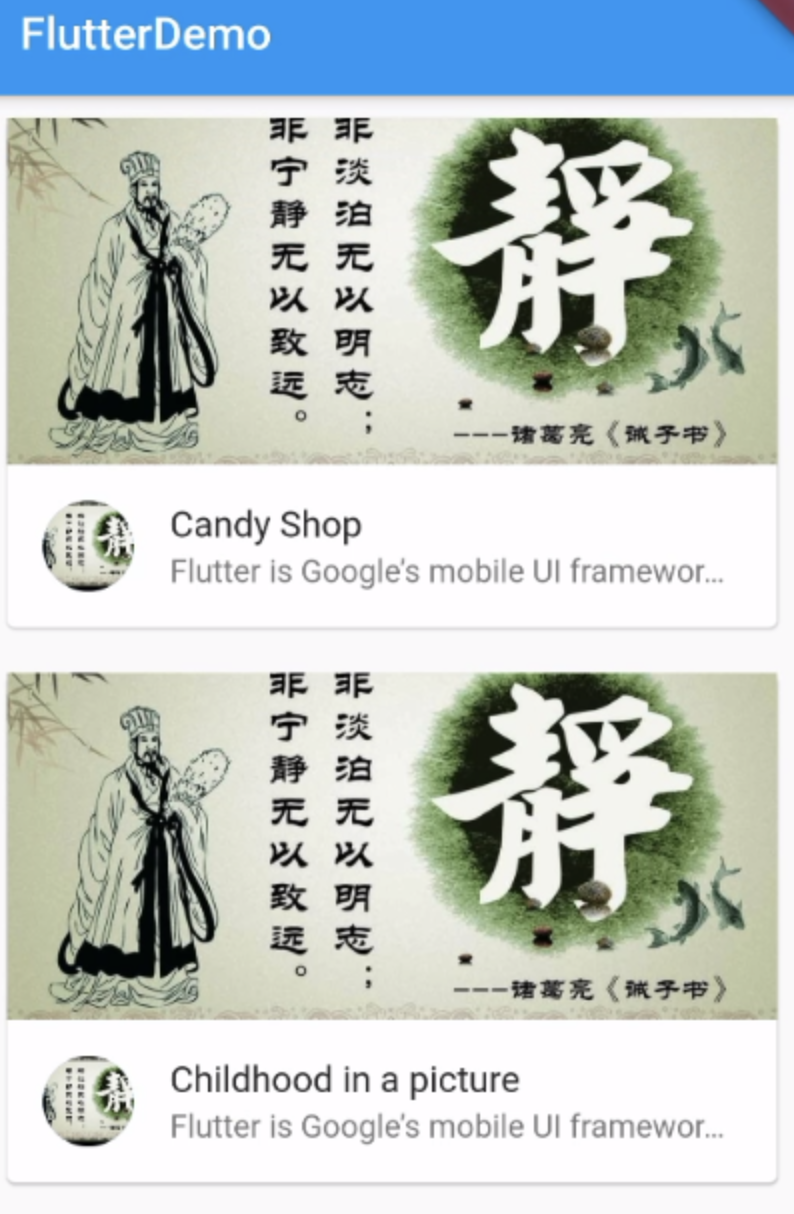
demo实现一个图文列表布局
import 'package:flutter/material.dart';

import 'res/listData.dart';

void main() => runApp(MyApp());

class MyApp extends StatelessWidget {

  @override

  Widget build(BuildContext context) {

    // TODO: implement build

    return MaterialApp(

        home: Scaffold(

        appBar: AppBar(title: Text('FlutterDemo')),

        body: LayoutDemo(),

      ));

  }

}

class LayoutDemo extends StatelessWidget {

 @override

  Widget build(BuildContext context) {

    // TODO: implement build

    return ListView(

      children: listData.map((value){

        return Card(

          margin: EdgeInsets.all(10),

          child:Column(

              children: <Widget>[

                  AspectRatio(

                    aspectRatio: 20/9,

                    child: Image.network(value["imageUrl"],fit: BoxFit.cover,),

                  ),

                  ListTile(

                    leading: CircleAvatar(

                      backgroundImage:NetworkImage(value["imageUrl"])

                    ),

                    title: Text(value["title"]),

                    subtitle: Text(value["description"],maxLines: 1,overflow: TextOverflow.ellipsis),

                  )

              ],

          ),

        );

      }).toList(),

    );

  }

}
listdata.drat
  List listData=[

      {

          "title": 'Candy Shop',

          "author": 'Mohamed Chahin',

          "imageUrl": 'http://img.redocn.com/sheji/20141219/zhongguofengdaodeliyizhanbanzhijing_3744115.jpg',

          "description": 'Flutter is Google’s mobile UI framework for crafting high-quality native experiences on iOS and Android in record time. Flutter works with existing',

      },

       {

          "title": 'Childhood in a picture',

          "author": 'Google',

          "imageUrl": 'http://img.redocn.com/sheji/20141219/zhongguofengdaodeliyizhanbanzhijing_3744115.jpg',

          "description": 'Flutter is Google’s mobile UI framework for crafting high-quality native experiences on iOS and Android in record time. Flutter works with existing',

      },

      {

          "title": 'Alibaba Shop',

          "author": 'Alibaba',

          "imageUrl": 'http://img.redocn.com/sheji/20141219/zhongguofengdaodeliyizhanbanzhijing_3744115.jpg',

          "description": 'Dart is a client-optimized language for fast apps on any platform... Dart is a client-optimized language for fast apps on any platform Optimizedfor',

      },

      {

          "title": 'Candy Shop',

          "author": 'Mohamed Chahin',

          "imageUrl": 'http://img.redocn.com/sheji/20141219/zhongguofengdaodeliyizhanbanzhijing_3744115.jpg',

          "description": 'Dart is a client-optimized language for fast apps on any platform... Dart is a client-optimized language for fast apps on any platform Optimizedfor',

      },

       {

          "title": 'Tornado',

          "author": 'Mohamed Chahin',

          "imageUrl": 'http://img.redocn.com/sheji/20141219/zhongguofengdaodeliyizhanbanzhijing_3744115.jpg',

          "description": 'Flutter is Google’s mobile UI framework for crafting high-quality native experiences on iOS and Android in record time. Flutter works with existing',

      },

      {

          "title": 'Undo',

          "author": 'Mohamed Chahin',

          "imageUrl": 'http://img.redocn.com/sheji/20141219/zhongguofengdaodeliyizhanbanzhijing_3744115.jpg',

          "description": 'Flutter is Google’s mobile UI framework for crafting high-quality native experiences on iOS and Android in record time. Flutter works with existing',

      },

      {

          "title": 'white-dragon',

          "author": 'Mohamed Chahin',

          "imageUrl": 'http://img.redocn.com/sheji/20141219/zhongguofengdaodeliyizhanbanzhijing_3744115.jpg',

          "description": 'Dart is a client-optimized language for fast apps on any platform... Dart is a client-optimized language for fast apps on any platform Optimizedfor',

      }

  ];
Flutter AspectRatio、Card 卡片组件的更多相关文章
- Flutter学习笔记(21)--TextField文本框组件和Card卡片组件
如需转载,请注明出处:Flutter学习笔记(21)--TextField文本框组件和Card卡片组件 今天来学习下TextField文本框组件和Card卡片组件. 只要是应用程序就少不了交互,基本上 ...
- AspectRatio图片的宽高比、Card 卡片组件
一.AspectRatio 组件 AspectRatio 的作用是根据设置调整子元素 child 的宽高比. AspectRatio 首先会在布局限制条件允许的范围内尽可能的扩展,widget 的高度 ...
- 12Flutter页面布局 AspectRatio和Cart卡片组件
/* Flutter AspectRatio.Cart卡片组件: AspectRatio的作用是根据设置调整子元素child的宽高比. AspectRatio首先会在布局限制条件允许的范围内尽可能的扩 ...
- Ionic 2 中的创建一个闪视卡片组件
闪视卡片是记忆信息的重要工具,它的使用可以追溯到19世纪.我们将要创建一个很酷的短暂动画来实现它.看起来像是这个样子的: 闪视卡片示例 Ionic 2 实例开发 新增章节将为你介绍如何在Ionic 2 ...
- flutter中的按钮组件
Flutter 里有很多的 Button 组件很多,常见的按钮组件有:RaisedButton.FlatButton.IconButton.OutlineButton.ButtonBar.Floati ...
- flutter中的列表组件
列表布局是我们项目开发中最常用的一种布局方式.Flutter 中我们可以通过 ListView 来定义列表项,支持垂直和水平方向展示.通过一个属性就可以控制列表的显示方向.列表有以下分类: 垂直列表 ...
- 【Flutter学习】基本组件之基本按钮组件
一,概述 由于Flutter是跨平台的,所以有适用于Android和iOS的两种风格的组件.一套是Google极力推崇的Material,一套是iOS的Cupertino风格的组件.无论哪种风格,都是 ...
- Flutter 中那么多组件,难道要都学一遍?
在 Flutter 中一切皆是 组件,仅仅 Widget 的子类和间接子类就有 350 多个,整理的 Flutter组件继承关系图 可以帮助大家更好的理解学习 Flutter,回归正题,如此多的组件到 ...
- flutter Card卡片列表组件
一个 Material Design 卡片.拥有一个圆角和阴影 import 'package:flutter/material.dart'; import './model/post.dart'; ...
随机推荐
- node-mysql-promise 操作
使用node操作数据库做顺序操作很麻烦,为了保证执行顺序需要使用promise. 可以直接封装,也可以使用封装好的,比如node-mysql-promise 操作文档见https://www.npmj ...
- 导出到CSV文件
一.手工导出导出 1.winform void DataGridViewToExcel(DataGridView dataGridView1) { SaveFileDialog saveFileDia ...
- 谈谈javascript中的prototype与继承
谈谈javascript中的prototype与继承 今天想谈谈javascript中的prototype. 通常来说,javascript中的对象就是一个指向prototype的指针和一个自身的属性 ...
- attention speech recognition
Attention:是一种权重向量或矩阵,其往往用在Encoder-Decoder架构中,其权重越大,表示的context对输出越重要.计算方式有很多变种,但是核心都是通过神经网络学习而得到对应的权重 ...
- CF1106F Lunar New Year and a Recursive Sequence——矩阵快速幂&&bsgs
题意 设 $$f_i = \left\{\begin{matrix}1 , \ \ \ \ \ \ \ \ \ \ \ \ \ \ \ \ \ \ \ \ \ \ \ \ \ i < k\\ ...
- Android平台5+ API提前生效,支持在plusready事件前调用
ios上plus是一直存在的,不涉及等ready事件.但安卓上还是需要等plus ready.在安卓环境中,通常情况下需要html页面解析完成后才会让5+ API生效,安卓的执行的顺序为: 加载htm ...
- learning java java.time相关类
var clock = Clock.systemUTC(); System.out.println(clock.instant()); System.out.println(clock.millis( ...
- 1-STM32+W5500+GPRS物联网开发基础篇-工控板简介
最近这些日子都在忙活STM+W5500+GPRS的板子,所以前面的那块板子的教程耽搁了些时间. 这次的板子和上一版相比更贴近了使用,是因为有朋友督促我要做一块直接可以在工厂使用的板子,所以设计了这一块 ...
- Linux中三种SCSI target的介绍之SCST
版权声明:本文为博主原创文章,遵循CC 4.0 BY-SA版权协议,转载请附上原文出处链接和本声明. 本文链接:https://blog.csdn.net/scaleqiao/article/deta ...
- Processing 中玩增强现实 Argument Reality
其实2009年Processing就能做AR了,只是我不知道而已~ 需要以下几个东西: 1.JMyron 2.GSVideo 3.nyar4psg 4.Picking 5.OBJLoader 或者大伙 ...