
16.翻译系列:EF 6 Code -First中使用存储过程【EF 6 Code-First系列】
EF 6 Code-First系列文章目录:
- 1 翻译系列:什么是Code First(EF 6 Code First 系列)
- 2.翻译系列:为EF Code-First设置开发环境(EF 6 Code-First系列)
- 3.翻译系列:EF Code-First 示例(EF 6 Code-First系列)
- 4.翻译系列:EF 6 Code-First默认约定(EF 6 Code-First系列)
- 5.翻译系列:EF 6中数据库的初始化(EF 6 Code-First 系列)
- 6.翻译系列:EF 6 Code-First中数据库初始化策略(EF 6 Code-First系列
- 7.翻译系列:EF 6中的继承策略(EF 6 Code-First 系列)
- 8.翻译系列: EF 6中配置领域类(EF 6 Code-First 系列)
- 9.翻译系列:EF 6以及EF Core中的数据注解特性(EF 6 Code-First系列)
- 9.1 翻译系列:数据注解特性之----Table【EF 6 Code-First 系列】
- 9.2 翻译系列:数据注解特性之---Column【EF 6 Code First系列】
- 9.3 翻译系列:数据注解特性之Key【EF 6 Code-First 系列】
- 9.4 翻译系列:EF 6以及 EF Core中的NotMapped特性(EF 6 Code-First系列)
- 9.5 翻译系列:数据注解之ForeignKey特性【EF 6 Code-First系列】
- 9.6 翻译系列:数据注解之Index特性【EF 6 Code-First系列】
- 9.7 翻译系列:EF数据注解特性之--InverseProperty【EF 6 Code-First系列】
- 9.8 翻译系列:数据注解特性之--Required 【EF 6 Code-First系列】
- 9.9 翻译系列:数据注解特性之--MaxLength 【EF 6 Code-First系列】
- 9.10 翻译系列:EF数据注解特性之StringLength【EF 6 Code-First系列】
- 9.11 翻译系列:数据注解特性之--Timestamp【EF 6 Code-First系列】
- 9.12 翻译系列:数据注解特性之ConcurrencyCheck【EF 6 Code-First系列】
- 10.翻译系列:EF 6中的Fluent API配置【EF 6 Code-First系列】
- 10.1.翻译系列:EF 6中的实体映射【EF 6 Code-First系列】
- 10.2.翻译系列:使用Fluent API进行属性映射【EF 6 Code-First】
- 11.翻译系列:在EF 6中配置一对零或者一对一的关系【EF 6 Code-First系列】
- 12.翻译系列:EF 6 中配置一对多的关系【EF 6 Code-First系列】
- 13.翻译系列:Code-First方式配置多对多关系【EF 6 Code-First系列】
- 14.翻译系列:从已经存在的数据库中生成上下文类和实体类【EF 6 Code-First系列】
- 15.翻译系列:EF 6中的级联删除【EF 6 Code-First 系列】
- 16.翻译系列:EF 6 Code -First中使用存储过程【EF 6 Code-First系列】
- 17.翻译系列:将Fluent API的配置迁移到单独的类中【EF 6 Code-First系列】
- 18.翻译系列:EF 6 Code-First 中的Seed Data(种子数据或原始测试数据)【EF 6 Code-First系列】
- 19.翻译系列:EF 6中定义自定义的约定【EF 6 Code-First约定】
- 20.翻译系列:Code-First中的数据库迁移技术【EF 6 Code-First系列】
- 20.1翻译系列:EF 6中自动数据迁移技术【EF 6 Code-First系列】
- 20.2.翻译系列:EF 6中基于代码的数据库迁移技术【EF 6 Code-First系列】
- 21.翻译系列:Entity Framework 6 Power Tools【EF 6 Code-First系列】
当SaveChanges方法被调用的时候,EF 6 可以用来创建并使用增删改存储过程。
我们来为下面的Student实体,创建增删改存储过程。
class Student

{

    public int StudentId { get; set; }

    public string StudentName { get; set; }

    public DateTime DoB { get; set; }

}
使用MapToStoredProcedures()方法,为实体配置默认的存储过程。
public class SchoolContext: DbContext

{

    protected override void OnModelCreating(DbModelBuilder modelBuilder)

    {

        modelBuilder.Entity<Student>()

                    .MapToStoredProcedures();

    }

    public DbSet<Student> Students { get; set; }

}
EF API将会为Student实体创建Student_Insert, Student_Update 和Student_Delete存储过程。
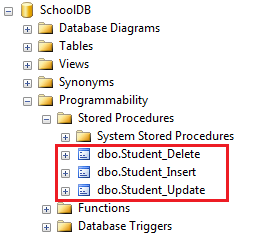
Student_Insert和Student_Update存储过程包含Student实体的所有属性的参数,Student_Delete存储过程仅仅包含Student的主键属性StudentID一个参数:
CREATE PROCEDURE [dbo].[Student_Insert]

    @StudentName [nvarchar](max),

    @DoB [datetime]

AS

BEGIN

    INSERT [dbo].[Students]([StudentName], [DoB])

    VALUES (@StudentName, @DoB)

    DECLARE @StudentId int

    SELECT @StudentId = [StudentId]

    FROM [dbo].[Students]

    WHERE @@ROWCOUNT >  AND [StudentId] = scope_identity()

    SELECT t0.[StudentId]

    FROM [dbo].[Students] AS t0

    WHERE @@ROWCOUNT >  AND t0.[StudentId] = @StudentId

END

CREATE PROCEDURE [dbo].[Student_Update]

    @StudentId [int],

    @StudentName [nvarchar](max),

    @DoB [datetime]

AS

BEGIN

    UPDATE [dbo].[Students]

    SET [StudentName] = @StudentName, [DoB] = @DoB

    WHERE ([StudentId] = @StudentId)

END

CREATE PROCEDURE [dbo].[Student_Delete]

    @StudentId [int]

AS

BEGIN

    DELETE [dbo].[Students]

    WHERE ([StudentId] = @StudentId)

END
为实体映射自定义的存储过程
EF6允许你使用自己的存储过程,你可以像下面这样进行配置,下面的代码为Student实体,映射了一个自定义的存储过程。
protected override void OnModelCreating(DbModelBuilder modelBuilder)

{

    modelBuilder.Entity<Student>()

            .MapToStoredProcedures(p => p.Insert(sp => sp.HasName("sp_InsertStudent").Parameter(pm => pm.StudentName, "name").Result(rs => rs.StudentId, "Id"))

                    .Update(sp => sp.HasName("sp_UpdateStudent").Parameter(pm => pm.StudentName, "name"))

                    .Delete(sp => sp.HasName("sp_DeleteStudent").Parameter(pm => pm.StudentId, "Id"))

            );

}
在上面的例子中,Student实体映射了三个存储过程,sp_InsertStudent、sp_UpdateStudent、以及sp_DeleteStudent.当然同样对存储过程的参数进行了配置。
为所有实体配置存储过程
你可以使用下面的代码,为所有实体配置存储过程。
protected override void OnModelCreating(DbModelBuilder modelBuilder)

{

    modelBuilder.Types().Configure(t => t.MapToStoredProcedures());

}
局限性
- 仅仅只有Fluent API才能被用来映射存储过程。EF 6中的数据注解特性,是不能映射存储过程的。
- 如果你想使用CUD操作,你就必须为实体映射Insert,Update以及Delete存储过程。仅仅是映射其中一个,是不被允许的。
16.翻译系列:EF 6 Code -First中使用存储过程【EF 6 Code-First系列】的更多相关文章
- 9.2 翻译系列:数据注解特性之---Column【EF 6 Code First系列】
原文链接:http://www.entityframeworktutorial.net/code-first/column-dataannotations-attribute-in-code-firs ...
- 21.翻译系列:Entity Framework 6 Power Tools【EF 6 Code-First系列】
原文链接:https://www.entityframeworktutorial.net/code-first/entity-framework-power-tools.aspx 大家好,这里就是EF ...
- 9.10 翻译系列:EF数据注解特性之StringLength【EF 6 Code-First系列】
原文链接:https://www.entityframeworktutorial.net/code-first/stringlength-dataannotations-attribute-in-co ...
- 9.9 翻译系列:数据注解特性之--MaxLength 【EF 6 Code-First系列】
原文链接:https://www.entityframeworktutorial.net/code-first/maxlength-minlength-dataannotations-attribut ...
- 9.7 翻译系列:EF数据注解特性之--InverseProperty【EF 6 Code-First系列】
原文链接:https://www.entityframeworktutorial.net/code-first/inverseproperty-dataannotations-attribute-in ...
- 9.3 翻译系列:数据注解特性之Key【EF 6 Code-First 系列】
原文链接:http://www.entityframeworktutorial.net/code-first/key-dataannotations-attribute-in-code-first.a ...
- 9.1 翻译系列:数据注解特性之----Table【EF 6 Code-First 系列】
原文地址:http://www.entityframeworktutorial.net/code-first/table-dataannotations-attribute-in-code-first ...
- 9.8 翻译系列:数据注解特性之--Required 【EF 6 Code-First系列】
原文链接:https://www.entityframeworktutorial.net/code-first/required-attribute-dataannotations-in-code-f ...
- 9.11 翻译系列:数据注解特性之--Timestamp【EF 6 Code-First系列】
原文链接:https://www.entityframeworktutorial.net/code-first/TimeStamp-dataannotations-attribute-in-code- ...
随机推荐
- HDU 2242 考研路茫茫—空调教室 (边双连通+树形DP)
<题目链接> 题目大意: 给定一个连通图,每个点有点权,现在需要删除一条边,使得整张图分成两个连通块,问你删除这条边后,两联通块点权值和差值最小是多少. 解题分析: 删除一条边,使原连通图 ...
- CodeForces 371C Hamburgers(经典)【二分答案】
<题目链接> 题目大意: 给以一段字符串,其中只包含"BSC"这三个字符,现在有一定量免费的'B','S','C‘,然后如果想再买这三个字符,就要付出相应的价格.现在总 ...
- PPT设计宝典!十招教你做出拿手的PPT
据说上班用 excel 的比 word 的工资高,用 ppt 的比用 excel 的工资高.无论如何,在职场演讲汇报中,PPT 扮演着至关重要的角色. 在本文我们将用 10 个超级技巧来解决糟糕的演 ...
- 给有C或C++基础的Python入门 :Python Crash Course 1 - 3
暑假ACM集训结束,预习下个学期要学习的Python. 前几章比较基础,玩玩学学很快学完了,这里随意写点收获. 第一章 搭建编译环境 用的是最新的Python3.编译器用的是推荐的Geany..具 ...
- BZOJ.4558.[JLOI2016]方(计数 容斥)
BZOJ 洛谷 图基本来自这儿. 看到这种计数问题考虑容斥.\(Ans=\) 没有限制的正方形个数 - 以\(i\)为顶点的正方形个数 + 以\(i,j\)为顶点的正方形个数 - 以\(i,j,k\) ...
- 合并排序 java
java 实现合并排序 package How; import java.io.BufferedReader; import java.io.BufferedWriter; import java. ...
- python执行方式及变量
.python执行方式 (1)交互式:调试方便,无法保存代码 (2)命令行方式:可以永久保存代码 (3)python执行阶段 先启动python解释器,解释器像文本编辑器一样将文件内容从硬盘读到内存, ...
- HDU5511 : Minimum Cut-Cut
设$d[x]$表示端点位于$x$子树内部的非树边条数,那么有两种情况: $1.$割去的两条树边$(x,fa[x]),(y,fa[y])$中,$x$是$y$的祖先,那么此时需要割去的非树边数量为$d[x ...
- 【学习笔记】python2的print和python3的print()
python2.x和3.x中的输出语句有着明显不同 2.x中的print不是个函数,输出格式如下 Python 2.7.12+ (default, Aug 4 2016, 20:04:34) [GCC ...
- MySQL(五)
关系 创建成绩表scores,结构如下 id 学生 科目 成绩 思考:学生列应该存什么信息呢? 答:学生列的数据不是在这里新建的,而应该从学生表引用过来,关系也是一条数据:根据范式要求应该存储学生的编 ...