
the simmon effect(in psychology) :build the function of subject_information(modify the experiment programme),before we begin the experiment
#the real experiment for simon effect

#load the library which is our need

import pygame

import sys

import random

from pygame.locals import *

#creat the subject information function

def sub_info():

    sub_ID = input("please input your number: ")

    sub_name = input("please input your name: ")

    sub_male = input("please input your male: ")

    sub_age = input("please input your age: ")

    return sub_ID, sub_name,sub_male,sub_age

#the variable result will be a tuple

result = sub_info()

#turn the tuple to a list

result = list(result)

pygame.init()

win = pygame.display.set_mode((800,600),DOUBLEBUF|HWSURFACE)

left = (200,300)

right = (600,300)

red  =(255,0,0)

blue = (0,0,255)

black = (0,0,0)

#wait for the pressed key

def wait4key(duration,key_list):

    """the function is to wait for subject to press the right key , and the experient will continue untill the\

subject press the key

duration : the time which is the subject wait to press the key ,if the time is too long ,the experiment will\

continue automaticly.

key_list: the key which the subject need to press to continue the experiment, and the key_list must \

be a list such as [K_A,K_/]"""

    fake_bool =False

    time_out = False

    #empty the event before

    pygame.event.clear()

    #use for count the time

    start_time = pygame.time.get_ticks()

    #if the subject does not press the right key, he will in the while loop all the time untill the duration is exhausted

    while  not (fake_bool or time_out):

        end_time = pygame.time.get_ticks()

        #if the duration is too long , the experiment will continue

        if end_time - start_time > duration:

            time_out = True

        #if subject press the right key ,the experimet will continue

        for i in pygame.event.get():

            if i.type ==KEYDOWN:

                if i.key in key_list:

                    #prepare for the result of the function

                    response_time = pygame.time.get_ticks()

                    key_name = pygame.key.name(i.key)

                    #if has the right key ,the loop will quit

                    fake_bool = True

    #in the end, if subject press the key ,we will collect the time , and the name of the key

    if fake_bool:

        return start_time, response_time, key_name

    #the purpose of the next line is stay the same with the result

    else:

        return start_time, None, None

#experiment for 10 times

#creat the list

#L mean left ,R mean right , RE mean the color red, BL mean the color blue

lis = [ ["L","RE","Z"],

        ["L","BL","/"],

        ["R","RE","Z"],

        ["R","BL","/"]]

#creat a function to ran one trial

def one_trial_list(pars):

#the parameters must be a list which contains the location, color ,right response of the stimuli and the the sequence of the element of parameters should not change"""

    global left

    global right

    global red

    global blue

    global black

    loc,col,ress=pars

    if loc =="L":

        pos = left

    if loc =="R":

        pos = right

    if col =="BL":

        color = red

    if col == "RE":

        color = blue

    win.fill(black)

    pygame.draw.circle(win,color,pos,20,0)

    pygame.display.flip()

    result1 = wait4key(2000,[K_z,K_SLASH])

    #turn the result1 which is the result of the wait4key function to a list

    result1 = list(result1)

    print(result + result1)

#random our lis which contains four trails

lis1 = lis*2

random.shuffle(lis1)

#run four trials

for i in lis1:

    one_trial_list(i)

    #when one trail end ,fill the window black again

    win.fill(black)

    pygame.display.flip()

    pygame.time.delay(500)

pygame.quit()

sys.exit()
the function sub_info is the function which is added based on the last experiment programme
the result is
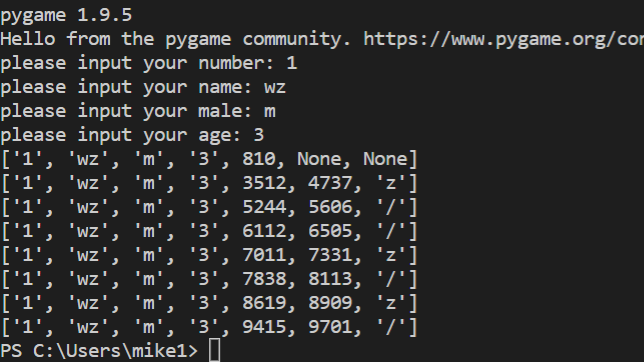
we also change the print result
what we need to pay attention is that:
we turn the result such as result1,result to a list and then compile them to a single list ,then print it
the simmon effect(in psychology) :build the function of subject_information(modify the experiment programme),before we begin the experiment的更多相关文章
- The `android.dexOptions.incremental` property is deprecated and it has no effect on the build process.
编译报错:The android.dexOptions.incremental property is deprecated and it has no effect on the build pro ...
- simon effect (psychology experiment ) : build the function of wait4key()
## #the real experiment for simon effect #load the library which is our need import pygame import sy ...
- simmon effect(psychology experiment) : this time, we add file_function who can creat a file in the window which contains our result
#the real experiment for simon effect #load the library which is our need import pygame import sys i ...
- simmon effect : build the funcion of trail list
#the real experiment for simon effect #load the library which is our need import pygame import sys i ...
- Android Studio升级到3.1.4后打开旧项目警告:The `android.dexOptions.incremental` property is deprecated and it has no effect on the build process.
现象截图 问题原因&解决方案 在build.gralde中,对Android开发过程中突破的方法数的限制,做了如下解决配置: dexOptions { incremental true jav ...
- fn project 打包Function
Option 1 (recommended): Use the fn cli tool We recommend using the fn cli tool which will handle a ...
- PostgreSQL function examples
warehouse_db=# CREATE TABLE warehouse_tbl(warehouse_id INTEGER NOT NULL,warehouse_name TEXT NOT NULL ...
- Mysql ERROR 1418 (HY000): This function has none of DETERMINISTIC, NO SQL, or READS SQL DATA
ERROR 1418 (HY000): This function has none of DETERMINISTIC, NO SQL, or READS SQL DATA in its declar ...
- verilog中的function用法与例子
函数的功能和任务的功能类似,但二者还存在很大的不同.在 Verilog HDL 语法中也存在函数的定义和调用. 1.函数的定义 函数通过关键词 function 和 endfunction 定义,不允 ...
随机推荐
- Redis5.x五种数据类型常见命令
关注公众号:CoderBuff,回复"redis"获取<Redis5.x入门教程>完整版PDF. <Redis5.x入门教程>目录 第一章 · 准备工作 第 ...
- python 中列表 元组 字典 集合的区别
先看图片解释 (1)列表 什么是列表呢?我觉得列表就是我们日常生活中经常见到的清单.比如,统计过去一周我们买过的东西,把这些东西列出来,就是清单.由于我们买一种东西可能不止一次,所以清单中是允许有重复 ...
- How to Convert a Class File to a Java File?
What is a programming language? Before introducing compilation and decompilation, let's briefly intr ...
- python常用模块集合
python常用模块集合 Python自定义模块 python collections模块/系列 Python 常用模块-json/pickle序列化/反序列化 python 常用模块os系统接口 p ...
- hadoop简介和环境
Hadoop是一个由Apache基金会所开发的分布式系统基础架构.用户可以在不了解分布式底层细节的情况下,开发分布式程序.充分利用集群的威力进行高速运算和存储. Hadoop实现了一个 ...
- office2010无法卸载问题
普通的卸载方式有: 1.从开始进入控制面板卸载程序,找到office2010并卸载. 2.运用软件管家等强力卸载电脑中的软件. 其他的卸载方式: 1).通过安装windows installer cl ...
- [Python]pip 国内源
临时使用方法 pip install -i http://pypi.douban.com/simple/ --trusted-host pypi.douban.com celery END
- matplotlib如何显示中文
问题:matplotlib不能渲染中文 想设定为中文字体,网上搜索的方法几乎都是下面这样,已经把字体拷贝到了程序目录下了,然而并没有生效 plt.rcParams [ font.sans-serif' ...
- VMware vCenter Server6.0安装及群集配置介绍
在本项目中,将在VMware Workstation 模拟的Windows Server 2008 R2虚拟机中安装VMware vCenter Server ,并且使用vCenter Server捆 ...
- Mysql 保存emoji表情报错
保存emoji表情错误 首先错误表现,抛出业务层报错之外,根源的数据库错误是: sql 错误码 1366 字符集相关错误. uncategorized SQLException; SQL state ...