
ELK学习实验003:Elasticsearch 集群安装
前面已经介绍了Elasticsearch这个工具,并对单机安装做了简单介绍,现在使用三台机器做一个elasticsearch集群
一 环境准备
1.1 机器准备

1.2 同步时间
[root@node* ~]# ntpdate ntp1.aliyun.com
Nov :: ntpdate[]: adjust time server 120.25.115.20 offset -0.015719 sec
[root@node1 ~]# crontab -l
* * * * * /usr/sbin/ntpdate ntp1.aliyun.com
1.3 检查其他配置
比如内核,文件连接等参数是否配置完成,三个节点都必须检查
[root@node2 ~]# sysctl -a|grep vm.max_map_count
vm.max_map_count =
[root@node2 ~]# cat /etc/security/limits.conf
* soft  nofile

* hard  nofile

* soft  nproc

* hard  nproc
[root@node2 ~]# cat /etc/security/limits.d/20-nproc.conf
*          soft    nproc

root       soft    nproc     unlimited
根据上篇文章下载并解压elasticsearch软件下面直接进入配置
二 各节点配置
2.1 主要配置文件
[root@node1 ~]# grep -Ev "^$|[#;]" /usr/local/elasticsearch/config/elasticsearch.yml
cluster.name: my-elktest-cluster

node.name: node-

network.host: 0.0.0.0

http.port:

discovery.seed_hosts: ["192.168.132.131","192.168.132.132","192.168.132.133"]

cluster.initial_master_nodes: ["node-1","node-2","node-3"]

http.cors.enabled: true

http.cors.allow-origin: "*"
[root@node2 ~]# grep -Ev "^$|[#;]" /usr/local/elasticsearch/config/elasticsearch.yml
cluster.name: my-elktest-cluster

node.name: node-

network.host: 0.0.0.0

http.port:

discovery.seed_hosts: ["192.168.132.131","192.168.132.132","192.168.132.133"]

cluster.initial_master_nodes: ["node-1","node-2","node-3"]

http.cors.enabled: true

http.cors.allow-origin: "*"
[root@node3 ~]# grep -Ev "^$|[#;]" /usr/local/elasticsearch/config/elasticsearch.yml
cluster.name: my-elktest-cluster

node.name: node-

network.host: 0.0.0.0

http.port:

discovery.seed_hosts: ["192.168.132.131","192.168.132.132","192.168.132.133"]

cluster.initial_master_nodes: ["node-1","node-2","node-3"]

http.cors.enabled: true

http.cors.allow-origin: "*"
[root@node* ~]# vi /etc/hosts
192.168.132.131   node-

192.168.132.132   node-

192.168.132.133   node-
2.2 启动服务
[root@node1 ~]# systemctl restart elasticsearch
[root@node2 ~]# systemctl restart elasticsearch
[root@node3 ~]# systemctl restart elasticsearch
2.3 检查服务状态
[root@node* ~]# systemctl status elasticsearch

三个节点都启动,出现以上状态,说明三个服务已经起来了
2.4 使用elasticsearch-head检查
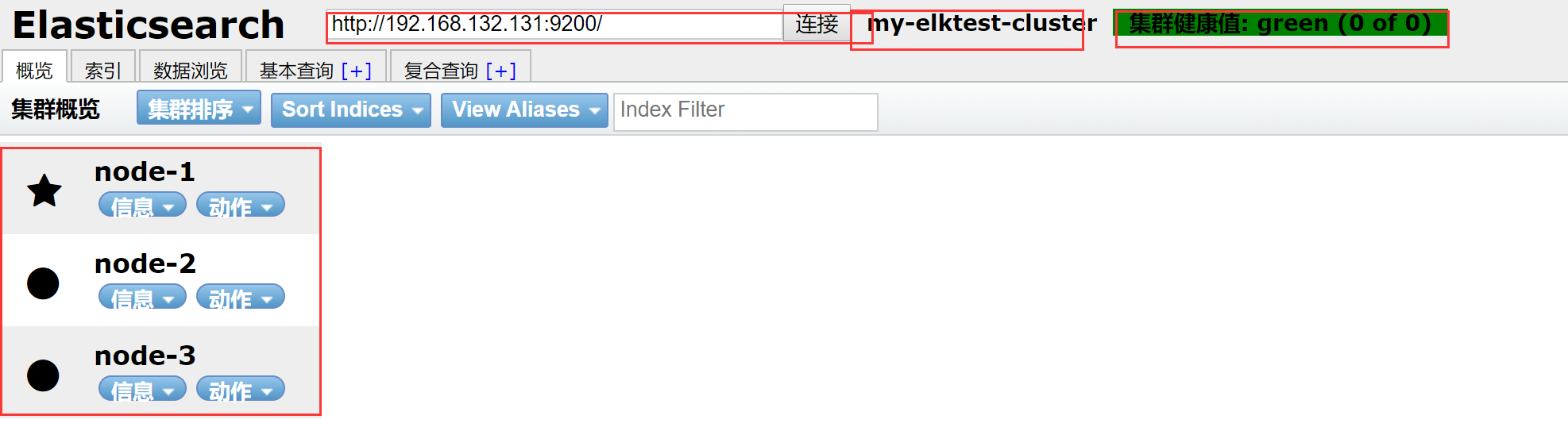
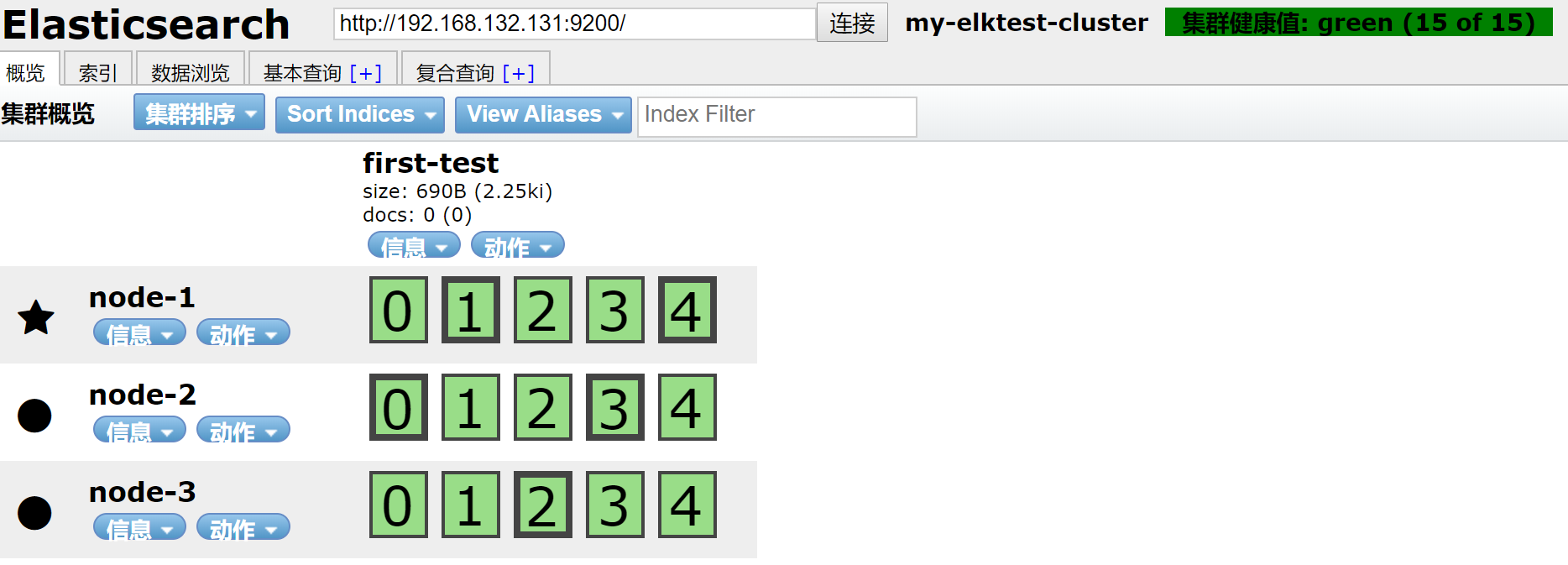
新建一个索引


结果
三 集群简单测试
3.1 测试slave节点
关掉node2节点
[root@node2 ~]# systemctl stop elasticsearch
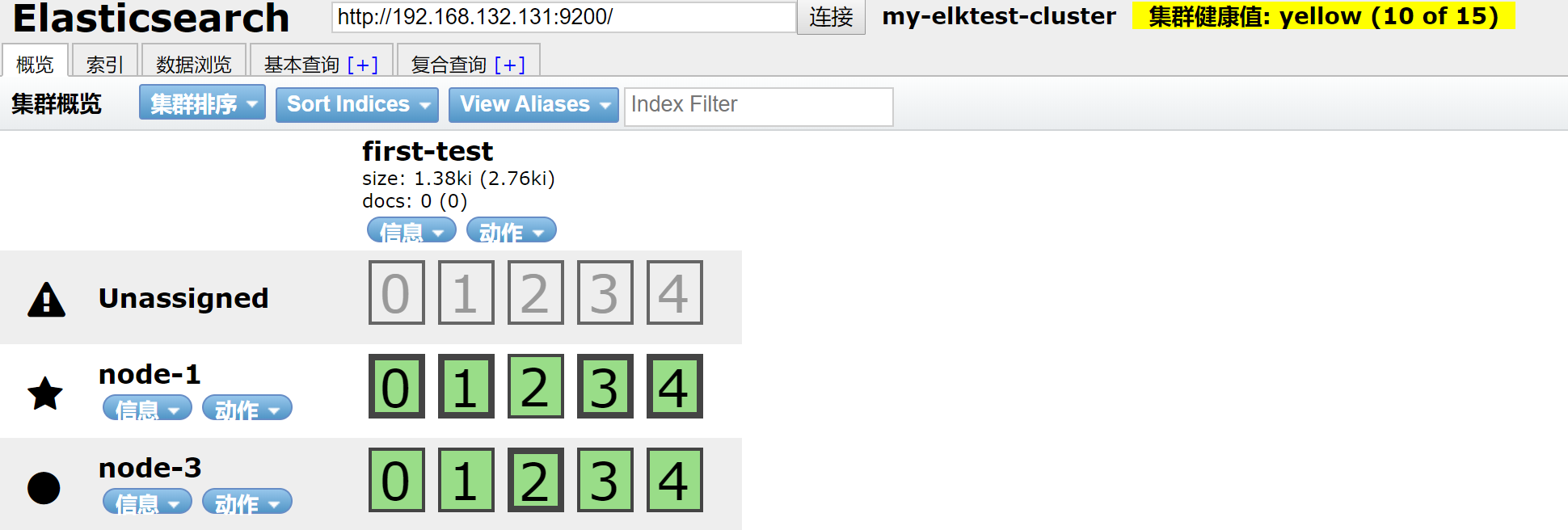
数据还在,开启node2
[root@node2 ~]# systemctl start elasticsearch
观察
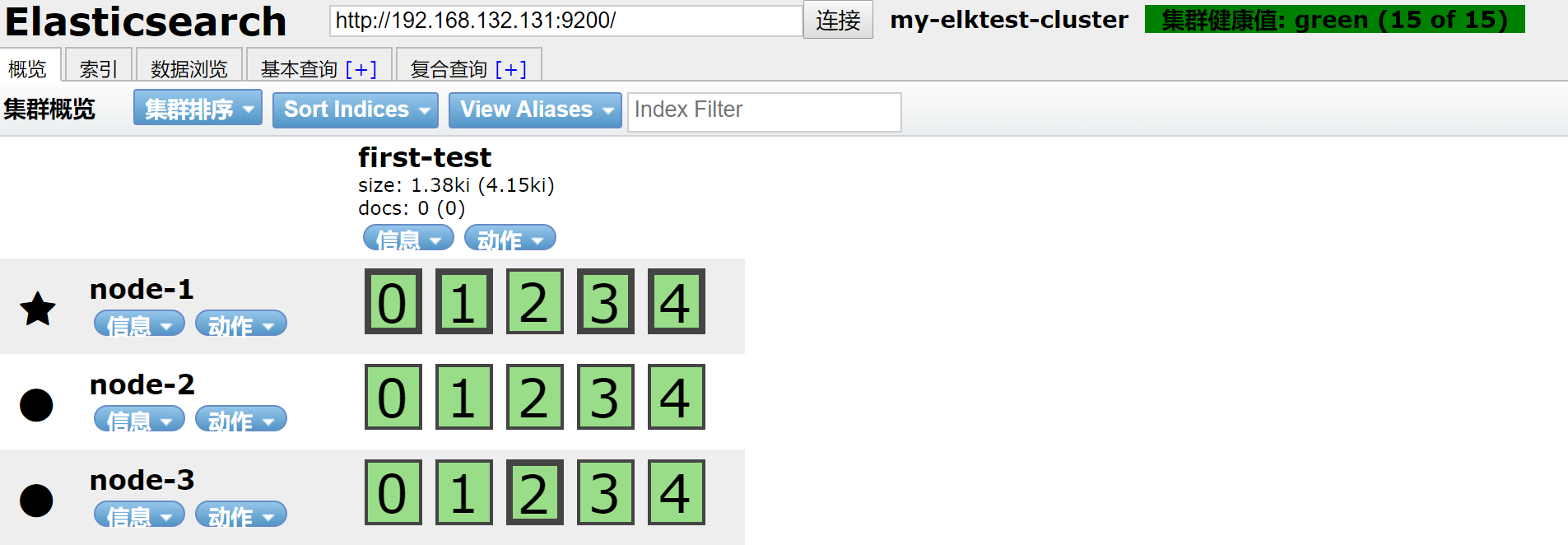
集群回复正常状态
3.2 测试主节点宕机,对集群影响
关闭主节点
五角星代表是主节点,圆点代表从节点
[root@node1 ~]# systemctl stop elasticsearch
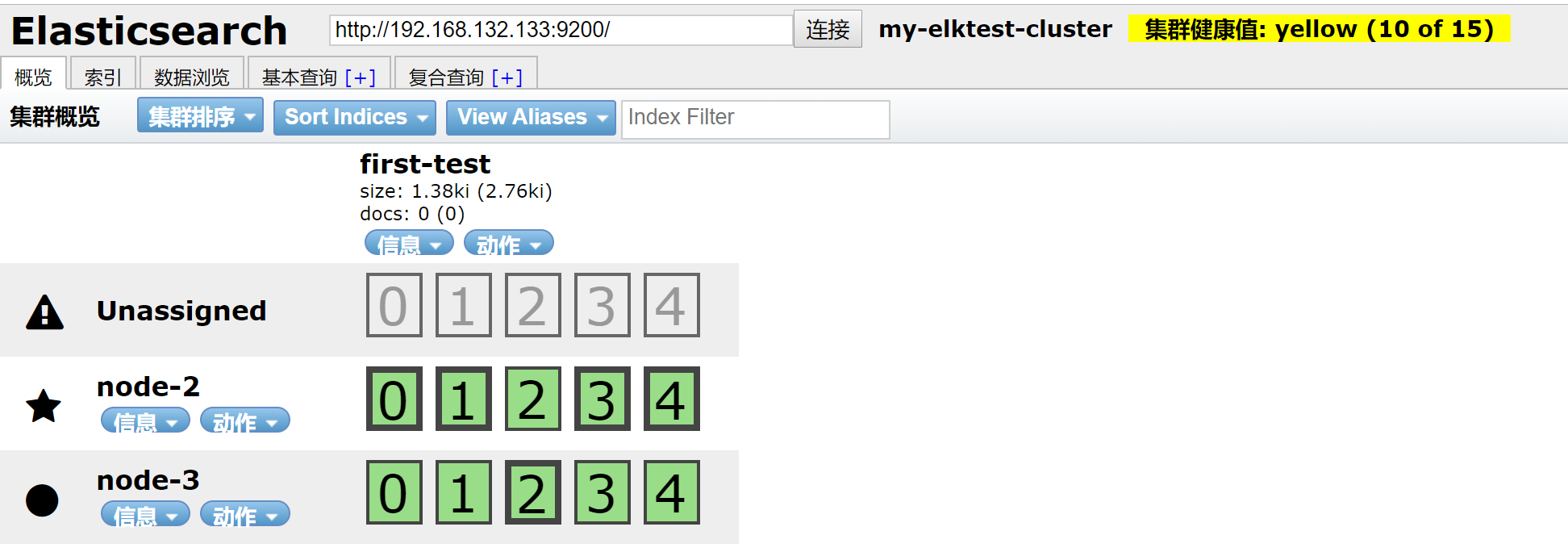
可以看到node-1节点不在,master节点已经转移到node-2上,数据也分不到node-2和node-3上
恢复node-1
[root@node1 ~]# systemctl start elasticsearch
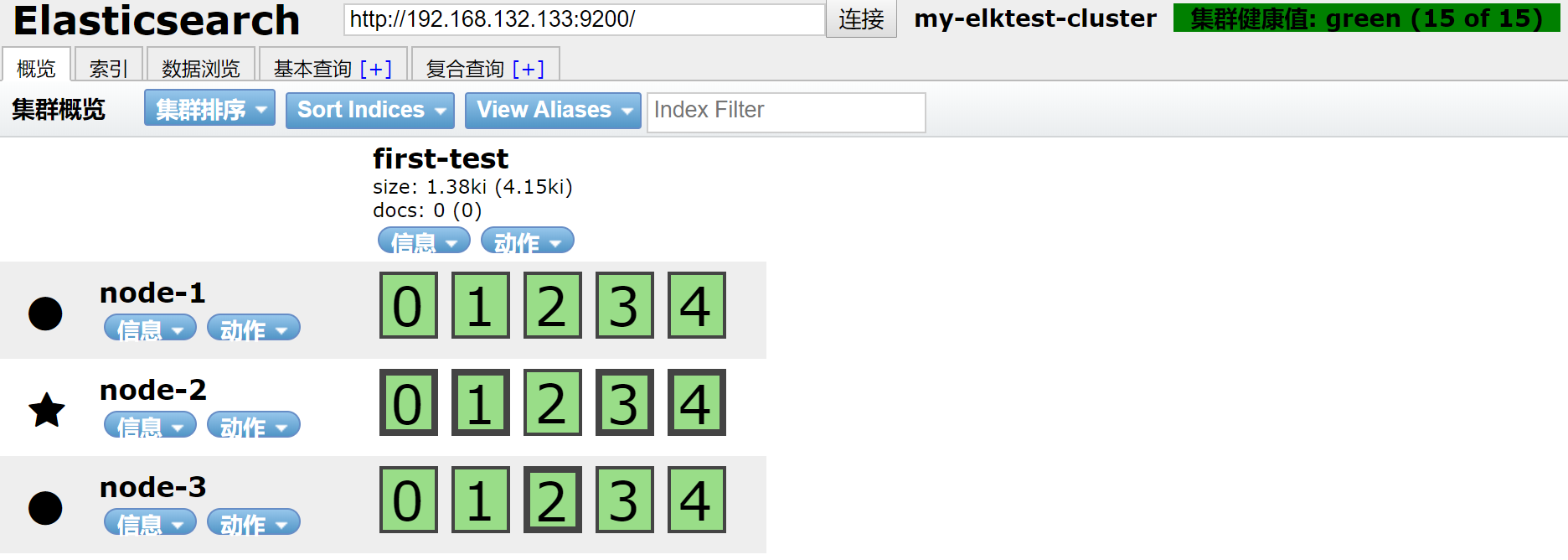
集群回复正常
四 使用curl简单的查看集群信息
4.1 查看master节点
[root@node1 ~]# curl http://192.168.132.131:9200/_cat/master
9qVjdVSvSAGlZ7lpB9O78g 192.168.132.132 192.168.132.132 node-
4.2 查看数据节点
[root@node1 ~]# curl -XGET http://127.0.0.1:9200/_cat/nodes?pretty
192.168.132.133    0.00 0.01 0.05 dilm - node-

192.168.132.131    0.00 0.01 0.05 dilm - node-

192.168.132.132    0.00 0.01 0.05 dilm * node-
4.3 查看集群健康状态
[root@node1 ~]# curl localhost:9200/_cluster/health?pretty
{

  "cluster_name" : "my-elktest-cluster",

  "status" : "green",

  "timed_out" : false,

  "number_of_nodes" : ,

  "number_of_data_nodes" : ,

  "active_primary_shards" : ,

  "active_shards" : ,

  "relocating_shards" : ,

  "initializing_shards" : ,

  "unassigned_shards" : ,

  "delayed_unassigned_shards" : ,

  "number_of_pending_tasks" : ,

  "number_of_in_flight_fetch" : ,

  "task_max_waiting_in_queue_millis" : ,

  "active_shards_percent_as_number" : 100.0

}
4.4其他的查看命令
[root@node1 ~]# curl localhost:9200/_cat
=^.^=

/_cat/allocation

/_cat/shards

/_cat/shards/{index}

/_cat/master

/_cat/nodes

/_cat/tasks

/_cat/indices

/_cat/indices/{index}

/_cat/segments

/_cat/segments/{index}

/_cat/count

/_cat/count/{index}

/_cat/recovery

/_cat/recovery/{index}

/_cat/health

/_cat/pending_tasks

/_cat/aliases

/_cat/aliases/{alias}

/_cat/thread_pool

/_cat/thread_pool/{thread_pools}

/_cat/plugins

/_cat/fielddata

/_cat/fielddata/{fields}

/_cat/nodeattrs

/_cat/repositories

/_cat/snapshots/{repository}

/_cat/templates
实验基本完成,后续在做关于集群的其他实验
ELK学习实验003:Elasticsearch 集群安装的更多相关文章
- 批量搞机(二):分布式ELK平台、Elasticsearch介绍、Elasticsearch集群安装、ES 插件的安装与使用
一.分布式ELK平台 ELK的介绍: ELK 是什么? Sina.饿了么.携程.华为.美团.freewheel.畅捷通 .新浪微博.大讲台.魅族.IBM...... 这些公司都在使用 ELK!ELK! ...
- ELK 性能(4) — 大规模 Elasticsearch 集群性能的最佳实践
ELK 性能(4) - 大规模 Elasticsearch 集群性能的最佳实践 介绍 集群规模 集群数:6 整体集群规模: 300 Elasticsearch 实例 141 物理服务器 4200 CP ...
- Elasticsearch集群安装Version6.2.2
Elasticsearch集群安装, 基于Elasticsearch6.2.2版本, 在Linux上安装Elasticsearch集群. 1.安装规划 IP HostName Service Mast ...
- ELK教程1:ElasticSearch集群的部署ELK
在分布式系统中,应用数量众多,应用调用链复杂,常常使用ELK作为日志收集.分析和展示的组件.本篇文章将讲讲解如何部署ELK,然后讲解如何使用Filebeat采集Spring Boot的日志输出到Log ...
- CentOS下 elasticsearch集群安装
1.进入root目录并下载elasticsearch cd /root wget https://download.elastic.co/elasticsearch/elasticsearch/ela ...
- ElasticSearch集群安装配置
1. 环境说明 Cent OS 7 jdk-8u121-linux-x64.tar.gz elasticsearch-5.2.1.zip 2. 系统环境配置 新建进程用户 修改File Descrip ...
- kafka学习2:kafka集群安装与配置
在前一篇:kafka学习1:kafka安装 中,我们安装了单机版的Kafka,而在实际应用中,不可能是单机版的应用,必定是以集群的方式出现.本篇介绍Kafka集群的安装过程: 一.准备工作 1.开通Z ...
- ElasticSearch 集群安装,简单使用
http://www.elastic.co/guide/en/elasticsearch/reference/current/setup-configuration.html https://gith ...
- elasticsearch集群安装+安全验证+kibana安装
准备环境 启动4个centos容器, 并暴露相对应端口 (我的本机ip为172.16.1.236,以下涉及到的地方需要修改为自己的ip) node_name ip http port transpor ...
随机推荐
- Kubernetes弹性伸缩全场景解读(五) - 定时伸缩组件发布与开源
前言 容器技术的发展让软件交付和运维变得更加标准化.轻量化.自动化.这使得动态调整负载的容量变成一件非常简单的事情.在kubernetes中,通常只需要修改对应的replicas数目即可完成.当负载的 ...
- @bzoj - 4524@ [Cqoi2016]伪光滑数
目录 @description@ @solution@ @version - 1@ @version - 2@ @accepted code@ @version - 1@ @version - 2@ ...
- 1878: [SDOI2009]HH的项 莫队算法-离线查询区间内部不同数字的个数
#include<iostream> #include<stdio.h> #include<string.h> #include<algorithm> ...
- 请求(RequestInfo)
请求类型 StringRequestInfo 用在 SuperSocket 命令行协议中. 你也可以根据你的应用程序的需要来定义你自己的请求类型. 例如, 如果所有请求都包含 DeviceID 信息, ...
- poj 3181 Dollar Dayz(完全背包)
Dollar Dayz Time Limit: 1000MS Memory Limit: 65536K Total Submissions: 5419 Accepted: 2054 Descr ...
- PHP实现微信小程序人脸识别刷脸登录功能
首先我们先确认我们的百度云人脸库里已经上传了我们的个人信息照片 然后我们在后台写刷脸登陆的接口login我们要把拍照获取的照片存储到服务器 public function login(){ // ...
- codeforces 609C
#include<bits/stdc++.h> using namespace std; ],c[]; int main() { int n,i; while(cin >> n ...
- const(每个对象中的常量), static const(类的编译时常量)
1 每个对象中的常量 --- const数据成员 const限定,意味着“在该对象生命周期内,它是一个常量”. 关键字const 使被限定的量为常量 在该类的每个对象中,编译器都为其const数据成员 ...
- CF1B.Spreadsheets(电子表格) 题解 模拟
作者:zifeiy 标签:模拟 题目出处:Spreadsheets 题目描述 在流行的电子表格系统中(例如,在Excel中),使用如下计算方式来对列号进行计算. 第1列对应A,第2列对应B,--,第2 ...
- PhpStorm terminal无法输入命令的解决方法
下面小编就为大家带来一篇PhpStorm terminal无法输入命令的解决方法.小编觉得挺不错的,现在就分享给大家,也给大家做个参考.一起跟随小编过来看看吧 在使用PhpStorm时,点击下面的 ...