
【代码笔记】iOS-一个tableView,两个section
一,效果图。
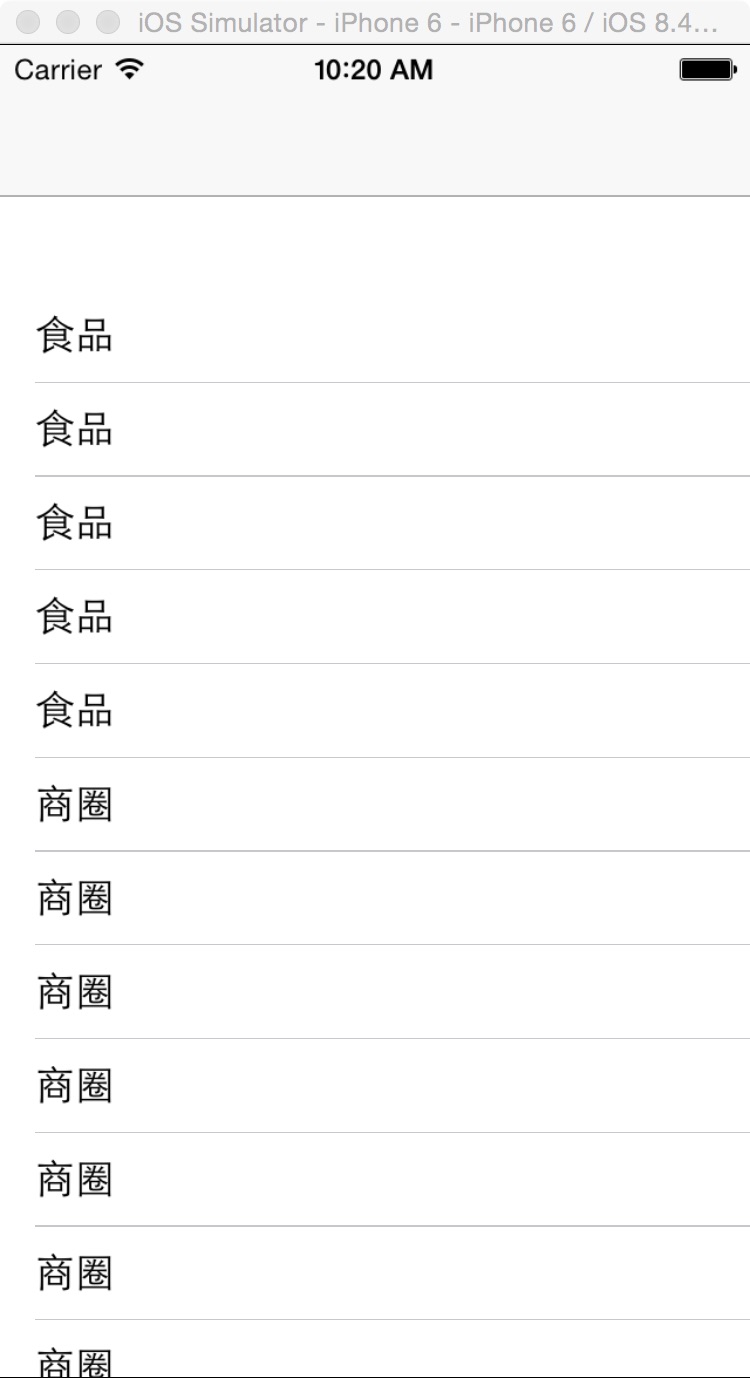
二,工程图。

三,代码。
RootViewController.h

#import <UIKit/UIKit.h>

@interface RootViewController : UIViewController

<UITableViewDataSource,UITableViewDelegate>

{

    UITableView *mTableView;

}

@end
RootViewController.m
#import "RootViewController.h"

@interface RootViewController ()

@end

@implementation RootViewController

- (id)initWithNibName:(NSString *)nibNameOrNil bundle:(NSBundle *)nibBundleOrNil

{

    self = [super initWithNibName:nibNameOrNil bundle:nibBundleOrNil];

    if (self) {

        // Custom initialization

    }

    return self;

}

- (void)viewDidLoad

{

    [super viewDidLoad];

    // Do any additional setup after loading the view.

   //初始化背景色

    [self initBackgroundView];

}

#pragma -mark -funcions

-(void)initBackgroundView

{

    mTableView=[[UITableView alloc] initWithFrame:CGRectMake(0, 40, 320, self.view.bounds.size.height)];

    mTableView.dataSource=self;

    mTableView.delegate=self;

    [self.view addSubview:mTableView];

}

#pragma -mark -UITableViewDelegate

-(NSInteger)numberOfSectionsInTableView:(UITableView *)tableView

{

    return 2;

}

-(NSInteger)tableView:(UITableView *)tableView numberOfRowsInSection:(NSInteger)section

{

    if (section==0) {

        return 5;

    }else if (section==1){

         return 10;

    }

    return 10;

}

-(CGFloat)tableView:(UITableView *)tableView heightForRowAtIndexPath:(NSIndexPath *)indexPath

{

    return 40;

}

-(UITableViewCell*)tableView:(UITableView *)tableView cellForRowAtIndexPath:(NSIndexPath *)indexPath

{

    static NSString *name=@"nearShop";

    UITableViewCell *cell=[tableView dequeueReusableCellWithIdentifier:name];

    if (cell==nil) {

        cell=[[UITableViewCell alloc]initWithStyle:UITableViewCellStyleDefault reuseIdentifier:name];

    }

    cell.selectionStyle=UITableViewCellSelectionStyleNone;

    if (indexPath.section==0) {

       cell.textLabel.text=@"食品";

    }else if (indexPath.section==1){

       cell.textLabel.text=@"商圈";

    }

    return cell;

}

-(UIView*)tableView:(UITableView *)tableView viewForHeaderInSection:(NSInteger)section

{

    UIView* customView =[[UIView alloc] initWithFrame:CGRectMake(0.0, 0.0, 320.0, 30.0)] ;

    customView.backgroundColor=[UIColor redColor];

    UILabel * headerLabel = [[UILabel alloc] initWithFrame:CGRectZero] ;

    headerLabel.backgroundColor = [UIColor redColor];

    headerLabel.textColor = [UIColor blackColor];

    headerLabel.font = [UIFont boldSystemFontOfSize:15];

    headerLabel.frame = CGRectMake(0.0, 0.0, 320.0, 30.0);

    if (section == 0) {

        headerLabel.text=@"热门商区";

    }else if (section == 1){

        headerLabel.text = @"分类";

    }

    [customView addSubview:headerLabel];

    return customView;

}
【代码笔记】iOS-一个tableView,两个section的更多相关文章
- IOS 作业项目 TableView两个section中cell置顶功能实现
点击cell会置顶,其他的下移
- 【代码笔记】iOS-推荐收听,左右两个tableView
一,效果图. 二,工程图. 三,代码. RootViewController.h #import <UIKit/UIKit.h> @interface RootViewController ...
- 【代码笔记】iOS-UIScrollerView里有两个tableView
一,效果图. 二,工程图. 三,代码. RootViewController.h #import <UIKit/UIKit.h> @interface RootViewController ...
- 【代码笔记】iOS-点击城市中的tableView跳转到旅游景点的tableView,下面会有“显示”更多。
一,效果图. 二,工程图. 三,代码. RootViewController.h #import <UIKit/UIKit.h> @interface RootViewController ...
- IOS中TableView的使用(1) -创建一个简单的tableView
创建一个简单的tableView: #import <UIKit/UIKit.h> /*tableView 一定要遵守这两个协议: UITableViewDataSource,UITabl ...
- 【代码笔记】iOS-scrollerView里多个tableView加搜索框
一,效果图. 二,工程图. 三,代码. RootViewController.h #import <UIKit/UIKit.h> #import "customCell.h&qu ...
- 【代码笔记】iOS-3个section,每个都有header.
一,效果图: 二,工程目录. 三,代码 RootViewController.h #import <UIKit/UIKit.h> @interface RootViewController ...
- 【代码笔记】iOS-点击顶点处,弹出另一个小的界面
一,效果图. 二,文件目录. 三,代码. RootViewController.h #import <UIKit/UIKit.h> @interface RootViewControlle ...
- 【代码笔记】iOS-带索引的tableView
一,效果图. 二,工程图. 三,代码. RootViewController.h #import <UIKit/UIKit.h> @interface RootViewController ...
随机推荐
- Flexbox 自由的布局
css3提出了一种新的布局方式.她并没有以摧枯拉朽之势博得我的喜爱.我和她的故事总是伴随着苦涩的味道.世道变了,总要做出些选择才能跟紧步伐.她很强大,能满足你天马行空的需求而不必抓掉一大把头发.她却很 ...
- Webpack+React+ES6开发模式入门指南
React无疑是今年最火的前端框架,github上的star直逼30,000,基于React的React Native的star也直逼20,000.有了React,组件化似乎不再步履蹒跚,有了Reac ...
- 从Java文件到字节码文件
本文涉及的javac编译器来自openjdk. javac的目录地址为:解压目录/langtools/src/share/classes/com/sun/tools/javac/ javac编译器将J ...
- 免费的精品: Productivity Power Tools 动画演示
Productivity Power Tools 是微软官方推出的 Visual Studio 扩展,被用以提高开发人员生产率.它的出现一定程度上弥补和完善了 Visual Studio 自身的不足, ...
- ABP教程-对Person信息进行操作
这一章的功能比较简单.下面开始 修改视图 对person的视图文件进行修改 <div class="row"> <div class="col-md-1 ...
- Composer概述及其自动加载探秘
composer概述 一开始,最吸引我的当属 Composer 了,因为之前从没用过 Composer . Composer 是PHP中用来管理依赖关系的工具,你只需在自己的项目中声明所依赖的外部工具 ...
- 使用AWS亚马逊云搭建Gmail转发服务(一)
title: 使用AWS亚马逊云搭建Gmail转发服务(一) author:青南 date: 2014-12-30 15:41:35 categories: Python tags: [Gmail,A ...
- Php基础知识测试题
一:选择题 1. LAMP具体结构不包含下面哪种(A ) A:Windows系统 如果是这个就是WMP B:Apache服务器 C:MySQL数据库 D:PHP语 ...
- MUI APP关于页面之间的传值,plusready和自定义事件
最近在用MUI开发这个APP,发现有时候这个plusready不起作用,表现在,这个页面如果重复打开,这个plusready就进不去,然后上一个页面传过来的值,就没法接收了.这个经过MUI官方确认,是 ...
- 计算机程序的思维逻辑 (29) - 剖析String
上节介绍了单个字符的封装类Character,本节介绍字符串类.字符串操作大概是计算机程序中最常见的操作了,Java中表示字符串的类是String,本节就来详细介绍String. 字符串的基本使用是比 ...