
springboot11-01-security入门
场景:
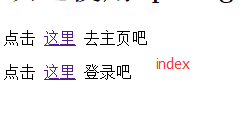
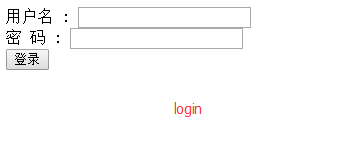
有3个页面:首页、登录页、登录成功后的主页面,如下图:
|
|

|
如果没有登录,点击“去主页”,会跳转到登录页
如果已经登录,点击“去主页”,跳转到主页,显示“hello 用户名”
下面用springboot + spring security简单实现:
1.新建maven项目,添加pom支持:
 <?xml version="1.0" encoding="UTF-8"?>

 <project xmlns="http://maven.apache.org/POM/4.0.0"

          xmlns:xsi="http://www.w3.org/2001/XMLSchema-instance"

          xsi:schemaLocation="http://maven.apache.org/POM/4.0.0 http://maven.apache.org/xsd/maven-4.0.0.xsd">

     <modelVersion>4.0.0</modelVersion>

     <groupId>com.mlxs.springboot11.security01</groupId>

     <artifactId>springboot11-security01</artifactId>

     <version>1.0-SNAPSHOT</version>

     <!--父依赖包-->

     <parent>

         <groupId>org.springframework.boot</groupId>

         <artifactId>spring-boot-starter-parent</artifactId>

         <version>1.4.2.RELEASE</version>

         <relativePath/>

     </parent>

     <properties>

         <project.build.sourceEncoding>UTF-8</project.build.sourceEncoding>

         <java.version>1.8</java.version>

     </properties>

     <dependencies>

         <dependency>

             <groupId>org.springframework.boot</groupId>

             <artifactId>spring-boot-starter</artifactId>

         </dependency>

         <!--测试-->

         <dependency>

             <groupId>org.springframework.boot</groupId>

             <artifactId>spring-boot-starter-test</artifactId>

             <scope>test</scope>

         </dependency>

         <!--mvc-->

         <dependency>

             <groupId>org.springframework.boot</groupId>

             <artifactId>spring-boot-starter-web</artifactId>

         </dependency>

         <!-- security -->

         <dependency>

             <groupId>org.springframework.boot</groupId>

             <artifactId>spring-boot-starter-security</artifactId>

         </dependency>

         <dependency>

             <groupId>org.springframework.boot</groupId>

             <artifactId>spring-boot-starter-thymeleaf</artifactId>

         </dependency>

     </dependencies>

 </project>
2.boot启动类
@SpringBootApplication

public class StartApp {

    public static void main(String[] args) {

        SpringApplication.run(StartApp.class, args);

    }

}
3.页面控制器类:
import org.springframework.stereotype.Controller;

import org.springframework.web.bind.annotation.RequestMapping;

/**

 * UserController类描述:

 *

 * @author yangzhenlong

 * @since 2017/5/23

 */

@Controller

public class UserController {

    @RequestMapping(value = "/")

    public String index(){

        return "/index";

    }

    @RequestMapping(value = "/login")

    public String login(){

        return "/login";

    }

    @RequestMapping(value = "/home")

    public String home(){

        return "/home";

    }

}
4.WebSecurityConfig配置类
 package com.mlxs.security.config;

 import com.mlxs.util.MD5Util;

 import org.springframework.beans.factory.annotation.Autowired;

 import org.springframework.context.annotation.Bean;

 import org.springframework.context.annotation.Configuration;

 import org.springframework.security.authentication.AuthenticationManager;

 import org.springframework.security.config.annotation.authentication.builders.AuthenticationManagerBuilder;

 import org.springframework.security.config.annotation.web.builders.HttpSecurity;

 import org.springframework.security.config.annotation.web.configuration.EnableWebSecurity;

 import org.springframework.security.config.annotation.web.configuration.WebSecurityConfigurerAdapter;

 import org.springframework.security.crypto.password.PasswordEncoder;

 /**

  * WebSecurityConfig类描述:

  *

  * @author yangzhenlong

  * @since 2017/5/18

  */

 @Configuration

 @EnableWebSecurity

 //@EnableGlobalMethodSecurity(prePostEnabled = true)//允许进入页面方法前检验

 public class WebSecurityConfig extends WebSecurityConfigurerAdapter{

     @Bean

     @Override

     protected AuthenticationManager authenticationManager() throws Exception {

         return super.authenticationManager();

     }

     @Override

     protected void configure(HttpSecurity httpSecurity) throws Exception {

         httpSecurity.authorizeRequests()

                 .antMatchers("/", "/login").permitAll() //无需验证权限

                 .anyRequest().authenticated() //其他地址的访问均需验证权限

                 .and().formLogin().loginPage("/login").defaultSuccessUrl("/home").permitAll()//指定登录页是"/login" //登录成功后默认跳转到"/home"

                 .and().logout().logoutSuccessUrl("/login").permitAll(); //退出登录后的默认url是"/login"

     }

     /**

      * 全局配置

      * @param builder

      * @throws Exception

      */

     @Autowired

     public void configure(AuthenticationManagerBuilder builder) throws Exception {

         builder

                 .userDetailsService(this.myUDService())

                 .passwordEncoder(this.passwordEncoder());

         //或者用下面的方式,直接配置固定的用户和对应的角色

         /*builder.inMemoryAuthentication().withUser("test").password("1234").roles("USER");

         builder.inMemoryAuthentication().withUser("admin").password("admin").roles("ADMIN");

         builder.inMemoryAuthentication().withUser("dba").password("root").roles("ADMIN","DBA");*/

     }

     /**

      * 设置用户密码的加密方式:MD5加密

      * @return

      */

     @Bean

     public PasswordEncoder passwordEncoder(){

         PasswordEncoder pe = new PasswordEncoder() {//自定义密码加密方式

             //加密

             @Override

             public String encode(CharSequence charSequence) {

                 return MD5Util.encode((String)charSequence);

             }

             //校验密码

             @Override

             public boolean matches(CharSequence charSequence, String s) {

                 return MD5Util.encode((String)charSequence).equals(s);

             }

         };

         return pe;

     }

     /**

      * 自定义用户服务,获取用户信息

      * @return

      */

     @Bean

     public MyUDService myUDService(){

         return new MyUDService();

     }

 }
5.MD5工具类:
 public class MD5Util {

     private static final String SALT = "test";//盐值

     public static String encode(String password) {

         password = password + SALT;

         MessageDigest md5 = null;

         try {

             md5 = MessageDigest.getInstance("MD5");

         } catch (Exception e) {

             throw new RuntimeException(e);

         }

         char[] charArray = password.toCharArray();

         byte[] byteArray = new byte[charArray.length];

         for (int i = 0; i < charArray.length; i++)

             byteArray[i] = (byte) charArray[i];

         byte[] md5Bytes = md5.digest(byteArray);

         StringBuffer hexValue = new StringBuffer();

         for (int i = 0; i < md5Bytes.length; i++) {

             int val = ((int) md5Bytes[i]) & 0xff;

             if (val < 16) {

                 hexValue.append("0");

             }

             hexValue.append(Integer.toHexString(val));

         }

         return hexValue.toString();

     }

     /*public static void main(String[] args) {

         System.out.println(MD5Util.encode("admin"));

         System.out.println("是否相等:" + MD5Util.encode("admin").equals("66d4aaa5ea177ac32c69946de3731ec0"));

     }*/

 }
6.用户信息服务类
 package com.mlxs.security.config;

 import org.springframework.security.core.authority.SimpleGrantedAuthority;

 import org.springframework.security.core.userdetails.User;

 import org.springframework.security.core.userdetails.UserDetails;

 import org.springframework.security.core.userdetails.UserDetailsService;

 import org.springframework.security.core.userdetails.UsernameNotFoundException;

 import java.util.ArrayList;

 import java.util.List;

 /**

  * MyUDService类描述: 用户服务类,用来从读取用户信息

  *

  * @author yangzhenlong

  * @since 2017/5/22

  */

 public class MyUDService implements UserDetailsService {

     @Override

     public UserDetails loadUserByUsername(String s) throws UsernameNotFoundException {

         if(s.equals("admin")) {

             List<SimpleGrantedAuthority> authorities = new ArrayList<SimpleGrantedAuthority>();

             authorities.add(new SimpleGrantedAuthority("ROLE_ADMIN"));

             User user = new User("admin", "66d4aaa5ea177ac32c69946de3731ec0", authorities);//用户名和通过MD5加密后的密码

             return user;

         }else{

             throw new UsernameNotFoundException("UserName " + s + " not found");

         }

     }

 }
启动app类,访问:http:localhost:8080
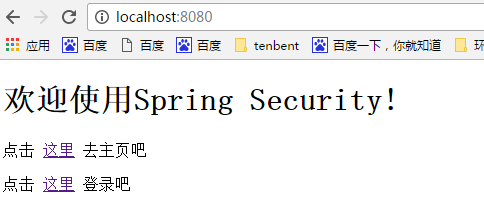
登录用户名/密码: admin / admin
springboot11-01-security入门的更多相关文章
- SpringBoot集成Spring Security入门体验
一.前言 Spring Security 和 Apache Shiro 都是安全框架,为Java应用程序提供身份认证和授权. 二者区别 Spring Security:重量级安全框架 Apache S ...
- Spring Security 入门(基本使用)
Spring Security 入门(基本使用) 这几天看了下b站关于 spring security 的学习视频,不得不说 spring security 有点复杂,脑袋有点懵懵的,在此整理下学习内 ...
- Redis 笔记 01:入门篇
Redis 笔记 01:入门篇 ★ ★ ★ ★ ★ ★ ★ ★ ★ ★ ★ ★ ★ ★ ★ ★ ★ ★ ★ ★ ★ ★ ★ ★ ★ ★ ★ ★ ★ ★ ★ ★ ★ ★ ★ ★ ★ ★ ★ ★ ★ ★ ...
- 01 spring security入门篇
1. 环境搭建 使用SpringBoot搭建开发环境,只需在pom.xml添加如下依赖即可. <?xml version="1.0" encoding="UTF-8 ...
- Spring Security 入门(1-1)Spring Security是什么?
1.Spring Security是什么? Spring Security 是一个安全框架,前身是 Acegi Security , 能够为 Spring企业应用系统提供声明式的安全访问控制. Spr ...
- Spring Security 入门
一.Spring Security简介 Spring Security是一个能够为基于Spring的企业应用系统提供声明式的安全访问控制解决方案的安全框架.它提供了一组可以在Spring应用上下文中配 ...
- SpringMVC札集(01)——SpringMVC入门完整详细示例(上)
自定义View系列教程00–推翻自己和过往,重学自定义View 自定义View系列教程01–常用工具介绍 自定义View系列教程02–onMeasure源码详尽分析 自定义View系列教程03–onL ...
- Spring Security 入门 (二)
我们在篇(一)中已经谈到了默认的登录页面以及默认的登录账号和密码. 在这一篇中我们将自己定义登录页面及账号密码. 我们先从简单的开始吧:设置自定义的账号和密码(并非从数据库读取),虽然意义不大. 上一 ...
- Spring Security 入门(一)
当你看到这篇文章时,我猜你肯定是碰到令人苦恼的问题了,我希望本文能让你有所收获. 本人几个月前还是 Spring 小白,几个月走来,看了 Spring,Spring boot,到这次的 Spring ...
- Spring Security 入门—内存用户验证
简介 作为 Spring 全家桶组件之一,Spring Security 是一个提供安全机制的组件,它主要解决两个问题: 认证:验证用户名和密码: 授权:对于不同的 URL 权限不一样,只有当认证的用 ...
随机推荐
- [CTSC2018]暴力写挂——边分树合并
[CTSC2018]暴力写挂 题面不错 给定两棵树,两点“距离”定义为:二者深度相加,减去两棵树上的LCA的深度(深度指到根节点的距离) 求最大的距离. 解决多棵树的问题就是降维了. 经典的做法是边分 ...
- WebAPI集成SignalR
WebAPI提供通用数据接口,SignalR提供实时消息传输,两者可以根据实际业务需求进行组合. 环境 版本 操作系统 Windows 10 prefessional 编译器 Visual Studi ...
- 对于Arrays的deep相关的方法。
关于: deepEquals Arrays.equals(Object[] o1, Object[] o2):当是判断数组是引用类型数组的时候,从以下条件判断: 1.o1与o2指向同一个数组实例时,返 ...
- postman 介绍
- testng优化:失败重跑,extentReport+appium用例失败截图,测试报告发邮件
生成的单html方便jenkins集成发邮件,= = 构建失败发邮件 参考:https://blog.csdn.net/galen2016/article/details/77975965 步骤: 1 ...
- 用python画三角函数
Pyplot http://www.labri.fr/perso/nrougier/teaching/matplotlib/ pyplot提供了一个方便的matplotlib基于对象库的借口,是模仿了 ...
- Level-IP(Linux userspace TCP/IP stack)
转自:github.com/saminiir/level-ip Level-IP is a Linux userspace TCP/IP stack, implemented with TUN/TAP ...
- ps: 图层样式;
图层样式是ps的一项图层处理能力,功能强大,能够简单快捷的制作处立体投影,各种质感以及光影效果. 10种图层样式: (1)投影:将为图层上的对象.文本或形状后面添加阴影效果.投影参数由“混合模式”.“ ...
- 【.NET】VS 本地调试 无法加载Json文件
1.如果要是发布到iis,还加载不出来,那就要配置一下MIME类型: 2.本地调试时,无法加载json文件: 解决方案: 在web.config中添加如下配置:mimeMap <system.w ...
- Gson入门教程【原】
gson一个jar包就能纵横天下,不像Json-lib.jar依赖其它jar包. 点击右边图片下载jar包 或以下链接 http://central.maven.org/maven2/co ...