
SwiftUI All In One
SwiftUI All In One
SwiftUI
SwiftUI is an innovative, exceptionally simple way to build user interfaces across all Apple platforms with the power of Swift.
Build user interfaces for any Apple device using just one set of tools and APIs.
With a declarative Swift syntax that’s easy to read and natural to write, SwiftUI works seamlessly with new Xcode design tools to keep your code and design perfectly in sync.
Automatic support for Dynamic Type, Dark Mode, localization, and accessibility means your first line of SwiftUI code is already the most powerful UI code you’ve ever written.
SwiftUI是一种创新的,非常简单的方法,可以借助Swift跨所有Apple平台构建用户界面。
仅使用一组工具和API为任何Apple设备构建用户界面。
SwiftUI具有易于阅读且易于编写的声明式Swift语法,可与新的Xcode设计工具无缝协作,以使您的代码和设计完美同步。
自动支持动态类型,暗模式,本地化和可访问性,这意味着您的SwiftUI代码的第一行已经是您编写过的功能最强大的UI代码。
Xcode 11.5
https://developer.apple.com/xcode/swiftui/
声明式语法
设计工具
在所有 Apple平台上都是原生

SwiftUI 快捷键
https://developer.apple.com/tutorials/swiftui/creating-and-combining-views
- Command + Click
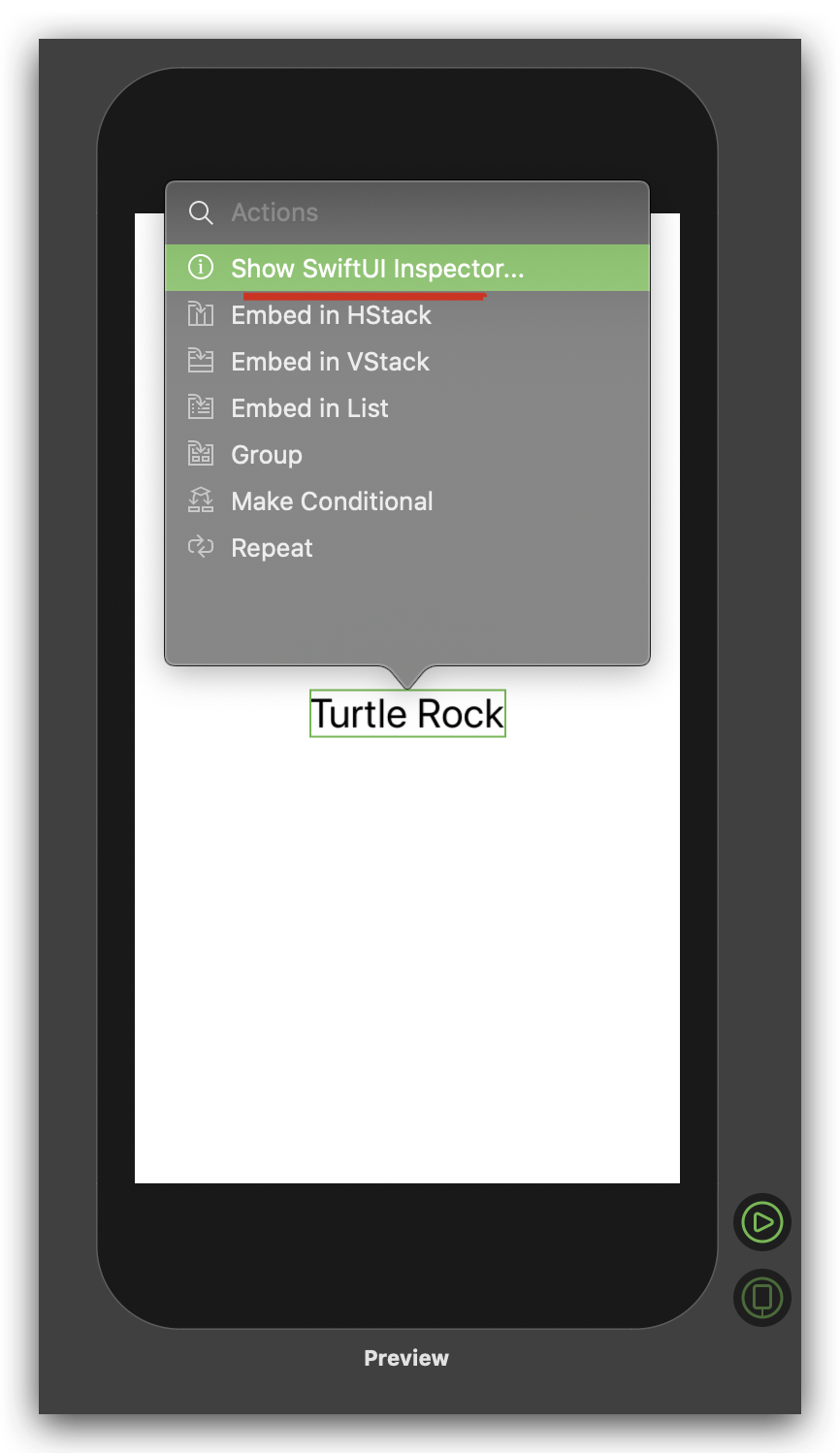
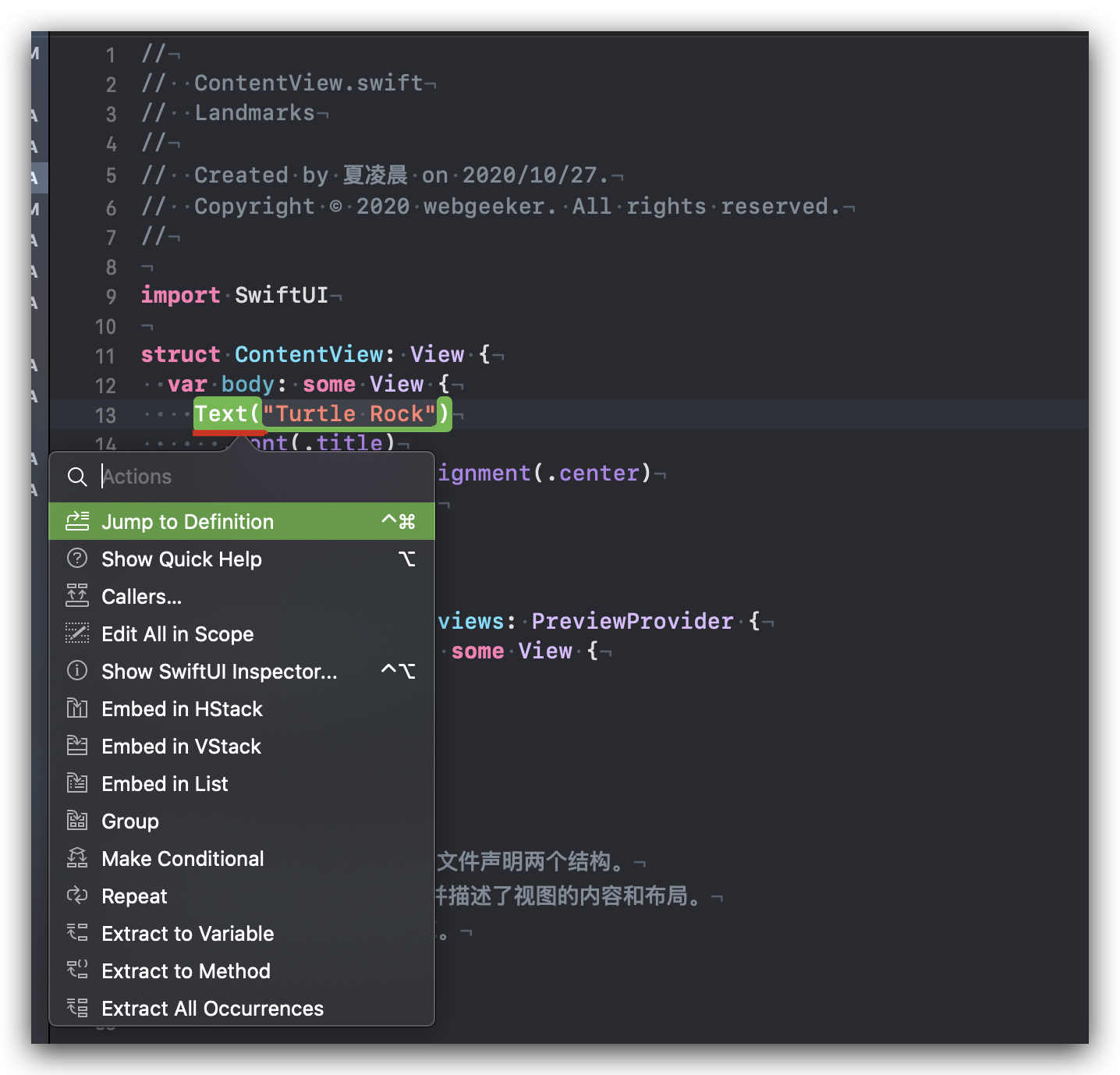
In the preview, Command-click the greeting to bring up the structured editing popover, and choose Inspect.
open the inspector by Command-clicking on the Text declaration in the code editor
View Stack
struct ContentView: View {

  var body: some View {

    Text("Turtle Rock")

      .font(.title)

      .multilineTextAlignment(.center)

      .brightness(0.0)

  }

}
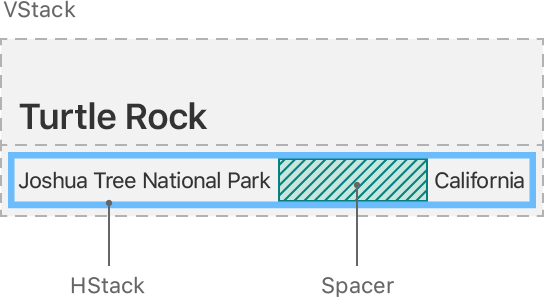
You can combine and embed multiple views in stacks, which group views together horizontally, vertically, or back-to-front.
- HStack
horizontally
import SwiftUI

struct ContentView: View {

  var body: some View {

    HStack {

      Text("Turtle Rock")

        .font(.title)

        .multilineTextAlignment(.center)

        .brightness(0.0)

    }

  }

}
- VStack
vertically
struct ContentView: View {

  var body: some View {

    VStack {

      Text("Turtle Rock")

        .font(.title)

        .multilineTextAlignment(.center)

        .brightness(0.0)

    }

  }

}
back-to-front
docs
https://developer.apple.com/documentation/swiftui/
refs
https://zzk.cnblogs.com/my/s/blogpost-p?Keywords=SwiftUI
https://github.com/xgqfrms/swift/tree/gh-pages/100-days-of-swiftui
https://www.hackingwithswift.com/100/swiftui
https://www.youtube.com/playlist?list=PLuoeXyslFTuZRi4q4VT6lZKxYbr7so1Mr
https://www.youtube.com/playlist?list=PLuoeXyslFTuaZtX7xSYbWz3TR0Vpz39gK
what's SwiftUI
https://www.hackingwithswift.com/quick-start/swiftui/what-is-swiftui
xgqfrms 2012-2020
www.cnblogs.com 发布文章使用:只允许注册用户才可以访问!
SwiftUI All In One的更多相关文章
- SwiftUI 官方教程(八)
8. 动态生成预览 接下来,我们会在 LandmarkList_Previews 中添加代码以在不同的设备尺寸上渲染列表.默认情况下,预览会以当前的 scheme 中设备的大小进行渲染.我们可以通过调 ...
- SwiftUI 官方教程(七)
7. 给子 View 传递数据 LandmarkDetail 现在依然使用硬编码的数据来显示地标.像 LandmarkRow 一样,LandmarkDetail 类型和它组合的其他 view 都需要一 ...
- SwiftUI 官方教程(六)
6. 在列表和详情之间设置导航 虽然列表已经能显示了,但是我们还不能通过点击单个地标来查看地标详情页面.SwiftUI教程 把 list 嵌入一个 NavigationView 中,并把每个 row ...
- SwiftUI 官方教程(五)
SwiftUI官方教程(五) 5. 同时使用 UIKit 和 SwiftUI 至此,我们已准备好创建 map view 了,接下来使用 MapKit 中的 MKMapView 类来渲染地图. 在 Sw ...
- SwiftUI 官方教程(四)
SwiftUI 官方教程(四) 4. 自定义 Image View 搞定名称和位置 view 后,我们来给地标添加图片. 这不需要添加很多代码,只需要创建一个自定义 view,然后给图片加上遮罩.边框 ...
- SwiftUI 官方教程(三)
3. 用 Stacks 组合 View 在上一节创建标题 view 后,我们来添加 text view,它用来显示地标的详细信息,比如公园的名称和所在的州. 在创建 SwiftUI view 时,我们 ...
- SwiftUI 官方教程(二)
SwiftUI 官方教程(二) 2. 自定义 Text View 为了自定义 view 的显示,我们可以自己更改代码,或者使用 inspector 来帮助我们编写代码. 在构建 Landmarks 的 ...
- SwiftUI 官方教程(一)
完整中文教程及代码请查看 https://github.com/WillieWangWei/SwiftUI-Tutorials 创建和组合 View 此部分将指引你构建一个发现和分享您喜爱地方的 ...
- SwiftUI 官方教程
SwiftUI 官方教程 完整中文教程及代码请查看 https://github.com/WillieWangWei/SwiftUI-Tutorials SwiftUI 官方教程 SwiftUI ...
- SwiftUI学习(一)
总览 如果你想要入门 SwiftUI 的使用,那 Apple 这次给出的官方教程绝对给力.这个教程提供了非常详尽的步骤和说明,网页的交互也是一流,是觉得值得看和动手学习的参考. 不过,SwiftUI ...
随机推荐
- 数据库内核——基于HLC的分布式事务实现深度剖析
DTCC 2019 | 深度解码阿里数据库实现 数据库内核--基于HLC的分布式事务实现深度剖析-阿里云开发者社区 https://developer.aliyun.com/article/70355 ...
- 8.3 Customizing Git - Git Hooks 钩子 自动拉取 自动部署 提交工作流钩子,电子邮件工作流钩子和其他钩子
https://git-scm.com/book/en/v2/Customizing-Git-Git-Hooks https://github.com/git/git/blob/master/temp ...
- mdns
mdns mdns_百度百科 https://baike.baidu.com/item/mdns 在计算机网络中 , 多播DNS ( mDNS )协议将主机名解析为不包含本地名称服务器的小型网络中的I ...
- linux 文件结构体和文件描述符号的学习
https://blog.csdn.net/cywosp/article/details/38965239
- Spring 设计模式介绍
JDK 中用到了那些设计模式?Spring 中用到了那些设计模式?这两个问题,在面试中比较常见.我在网上搜索了一下关于 Spring 中设计模式的讲解几乎都是千篇一律,而且大部分都年代久远.所以,花了 ...
- MySql(二)索引的设计与使用
MySql(二)索引的设计与使用 一.索引概述 二.设计索引的原则 三.BTREE索引与HASH索引 一.索引概述 所有Mysql列类型都可以被索引,对相关列使用索引时提高select操作性能的最佳途 ...
- MySql命令,吐血整理的Mysql,实话,真的吐血
MySql命令,吐血整理的Mysql,实话,真的吐血 1.基本操作 2.数据库操作 3.表的操作 4.数据操作 5.字符集编码 6.数据类型(列类型) 7.列属性(列约束) 8.建表规范 9.SELE ...
- springboot中的parent依赖作用详解
最近在阅读springboot+vue全栈开发实战,松哥编写的,虽然比较简单,各种技术没有深入讲解,但是还是可以看看的,特别是我这个前端菜鸟哈哈,以后可是要学习全栈的,把书中看到的不会的地方会记录下笔 ...
- 并发编程补充--方法interrupted、isinterrupted详解
并发编程 interrupted()源码 /** * Tests whether the current thread has been interrupted. The * <i>int ...
- httprunner(4)录制生成测试用例
前言 写用例之前,我们应该熟悉API的详细信息.建议使用抓包工具Charles或AnyProxy进行抓包. har2case 我们先来了解一下另一个项目har2case 他的工作原理就是将当前主流的抓 ...