
Python+selenium之带unittest的脚本分析
 from selenium import webdriver

 from selenium.webdriver.common.by import By

 from selenium.webdriver.common.keys import Keys

 from selenium.webdriver.support.ui import Select

 from selenium.common.exceptions import NoSuchElementException, NoAlertPresentException

 import unittest, time, re

 class Baidu(unittest.TestCase):

     def setUp(self):

         self.driver = webdriver.Firefox()

         self.driver.implicitly_wait(30)

         self.base_url = "http://www.baidu.com/"

         self.verificationErrors = []

         self.accept_next_alert = True

     def test_baidu(self):

         driver = self.driver

         driver.get(self.base_url + "/")

         driver.find_element_by_id("kw").send_keys("selenium webdriver")

         driver.find_element_by_id("su").click()

         driver.close()

     def is_element_present(self, how, what):

         try:

             self.driver.find_element(by=how, value=what)

         except NoSuchElementException as e:

             return False

         return True

     def is_alert_present(self):

         try:

             self.driver.switch_to_alert()

         except NoAlertPresentException as e:

             return False

         return True

     def close_alert_and_get_its_text(self):

         try:

             alert = self.driver.switch_to_alert()

             alert_text = alert.text

             if self.accept_next_alert:

                 alert.accept()

             else:

                 alert.dismiss()

             return alert_text

         finally:

             self.accept_next_alert = True

     def tearDown(self):

         self.driver.quit()

         self.assertEqual([], self.verificationErrors)

 if __name__ == "__main__":

     unittest.main()
****注:以上代码适用与Python2.7版本,Python3.0版本会报错
import unittest

1.首先导入unittest模块

class BaiduTest(unittest.TestCase)

2.BaiduTest类继承unittest框架的TestCase类成为标准测试类
    def setUp(self):

        self.driver = webdriver.Firefox()

        self.driver.implicitly_wait(30)

        self.base_url = "http://www.baidu.com/"

        self.verificationErrors = []

        self.accept_next_alert = True

1.setUp用于设置初始化工作,在执行每一测试用例前先被执行,它与tearDown方法相呼应,后者在每一个测试用例执行后被执行。初始化工作定义了浏览器启动和基础URL地址。

2.implicitly_wait()设置页面上元素的隐性等待时间为30s

3.verificationErrors数组,脚本运行时的错误信息将被记录到这个数组中。

4.定义accept_next_alert变量,表示是否继续接受下一个警告,初始状态为True
 def is_element_present(self, how, what):

        try:

            self.driver.find_element(by=how, value=what)

        except NoSuchElementException as e:

            return False

        return True

1.is_element_present方法用于查找页面元素是否存在,通过find_element()来接收元素的定位方法(how)和定位值(what)。
如果定位到元素则返回True。否则爆出异常并返回False。try.....except....为Python语言的异常处理。
    def is_alert_present(self):

        try:

            self.driver.switch_to_alert()

        except NoAlertPresentException as e:

            return False

        return True

1.is_alert_prent()方法用于判断当前页面是否存在警告框,利用WebDriver提供的switch_to_alert()方法来捕捉页面上的警告框。

如果捕捉到警告框则返回True。否者跑输NoAlertPrentException类型的异常,并返回False

2.鉴于不管页面是否出现警告框,返回结果都为True。所以可以通过dirver.switch_to_alert().text,用于获取当前页面上的警告提示信息。可以获取到就返回True,获取不到则返回False。
    def close_alert_and_get_its_text(self):

        try:

            alert = self.driver.switch_to_alert()

            alert_text = alert.text

            if self.accept_next_alert:

                alert.accept()

            else:

                alert.dismiss()

            return alert_text

        finally:

            self.accept_next_alert = True

1.close_alert_and_get_its_text()关闭警告并获得警告信息。

2.通过switch_to_alert()获得警告,通过text获得警告框的信息。

3.然后通过if语句判断accept_naxt_alert的状态,在setUp()中已经初始化状态为True,如果为True,则通过accept()接受警告,否者dismiss()忽略警告。
    def tearDown(self):

        self.driver.quit()

        self.assertEqual([], self.verificationErrors)

1.tearDown()方法在每个测试方法执行后调用,这个方法用于测试用例执行后的清理工作。如退出浏览器,关闭驱动,恢复用例执行状态。

2.在setUp()方法中定义了verificationErrors为空数组,这里通过assertEqual()比较其是否为空,如果为空则说明用例执行的过程中没有出现异常,否则将抛出AssertionErrory异常。
if __name__ == "__main__":

    unittest.main()

通过unittest。main()方法来运行当前文件中的测试方法,其默认匹配并运行以test开头的方法。
**********************************************************************************************************************************************************************************************************************************
以上代码从《虫师》copy,但是会报如下的错误
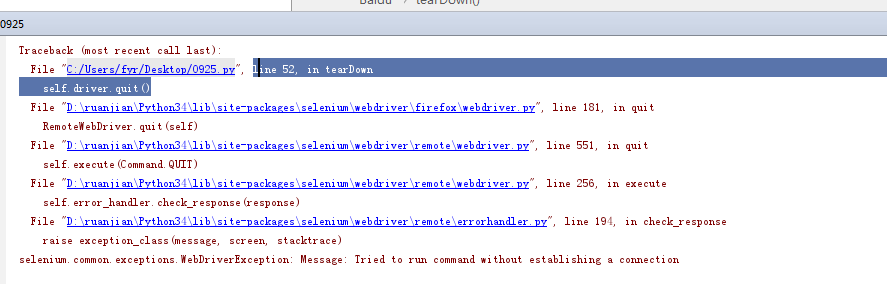
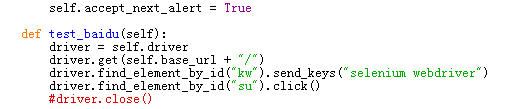
解决的办法:注释掉driver.close()
 from selenium import webdriver

 from selenium.webdriver.common.by import By

 from selenium.webdriver.common.keys import Keys

 from selenium.webdriver.support.ui import Select

 from selenium.common.exceptions import NoSuchElementException, NoAlertPresentException

 import unittest, time, re

 class Baidu (unittest.TestCase):

     def setUp(self):

         self.driver = webdriver.Firefox ()

         self.driver.implicitly_wait (30)

         self.base_url = "http://XXXXXXXX    /oneCard/login"

         self.verificationErrors = []

         self.accept_next_alert = True

     def test_baidu(self):

         driver = self.driver

         driver.get (self.base_url + "/")

         driver.find_element_by_name ("username").clear ()

         driver.find_element_by_name ("username").send_keys ("super")

         driver.find_element_by_name ("password").clear ()

         driver.find_element_by_name ("password").send_keys ("XXXXXXX")

         driver.find_element_by_xpath ("/html/body/div[1]/div/div/div/div[2]/form/fieldset/div[4]/button").click ()

         time.sleep (3)

         # 进入卡入库界面

         driver.find_element_by_xpath ("//*[@id='sidebar-menu']/div/ul/li[1]/a").click ()

         driver.find_element_by_xpath ("//*[@id='sidebar-menu']/div/ul/li[1]/ul/li[1]/a").click ()

         time.sleep (3)

         # 点击卡入库,进入卡入库

         driver.switch_to.frame (driver.find_element_by_xpath ("//*[@id='tabBody']/div[2]/div/iframe"))

         driver.find_element_by_link_text ("入库").click ()

         time.sleep (3)

         driver.switch_to.default_content ()

         driver.switch_to.frame (driver.find_element_by_xpath ("//*[@id='tabBody']/div[3]/div/iframe"))

         driver.find_element_by_id ("cardNo").clear ()

         driver.find_element_by_id ("cardNo").send_keys ("")

         time.sleep (3)

         driver.find_element_by_id ("cardChipId").clear ()

         driver.find_element_by_id ("cardChipId").send_keys ("")

         # 输入外部成本 和内部成本

         driver.find_element_by_id ("costInternal").clear ()

         driver.find_element_by_id ("costInternal").send_keys (1)

         time.sleep (2)

         driver.find_element_by_id ("costExternal").clear ()

         driver.find_element_by_id ("costExternal").send_keys (10)

         # 提交

         driver.find_element_by_xpath ("//*[@id='btnSubmit']").click ()

     def is_element_present(self, how, what):

         try:

             self.driver.find_element (by=how, value=what)

         except NoSuchElementException as e:

             return False

         return True

     def is_alert_present(self):

         try:

             self.driver.switch_to_alert ()

         except NoAlertPresentException as e:

             return False

         return True

     def close_alert_and_get_its_text(self):

         try:

             alert = self.driver.switch_to_alert ()

             alert_text = alert.text

             print(alert_text)

             if self.accept_next_alert:

                 alert.accept ()

             else:

                 alert.dismiss ()

             return alert_text

         finally:

             self.accept_next_alert = True

     def tearDown(self):

         self.driver.quit ()

         self.assertEqual ([], self.verificationErrors)

 if __name__ == "__main__":

     unittest.main ()
Python+selenium之带unittest的脚本分析的更多相关文章
- Selenium 2自动化测试实战33(带unittest的脚本分析)
带unittest的脚本分析 #test.py #coding:utf-8 from selenium import webdriver from selenium.webdriver.common. ...
- python +selenium 自带case +生成报告的模板
https://github.com/huahuijay/python-selenium2这个就是 python +selenium的 里面还自带case 然后也有生成报告的模板 我的: https: ...
- 使用Python+selenium实现第一个自动化测试脚本
原blog 一,安装Python. python官方下载地址:https://www.python.org/downloads/ 安装后点击开始菜单,在菜单最上面能找到IDLE. IDLE是pytho ...
- Python&Selenium 数据驱动【unittest+ddt+mysql】
一.摘要 本博文将介绍Python和Selenium做自动化测试的时候,基于unittest框架,借助ddt模块使用mysql数据库为数据源作为测试输入 二.SQL脚本 # encoding crea ...
- Python&Selenium 数据驱动【unittest+ddt+xml】
一.摘要 本博文将介绍Python和Selenium做自动化测试的时候,基于unittest框架,借助ddt模块使用xml文件作为数据文件作为测试输入 二.xml文件 <?xml version ...
- Python&Selenium 数据驱动【unittest+ddt+json】
一.摘要 本博文将介绍Python和Selenium做自动化测试的时候,基于unittest框架,借助ddt模块使用json文件作为数据文件作为测试输入,最后生成html测试报告 二.json文件 [ ...
- 【Python Selenium】简单数据生成脚本
最近因工作需要,写了一个简单的自动化脚本,纯属学习,顺便学习下selenium模块. 废话不多说,直接上代码!! 这里一位大神重写了元素定位.send_keys等方法,咱们直接进行调用. 适用Pyth ...
- Python&Selenium 数据驱动【unittest+ddt+Excel】
一.摘要 一般情况下我们为了更好的管理测试数据会选择将测试数据存储在Excel文件当中去,本节内容将展示给读者将测试数据存储在Excel文档中的案例. 二.创建存储测试数据的Excel 创建一个Exc ...
- Python&Selenium 数据驱动【unittest+ddt+json+HTMLTestRunner】
一.摘要 本博文将介绍Python和Selenium做自动化测试的时候,基于unittest框架,借助ddt模块使用json文件作为数据文件作为测试输入,最后借助著名的HTMLTestRunner.p ...
随机推荐
- git push -u origin master error: failed to push some refs to
1.问题描述 $ git push -u origin master To github.com:[github_name]/[github_repository_name].git ! [rejec ...
- windows文件同步工具
windows 文件同步工具: realTimesync freefilesync second copy second copy注册码: Name:爱学府软件园 注册码:15BF-E46C-67 ...
- Hibernate 的HQL和sql有什么区别
转自:https://blog.csdn.net/haozhugogo/article/details/54575802sql 面向数据库表查询 hql 面向对象查询 hql : from 后面跟的 ...
- POJ-3069
Saruman's Army Time Limit: 1000MS Memory Limit: 65536K Total Submissions: 10994 Accepted: 5555 D ...
- 模块 DLL C:\WINDOWS\system32\inetsrv\aspnetcore.dll 未能加载。返回的数据为错误信息。
更新了win10的版本后,就启动原来的iis发布的程序 程序池就自动关闭.后来 启动网站 iis程序池自动关闭. 在为应用程序池“.NET v4.5”提供服务的工作进程“21908”中,协议“http ...
- 转载ASP.NET MVC中Session的处理机制
本文章转载自 http://www.cnblogs.com/darrenji/p/3951065.html ASP.NET MVC中的Session以及处理方式 最近在ASP.NET MVC项目中 ...
- SO_REUSEADDR的分析
今天协议个socket程序时碰到了这个问题,选自博客http://www.cppblog.com/ace/archive/2006/04/29/6446.html 敲完代码,等下看它.
- [poj] Dungeon Master bfs
Description You are trapped in a 3D dungeon and need to find the quickest way out! The dungeon is co ...
- java.lang.IllegalStateException: Cannot get a STRING value from a NUMERIC cell
异常 在使用POI读取Excel文件内容时,发生了异常,报错如下: 大概意思是不能从一个数值的列获取一个字符串类型的值,我使用下面的代码来获取单元格的值: //此处省略N行代码 String cell ...
- Solr 6.7学习笔记(04)-- suggester 遇到的问题
遇到的一些问题: 在前面的Suggest配置完后,我在 “/select” 这个 <requestHandler>里面加上了highlight的配置,可是当我在搜索框里输入字符时,竟然报如 ...