
Python爬虫学习笔记之爬今日头条的街拍图片
代码:
 import requests

 import os

 from hashlib import md5

 from urllib.parse import urlencode

 from multiprocessing.pool import Pool

 GROUP_START = 1

 GROUP_END = 5

 def get_page(offset):

     params = {

         'offset': offset,

         'format': 'json',

         'keyword': '街拍',

         'autoload': 'true',

         'count': '',

         'cur_tab': '',

         'form': 'search_tab',

     }

     url  = 'https://www.toutiao.com/search_content/?' + urlencode(params)

     try:

         response = requests.get(url)

         if response.status_code == 200:

             return response.json()

     except requests.ConnectionError:

         return None

 def get_images(json):

     data = json.get('data')

     if data:

         for item in data:

             image_list = item.get('image_list')

             title = item.get('title')

             if image_list:

                 for image in image_list:

                     # 构造一个生成器,将图片和标题一起返回

                     yield {

                         'image': image.get('url'),

                         'title': title

                     }

 # item就是get_image()返回的一个字典

 # item里面的title创建一个文件夹

 def save_image(item):

     if not os.path.exists(item.get('title')):

         os.mkdir(item.get('title'))

     try:

         local_image_url = item.get('image')

         new_image_url = local_image_url.replace('list', 'large')

         response = requests.get('http:' + new_image_url)

         if response.status_code == 200:

             file_path = '{0}/{1}.{2}'.format(item.get('title'), md5(response.content).hexdigest(), 'jpg')

             # 判断路径是否存在,如果不存在,写入

             if not os.path.exists(file_path):

                 with open(file_path, 'wb')as f:

                     f.write(response.content)

             else:

                 print('Already Download', file_path)

     except:

         print('Failed to save image')

 # 定义一个offset数组,遍历,提取图片,下载

 def main(offset):

     json = get_page(offset)

     for item in get_images(json):

         print(item)

         save_image(item)

 if __name__ == '__main__':

     pool = Pool() # 创建进程池

     groups = ([x * 20 for x in range(GROUP_START, GROUP_END + 1)])

     pool.map(main, groups) # 第一个参数是函数,第二个参数是一个迭代器,将迭代器中的数字作为参数依次传入函数中

     pool.close() # 关闭pool,使其不在接受新的(主进程)任务

     pool.join() # 主进程阻塞后,让子进程继续运行完成,子进程运行完后,再把主进程全部关掉
结果:

此时可以看到文件夹里:

随便打开一个:
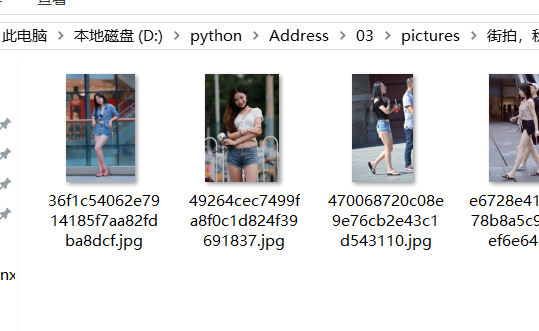
Successful!
Python爬虫学习笔记之爬今日头条的街拍图片的更多相关文章
- Python爬虫学习笔记之爬取新浪微博
import requests from urllib.parse import urlencode from pyquery import PyQuery as pq from pymongo im ...
- python爬虫学习01--电子书爬取
python爬虫学习01--电子书爬取 1.获取网页信息 import requests #导入requests库 ''' 获取网页信息 ''' if __name__ == '__main__': ...
- 分析AJAX抓取今日头条的街拍美图并把信息存入mongodb中
今天学习分析ajax 请求,现把学得记录, 把我们在今日头条搜索街拍美图的时候,今日头条会发起ajax请求去请求图片,所以我们在网页源码中不能找到图片的url,但是今日头条网页中有一个json 文件, ...
- python爬虫学习笔记(一)——环境配置(windows系统)
在进行python爬虫学习前,需要进行如下准备工作: python3+pip官方配置 1.Anaconda(推荐,包括python和相关库) [推荐地址:清华镜像] https://mirrors ...
- python爬虫学习笔记
爬虫的分类 1.通用爬虫:通用爬虫是搜索引擎(Baidu.Google.Yahoo等)“抓取系统”的重要组成部分.主要目的是将互联网上的网页下载到本地,形成一个互联网内容的镜像备份. 简单来讲就是尽可 ...
- 一入爬虫深似海,从此游戏是路人!总结我的python爬虫学习笔记!
前言 还记得是大学2年级的时候,偶然之间看到了学长在学习python:我就坐在旁边看他敲着代码,感觉很好奇.感觉很酷,从那之后,我就想和学长一样的厉害,就想让学长教我,请他吃了一周的饭,他答应了.从此 ...
- Python爬虫学习笔记(一)
概念: 使用代码模拟用户,批量发送网络请求,批量获取数据. 分类: 通用爬虫: 通用爬虫是搜索引擎(Baidu.Google.Yahoo等)"抓取系统"的重要组成部分. 主要目的是 ...
- Python爬虫学习笔记(三)
Cookies: 以抓取https://www.yaozh.com/为例 Test1(不使用cookies): 代码: import urllib.request # 1.添加URL url = &q ...
- python多线程爬取-今日头条的街拍数据(附源码加思路注释)
这里用的是json+re+requests+beautifulsoup+多线程 1 import json import re from multiprocessing.pool import Poo ...
随机推荐
- python2.7练习小例子(二十九)
29):1.题目:按相反的顺序输出列表的值. #!/usr/bin/python # -*- coding: UTF-8 -*- a = ['one', 'two', 'three'] for ...
- WPF中使用定时器的注意事项
原文:WPF中使用定时器的注意事项 注意事项 要使用System.Windows.Threading.DispatcherTimer,而不能使用System.Timers.Timer. 原因是WPF是 ...
- vs2015-Cordova开发安卓应用环境搭建
之前看到过用html5+css+js就可以开发跨平台的应用,然后发现vs2015里就有个Cordova项目所以就想试试,但并不是这么顺利.刚开始对安卓环境一点也不了解,就到处百度搜索.终于成功了. 首 ...
- 『Golang』MongoDB在Golang中的使用(mgo包)
有关在Golang中使用mho进行MongoDB操作的最简单的例子.
- Mybatis 异常记录(1): Invalid bound statement (not found)
错误信息: org.apache.ibatis.binding.BindingException: Invalid bound statement (not found): com.pingan.cr ...
- 梳理 Opengl ES 3.0 (二)剖析一个GLSL程序
OpenGL ES shading language 3.0 也被称作 GLSL,是个 C风格的编程语言. Opengl ES 3.0内部有两种可编程处理单元,即Vertex processor和Fr ...
- Go基础篇【第8篇】: 内置库模块 bytes [一]
bytes包实现了操作[]byte的常用函数.本包的函数和strings包的函数相当类似. func Compare func Compare(a, b []byte) int Compare函数返回 ...
- STL应用——UVA673(堆栈)
分析:栈的应用,遇到右括号便弹出栈顶元素,看是否与右括号相互匹配,其余情况压入栈. 注意:本题有坑,空串空串,为此我跪了数次 #include<iostream> #include< ...
- iOS-登录发送验证码时60秒倒计时,直接用
__block NSInteger timeout= ; //倒计时时间 KWeakSelf dispatch_queue_t queue = dispatch_get_global_queue(DI ...
- [转] const int *a与int *const a,const int *const a的区别
http://blog.csdn.net/zhangheng837964767/article/details/33783511 关键问题点:const 属于修饰符 ,关键是看const 修饰的位置在 ...