
Python Ethical Hacking - Intercepting and Modifying Packets
INTERCEPTING & MODIFYING PACKETS
Scapy can be used to:
- Create packets.
- Analyze packets.
- Send/receive packets.
But it can't be used to intercept packets/flows.
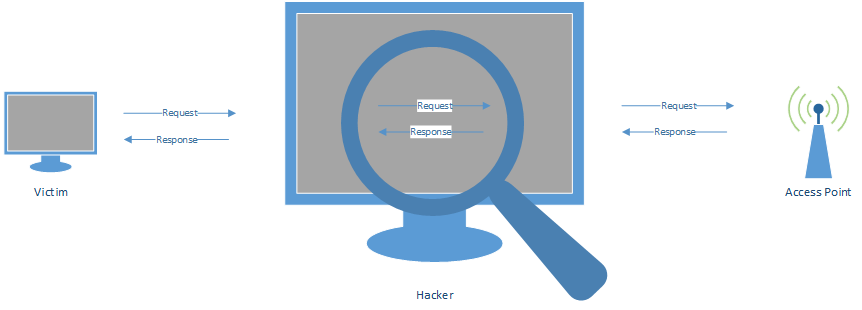
CLASSIC MITM SCENARIO

MITM - SNIFFING DATA
MITM - MODIFYING DATA


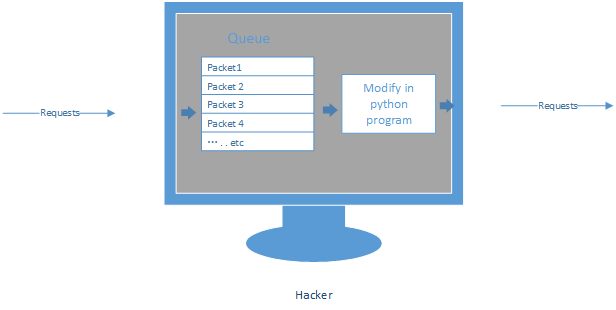
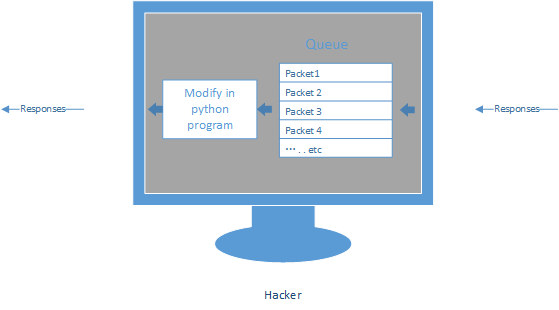
1. Execute the command - iptables to capture the packets into a queue.
iptables -I INPUT -d 10.0.0.0/ -j NFQUEUE --queue-num

2. Access the Packets queue.
Install the module netfilterqueue first.
pip3 install -U git+https://github.com/kti/python-netfilterqueue

3. Write the Python script to intercept and process the packets.
#!/usr/bin/env python

from netfilterqueue import NetfilterQueue

def process_packet(packet):

    print(packet)

    packet.accept()

queue = NetfilterQueue()

queue.bind(1, process_packet)

try:

    queue.run()

except KeyboardInterrupt:

    print('')

We can also drop the packets through function packet.drop().
4. Use the following command to stop the packet capturing.
iptables --flush
Converting Packets to Scapy Packets
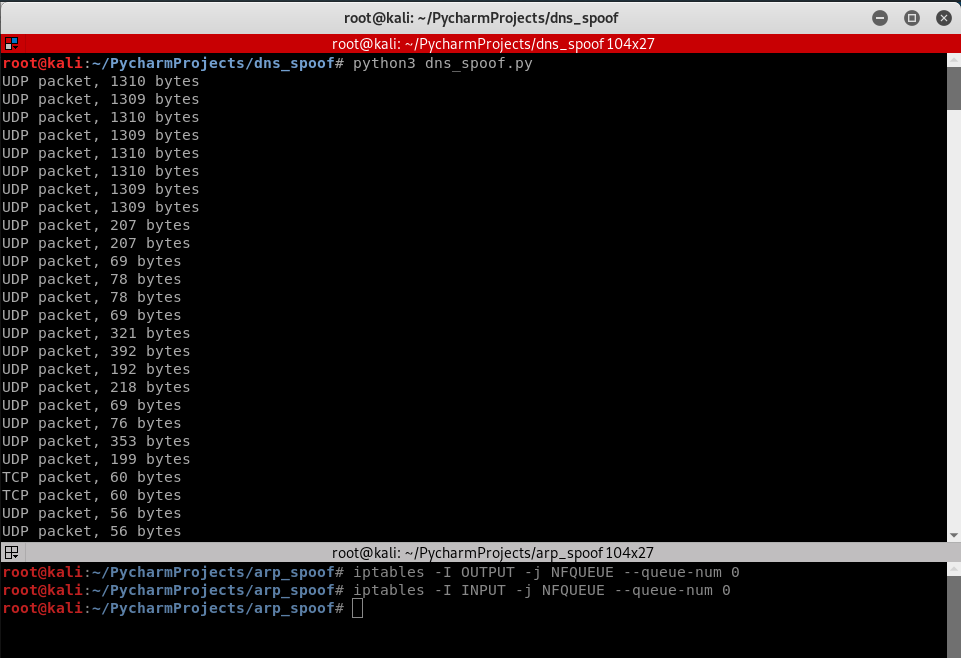
1. Execute the iptables command to capture the OUTPUT and INPUT packets.
iptables -I OUTPUT -j NFQUEUE --queue-num

iptables -I INPUT -j NFQUEUE --queue-num

2. Execute the following Python script to process the captured packets.
#!/usr/bin/env python

from netfilterqueue import NetfilterQueue

def process_packet(packet):

    print(packet)

    packet.accept()

queue = NetfilterQueue()

queue.bind(0, process_packet)

try:

    queue.run()

except KeyboardInterrupt:

    print('')
3. Convert the packet to scapy packet and show on the screen.
#!/usr/bin/env python

from netfilterqueue import NetfilterQueue

from scapy.layers.inet import IP

def process_packet(packet):

    scapy_packet = IP(packet.get_payload())

    print(scapy_packet.show())

    packet.accept()

queue = NetfilterQueue()

queue.bind(0, process_packet)

try:

    queue.run()

except KeyboardInterrupt:

    print('')
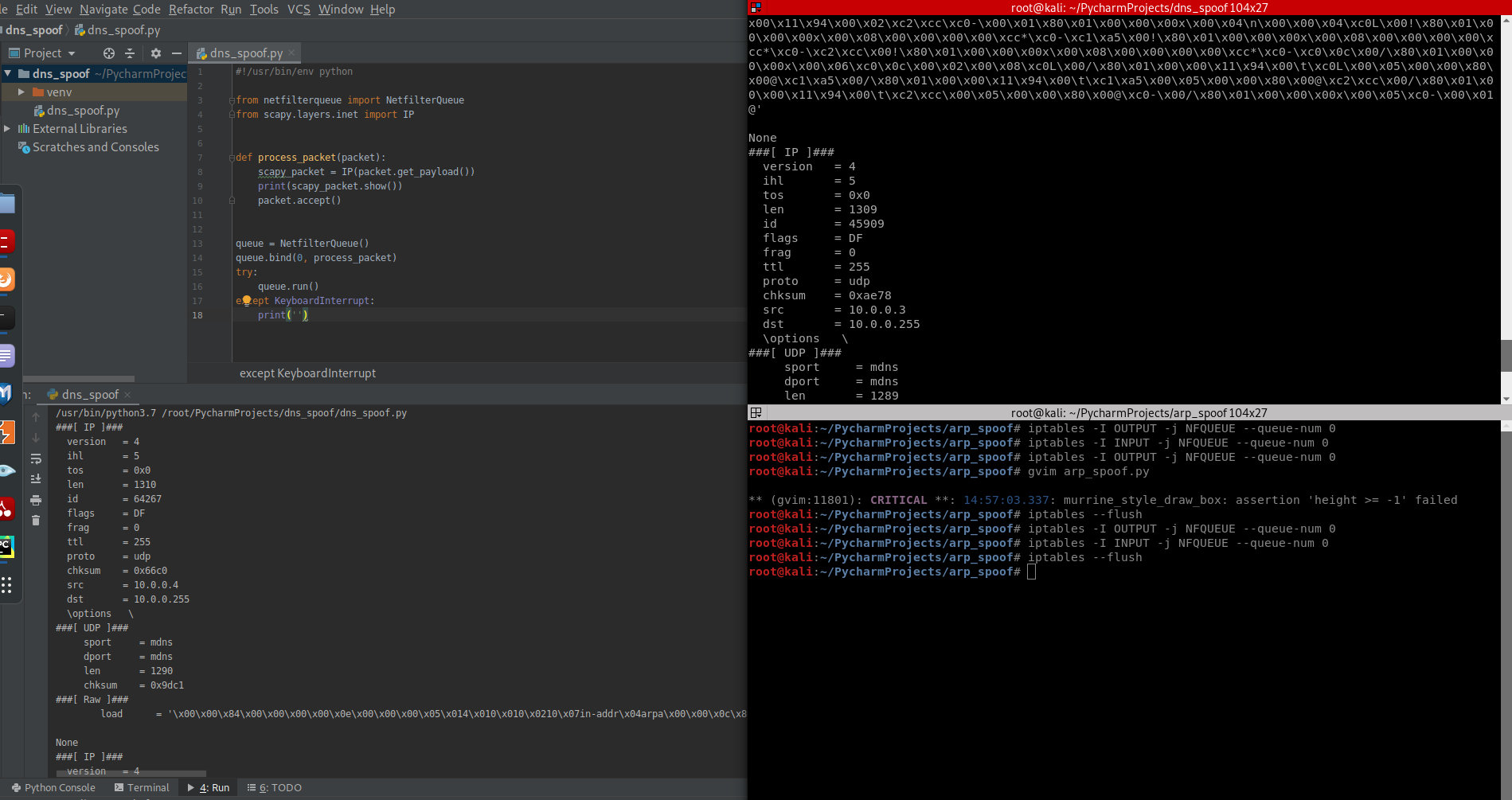
4. Stop the capture of the packet by the command.
iptables --flush
Python Ethical Hacking - Intercepting and Modifying Packets的更多相关文章
- Python Ethical Hacking - Packet Sniffer(1)
PACKET_SNIFFER Capture data flowing through an interface. Filter this data. Display Interesting info ...
- Python Ethical Hacking - MODIFYING DATA IN HTTP LAYER(2)
MODIFYING DATA IN HTTP LAYER Edit requests/responses. Replace download requests. Inject code(html/Ja ...
- Python Ethical Hacking - MODIFYING DATA IN HTTP LAYER(1)
MODIFYING DATA IN HTTP LAYER Edit requests/responses. Replace download requests. Inject code(html/Ja ...
- Python Ethical Hacking - MODIFYING DATA IN HTTP LAYER(3)
Recalculating Content-Length: #!/usr/bin/env python import re from netfilterqueue import NetfilterQu ...
- Python Ethical Hacking - ARP Spoofing
Typical Network ARP Spoofing Why ARP Spoofing is possible: 1. Clients accept responses even if they ...
- Python Ethical Hacking - Bypass HTTPS(1)
HTTPS: Problem: Data in HTTP is sent as plain text. A MITM can read and edit requests and responses. ...
- Python Ethical Hacking - Packet Sniffer(2)
Capturing passwords from any computer connected to the same network. ARP_SPOOF + PACKET_SNIFFER Ta ...
- Python Ethical Hacking - BACKDOORS(8)
Cross-platform hacking All programs we wrote are pure python programs They do not rely on OS-specifi ...
- Python Ethical Hacking - NETWORK_SCANNER(2)
DICTIONARIES Similar to lists but use key instead of an index. LISTS List of values/elements, all ca ...
随机推荐
- cb44a_c++_STL_算法_删除_(2)remove_copy_remove_copy_if
cb44a_c++_STL_算法_删除_(2)remove_copy_remove_copy_if remove_copy()//在复制过程中删除一些数据remove_copy_if() 删除性算法: ...
- Oracle SQL调优系列之SQL Monitor Report
@ 目录 1.SQL Monitor简介 2.捕捉sql的前提 3.SQL Monitor 参数设置 4.SQL Monitor Report 4.1.SQL_ID获取 4.2.Text文本格式 4. ...
- linux环境下搭建Jenkins持续集成(Jenkins+git+shell+maven+tomact)
准备环境 jenkins.war包 ,jdk1.8 ,tomact , maven,git 1.Jenkins war包,下载地址https://jenkins.io/zh/download/ ...
- docker 镜像删除
(我们以删除 php-fpm 这个镜像为例子) 一.查看镜像的 ID [root@localhost ~]# docker images REPOSITORY TAG IMAGE ID CREATED ...
- Linux上的Systemctl命令
LinuxSystemctl是一个系统管理守护进程.工具和库的集合,用于取代System V.service和chkconfig命令,初始进程主要负责控制systemd系统和服务管理器.通过Syste ...
- 关于idea的一些快捷键
最近在用idea写代码,熟悉一些快捷键的使用能够让写代码的速度提高,以下快捷键是默认idea的快捷键,当然我们可以自己修改的: 自动补全代码快捷键:CTRL+alt+V 自动格式化代码:CTRL+al ...
- CImage显示位图与CDC双缓冲冲突,使用路径层解决.
2010年04月29日 星期四 20:35 位图闪的问题困扰我很久了,因为程序的需要,我显示位图的方式是CImage类. 如果从CImage转到CBitmap,之后使用Attach到是可以,但我发现这 ...
- C++的新手入门答疑
基本部分: .ctrl+f5 调试不运行,会出现press anykey to continue f5 调试 .c++变c,修改Stdafx.h,将#include<stdio.h>替换为 ...
- Python进阶之浅谈内置方法(补充)
目录 列表类型的内置方法 元组类型的内置方法 字典类型的内置方法 集合类型的内置方法 列表类型的内置方法 1.作用:描述名字,说的话等 2.定义方式 s=['tim','age'] s=str('ti ...
- 分析并封装排序算法(js,java)
前言 本次来分享一下排序的api底层的逻辑,这次用js模拟,java的逻辑也是差不多. 先看封装好的api例子: js的sort排序 java的compareTo排序 自己模拟的代码(JS) func ...