
《DSP using MATLAB》Problem 5.13


1、 代码:
%% ++++++++++++++++++++++++++++++++++++++++++++++++++++++++++++++++++++++++++++++++

%%            Output Info about this m-file

fprintf('\n***********************************************************\n');

fprintf('        <DSP using MATLAB> Problem 5.13 \n\n');

banner();

%% ++++++++++++++++++++++++++++++++++++++++++++++++++++++++++++++++++++++++++++++++

% -----------------------------------------------------------------

%              1  x(n) = [1, 2, -3, 4, 5, 1, 2, -3, 4, 5]

%                   x(n) = x(n+N/2)  N=even integer

% -----------------------------------------------------------------

nn1 = [0:9];

xx1 = [1, 2, -3, 4, 5, 1, 2, -3, 4, 5];

NN1 = length(xx1);                                % length is 10

%m = mod_1(nn1, NN1);

%x = [xx1 zeros(1, 0)];                        % padding zeros

%n = [nn1 max(nn1)+1:max(nn1)+6];

x = xx1;

n = nn1;

figure('NumberTitle', 'off', 'Name', 'P5.13.1 x(n)')

set(gcf,'Color','white');

subplot(2,1,1); stem(nn1, xx1);

xlabel('n'); ylabel('x(n)');

title('x(n) ori sequence');  grid on;

subplot(2,1,2); stem(n, x);

xlabel('n'); ylabel('x(n)');

title('x(n) padding zeros');  grid on;

%% =============================================================================

%%                 DTFT X(w) of xn sequence, w=[0:2pi],

%% =============================================================================

MM = 500;

[Xw_DTFT, w] = dtft1(x, n, MM);

 magXw_DTFT = abs(Xw_DTFT);   angXw_DTFT = angle(Xw_DTFT)/pi;

realXw_DTFT = real(Xw_DTFT); imagXw_DTFT = imag(Xw_DTFT);

%% --------------------------------------------------------------

%%        START X_DTFT's  mag ang real imag

%% --------------------------------------------------------------

figure('NumberTitle', 'off', 'Name', 'P5.13.1 X(w) DTFT of x(n)');

set(gcf,'Color','white');

subplot(2,2,1); plot(w/pi,magXw_DTFT); grid on;  % axis([-2,2,0,15]);

title('Magnitude Part');

xlabel('frequency in \pi units'); ylabel('Magnitude  |X\_DTFT|');

subplot(2,2,3); plot(w/pi, angXw_DTFT); grid on;  % axis([-2,2,-1,1]);

title('Angle Part');

xlabel('frequency in \pi units'); ylabel('Rad \pi'); %axis([-200,200,0,2]);

subplot('2,2,2'); plot(w/pi, realXw_DTFT); grid on;

title('Real Part');

xlabel('frequency in \pi units'); ylabel('Real');

subplot('2,2,4'); plot(w/pi, imagXw_DTFT); grid on;

title('Imaginary Part');

xlabel('frequency in \pi units'); ylabel('Imaginary');

%% --------------------------------------------------------------

%%        END X_DTFT's  mag ang real imag

%% --------------------------------------------------------------

%% ------------------------------------------------------------------

%%                 DFT(k) of xn sequence, k=[0:N-1]

%%                      w=2pi*k/N       k=Nw/(2pi)

%% ------------------------------------------------------------------

N1 = length(x);

k1 = [0 : N1-1];

%k2 = [-N : N-1];

%k3 = [-N/2 : N/2];

Xk_DFT = dft(x, N1);                                         % DFT

    magXk_DFT = abs( [ Xk_DFT ] );                          % DFT magnitude

    angXk_DFT = angle( [Xk_DFT] )/pi;                       % DFT angle

   realXk_DFT = real(Xk_DFT); imagXk_DFT = imag(Xk_DFT);

figure('NumberTitle', 'off', 'Name', 'P5.13.1 DFT(k) of x(n)')

set(gcf,'Color','white');

subplot(2,1,1); stem(k1, magXk_DFT); hold on; plot(N1*w/(2*pi), magXw_DTFT,'r--'); hold off;

%axis([-N/2, N/2, -0.5, 50.5]);

xlabel('k'); ylabel('magnitude(k)');

title('DFT magnitude of x(n), N=10');  grid on;

subplot(2,1,2); stem(k1, angXk_DFT);  hold on; plot(N1*w/(2*pi), angXw_DTFT,'r--'); hold off;

%axis([-N/2, N/2, -0.5, 50.5]);

xlabel('k'); ylabel('angle(k)');

title('DFT angle of x(n), N=10');  grid on;
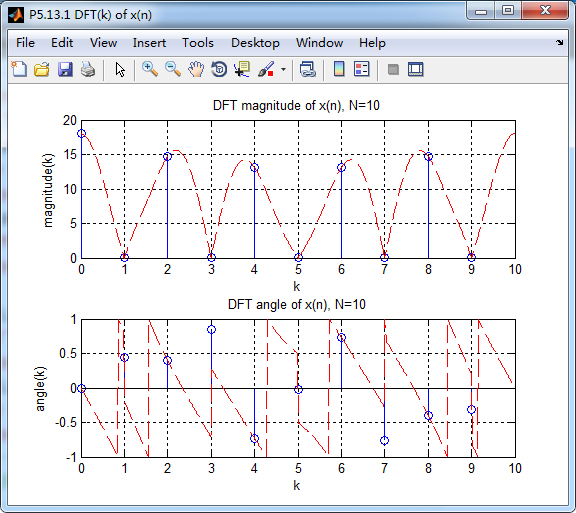
运行结果:



2、代码
%% ++++++++++++++++++++++++++++++++++++++++++++++++++++++++++++++++++++++++++++++++

%%            Output Info about this m-file

fprintf('\n***********************************************************\n');

fprintf('        <DSP using MATLAB> Problem 5.13 \n\n');

banner();

%% ++++++++++++++++++++++++++++++++++++++++++++++++++++++++++++++++++++++++++++++++

% -----------------------------------------------------------------

%              2  x(n) = [1, 2, -3, 4, 5, -1, -2, 3, -4, -5]

%                       x(n) = -x(n + N/2)   N=even integer

% -----------------------------------------------------------------

nn1 = [0:9];

xx1 = [1, 2, -3, 4, 5, -1, -2, 3, -4, -5];

NN1 = length(xx1);                                % length is 10

%m = mod_1(nn1, NN1);

%x = [xx1 zeros(1, 0)];                        % padding zeros

%n = [nn1 max(nn1)+1:max(nn1)+6];

x = xx1;

n = nn1;

figure('NumberTitle', 'off', 'Name', 'P5.13.2 x(n)')

set(gcf,'Color','white');

subplot(2,1,1); stem(nn1, xx1);

xlabel('n'); ylabel('x(n)');

title('x(n) ori sequence');  grid on;

subplot(2,1,2); stem(n, x);

xlabel('n'); ylabel('x(n)');

title('x(n) no padding zeros');  grid on;

%% =============================================================================

%%                 DTFT X(w) of xn sequence, w=[0:2pi],

%% =============================================================================

MM = 500;

[Xw_DTFT, w] = dtft1(x, n, MM);

 magXw_DTFT = abs(Xw_DTFT);   angXw_DTFT = angle(Xw_DTFT)/pi;

realXw_DTFT = real(Xw_DTFT); imagXw_DTFT = imag(Xw_DTFT);

%% --------------------------------------------------------------

%%        START X_DTFT's  mag ang real imag

%% --------------------------------------------------------------

figure('NumberTitle', 'off', 'Name', 'P5.13.2 X(w) DTFT of x(n)');

set(gcf,'Color','white');

subplot(2,2,1); plot(w/pi,magXw_DTFT); grid on;  % axis([-2,2,0,15]);

title('Magnitude Part');

xlabel('frequency in \pi units'); ylabel('Magnitude  |X\_DTFT|');

subplot(2,2,3); plot(w/pi, angXw_DTFT); grid on;  % axis([-2,2,-1,1]);

title('Angle Part');

xlabel('frequency in \pi units'); ylabel('Rad \pi'); %axis([-200,200,0,2]);

subplot('2,2,2'); plot(w/pi, realXw_DTFT); grid on;

title('Real Part');

xlabel('frequency in \pi units'); ylabel('Real');

subplot('2,2,4'); plot(w/pi, imagXw_DTFT); grid on;

title('Imaginary Part');

xlabel('frequency in \pi units'); ylabel('Imaginary');

%% --------------------------------------------------------------

%%        END X_DTFT's  mag ang real imag

%% --------------------------------------------------------------

%% ------------------------------------------------------------------

%%                 DFT(k) of xn sequence, k=[0:N-1]

%%                      w=2pi*k/N       k=Nw/(2pi)

%% ------------------------------------------------------------------

N1 = length(x);

k1 = [0 : N1-1];

%k2 = [-N : N-1];

%k3 = [-N/2 : N/2];

Xk_DFT = dft(x, N1);                                         % DFT

    magXk_DFT = abs( [ Xk_DFT ] );                          % DFT magnitude

    angXk_DFT = angle( [Xk_DFT] )/pi;                       % DFT angle

   realXk_DFT = real(Xk_DFT); imagXk_DFT = imag(Xk_DFT);

figure('NumberTitle', 'off', 'Name', 'P5.13.2 DFT(k) of x(n)')

set(gcf,'Color','white');

subplot(2,1,1); stem(k1, magXk_DFT); hold on; plot(N1*w/(2*pi), magXw_DTFT,'r--'); hold off;

%axis([-N/2, N/2, -0.5, 50.5]);

xlabel('k'); ylabel('magnitude(k)');

title('DFT magnitude of x(n), N=10');  grid on;

subplot(2,1,2); stem(k1, angXk_DFT);  hold on; plot(N1*w/(2*pi), angXw_DTFT,'r--'); hold off;

%axis([-N/2, N/2, -0.5, 50.5]);

xlabel('k'); ylabel('angle(k)');

title('DFT angle of x(n), N=10');  grid on;
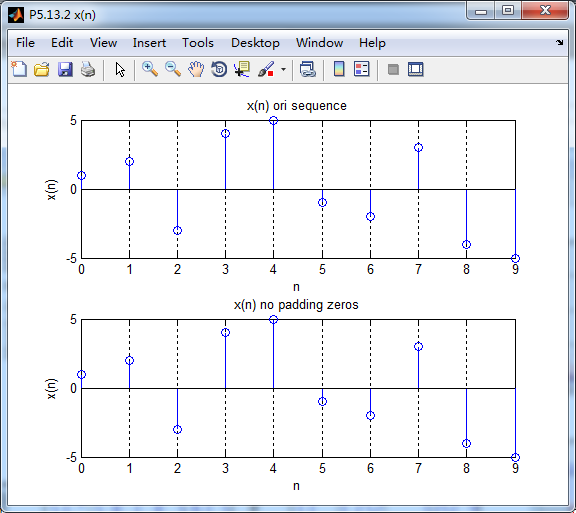
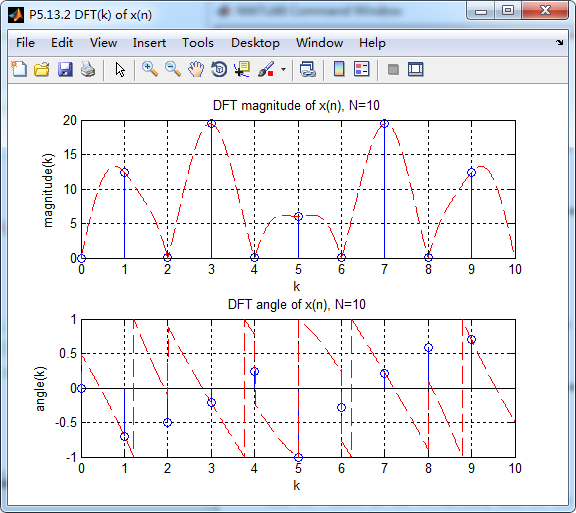
运行结果:

《DSP using MATLAB》Problem 5.13的更多相关文章
- 《DSP using MATLAB》Problem 7.13
代码: %% ++++++++++++++++++++++++++++++++++++++++++++++++++++++++++++++++++++++++++++++++ %% Output In ...
- 《DSP using MATLAB》Problem 6.13
代码: %% ++++++++++++++++++++++++++++++++++++++++++++++++++++++++++++++++++++++++++++++++ %% Output In ...
- 《DSP using MATLAB》Problem 4.13
代码: %% ---------------------------------------------------------------------------- %% Output Info a ...
- 《DSP using MATLAB》Problem 8.13
代码: %% ------------------------------------------------------------------------ %% Output Info about ...
- 《DSP using MATLAB》Problem 6.12
代码: %% ++++++++++++++++++++++++++++++++++++++++++++++++++++++++++++++++++++++++++++++++ %% Output In ...
- 《DSP using MATLAB》Problem 6.10
代码: %% ++++++++++++++++++++++++++++++++++++++++++++++++++++++++++++++++++++++++++++++++ %% Output In ...
- 《DSP using MATLAB》Problem 4.11
代码: %% ---------------------------------------------------------------------------- %% Output Info a ...
- 《DSP using MATLAB》Problem 3.3
按照题目的意思需要利用DTFT的性质,得到序列的DTFT结果(公式表示),本人数学功底太差,就不写了,直接用 书中的方法计算并画图. 代码: %% -------------------------- ...
- 《DSP using MATLAB》Problem 3.1
先写DTFT子函数: function [X] = dtft(x, n, w) %% --------------------------------------------------------- ...
随机推荐
- Win10系列:VC++ Direct3D开发基础1
在介绍如何使用Direct3D项目模版来绘制立体图形之前,首先为读者介绍在Direct3D应用程序开发过程中涉及到的一些常用概念. (1)资源 资源是指可以被Direct3D图形管线所访问的内存空间, ...
- learning shell display alert function
[Purpose] Shell print function base on err info wrn ext output level [Eevironment] U ...
- xadmin后台导出时gunicorn报错ascii
django + xadmin + nginx + gunicorn部署后,xadmin后台导出model数据报错,gunicorn日志记录为:UnicodeEncodeError: 'ascii' ...
- Linux运维工程师真实的工作状态到底是怎么样的?
现在的运维工程师在大家眼中是个什么样子呢? 是不是还是把服务器搬来搬去,每天不是在拿着Linux光盘开始装系统,就是在等待系统安装完成.你如果还是这么想,那就大错特错了.现在又有做一个新的物种诞生,那 ...
- Animation(动画)倒着播放方法
public GameObject AnimationObj;//带有动画的对象 // Use this for initialization void Start () { AnimationObj ...
- mac mamp环境 和linux下 安装redis 和可视化工具 Redis Desktop Manager
mac下安装 第一步:安装redis 1. brew install redis 2.启动服务/usr/local/opt/redis/bin/redis-server 3.配置redis密码访问 编 ...
- c#7的新特性
1.out关键字 //可以直接声明使用 ",out int number); 2.元组 //有点类似匿名对象的样子 //用小括号包含变量,可以当做返回值,可以当做变量赋值等 //1.当做函数 ...
- S2 深入.NET和C#编程 笔试测试错题积累
---恢复内容开始--- <深入.NET平台和C#编程>内部测试题-笔试试卷错题积累 1: 1) 以下关于序列化和反序列化的描述错误的是( C). a) 序列化是将对象的状态存储到特定存储 ...
- Linux文件系统中的inode节点详细介绍
这篇文章主要介绍了Linux文件系统中的inode节点,详细讲解了inode是什么.inode包含的信息.inode号码的相关资料等,需要的朋友可以参考下 一.inode是什么? 理解inode,要从 ...
- 秦皇岛CCPC的失败总结
个人状态原因:尤其是我,在比赛前没有很好的做准备,还一直看小说,前两天我们本来应该好好打两场训练赛的时候却没有打,然后一直在玩手机,比赛前一天,我下午就不小心睡着了,然后晚上醒来睡不着第二天的精神状态 ...