
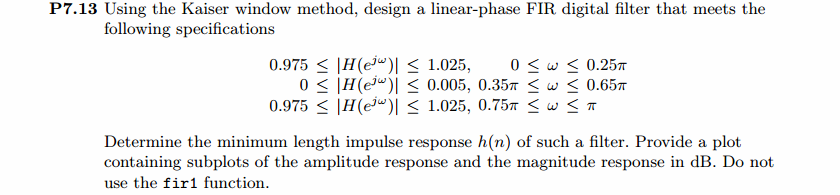
《DSP using MATLAB》Problem 7.13
代码:
%% ++++++++++++++++++++++++++++++++++++++++++++++++++++++++++++++++++++++++++++++++

%%            Output Info about this m-file

fprintf('\n***********************************************************\n');

fprintf('        <DSP using MATLAB> Problem 7.13 \n\n');

banner();

%% ++++++++++++++++++++++++++++++++++++++++++++++++++++++++++++++++++++++++++++++++

% bandstop

wp1 = 0.25*pi; ws1 = 0.35*pi; ws2=0.65*pi; wp2=0.75*pi; delta1 = 0.025; delta2 = 0.005;

tr_width = min(ws1-wp1, wp2-ws2);

f = [wp1, ws1, ws2, wp2]/pi;

[Rp, As] = delta2db(delta1, delta2)

M = ceil((As-7.95)/(2.285*tr_width)) + 1;                 % Kaiser Window

if As > 21 || As < 50

	beta = 0.5842*(As-21)^0.4 + 0.07886*(As-21);

else

	beta = 0.1102*(As-8.7);

end

fprintf('\nKaiser Window method, Filter Length: M = %d. beta = %.4f\n', M, beta);

n = [0:1:M-1]; wc1 = (ws1+wp1)/2; wc2 = (ws2+wp2)/2;

%wc = (ws + wp)/2,                    % ideal LPF cutoff frequency

hd = ideal_lp(wc1, M) + ideal_lp(pi, M) - ideal_lp(wc2, M);

w_kai = (kaiser(M, beta))';  h = hd .* w_kai;

[db, mag, pha, grd, w] = freqz_m(h, [1]);  delta_w = 2*pi/1000;

[Hr,ww,P,L] = ampl_res(h);

Rp = -(min(db(1 :1: floor(wp1/delta_w)+1)));                     % Actual Passband Ripple

fprintf('\nActual Passband Ripple is %.4f dB.\n', Rp);

As = -round(max(db(ws1/delta_w+1 : 1 : ws2/delta_w )));   % Min Stopband attenuation

fprintf('\nMin Stopband attenuation is %.4f dB.\n', As);

[delta1, delta2] = db2delta(Rp, As)

%% ----------------------------------

%%      Increse M

%% ----------------------------------

M = M+2

hd = ideal_lp(wc1, M) + ideal_lp(pi, M) - ideal_lp(wc2, M);

w_kai = (kaiser(M, beta))';  h = hd .* w_kai;

[db, mag, pha, grd, w] = freqz_m(h, [1]);  delta_w = 2*pi/1000;

[Hr,ww,P,L] = ampl_res(h);

Rp = -(min(db(1 :1: floor(wp1/delta_w)+1)));               % Actual Passband Ripple

fprintf('\nActual Passband Ripple is %.4f dB.\n', Rp);

As = -round(max(db(ws1/delta_w+1 : 1 : ws2/delta_w )));   % Min Stopband attenuation

fprintf('\nMin Stopband attenuation is %.4f dB.\n', As);

[delta1, delta2] = db2delta(Rp, As)

n = [0:1:M-1];

% Plot

figure('NumberTitle', 'off', 'Name', 'Problem 7.13 ideal_lp Method')

set(gcf,'Color','white');

subplot(2,2,1); stem(n, hd); axis([0 M-1 -0.2 0.6]); grid on;

xlabel('n'); ylabel('hd(n)'); title('Ideal Impulse Response');

subplot(2,2,2); stem(n, w_kai); axis([0 M-1 0 1.1]); grid on;

xlabel('n'); ylabel('w(n)'); title('Kaiser Window');

subplot(2,2,3); stem(n, h); axis([0 M-1 -0.2 0.6]); grid on;

xlabel('n'); ylabel('h(n)'); title('Actual Impulse Response');

subplot(2,2,4); plot(w/pi, db); axis([0 1 -100 10]); grid on;

set(gca,'YTickMode','manual','YTick',[-90,-49,0]);

set(gca,'YTickLabelMode','manual','YTickLabel',['90';'49';' 0']);

set(gca,'XTickMode','manual','XTick',[0,f,1]);

xlabel('frequency in \pi units'); ylabel('Decibels'); title('Magnitude Response in dB');

figure('NumberTitle', 'off', 'Name', 'Problem 7.13 h(n) ideal_lp Method')

set(gcf,'Color','white');

subplot(2,2,1); plot(w/pi, db); grid on; axis([0 2 -100 10]);

xlabel('frequency in \pi units'); ylabel('Decibels'); title('Magnitude Response in dB');

set(gca,'YTickMode','manual','YTick',[-90,-49,0])

set(gca,'YTickLabelMode','manual','YTickLabel',['90';'49';' 0']);

set(gca,'XTickMode','manual','XTick',[0,f,1+f,2]);

subplot(2,2,3); plot(w/pi, mag); grid on; %axis([0 2 -100 10]);

xlabel('frequency in \pi units'); ylabel('Absolute'); title('Magnitude Response in absolute');

set(gca,'XTickMode','manual','XTick',[0,f,1+f,2]);

set(gca,'YTickMode','manual','YTick',[0.0,0.5,1.0])

subplot(2,2,2); plot(w/pi, pha); grid on; %axis([0 1 -100 10]);

xlabel('frequency in \pi units'); ylabel('Rad'); title('Phase Response in Radians');

subplot(2,2,4); plot(w/pi, grd*pi/180);  grid on; %axis([0 1 -100 10]);

xlabel('frequency in \pi units'); ylabel('Rad'); title('Group Delay');

figure('NumberTitle', 'off', 'Name', 'Problem 7.13 h(n)')

set(gcf,'Color','white');

plot(ww/pi, Hr); grid on; %axis([0 1 -100 10]);

xlabel('frequency in \pi units'); ylabel('Hr'); title('Amplitude Response');

set(gca,'YTickMode','manual','YTick',[-delta2,0,delta2,1 - delta1,1, 1 + delta1])

%set(gca,'YTickLabelMode','manual','YTickLabel',['90';'45';' 0']);

set(gca,'XTickMode','manual','XTick',[0,f,2]);

%% +++++++++++++++++++++++++++++++++++++++++

%%          fir1 function method

%% +++++++++++++++++++++++++++++++++++++++++

f = [wp1, ws1, ws2, wp2]/pi;

m = [1 0 1];

ripple = [0.025 0.005 0.025];

[N, wc, beta, ftype] = kaiserord(f,m,ripple);

fprintf('\n------------ kaiserord function: START---------------\n');

fprintf('\n--------- results used by fir1 function ---------\n');

N

wc

beta

ftype

fprintf('------------- kaiserord function: FINISH---------------\n');

%h_check = fir1(M-1, [wc1 wc2]/pi, 'stop', window(@kaiser, M));

%h_check = fir1(N, wc, ftype, window(@kaiser, N+1));

h_check = fir1(N, wc, ftype, kaiser(N+1, beta));

[db, mag, pha, grd, w] = freqz_m(h_check, [1]);

[Hr,ww,P,L] = ampl_res(h_check);

Rp = -(min(db(1 :1: floor(wp1/delta_w)+1)));              % Actual Passband Ripple

fprintf('\nActual Passband Ripple is %.4f dB.\n', Rp);

As = -round(max(db(ws1/delta_w+1 : 1 : ws2/delta_w )));   % Min Stopband attenuation

fprintf('\nMin Stopband attenuation is %.4f dB.\n', As);

%% ----------------------------------

%%            Increse N

%% ----------------------------------

N = N+2

h_check = fir1(N, wc, ftype, kaiser(N+1, beta));

[db, mag, pha, grd, w] = freqz_m(h_check, [1]);

[Hr,ww,P,L] = ampl_res(h_check);

As = -round(max(db(ws1/delta_w+1 : 1 : ws2/delta_w )));   % Min Stopband attenuation

fprintf('\nMin Stopband attenuation is %.4f dB.\n', As);

figure('NumberTitle', 'off', 'Name', 'Problem 7.13 fir1 Method')

set(gcf,'Color','white');

subplot(2,2,1); stem(n, hd); axis([0 M-1 -0.2 0.6]); grid on;

xlabel('n'); ylabel('hd(n)'); title('Ideal Impulse Response');

subplot(2,2,2); stem(n, w_kai); axis([0 M-1 0 1.1]); grid on;

xlabel('n'); ylabel('w(n)'); title('Kaiser Window');

subplot(2,2,3); stem([0:N], h_check); axis([0 M -0.2 0.7]); grid on;

xlabel('n'); ylabel('h\_check(n)'); title('Actual Impulse Response');

subplot(2,2,4); plot(w/pi, db); axis([0 1 -100 10]); grid on;

set(gca,'YTickMode','manual','YTick',[-90,-49,0])

set(gca,'YTickLabelMode','manual','YTickLabel',['90';'49';' 0']);

set(gca,'XTickMode','manual','XTick',[0,f,1]);

xlabel('frequency in \pi units'); ylabel('Decibels'); title('Magnitude Response in dB');

figure('NumberTitle', 'off', 'Name', 'Problem 7.13 h(n) fir1 Method')

set(gcf,'Color','white');

subplot(2,2,1); plot(w/pi, db); grid on; axis([0 2 -100 10]);

xlabel('frequency in \pi units'); ylabel('Decibels'); title('Magnitude Response in dB');

set(gca,'YTickMode','manual','YTick',[-90,-49,0])

set(gca,'YTickLabelMode','manual','YTickLabel',['90';'49';' 0']);

set(gca,'XTickMode','manual','XTick',[0,f,1+f,2]);

subplot(2,2,3); plot(w/pi, mag); grid on; %axis([0 1 -100 10]);

xlabel('frequency in \pi units'); ylabel('Absolute'); title('Magnitude Response in absolute');

set(gca,'XTickMode','manual','XTick',[0,f,1+f,2]);

set(gca,'YTickMode','manual','YTick',[0.0,0.5,1.0])

subplot(2,2,2); plot(w/pi, pha); grid on; %axis([0 1 -100 10]);

xlabel('frequency in \pi units'); ylabel('Rad'); title('Phase Response in Radians');

subplot(2,2,4); plot(w/pi, grd*pi/180);  grid on; %axis([0 1 -100 10]);

xlabel('frequency in \pi units'); ylabel('Rad'); title('Group Delay');
运行结果:
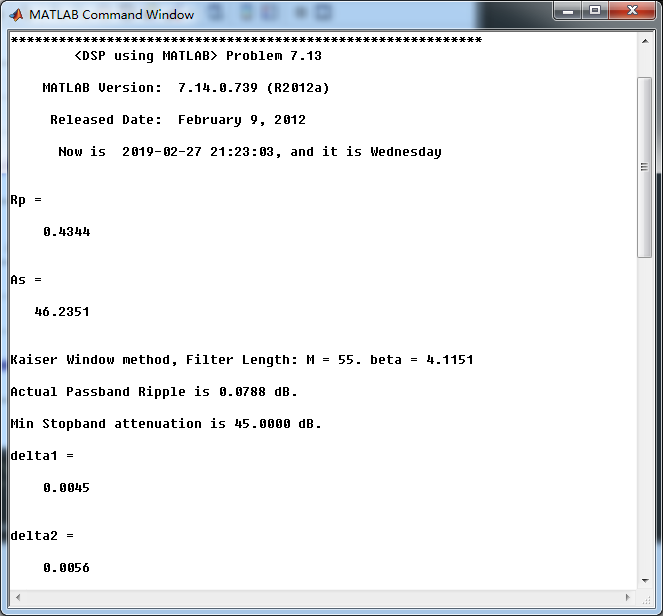
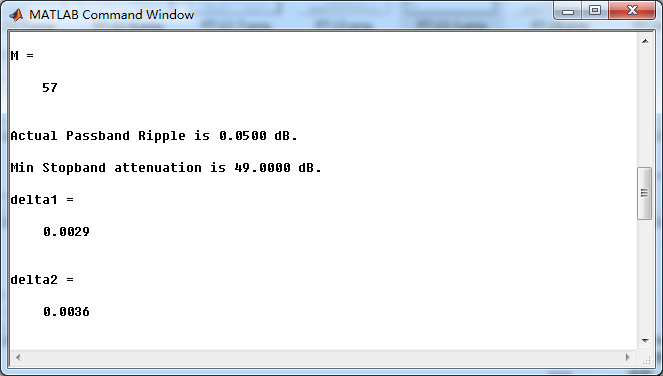
最小阻带衰减设计是46.2351dB,kaiser窗长度M=57时满足要求。
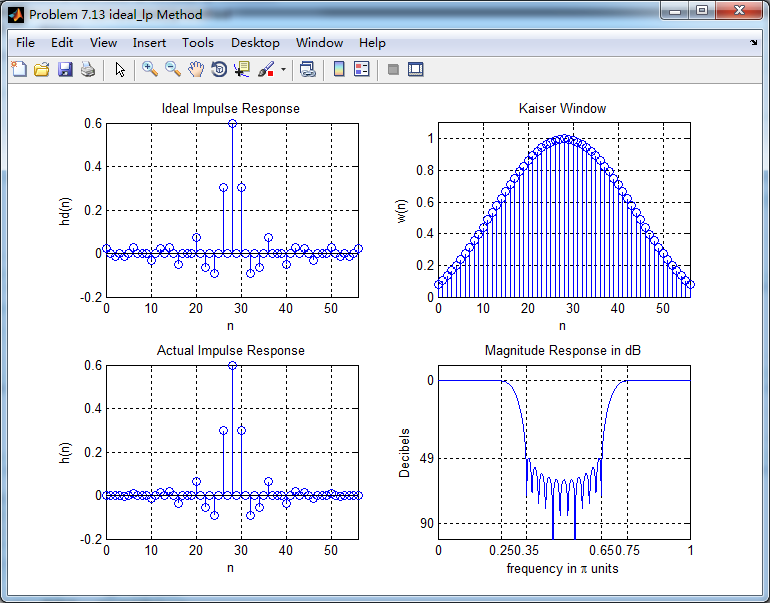
利用Kaiser窗得到的脉冲响应,计算其幅度响应(dB和Absolute单位)、相位响应和群延迟响应。
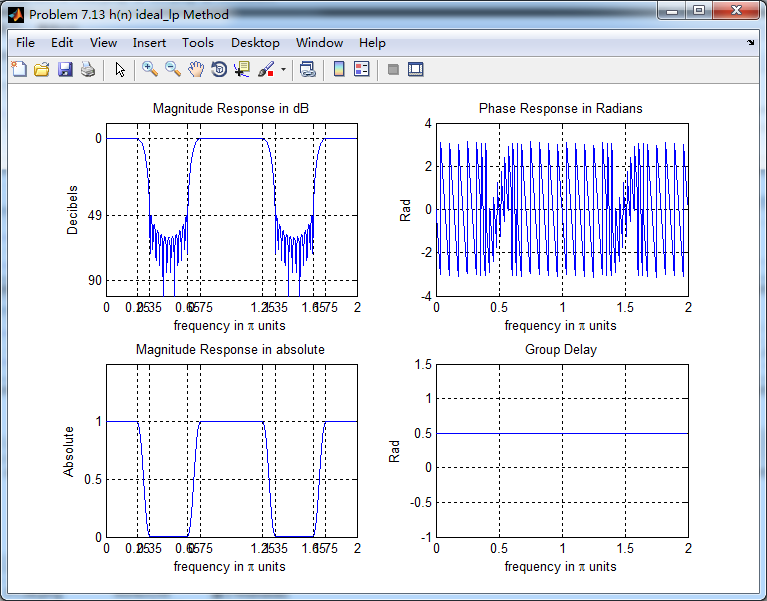
振幅响应
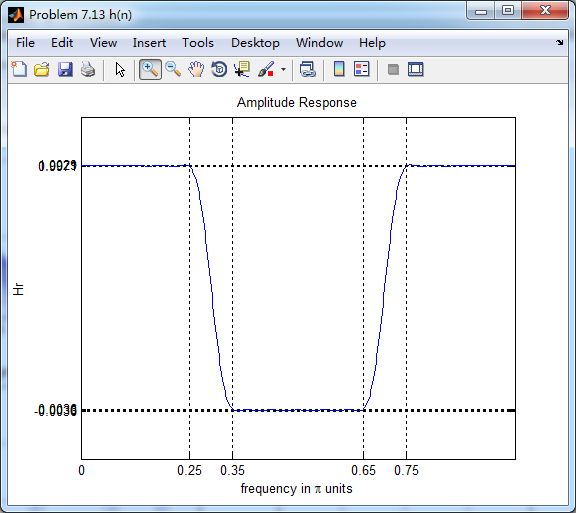
通带部分
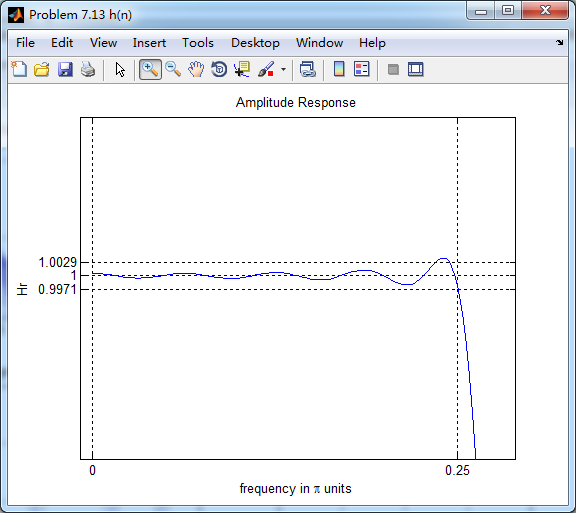
阻带部分
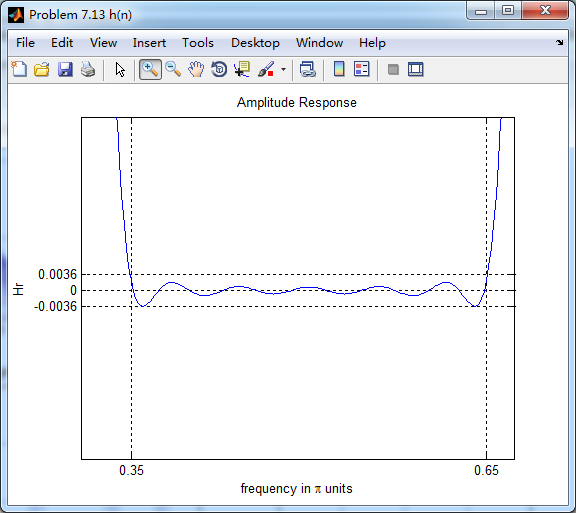
利用fir1函数得到脉冲响应,和前面进行对比


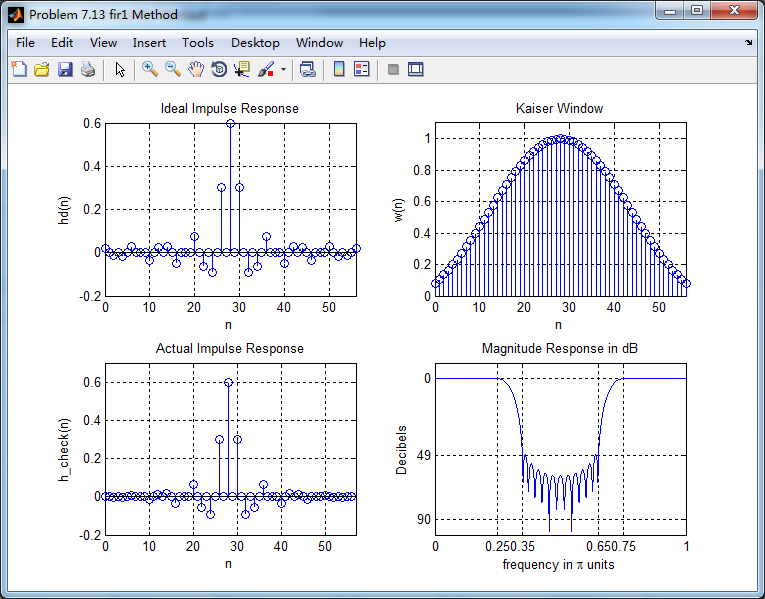
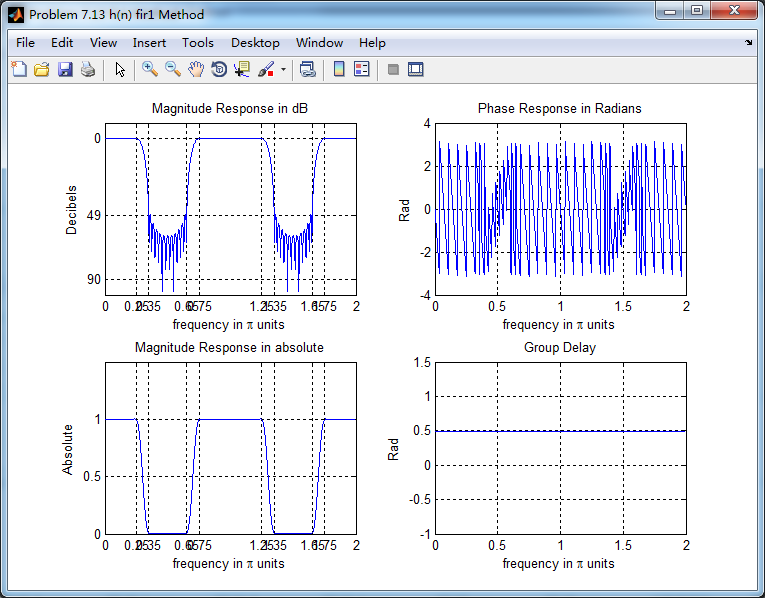
两种方法,区别不大。
《DSP using MATLAB》Problem 7.13的更多相关文章
- 《DSP using MATLAB》Problem 6.13
代码: %% ++++++++++++++++++++++++++++++++++++++++++++++++++++++++++++++++++++++++++++++++ %% Output In ...
- 《DSP using MATLAB》Problem 5.13
1. 代码: %% ++++++++++++++++++++++++++++++++++++++++++++++++++++++++++++++++++++++++++++++++ %% Output ...
- 《DSP using MATLAB》Problem 4.13
代码: %% ---------------------------------------------------------------------------- %% Output Info a ...
- 《DSP using MATLAB》Problem 8.13
代码: %% ------------------------------------------------------------------------ %% Output Info about ...
- 《DSP using MATLAB》Problem 6.12
代码: %% ++++++++++++++++++++++++++++++++++++++++++++++++++++++++++++++++++++++++++++++++ %% Output In ...
- 《DSP using MATLAB》Problem 6.10
代码: %% ++++++++++++++++++++++++++++++++++++++++++++++++++++++++++++++++++++++++++++++++ %% Output In ...
- 《DSP using MATLAB》Problem 4.11
代码: %% ---------------------------------------------------------------------------- %% Output Info a ...
- 《DSP using MATLAB》Problem 3.3
按照题目的意思需要利用DTFT的性质,得到序列的DTFT结果(公式表示),本人数学功底太差,就不写了,直接用 书中的方法计算并画图. 代码: %% -------------------------- ...
- 《DSP using MATLAB》Problem 3.1
先写DTFT子函数: function [X] = dtft(x, n, w) %% --------------------------------------------------------- ...
随机推荐
- HDU2476 String painter——区间DP
题意:要把a串变成b串,每操作一次,可以使a串的[l,r]区间变为相同的一个字符.问把a变成b最少操作几次. 这题写法明显是区间dp ,关键是处理的方法. dp[l][r]表示b串的l~r区段至少需要 ...
- Lintcode376-Binary Tree Path Sum-Easy
376. Binary Tree Path Sum Given a binary tree, find all paths that sum of the nodes in the path equa ...
- 【Python】【装饰器】
Python中的装饰器是你进入Python大门的一道坎,不管你跨不跨过去它都在那里. 为什么需要装饰器 我们假设你的程序实现了say_hello()和say_goodbye()两个函数. def sa ...
- 环境准备—之—linux下安装jdk
本文大部分转自 https://www.cnblogs.com/Dylansuns/p/6974272.html openjdk与jdk的区别 ----反正不一样,要不名字也不会不相同了 https ...
- ubuntu1404安装搜狗输入法
1.安装fcitx,一种输入法框架 apt-get install fcitx 2.配置使用fcitx 配置中心-语言支持-键盘输入方式系统,选择fcitx 3.登出再登入 4.下载sougou安装d ...
- English trip EM2-LP-4B At School Teacher:Russell
课上内容(Lesson) Where is Loki a student? Loki is in Meten, BaobaoStreet, Chengdu. What is he studying? ...
- Python自学:第二章 注释
#向大家问好 print("Hello Python People") 输出为 Hello Python People
- Confluence 6 服务器硬件要求指南
服务器管理员可以通过本页面的指南来对在运行 Confluence 评估版本的最小服务器硬件需求进行评估.应为实际的服务器负载是很难进行预测的,所以最好的办法是通过实际运行一个 Confluence 实 ...
- php-parser在Aop编程中的使用
在laravel下使用php-parser实现aop composer require nikic/php-parser Test.php <?php /** * Created by PhpS ...
- mongodump and mongorestore
mongoexport和mongoimport只能导出/导入某个特定集合 1 mongoexport bin目录下 ./mongoexport <hostname><:port> ...