
《DSP using MATLAB》Problem 3.20
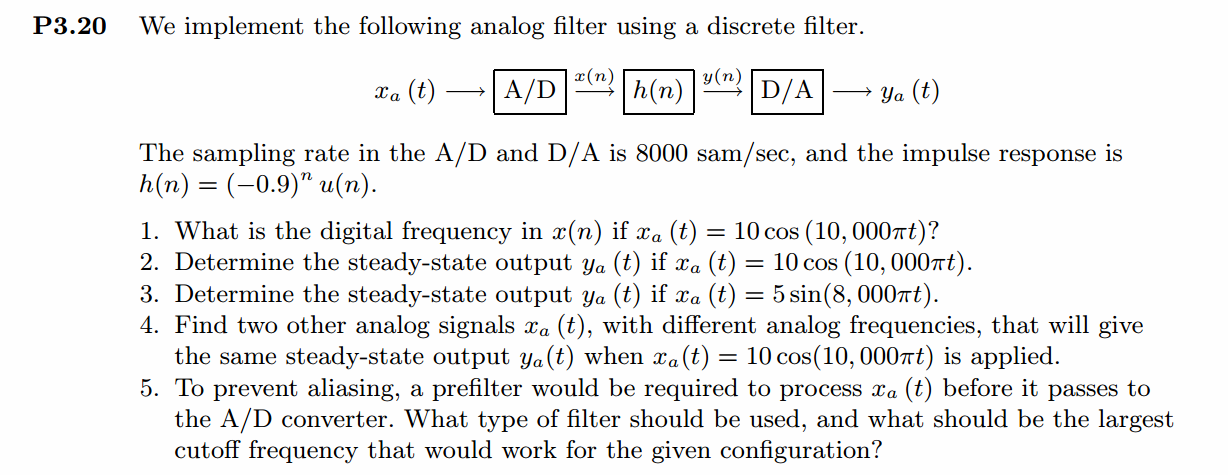
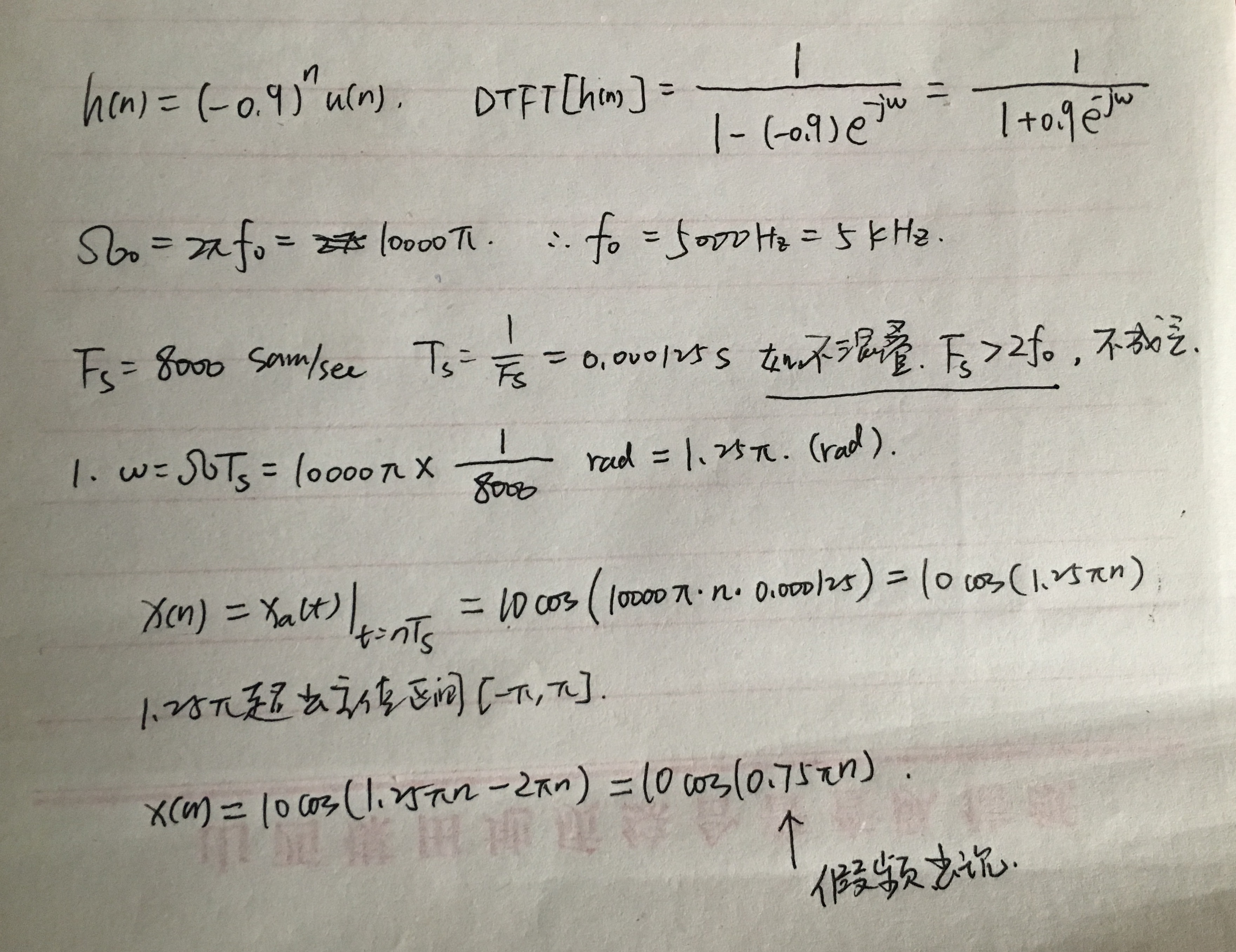
代码:
%% ------------------------------------------------------------------------

%%            Output Info about this m-file

fprintf('\n***********************************************************\n');

fprintf('        <DSP using MATLAB> Problem 3.20 \n\n');

banner();

%% ------------------------------------------------------------------------

%% -------------------------------------------------------------------

%%                     xa(t)=10cos(10000πt)  through A/D

%% -------------------------------------------------------------------

Fs = 8000;                       % sample/sec

Ts = 1/Fs;                       % sample interval, 0.125ms=0.000125s

n1_start = -80; n1_end = 80;

      n1 = [n1_start:1:n1_end];

     nTs = n1 * Ts;              % [-10,10]ms    [-0.01,0.01]s

x1 = 10*cos(10000*pi*nTs);       % Digital signal

M = 500;

[X1, w] = dtft1(x1, n1, M);

magX1  = abs(X1);  angX1  = angle(X1);  realX1  = real(X1);  imagX1  = imag(X1);

%% --------------------------------------------------------------------

%%              START X(w)'s  mag ang real imag

%% --------------------------------------------------------------------

figure('NumberTitle', 'off', 'Name', 'Problem 3.20 X1');

set(gcf,'Color','white');

subplot(2,1,1); plot(w/pi,magX1); grid on;  %axis([-1,1,0,1.05]);

title('Magnitude Response');

xlabel('frequency in \pi units'); ylabel('Magnitude  |H|');

subplot(2,1,2); plot(w/pi, angX1/pi); grid on;  %axis([-1,1,-1.05,1.05]);

title('Phase Response');

xlabel('frequency in \pi units'); ylabel('Radians/\pi');

figure('NumberTitle', 'off', 'Name', 'Problem 3.20 X1');

set(gcf,'Color','white');

subplot(2,1,1); plot(w/pi, realX1); grid on;

title('Real Part');

xlabel('frequency in \pi units'); ylabel('Real');

subplot(2,1,2); plot(w/pi, imagX1); grid on;

title('Imaginary Part');

xlabel('frequency in \pi units'); ylabel('Imaginary');

%% -------------------------------------------------------------------

%%             END X's  mag ang real imag

%% -------------------------------------------------------------------

%% --------------------------------------------------------

%%                    h(n) = (-0.9)^n[u(n)]

%% --------------------------------------------------------

n2 = n1;

h = (-0.9) .^ (n2) .* stepseq(0, n1_start, n1_end);

figure('NumberTitle', 'off', 'Name', 'Problem 3.20 h(n)');

set(gcf,'Color','white');

%subplot(2,1,1);

stem(n2, h); grid on;  %axis([-1,1,0,1.05]);

title('Impulse Response: (-0.9)^n[u(n)]');

xlabel('n'); ylabel('h');

[H, w] = dtft1(h, n2, M);

magH  = abs(H);  angH  = angle(H);  realH  = real(H);  imagH  = imag(H);

%% --------------------------------------------------------------------

%%              START H(w)'s  mag ang real imag

%% --------------------------------------------------------------------

figure('NumberTitle', 'off', 'Name', 'Problem 3.20 H');

set(gcf,'Color','white');

subplot(2,1,1); plot(w/pi,magH); grid on;  %axis([-1,1,0,1.05]);

title('Magnitude Response');

xlabel('frequency in \pi units'); ylabel('Magnitude  |H|');

subplot(2,1,2); plot(w/pi, angH/pi); grid on;  %axis([-1,1,-1.05,1.05]);

title('Phase Response');

xlabel('frequency in \pi units'); ylabel('Radians/\pi');

figure('NumberTitle', 'off', 'Name', 'Problem 3.20 H');

set(gcf,'Color','white');

subplot(2,1,1); plot(w/pi, realH); grid on;

title('Real Part');

xlabel('frequency in \pi units'); ylabel('Real');

subplot(2,1,2); plot(w/pi, imagH); grid on;

title('Imaginary Part');

xlabel('frequency in \pi units'); ylabel('Imaginary');

%% -------------------------------------------------------------------

%%             END X's  mag ang real imag

%% -------------------------------------------------------------------

%% ----------------------------------------------

%%                 y(n)=x(n)*h(n)

%% ----------------------------------------------

[y, ny] = conv_m(x1, n1, h, n1);

figure('NumberTitle', 'off', 'Name', 'Problem 3.20 y(n)');

set(gcf,'Color','white');

%subplot(2,1,1);

stem(ny, y); grid on;  %axis([-1,1,0,1.05]);

title('x(n)*h(n)');

xlabel('n'); ylabel('y');

[Y, w] = dtft1(y, ny, M);

magY  = abs(Y);  angY  = angle(Y);  realY  = real(Y);  imagY  = imag(Y);

%% --------------------------------------------------------------------

%%              START Y(w)'s  mag ang real imag

%% --------------------------------------------------------------------

figure('NumberTitle', 'off', 'Name', 'Problem 3.20 Y');

set(gcf,'Color','white');

subplot(2,1,1); plot(w/pi,magY); grid on;  %axis([-1,1,0,1.05]);

title('Magnitude Response');

xlabel('frequency in \pi units'); ylabel('Magnitude  |H|');

subplot(2,1,2); plot(w/pi, angY/pi); grid on;  %axis([-1,1,-1.05,1.05]);

title('Phase Response');

xlabel('frequency in \pi units'); ylabel('Radians/\pi');

figure('NumberTitle', 'off', 'Name', 'Problem 3.20 Y');

set(gcf,'Color','white');

subplot(2,1,1); plot(w/pi, realY); grid on;

title('Real Part');

xlabel('frequency in \pi units'); ylabel('Real');

subplot(2,1,2); plot(w/pi, imagY); grid on;

title('Imaginary Part');

xlabel('frequency in \pi units'); ylabel('Imaginary');

%% -------------------------------------------------------------------

%%             END X's  mag ang real imag

%% -------------------------------------------------------------------

%% ----------------------------------------------------------

%%                  xa(t) reconstruction from x1(n)

%% ----------------------------------------------------------

Dt = 0.00005; t = -0.01:Dt:0.01;

xa = x1 * sinc(Fs*(ones(length(n1),1)*t - nTs'*ones(1,length(t)))) ;

figure('NumberTitle', 'off', 'Name', 'Problem 3.20 Reconstructed From x1(n)');

set(gcf,'Color','white');

%subplot(2,1,1);

stairs(nTs*1000,x1); grid on;  %axis([0,1,0,1.5]);       % Zero-Order-Hold

title('Reconstructed Signal from x1(n) using zero-order-hold');

xlabel('t in msec.'); ylabel('xa(t)'); hold on;

stem(nTs*1000, x1); gtext('ZOH'); hold off;

figure('NumberTitle', 'off', 'Name', 'Problem 3.20 Reconstructed From x1(n)');

set(gcf,'Color','white');

%subplot(2,1,2);

plot(nTs*1000,x1); grid on;  %axis([0,1,0,1.5]);       % first-Order-Hold

title('Reconstructed Signal from x1(n) using first-Order-Hold');

xlabel('t in msec.'); ylabel('xa(t)'); hold on;

stem(nTs*1000,x1); gtext('FOH'); hold off;

xa = spline(nTs, x1, t);

figure('NumberTitle', 'off', 'Name', sprintf('Problem 3.20 Ts = %.6fs', Ts));

set(gcf,'Color','white');

%subplot(2,1,1);

plot(1000*t, xa);

xlabel('t in ms units'); ylabel('x');

title(sprintf('Reconstructed Signal from x1(n) using spline function')); grid on; hold on;

stem(1000*nTs, x1); gtext('spline');

%% ----------------------------------------------------------------

%%                     y(n) through D/A, reconstruction

%% ----------------------------------------------------------------

Dt = 0.00005; t = -0.02:Dt:0.02;

ya = y * sinc(Fs*(ones(length(ny),1)*t - (ny*Ts)'*ones(1,length(t)))) ;

figure('NumberTitle', 'off', 'Name', 'Problem 3.20 Reconstructed From y(n)');

set(gcf,'Color','white');

%subplot(2,1,1);

stairs(ny*Ts*1000,y); grid on;  %axis([0,1,0,1.5]);       % Zero-Order-Hold

title('Reconstructed Signal from y(n) using zero-order-hold');

xlabel('t in msec.'); ylabel('ya(t)'); hold on;

stem(ny*Ts*1000, y); gtext('ZOH'); hold off;

figure('NumberTitle', 'off', 'Name', 'Problem 3.20 Reconstructed From y(n)');

set(gcf,'Color','white');

%subplot(2,1,2);

plot(ny*Ts*1000,y); grid on;  %axis([0,1,0,1.5]);       % first-Order-Hold

title('Reconstructed Signal from y(n) using first-Order-Hold');

xlabel('t in msec.'); ylabel('ya(t)'); hold on;

stem(ny*Ts*1000,y); gtext('FOH'); hold off;

ya = spline(ny*Ts, y, t);

figure('NumberTitle', 'off', 'Name', sprintf('Problem 3.20 Ts = %.6fs', Ts));

set(gcf,'Color','white');

%subplot(2,1,1);

plot(1000*t, ya);

xlabel('t in ms units'); ylabel('y');

title(sprintf('Reconstructed Signal from y(n) using spline function')); grid on; hold on;

stem(1000*ny*Ts, y); gtext('spline');
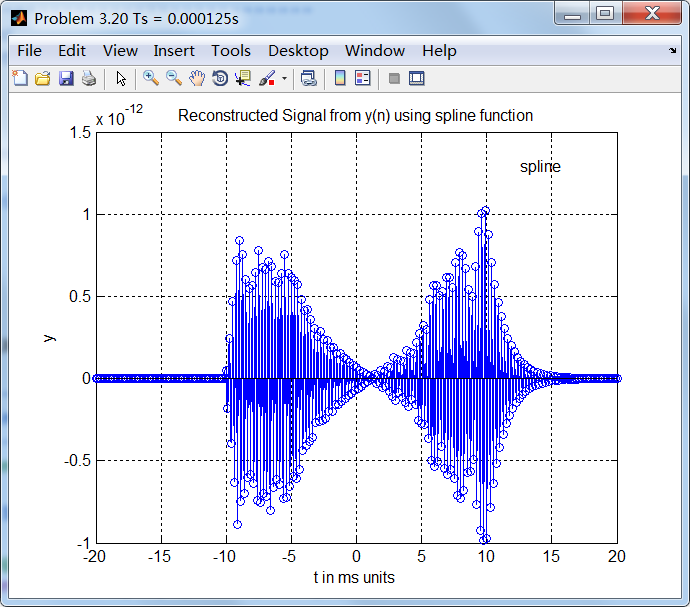
运行结果:
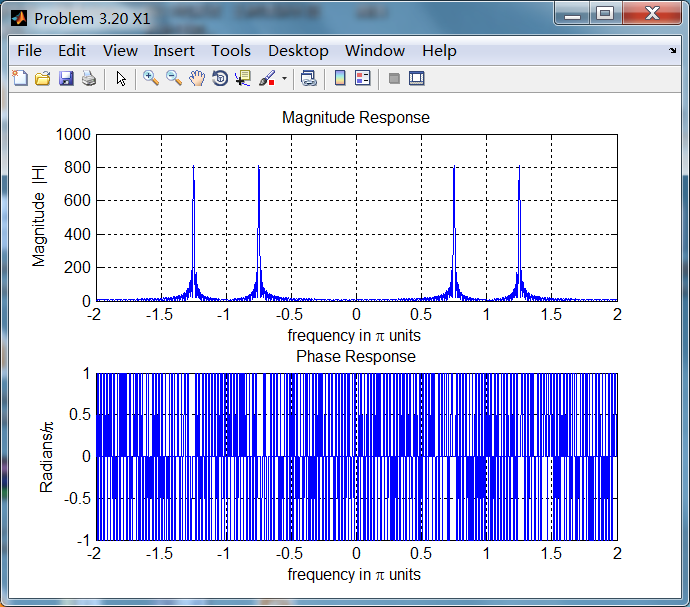
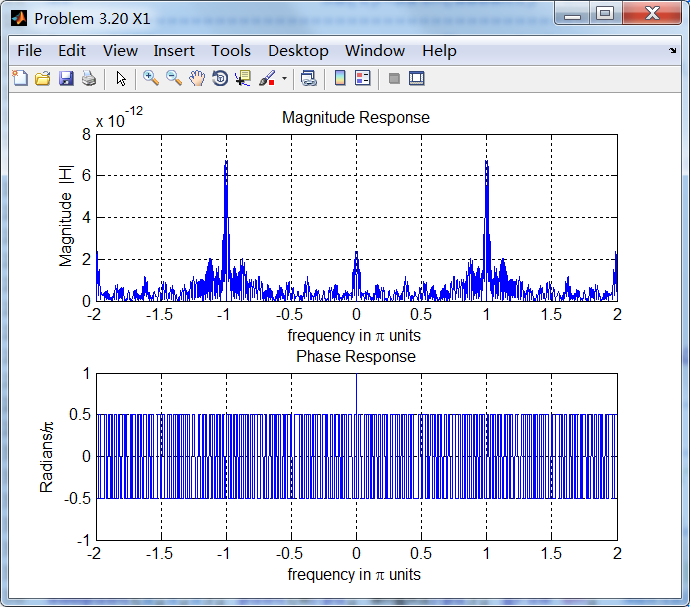
2、模拟信号经过Fs=8000sample/sec采样后,得采样信号的谱,如下图,0.75π处为假频。
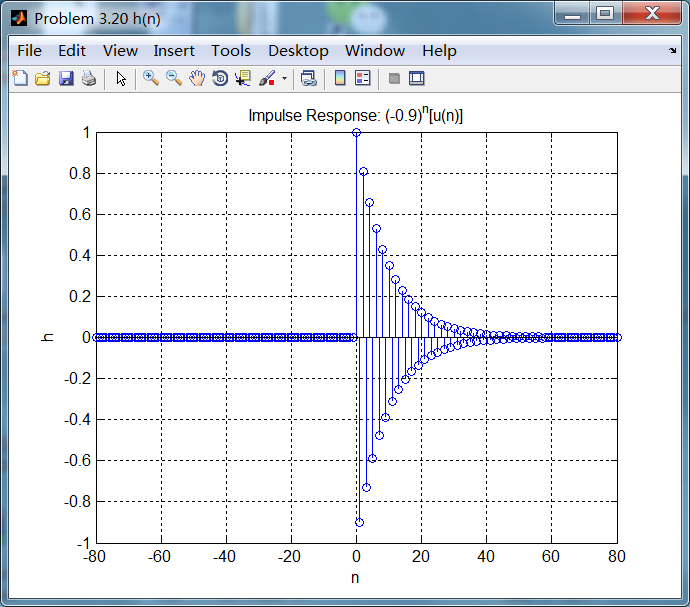
脉冲响应序列如下:
系统的频率响应,即脉冲响应序列的DTFT:
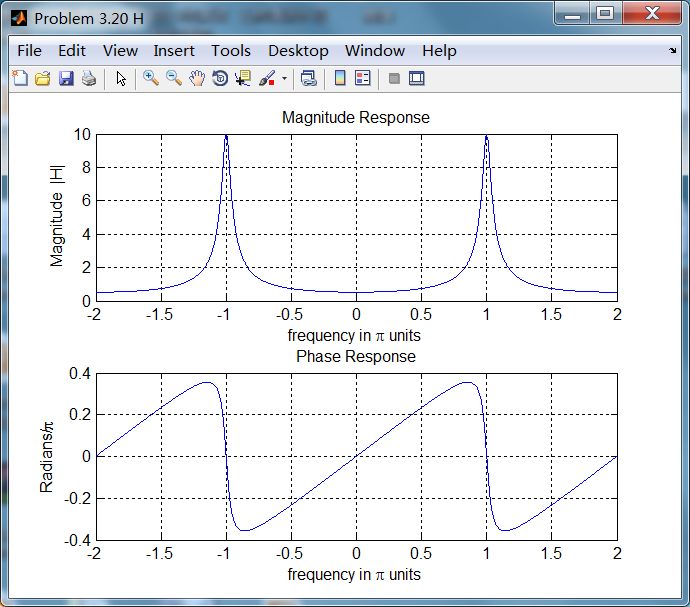
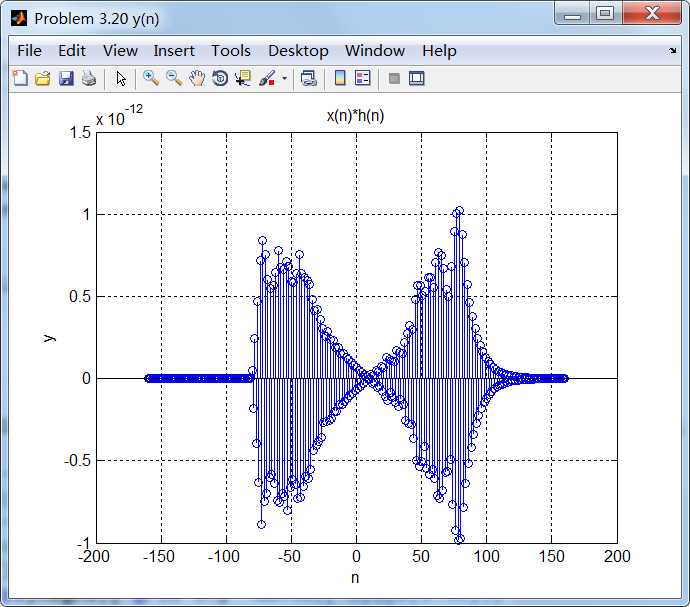
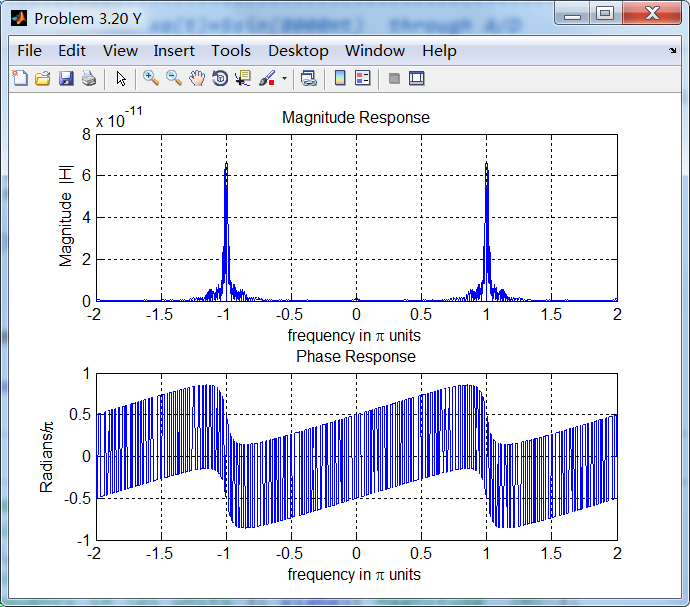
输出信号及其DTFT:
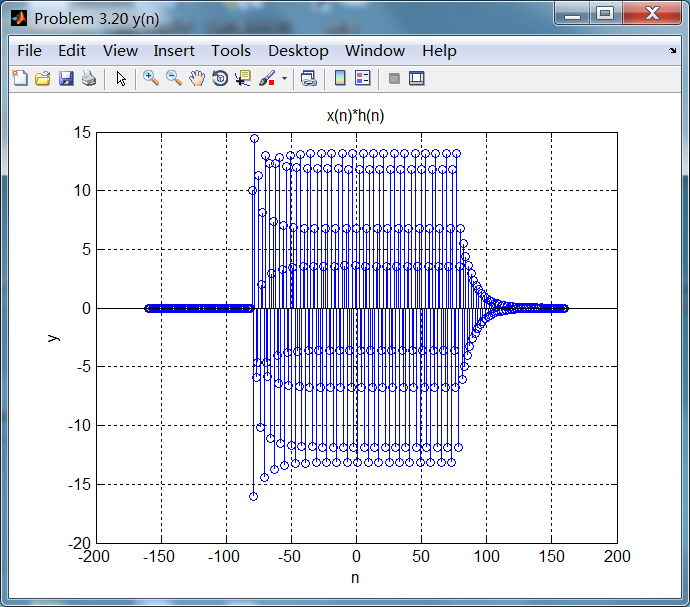
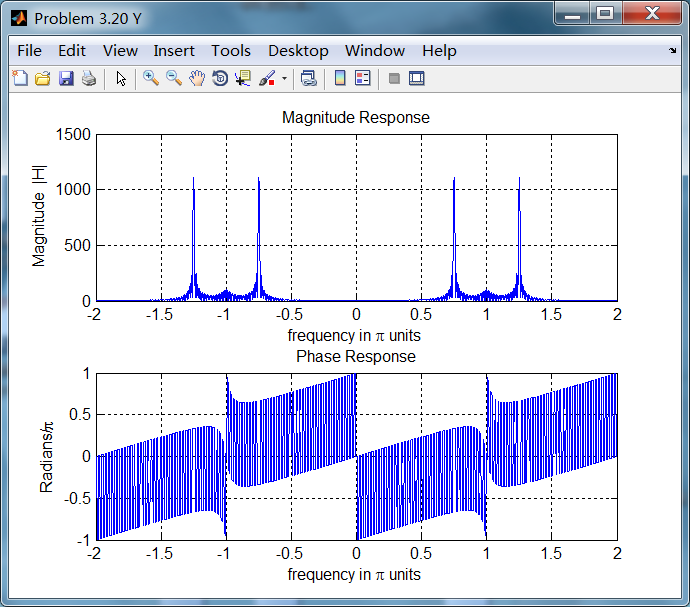
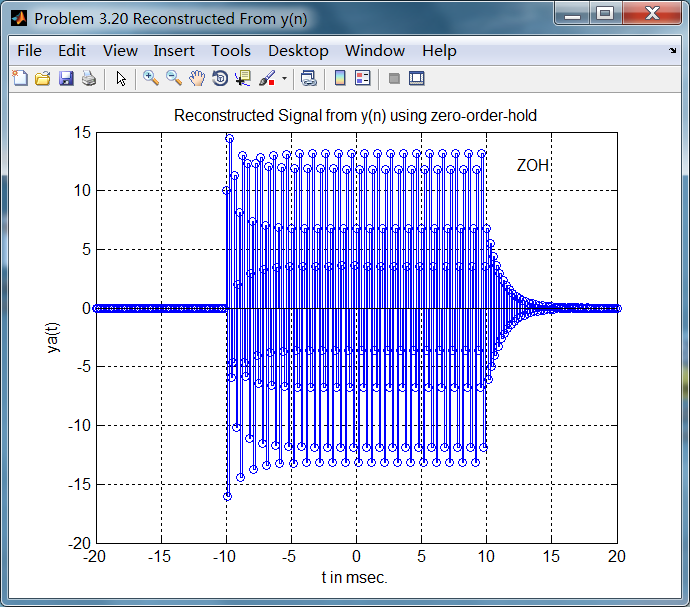
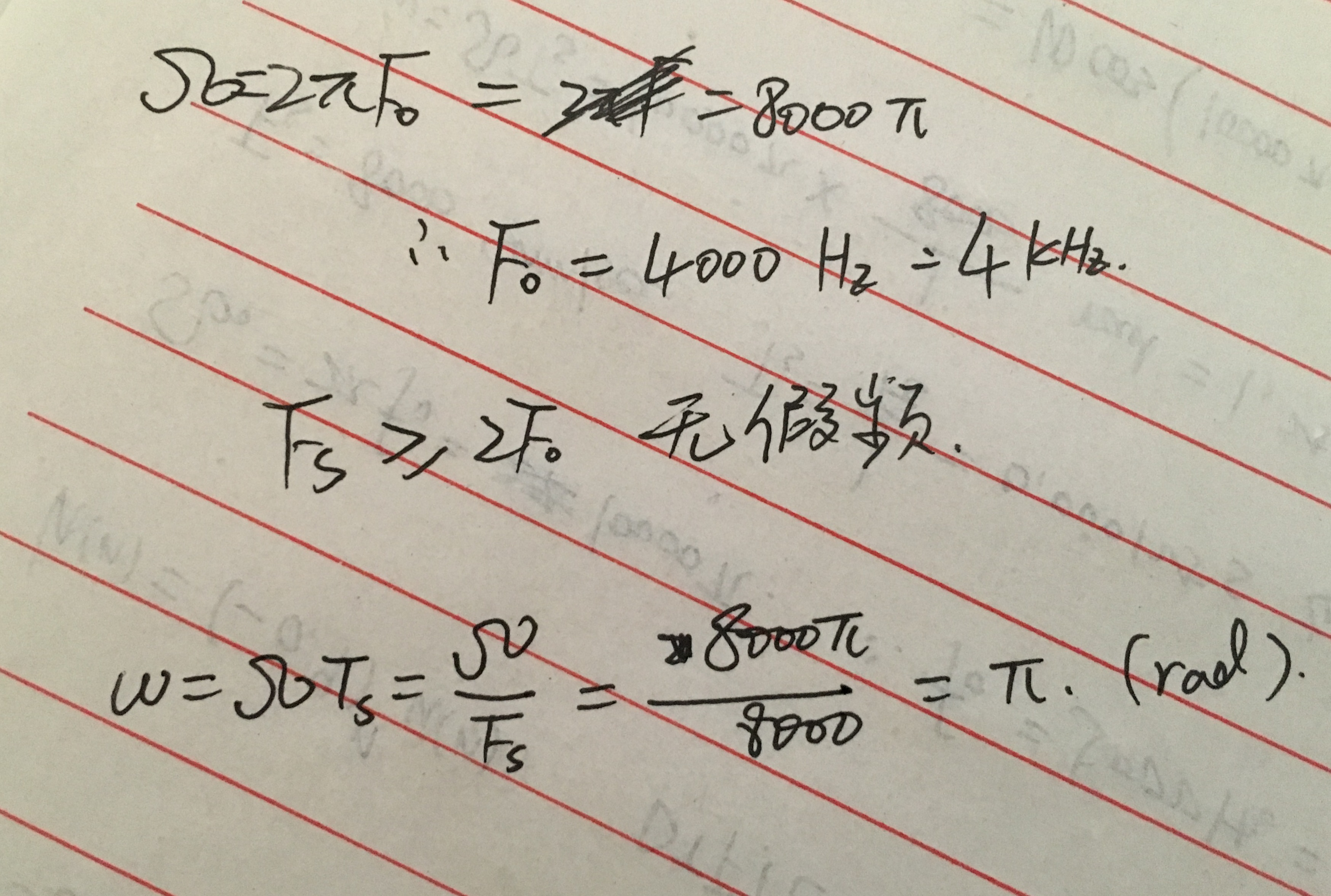
3、第3小题中的模拟信号经Fs=8000采样后,数字角频率为π,
采样后信号的谱:
采样后信号经过滤波器,输出信号的谱,
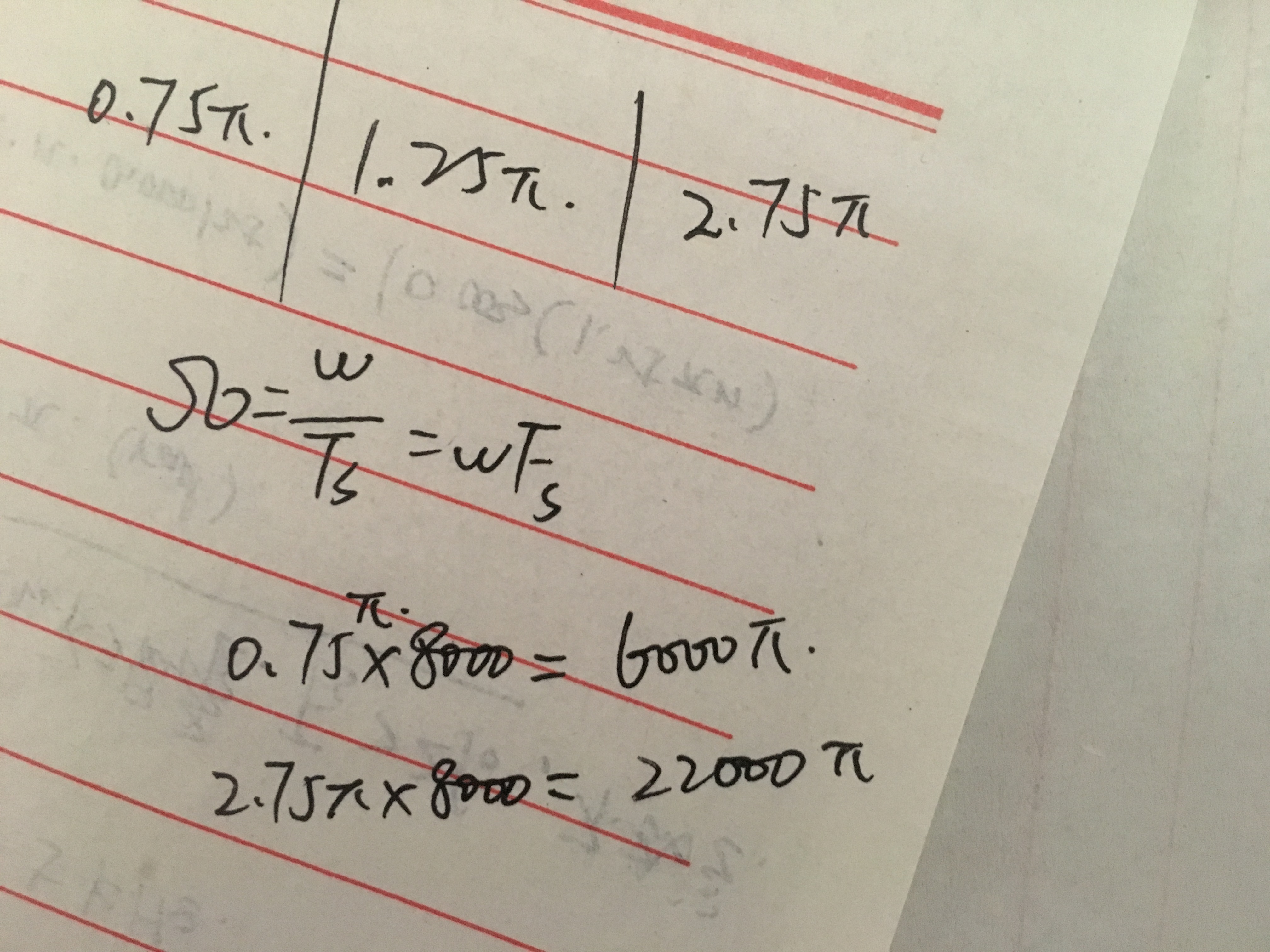
4、找到另外两个不同的模拟角频率的模拟信号,使得采样后和第1小题模拟信号采样后稳态输出相同。
想求的数字角频率和第1题的数字角频率0.75π+2π,对应的模拟频率如下计算:
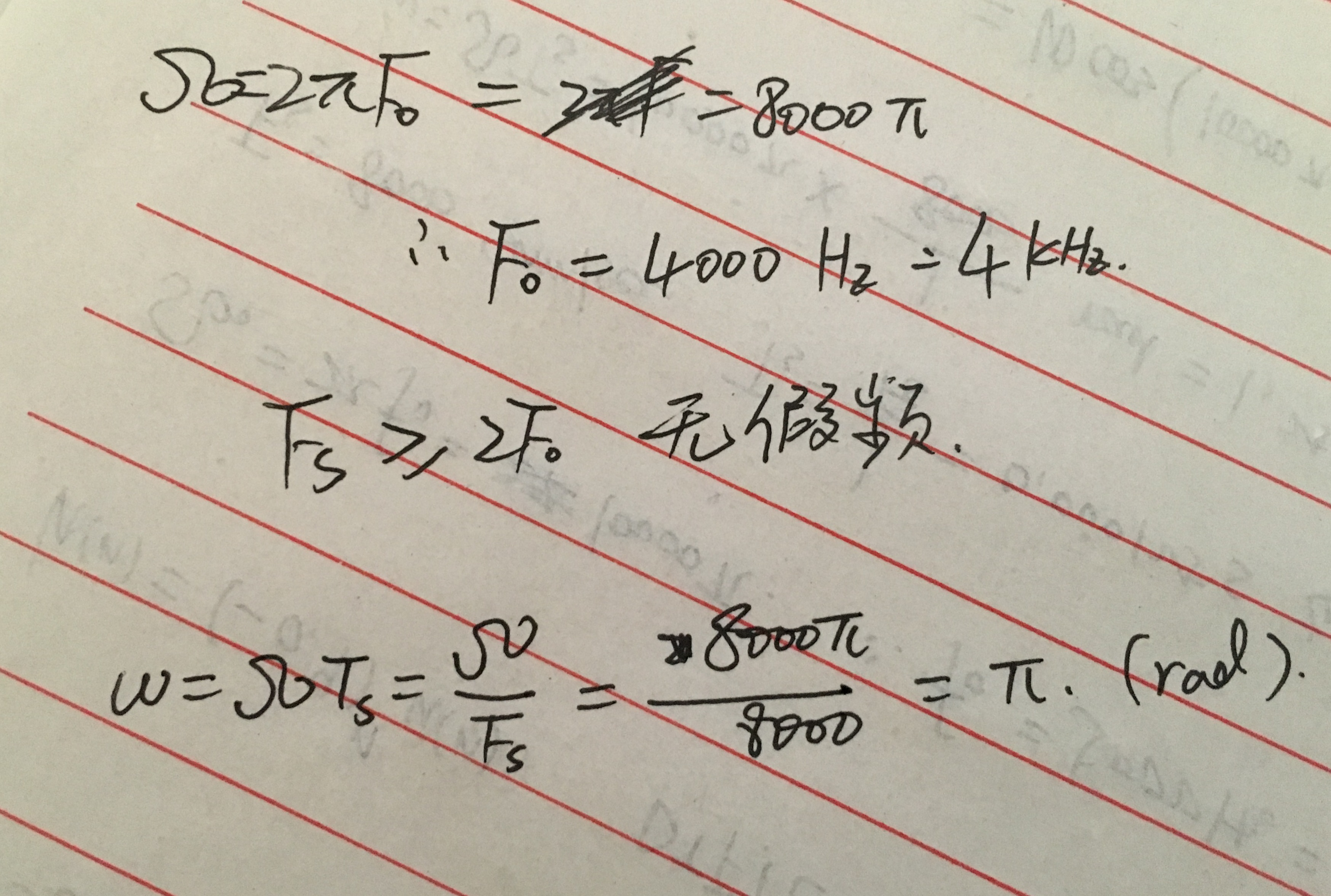
5、根据抽样定理,采用截止频率F0=4kHz,低通滤波器。
《DSP using MATLAB》Problem 3.20的更多相关文章
- 《DSP using MATLAB》Problem 6.20
先放子函数: function [C, B, A, rM] = dir2fs_r(h, r); % DIRECT-form to Frequency Sampling form conversion ...
- 《DSP using MATLAB》Problem 5.20
窗外的知了叽叽喳喳叫个不停,屋里温度应该有30°,伏天的日子难过啊! 频率域的方法来计算圆周移位 代码: 子函数的 function y = cirshftf(x, m, N) %% -------- ...
- 《DSP using MATLAB》Problem 4.20
代码: %% ------------------------------------------------------------------------ %% Output Info about ...
- 《DSP using MATLAB》Problem 2.20
代码: %% ------------------------------------------------------------------------ %% Output Info about ...
- 《DSP using MATLAB》Problem 7.24
又到清明时节,…… 注意:带阻滤波器不能用第2类线性相位滤波器实现,我们采用第1类,长度为基数,选M=61 代码: %% +++++++++++++++++++++++++++++++++++++++ ...
- 《DSP using MATLAB》Problem 7.23
%% ++++++++++++++++++++++++++++++++++++++++++++++++++++++++++++++++++++++++++++++++ %% Output Info a ...
- 《DSP using MATLAB》Problem 6.15
代码: %% ++++++++++++++++++++++++++++++++++++++++++++++++++++++++++++++++++++++++++++++++ %% Output In ...
- 《DSP using MATLAB》Problem 6.12
代码: %% ++++++++++++++++++++++++++++++++++++++++++++++++++++++++++++++++++++++++++++++++ %% Output In ...
- 《DSP using MATLAB》Problem 6.10
代码: %% ++++++++++++++++++++++++++++++++++++++++++++++++++++++++++++++++++++++++++++++++ %% Output In ...
随机推荐
- tomcat日志切割和定期删除
tomcat日志切割和定期删除 在tomcat的软件环境中,如果我们任由日志文件无限增长,总有一天会将磁盘占满的(废话).特别是在日志文件增长速度很快的一些情况下,按日志切割日志文件并删除,就是一件很 ...
- C#退出模式
1.this.Close(); 只是关闭当前窗口,若不是主窗体的话,是无法退出程序的,另外若有托管线程(非主线程),也无法干净地退出: 2.Application.Exit(); 强制所有消息中 ...
- (转)sublime text3 3176激活
更改hosts:sudo vim /private/etc/hosts 127.0.0.1 www.sublimetext.com 127.0.0.1 license.sublimehq.com 激活 ...
- 使用Jenkins实现maven项目一键部署
下面的博客请详细的,值得一看:jenkins+maven+svn实现简单的一键发布 http://blog.csdn.net/pein_zero/article/details/52597615#co ...
- Confluence 6 导入 Active Directory 服务器证书 - UNIX
为了让你的应用服务器能够信任你的目录服务器.你目录服务器上导出的证书需要导入到你应用服务器的 Java 运行环境中.JDK 存储了信任的证书,这个存储信任证书的文件称为一个 keystore.默认的 ...
- AIM Tech Round 3 (Div. 1) (构造,树形dp,费用流,概率dp)
B. Recover the String 大意: 求构造01字符串使得子序列00,01,10,11的个数恰好为$a_{00},a_{01},a_{10},a_{11}$ 挺简单的构造, 注意到可以通 ...
- Mac下找不到gl.pc和glu.pc
在用pkg-config可以用来自动查找对应库的include和lib文件,方便编译.它主要通过PKG_CONFIG_PATH和/usr/lib/pkgconfig目录下的.pc文件进行自动配置.在c ...
- Windows系统配置Python环境,python2和python3共存
Windows系统配置python2和python3共存 1.下载python: https://www.python.org/downloads/ 注:选择需要的版本(python2 or ...
- 快速切题 sgu120. Archipelago 计算几何
120. Archipelago time limit per test: 0.25 sec. memory limit per test: 4096 KB Archipelago Ber-Islan ...
- mysql server查询客户端连接数
SELECT substring_index(HOST, ) AS host_name, state, count(*) FROM information_schema. PROCESSLIST GR ...