
《DSP using MATLAB》Problem 4.20

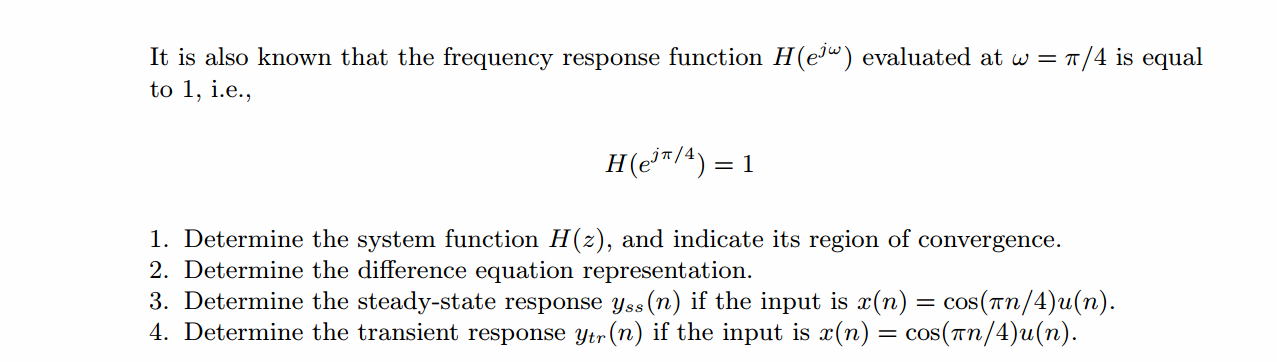
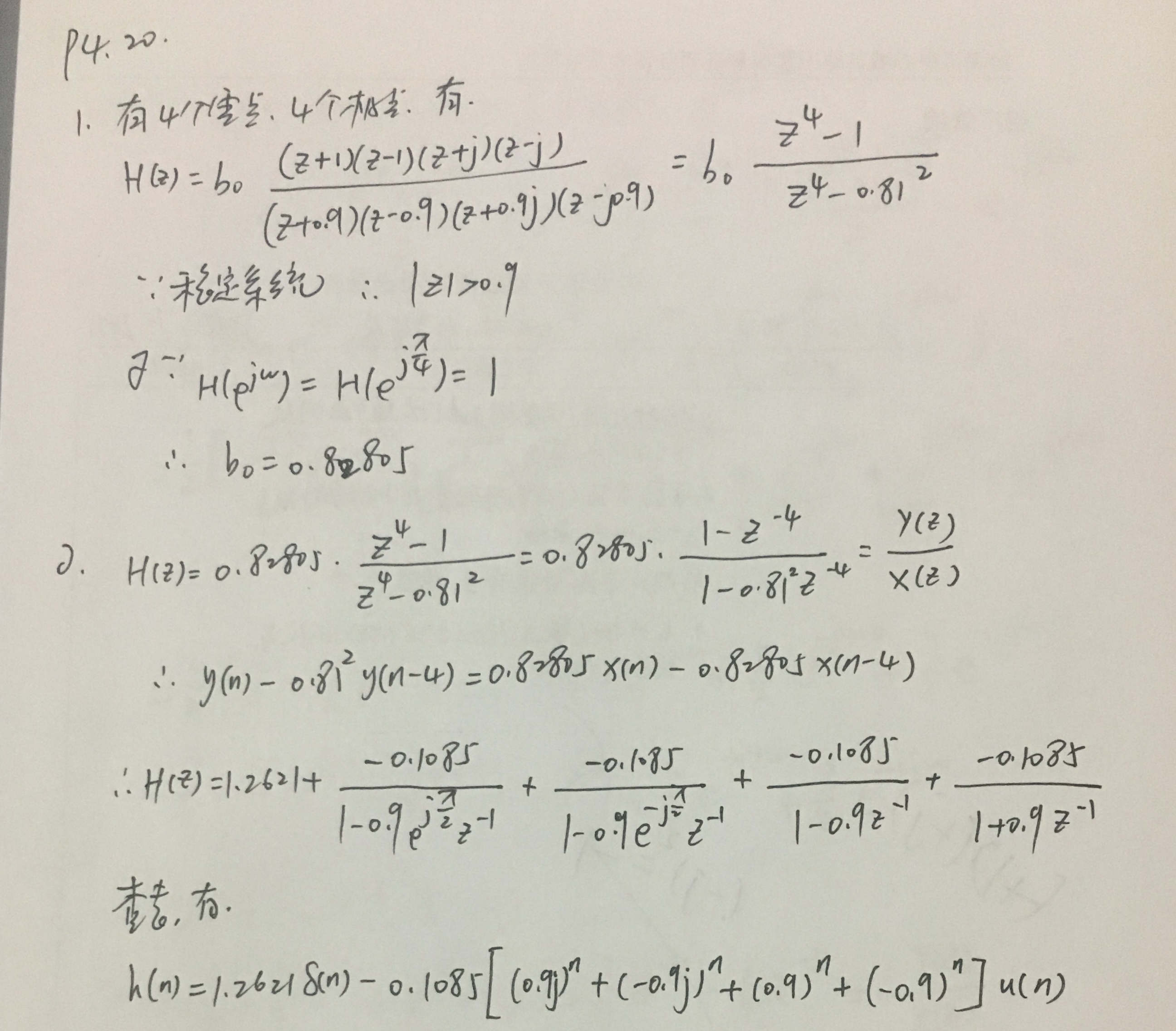


代码:
%% ------------------------------------------------------------------------

%%            Output Info about this m-file

fprintf('\n***********************************************************\n');

fprintf('        <DSP using MATLAB> Problem 4.20 \n\n');

banner();

%% ------------------------------------------------------------------------

% ----------------------------------------------------

%               1        H1(z)

% ----------------------------------------------------

b = [1, 0, 0, 0, -1]*0.82805;

a = [1, 0, 0, 0, -0.81*0.81];               %

[R, p, C] = residuez(b,a)

Mp = (abs(p))'

Ap = (angle(p))'/pi

%% ------------------------------------------------------

%%   START a    determine H(z) and sketch

%% ------------------------------------------------------

figure('NumberTitle', 'off', 'Name', 'P4.20 H(z) its pole-zero plot')

set(gcf,'Color','white');

zplane(b,a);

title('pole-zero plot'); grid on;

%% ----------------------------------------------

%%    END

%% ----------------------------------------------

% ------------------------------------

%                  h(n)

% ------------------------------------

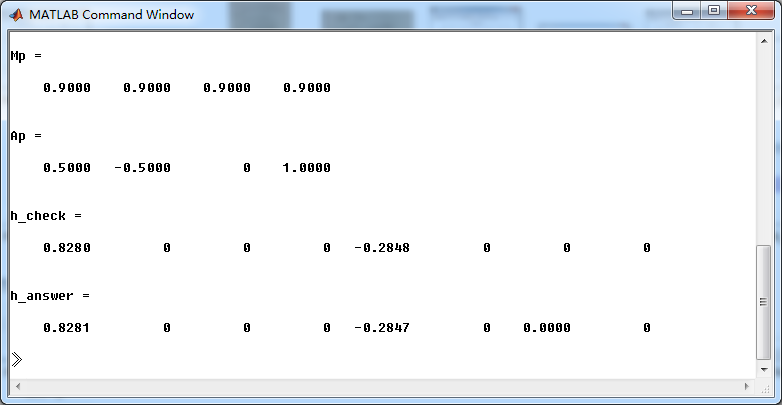
[delta, n] = impseq(0, 0, 7);

h_check = filter(b, a, delta)                                             % check sequence

h_answer = 1.2621*impseq(0,0,7) ...

            - 0.1085*(0.9*j).^n.*stepseq(0,0,7) - 0.1085*(-0.9*j).^n.*stepseq(0,0,7) ...

            - 0.1085*(0.9).^n.*stepseq(0,0,7) - 0.1085*(-0.9).^n.*stepseq(0,0,7)         % answer sequence

%% --------------------------------------------------------------

%%    START    b   |H|   <H

%%    3rd form of freqz

%% --------------------------------------------------------------

w = [-500:1:500]*pi/500;     H = freqz(b,a,w);

%[H,w] = freqz(b,a,200,'whole');                 % 3rd form of freqz

magH  = abs(H);  angH  = angle(H);  realH  = real(H);  imagH  = imag(H);

%% ================================================

%%              START H's  mag ang real imag

%% ================================================

figure('NumberTitle', 'off', 'Name', 'P4.20  DTFT and Real Imaginary Part ');

set(gcf,'Color','white');

subplot(2,2,1); plot(w/pi,magH); grid on;  %axis([0,1,0,1.5]);

title('Magnitude Response');

xlabel('frequency in \pi units'); ylabel('Magnitude  |H|');

subplot(2,2,3); plot(w/pi, angH/pi); grid on; % axis([-1,1,-1,1]);

title('Phase Response');

xlabel('frequency in \pi units'); ylabel('Radians/\pi');

subplot('2,2,2'); plot(w/pi, realH); grid on;

title('Real Part');

xlabel('frequency in \pi units'); ylabel('Real');

subplot('2,2,4'); plot(w/pi, imagH); grid on;

title('Imaginary Part');

xlabel('frequency in \pi units'); ylabel('Imaginary');

%% ==================================================

%%             END H's  mag ang real imag

%% ==================================================

%% =========================================================

%%        Steady-State and Transient Response

%% =========================================================

bx = [1, -sqrt(2)/2]; ax = [1, -sqrt(2), 1];

by = 0.82805*conv(b, bx)

ay = conv(a, ax)

[R, p, C] = residuez(by, ay)

Mp_Y = (abs(p))'

Ap_Y = (angle(p))'/pi

%% ------------------------------------------------------

%%   START a    determine Y(z) and sketch

%% ------------------------------------------------------

figure('NumberTitle', 'off', 'Name', 'P4.20 Y(z) its pole-zero plot')

set(gcf,'Color','white');

zplane(by, ay);

title('pole-zero plot'); grid on;

% ------------------------------------

%                  y(n)

% ------------------------------------

LENGTH = 50;

[delta, n] = impseq(0, 0, LENGTH-1);

y_check = filter(by, ay, delta);                                             % check sequence

y_answer = ( 2*0.414.*(cos(pi*n/4)) - 0.029*(0.9).^n ...

           + (-2*0.0356*(0.9).^n.*cos(pi*n/2) - 2*0.0625*(0.9).^n.*sin(pi*n/2) ...

           - 0.0422*(-0.9).^n ) ) .* stepseq(0,0,LENGTH-1);

yss = 2*0.414.*(cos(pi*n/4)) .* stepseq(0,0,LENGTH-1);

yts = - 0.029*(0.9).^n ...

           + (-2*0.0356*(0.9).^n.*cos(pi*n/2) - 2*0.0625*(0.9).^n.*sin(pi*n/2) ...

           - 0.0422*(-0.9).^n ) .* stepseq(0,0,LENGTH-1);

figure('NumberTitle', 'off', 'Name', 'P4.20  Yss and Yts ');

set(gcf,'Color','white');

subplot(2,1,1); stem(n, yss); grid on;  %axis([0,1,0,1.5]);

title('Steady-State Response');

xlabel('n'); ylabel('Yss');

subplot(2,1,2); stem(n, yts); grid on; % axis([-1,1,-1,1]);

title('Transient Response');

xlabel('n'); ylabel('Yts');

figure('NumberTitle', 'off', 'Name', 'P4.20  Y(n) ');

set(gcf,'Color','white');

subplot(1,1,1); stem(n, y_answer); grid on;  %axis([0,1,0,1.5]);

title('Total Response');

xlabel('n'); ylabel('Y(n)');
运行结果:
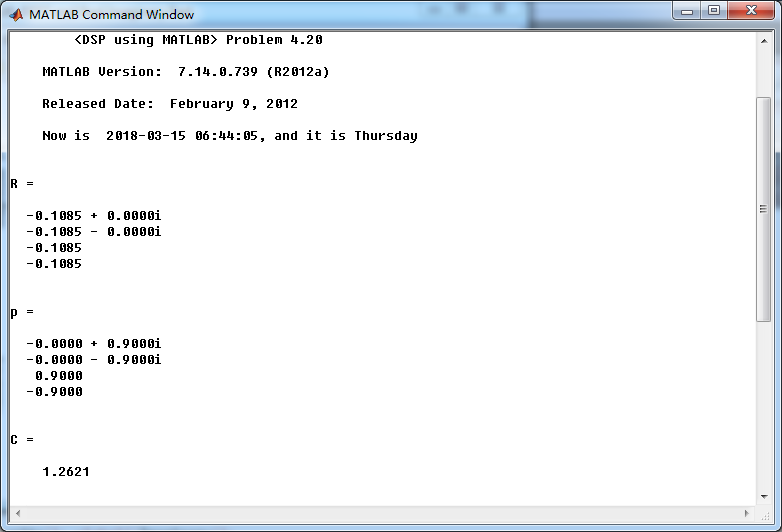
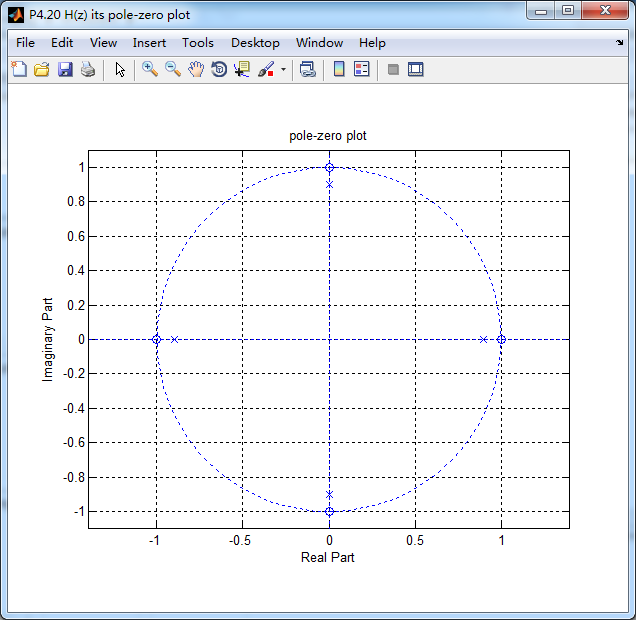
系统函数的零极点图如下,4个极点都位于单位圆内。
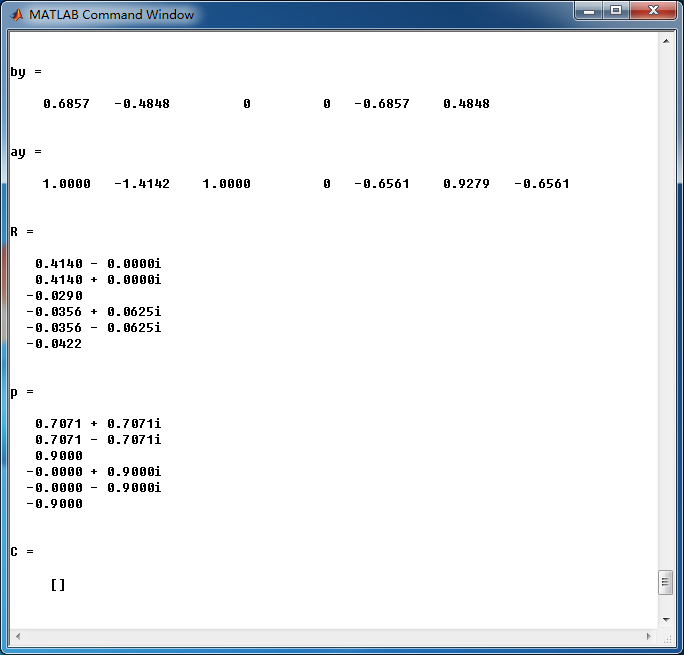
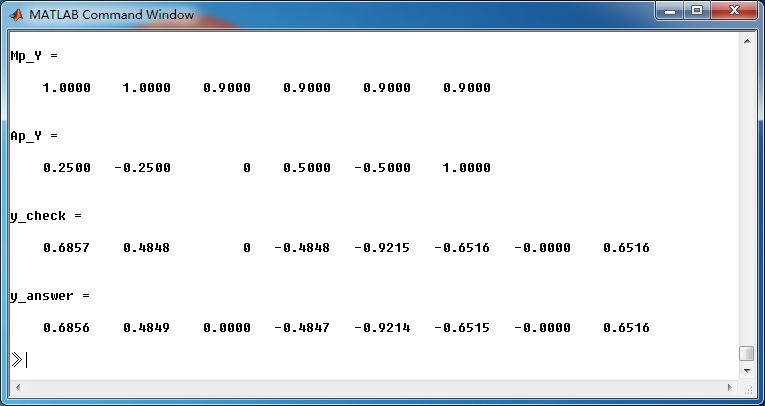
全部输出的z变换,Y(z)的零极点图如下,单位圆上的极点和稳态输出有关,单位圆内部的极点和暂态输出有关。

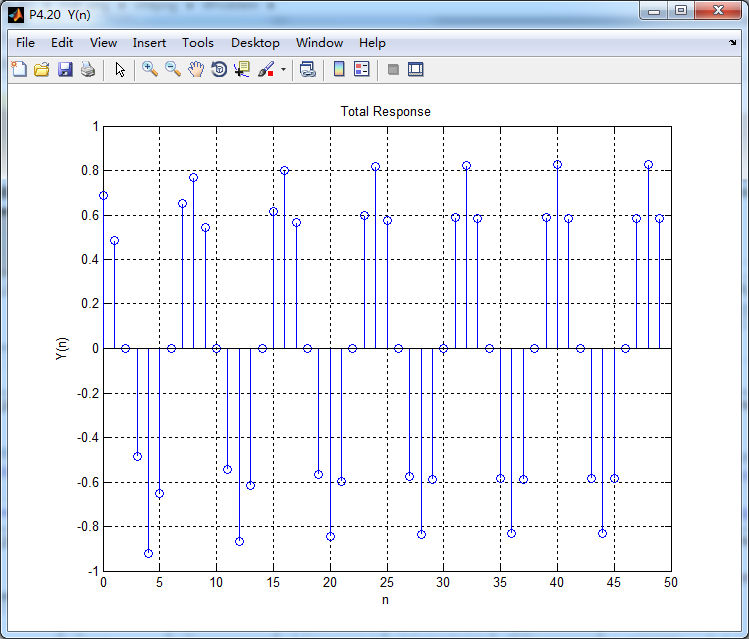
这里显示输出的前50个元素,下面是全输出:
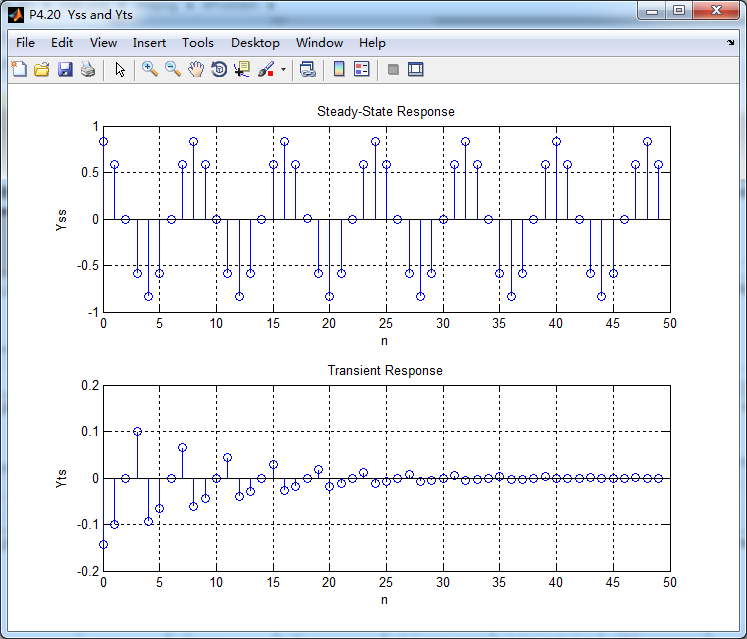
稳态输出和暂态输出如下图:
《DSP using MATLAB》Problem 4.20的更多相关文章
- 《DSP using MATLAB》Problem 6.20
先放子函数: function [C, B, A, rM] = dir2fs_r(h, r); % DIRECT-form to Frequency Sampling form conversion ...
- 《DSP using MATLAB》Problem 5.20
窗外的知了叽叽喳喳叫个不停,屋里温度应该有30°,伏天的日子难过啊! 频率域的方法来计算圆周移位 代码: 子函数的 function y = cirshftf(x, m, N) %% -------- ...
- 《DSP using MATLAB》Problem 3.20
代码: %% ------------------------------------------------------------------------ %% Output Info about ...
- 《DSP using MATLAB》Problem 2.20
代码: %% ------------------------------------------------------------------------ %% Output Info about ...
- 《DSP using MATLAB》Problem 7.24
又到清明时节,…… 注意:带阻滤波器不能用第2类线性相位滤波器实现,我们采用第1类,长度为基数,选M=61 代码: %% +++++++++++++++++++++++++++++++++++++++ ...
- 《DSP using MATLAB》Problem 7.23
%% ++++++++++++++++++++++++++++++++++++++++++++++++++++++++++++++++++++++++++++++++ %% Output Info a ...
- 《DSP using MATLAB》Problem 6.15
代码: %% ++++++++++++++++++++++++++++++++++++++++++++++++++++++++++++++++++++++++++++++++ %% Output In ...
- 《DSP using MATLAB》Problem 6.12
代码: %% ++++++++++++++++++++++++++++++++++++++++++++++++++++++++++++++++++++++++++++++++ %% Output In ...
- 《DSP using MATLAB》Problem 6.10
代码: %% ++++++++++++++++++++++++++++++++++++++++++++++++++++++++++++++++++++++++++++++++ %% Output In ...
随机推荐
- 更改Windows Update设置时,为何会提示“某些设置由你的系统管理员管理”?
亲测有效 及时进行更新是保证系统正常运行的一个有效措施.可为什么当我们进入“控制面板->Windows Update”手动修改 Windows Update 的设置时,系统却弹出提示“某些设置由 ...
- t-SNE 聚类
一个有效的数据降维的方法 t-SNE,类似PCA的主成分降维分析. 参考: t-分布邻域嵌入算法(t-SNE algorithm)简单理解 t-SNE初学 很好的教程:An illustrated i ...
- GetTextAndImageCreateExamPaper
Private Declare Function URLDownloadToFile Lib "urlmon" Alias "URLDownloadToFileA&quo ...
- nyoj-677-最大流最小割
677-碟战 内存限制:64MB 时间限制:2000ms 特判: No通过数:2 提交数:2 难度:4 题目描述: 知己知彼,百战不殆!在战争中如果被敌人掌握了自己的机密,失败是必然的.K国在一场战争 ...
- Unity3D中的函数方法和解释
一.刷新函数 Update 当MonoBehaviour启用时,其Update在每一帧被调用. LateUpdate 当Behaviour启用时,其LateUpdate在每一帧被调用. FixedUp ...
- kill prefix out 1 homo,hemero out1
1● homo 同性恋者 2●hetero 异性恋者
- net负载均衡服务器架构网址
https://blog.csdn.net/orichisonic/article/details/71122291 https://blog.csdn.net/huangxiangec/articl ...
- CUDA ---- CUDA库简介
CUDA Libraries简介 上图是CUDA 库的位置,本文简要介绍cuSPARSE.cuBLAS.cuFFT和cuRAND,之后会介绍OpenACC. cuSPARSE线性代数库,主要针对稀疏矩 ...
- 关于junk jack
旨在利用一切物品打造你自己的世界.你需要砍树获得木头,挖各种矿石用火炉炼成不同东西,顺便得到不同颜色材质的石头建房子,打各种家禽获得吃的甚至烘焙.养起来繁殖,天上掉下的星星.捡到圣诞礼包中的袜子都可以 ...
- HTTPS 通俗简介
为什么需要HTTPS 9个问题搞懂 https 来源 HTTP是明文传输的,也就意味着,介于发送端.接收端中间的任意节点都可以知道你们传输的内容是什么.这些节点可能是路由器.代理 等. 举个最常见的例 ...