
windows 10 上使用pybind11进行C++和Python代码相互调用 | Interfacing C++ and Python with pybind11 on windows 10
本文首发于个人博客https://kezunlin.me/post/8b9c051d/,欢迎阅读!
Interfacing C++ and Python with pybind11 on windows 10
Series
- Part 1: Interfacing C++ and Python with pybind11 on windows 10
- Part 2: Interfacing C++ and Python with pybind11 on ubuntu 16.04
Guide
requirements:
- pybind11 v2.3.dev0
- python 2.7
install pytest
pip install pytest
compile
git clone https://github.com/pybind/pybind11.git

cd pybind11

mkdir build

cd build

cmake-gui ..
with options
PYBIND11_CPP_STANDARD /std:c++11 # default c++14

PYTHON_EXECUTABLE C:/Python27/python.exe

CMAKE_INSTALL_PREFIX C:/Program Files/pybind11
compile with VS 2015 with x64 Release
install to C:\Program Files\pybind11 with only include and share
$ tree .

.

├── include

│   └── pybind11

│       ├── attr.h

│       ├── buffer_info.h

│       ├── cast.h

│       ├── chrono.h

│       ├── common.h

│       ├── complex.h

│       ├── detail

│       │   ├── class.h

│       │   ├── common.h

│       │   ├── descr.h

│       │   ├── init.h

│       │   ├── internals.h

│       │   └── typeid.h

│       ├── eigen.h

│       ├── embed.h

│       ├── eval.h

│       ├── functional.h

│       ├── iostream.h

│       ├── numpy.h

│       ├── operators.h

│       ├── options.h

│       ├── pybind11.h

│       ├── pytypes.h

│       ├── stl.h

│       └── stl_bind.h

└── share

    └── cmake

        └── pybind11

            ├── FindPythonLibsNew.cmake

            ├── pybind11Config.cmake

            ├── pybind11ConfigVersion.cmake

            ├── pybind11Targets.cmake

            └── pybind11Tools.cmake

6 directories, 29 files
Usage
pybind11 (cpp--->python)
module: examplelib
target: examplelib
cpp: example.cpp
example.cpp
#include <pybind11/pybind11.h>

namespace py = pybind11;

int add(int i, int j) {

    return i + j;

}

/*

#include <pybind11/pybind11.h>

namespace py = pybind11;

int add(int i, int j) {

    return i + j;

}

struct Pet {

	Pet(const std::string &name) : name(name) { }

	void setName(const std::string &name_) { name = name_; }

	const std::string &getName() const { return name; }

	std::string name;

};

/*

module: examplelib

target: examplelib

cpp: example.cpp

*/

PYBIND11_MODULE(examplelib, m)

{

	// optional module docstring

	m.doc() = "pybind11 example plugin";

	// FUNCTIONS

	// expose add function, and add keyword arguments and default arguments

	m.def("add", &add, "A function which adds two numbers", py::arg("i") = 1, py::arg("j") = 2);

	// DATA

	// exporting variables

	m.attr("the_answer") = 42;

	py::object world = py::cast("World");

	m.attr("what") = world;

	// CLASSES

	py::class_<Pet>(m, "Pet")

		.def(py::init<const std::string &>())

		.def("setName", &Pet::setName)

		.def("getName", &Pet::getName);

	/*

	python3

	> help(examplelib)

	*/

}
CMakeLists.txt
cmake_minimum_required (VERSION 2.6)

project (pybind)

enable_language(C)

enable_language(CXX)

find_package(pybind11 CONFIG REQUIRED)

include_directories(${pybind11_INCLUDE_DIRS})

message([MAIN] "Found pybind11 v${pybind11_VERSION}: ${pybind11_INCLUDE_DIRS}")

MESSAGE( [Main] " pybind11_INCLUDE_DIRS = ${pybind11_INCLUDE_DIRS}")

MESSAGE( [Main] " pybind11_LIBRARIES = ${pybind11_LIBRARIES}")

#

#   # Create an extension module

#   add_library(mylib MODULE main.cpp)

#   target_link_libraries(mylib pybind11::module)

#

#   # Or embed the Python interpreter into an executable

#   add_executable(myexe main.cpp)

#   target_link_libraries(myexe pybind11::embed)

# method (1): generate `examplelib.pyd`

pybind11_add_module(examplelib example.cpp)

# method (2): generate `examplelib.dll` rename to `examplelib.pyd`

#add_library(examplelib MODULE example.cpp)

#target_link_libraries(examplelib pybind11::module)

MESSAGE( [Main] " pybind11_INCLUDE_DIRS = ${pybind11_INCLUDE_DIRS}")

MESSAGE( [Main] " pybind11_LIBRARIES = ${pybind11_LIBRARIES}")

#add_executable(cpp_use_python cpp_use_python.cpp)

#target_link_libraries(cpp_use_python PRIVATE pybind11::embed)
cmake and config
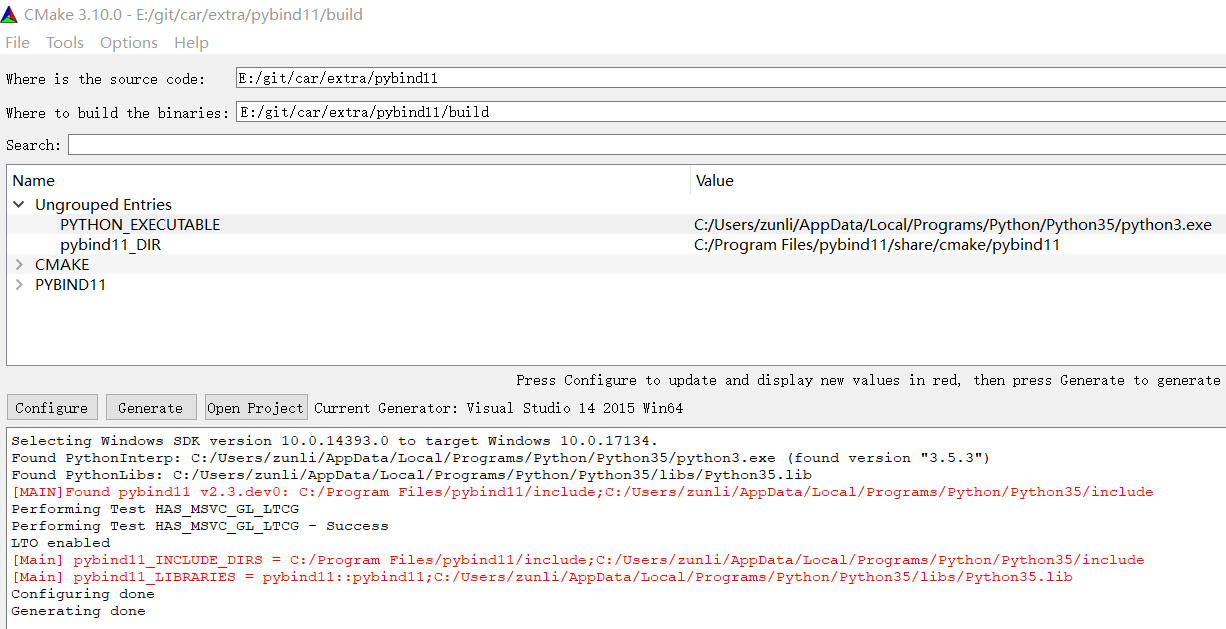
build with vs and we get 3 files:
examplelib.lib

examplelib.exp

examplelib.cp35-win_amd64.pyd
python import examplelib
 python3

Python 3.5.3 (v3.5.3:1880cb95a742, Jan 16 2017, 16:02:32) [MSC v.1900 64 bit (AMD64)] on win32

Type "help", "copyright", "credits" or "license" for more information.

>>> import examplelib

>>> help(examplelib)

Help on module examplelib:

NAME

    examplelib - pybind11 example plugin

CLASSES

    pybind11_builtins.pybind11_object(builtins.object)

        Pet

    class Pet(pybind11_builtins.pybind11_object)

     |  Method resolution order:

     |      Pet

     |      pybind11_builtins.pybind11_object

     |      builtins.object

     |

     |  Methods defined here:

     |

     |  __init__(...)

     |      __init__(self: examplelib.Pet, arg0: str) -> None

     |

     |  getName(...)

     |      getName(self: examplelib.Pet) -> str

     |

     |  setName(...)

     |      setName(self: examplelib.Pet, arg0: str) -> None

     |

     |  ----------------------------------------------------------------------

     |  Methods inherited from pybind11_builtins.pybind11_object:

     |

     |  __new__(*args, **kwargs) from pybind11_builtins.pybind11_type

     |      Create and return a new object.  See help(type) for accurate signature.

FUNCTIONS

    add(...) method of builtins.PyCapsule instance

        add(i: int = 1, j: int = 2) -> int

        A function which adds two numbers

DATA

    the_answer = 42

    what = 'World'

FILE

    e:\git\car\extra\pybind11\build\release\examplelib.cp35-win_amd64.pyd

>>> p = examplelib.Pet('kzl')

>>> print(p)

<examplelib.Pet object at 0x0000025EED9E3D18>

>>> p.getName()

'kzl'

>>> examplelib.add(1,2)

3

>>> examplelib.the_answer

42

>>> examplelib.what

'World'

>>>
embed
example.py
def add(i, j):

    print("hello, pybind11")

    return i+j

class MyMath:

	def __init__(self,name):

		self.name = name

	def my_add(self,i,j):

		return i + j

	def my_strcon(self,a,b):

		return a + b
cpp_use_python.cpp
#include <pybind11/embed.h>

#include <iostream>

namespace py = pybind11;

int main() {

	py::scoped_interpreter python;

	/*

	import sys

	print sys.path

	print "Hello,World!"

	*/

	py::module sys = py::module::import("sys");

	py::print(sys.attr("path"));

	py::print("Hello, World!"); // use the Python API

	/*

	import example

	n = example.add(1,2)

	*/

	py::module example = py::module::import("example");

	py::object result = example.attr("add")(1, 2);

	int n = result.cast<int>();

	assert(n == 3);

	std::cout << "result from example.add(1,2) = " << n << std::endl;

	/*

	from example import MyMath

	obj = MyMath("v0")

	obj.my_add(1,2)

	*/

	py::object MyMath = py::module::import("example").attr("MyMath"); // class

	py::object obj = MyMath("v0"); // class object

	py::object my_add = obj.attr("my_add");// object method

	py::object result2 = my_add(1, 2); // result

	int n2 = result2.cast<int>(); // cast from python type to c++ type

	assert(n2 == 3);

	std::cout << "result from obj.my_add(1,2) = " << n2 << std::endl;

	/*

	from example import MyMath

	obj = MyMath("v0")

	obj.my_strcon("abc","123");

	*/

	py::object my_strcon = obj.attr("my_strcon"); // object method

	py::object result3 = my_strcon("abc", "123");

	std::string str3 = result3.cast<std::string>();

	std::cout << "result from obj.my_strcon(abc,123) = " << str3 << std::endl;

	return 0;

}
CMakeLists.txt
cmake_minimum_required (VERSION 2.6)

project (pybind)

enable_language(C)

enable_language(CXX)

find_package(pybind11 CONFIG REQUIRED)

include_directories(${pybind11_INCLUDE_DIRS})

MESSAGE( [Main] " pybind11_INCLUDE_DIRS = ${pybind11_INCLUDE_DIRS}")

MESSAGE( [Main] " pybind11_LIBRARIES = ${pybind11_LIBRARIES}")

add_executable(cpp_use_python cpp_use_python.cpp)

target_link_libraries(cpp_use_python PRIVATE pybind11::embed)
Reference
History
- 20180301: created.
Copyright
- Post author: kezunlin
- Post link: https://kezunlin.me/post/8b9c051d/
- Copyright Notice: All articles in this blog are licensed under CC BY-NC-SA 3.0 unless stating additionally.
windows 10 上使用pybind11进行C++和Python代码相互调用 | Interfacing C++ and Python with pybind11 on windows 10的更多相关文章
- ubuntu 16.04 上使用pybind11进行C++和Python代码相互调用 | Interfacing C++ and Python with pybind11 on ubuntu 16.04
本文首发于个人博客https://kezunlin.me/post/a41adc1/,欢迎阅读! Interfacing C++ and Python with pybind11 on ubuntu ...
- Windows平台上通过git下载github的开源代码
常见指令整理: (1)检查ssh密钥是否已经存在.GitBash. 查看是否已经有了ssh密钥:cd ~/.ssh.示例中说明已经存在密钥 (2)生成公钥和私钥 $ ssh-keygen -t rsa ...
- Windows 10上源码编译Poco并编写httpserver和tcpserver | compile and install poco cpp library on windows
本文首发于个人博客https://kezunlin.me/post/9587bb47/,欢迎阅读! compile and install poco cpp library on windows Se ...
- service层代码相互调用, 导致spring循环依赖,设计上的优化
管理员创建用户需要发送激活邮件, 而发送激活邮件的时候需要判断发件人是不是合法的用户, 因此设计到一个循环依赖的问题 //UserService @Service class UserService{ ...
- DB 查询分析器 6.04 在 Windows 10 上的安装与运行展示
DB查询分析器 6.04 在 Windows 10 上的安装与运行展示 中国本土程序员马根峰(CSDN专访马根峰:海量数据处理与分析大师的中国本土程序员 http://www.csdn.net/art ...
- (转)在Windows平台上安装Node.js及NPM模块管理
本文转载自:http://www.cnblogs.com/seanlv/archive/2011/11/22/2258716.html 之前9月份的时候我写了一篇关于如何在Windows平台上手工管理 ...
- Windows 10 上强制Visual Studio以管理员身份运行
Windows 10 的一个既安全又蛋疼之处是UAC的行为被改变了.以往在Windows 7中,只要关闭了UAC,自己的帐号又是本机管理员组的,任何程序都会以管理员身份启动.然而,在Windows 8 ...
- 在Windows 10上安装Oracle 11g数据库出现的问题及解决
在Windows 10上安装Oracle 11g数据库,并且很多次出现过:当安装的进度条进行到快要结束的时候弹出一个提示框.如下: [Java(TM)2 Platform Standard Editi ...
- Windows 10 上,Edge 浏览器不支持插件,因此将不运行 Java
在 Windows 10 上,Edge 浏览器不支持插件,因此将不运行 Java.微软想干嘛?
随机推荐
- Spring使用AspectJ开发AOP:基于XML
基于XML的声明式 基于 XML 的声明式是指通过 Spring 配置文件的方式定义切面.切入点及声明通知,而所有的切面和通知都必须定义在 <aop:config> 元素中. 下面通过案例 ...
- background-origin背景图片定位
语法 background-origin: padding-box|border-box|content-box; background-Origin属性指定background-position属性 ...
- Google Tensorflow 迁移学习 Inception-v3
附上代码加数据地址 https://github.com/Liuyubao/transfer-learning ,欢迎参考. 一.Inception-V3模型 1.1 详细了解模型可参考以下论文: [ ...
- 什么是浮点型?什么是单精度浮点数(float)以及双精度浮点数(double)?
前言 作为一名java学习者,怎能不懂这些java基础中的基础呢?本文就带各位温顾温顾java浮点型.单精度浮点数.双精度浮点数. 浮点型 首先明确java中浮点型数据类型主要有:单精度float.双 ...
- 在VMware下的Linux中的RAID5校验位算法下的磁盘管理
前景:1988年由加利福尼亚大学伯克利分校发表的文章首次提到并定义了RAID,当今CPU性能每年可提升30%-50%但硬盘仅提升7%,渐渐的已经成为计算机整体性能的瓶颈,并且为了避免硬盘的突然损坏导致 ...
- 前端与算法 leetcode 26. 删除排序数组中的重复项
目录 # 前端与算法 leetcode 26. 删除排序数组中的重复项 题目描述 概要 提示 解析 算法 # 前端与算法 leetcode 26. 删除排序数组中的重复项 题目描述 26. 删除排序数 ...
- 爬虫之scrapy简介
原始的爬虫流程:效率低.同步.阻塞 scrapy执行流程:效率高.异步.非阻塞 scrapy的概念 scrapy是一个爬虫框架 开发速度快 稳定性高 性能优越 scrapy的流程 1. 爬虫模块(Sp ...
- vue学习之插槽
插槽 插槽(Slot)是Vue提出来的一个概念,正如名字一样,插槽用于决定将所携带的内容,插入到指定的某个位置,从而使模板分块,具有模块化的特质和更大的重用性. 个人理解:我感觉插槽就是父组件控制插槽 ...
- COO 与 CSR 稀疏矩阵存取格式;
稀疏矩阵是指矩阵中元素大部分是0的矩阵,事实上,实际问题中大规模矩阵基本上是稀疏矩阵,很多稀疏度在90%甚至99%以上:因此我们需要有高效的稀疏矩阵存储格式. 本文参考了 https://www.cn ...
- netty源码解析(4.0)-28 ByteBuf内存池:PooledByteBufAllocator-把一切组装起来
PooledByteBufAllocator负责初始化PoolArena(PA)和PoolThreadCache(PTC).它提供了一系列的接口,用来创建使用堆内存或直接内存的PooledByteBu ...