
20181101_将WCF寄宿到控制台
- 使用管理员权限打开VS2017

2. 创建以下代码进行测试:
a) 创建一个空白解决方案
b) 创建三个类库文件

c) IMathService代码如下:
using System;

using System.Collections.Generic;

using System.Linq;

using System.Text;

using System.Threading.Tasks;

using System.ServiceModel;

using MyWCF.Model;

namespace MyWCF.Interface

{

    /// <summary>

    /// 引用命名空间  System.ServiceModel

    /// </summary>

    [ServiceContract] //必须添加此特性

    public interface IMathService

    {

        [OperationContract]//想对外公布的添加此特性

        int PlusInt(int x, int y);

        //不想对外公布的服务(接口), 不要添加OperationContract这个特性; 类似于public和private

        int Minus(int x, int y);

        [OperationContract]

        WCFUser GetUser(int x, int y);

        [OperationContract]

        List<WCFUser> UserList();

    }

}
d) WCFUser代码如下:
using System;

using System.Collections.Generic;

using System.Linq;

using System.Runtime.Serialization;

using System.Text;

using System.Threading.Tasks;

namespace MyWCF.Model

{

    /// <summary>

    /// 记得添加  System.Runtime.Serialization 引用

    ///

    /// 标准写法, 数据契约和 数据成员都要标记好

    /// DataContract表示数据契约

    /// 1. 标准规范实体需要添加,  当这个类有一个无参数构造函数的时候, 这个契约可以省略;

    /// 2. 但是不建议省略, 最好是都标记好

    /// 3. 有了DataContract之后,必须DataMember

    /// </summary>

    [DataContract]

    public class WCFUser

    {

        [DataMember]

        public int Id { get; set; }

        [DataMember]

        public int Age { get; set; }

        [DataMember]

        public int Sex { get; set; }

        [DataMember(Name = "ShortName")] //()括号中的是别名; 也就是说我在这里写的是Name, 但是传递到调用方则会变成ShortName.

        public string Name { get; set; }

        //[DataMember] 不想对外暴露的属性, 不要添加DataMember

        public string Description { get; set; }

    }

    public enum WCFUserSex

    {

        Famale,

        Male,

        Other

    }

}
e) Service代码如下:
using System;

using System.Collections.Generic;

using System.Linq;

using System.Text;

using System.Threading.Tasks;

using MyWCF.Interface;

using MyWCF.Model;

namespace MyWCF.Service

{

    public class MathService : IMathService

    {

        public int PlusInt(int x, int y)

        {

            return x + y;

        }

        public WCFUser GetUser(int x, int y)

        {

            return new WCFUser()

            {

                Id = 1,

                Name = "小孙",

                Age = 22,

                Description = "这里是WCFServie测试",

                Sex = (int)WCFUserSex.Famale

            };

        }

        public List<WCFUser> UserList()

        {

            return new List<WCFUser>(){

                new WCFUser()

                {

                    Id = 1,

                    Name = "伍佰",

                    Sex = (int)WCFUserSex.Male,

                    Age = 23,

                    Description = "我是世界第一等"

                },

                 new WCFUser()

                {

                    Id = 2,

                    Name = "陆佰",

                    Sex = (int)WCFUserSex.Male,

                    Age = 21,

                    Description = "我是世界第二等"

                },

                 new WCFUser()

                {

                    Id = 3,

                    Name = "柒佰",

                    Sex = (int)WCFUserSex.Famale,

                    Age = 24,

                    Description = "我是世界第三等"

                }

            };

        }

        public int Minus(int x, int y)

        {

            return x - y;

        }

    }

}
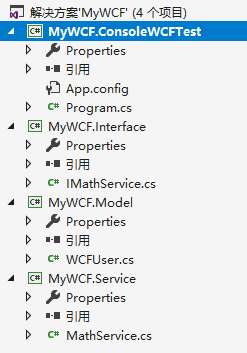
3.接下来创建一个控制台程序, 并设置为启动项, 如下图
4. 打开App.config文件, 将下面的代码复制进去:
a) 原始的App.Config文件截图如下:

b) 复制完成后的截图文件如下:
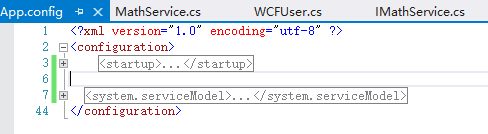
c) 所要复制的内容, 将这些内容复制成<starup>之下的节点, <configuration>之间的节点
<system.serviceModel>

    <!--WCF的配置文件  基于http的 -->

    <behaviors>

      <!--传输的行为定义-->

      <serviceBehaviors>

        <!--Behavior  → 行为 -->

        <behavior name="MathServicebehavior">

          <serviceDebug httpHelpPageEnabled="false"/>

          <serviceMetadata httpGetEnabled="false"/>

          <serviceTimeouts transactionTimeout="00:10:00"/>

          <!--事务的超时时间-->

          <!--maxConcurrentCalls→当前请求的, 最大请求数量-->

          <serviceThrottling maxConcurrentCalls="1000" maxConcurrentInstances="1000" maxConcurrentSessions="1000"/>

        </behavior>

      </serviceBehaviors>

    </behaviors>

    <bindings>

      <!--这个可以不用使用, 这里主要定义传输的协议, 类别, 加密, 安全格式等-->

      <basicHttpBinding>

        <binding name="httpbinding"/>

      </basicHttpBinding>

    </bindings>

    <services>

      <!--完整的类型名称-->

      <!--behaviorConfiguration 为上面对应的 behavior对应的name-->

      <service name="MyWCF.Service.MathService" behaviorConfiguration="MathServicebehavior">

        <host>

          <baseAddresses>

            <add baseAddress="http://localhost:8999/MathService"/>

          </baseAddresses>

        </host>

        <!--WCF中的endpoint中的ABC    A=wcf的地址, b=绑定的协议, c=具体的接口-->

        <endpoint address="" binding="basicHttpBinding" bindingConfiguration="httpbinding" contract="MyWCF.Interface.IMathService"/>

        <endpoint address="mex" binding="mexHttpBinding" contract="IMetadataExchange"/>

      </service>

    </services>

  </system.serviceModel>
5. 控制台程序编码如下:
class Program

    {

        static void Main(string[] args)

        {

            try

            {

                Console.WriteLine("开始测试WCF控制台寄宿");

                ServiceInit.Process();

            }

            catch (Exception ex)

            {

                //1. 如果报无法注册. . ., 则说明需要管理员权限, 启动这个程序

                //2. 如果报 服务“***Service”有零个应用程序(非基础结构)终结点。这可能是因为未找到应用程序的配置文件,或者在配置文件中未找到与服务名称匹配的服务元素,或者服务元素中未定义终结点。

                //则说明没有配置文件

                //3. 如果报另一应用程序已使用 HTTP.SYS 注册了该 URL。

                //端口 8999 被其它应用程序占用了, 找到并将其停止

                Console.WriteLine(ex.Message);

            }

            Console.Read();

        }

    }

    /// <summary>

    /// WCF寄宿到控制台

    /// </summary>

    public class ServiceInit

    {

        public static void Process()

        {

            //ServiceHost →表示提供服务的主机,使用服务的类型及其指定的基址初始化 System.ServiceModel.ServiceHost 类的新实例。

             ServiceHost host=  new ServiceHost(typeof(MathService)),

                //正在打开事件

                host.Opening += (s, e) => Console.WriteLine($"{host.GetType().Name} 准备打开");

                //已经打开事件

                host.Opened += (s, e) => Console.WriteLine($"{host.GetType().Name} 已经正常打开");

                //开启服务; 注意当这里需要Open的时候, 会去配置文件中检查是否有配置了MathService这个类的behavior(行为)

                host.Open();

            Console.WriteLine("输入任何字符,就停止");

            Console.Read();

            //如果报无法注册. . ., 则说明需要管理员权限, 启动这个程序

            host.Close();

            Console.Read();

        }

    }
6. 现在可以尝试启动控制台, 启动后, 运行完成, 不要点击任何字符, 接下来进行下面的操作, 如果没有任何异常, 则表示现在已经成功的把WCF服务, 寄宿到控制台程序上了;

7. 用cmd检查一下8999端口是否除以监听状态, netstat -ano | find "8999"
8. 开始调用测试:
a) 为了区分的清楚一点, 再打开一个VS, 创建一个调用测试项目, 还是用控制台项目来调用

b) 右键引用→添加服务引用

c) 在弹出来的窗口中输入, 在App.config中配置的地址, 然后点击转到, 等待搜索完成, 点击确定
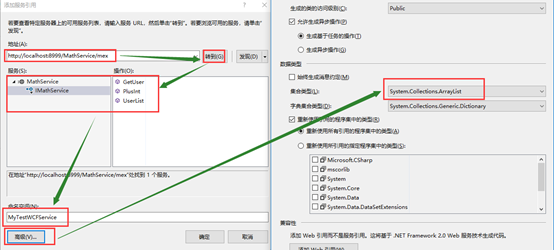
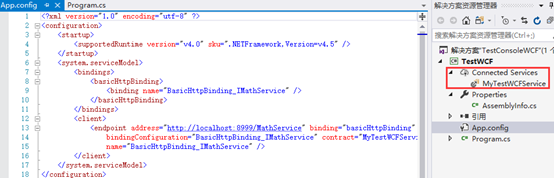
d) 这个时候就可以看到刚才控制台启动的那个服务已经被引用进来了, 同时也可以看到配置文件中也做了修改
e) Program类代码如下
class Program

    {

        static void Main(string[] args)

        {

            MyTestWCFService.MathServiceClient mathServiceClient = null;

            try

            {

                mathServiceClient = new MyTestWCFService.MathServiceClient();

                MyTestWCFService.WCFUser wCFUser = mathServiceClient.GetUser(11, 22);

                Console.WriteLine(wCFUser.ShortName); //虽然在WCF服务中, WCFUser是Name属性, 但是映射过来之后, 将变成ShortName属性, 因为别名的原因

                //这里应将引用的高级设置里面改成返回list类型, 然后就不用ToList()转换了

                mathServiceClient.UserList().ToList().ForEach(

                    (x) => { Console.WriteLine(x.ShortName); }

                     );

                mathServiceClient.Close();

                Console.Read();

            }

            catch (Exception ex)

            {

                Console.WriteLine(ex.Message);

                if (mathServiceClient != null)

                { //如果出现了异常, 则强制关闭客户端连接, 这是一个标准写法

                    mathServiceClient.Abort();

                }

                throw;

            }

        }

    }
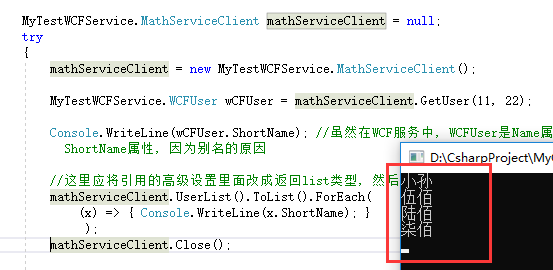
f) 运行结果:
g) 结束
20181101_将WCF寄宿到控制台的更多相关文章
- WCF寄宿在C#控制台,并用命令行启动
公司运用wcf比较多,所以自己研究一下寄宿做个笔记,wcf寄宿在控制台有两种方式 第一种,直接在控制台程序内添加wcf服务. 第二种分别添加控制台程序和wcf服务应用程序,前者引用后者,并在app.c ...
- WCF寄宿控制台.WindowsService.WinFrom.WebAPI寄宿控制台和windows服务
先建立wcf类库.会默认生成一些试用代码.如下: public class Service1 { public string GetData(int value) { return string.Fo ...
- WCF学习之旅—WCF寄宿前的准备(八)
一.WCF服务应用程序与WCF服务库 我们在平时开发的过程中常用的项目类型有“WCF 服务应用程序”和“WCF服务库”. WCF服务应用程序,是一个可以执行的程序,它有独立的进程,WCF服务类协定的定 ...
- WCF寄宿方式
WCF开发框架形成之旅---WCF的几种寄宿方式 WCF寄宿方式是一种非常灵活的操作,可以在IIS服务.Windows服务.Winform程序.控制台程序中进行寄宿,从而实现WCF服务的运行,为调用者 ...
- WCF寄宿到Windows Service
WCF寄宿到Windows Service[1] 2014-06-14 WCF寄宿到Windows Service参考 WCF寄宿到Windows Service 返回 在前面创建一个简单的WCF程序 ...
- WCF寄宿到Windows Service[1]
WCF寄宿到Windows Service 返回 在前面创建一个简单的WCF程序,我们把WCF的服务寄宿到了Host这个控制台项目中了.下面将介绍如何把WCF的服务寄宿到Windows服务中(源代码) ...
- WCF寄宿与IIS里时遇到的问题
[问题总结]WCF寄宿与IIS里时遇到的问题 最近在公司做了一个小的视频处理网站,由于视频处理,网站在不同的服务器上,所以处理视频的时候得在网站服务器上通过wcf请求视频处理服务器处理视频,并将结果返 ...
- WCF绑定netTcpBinding寄宿到控制台应用程序
契约 新建一个WCF服务类库项目,在其中添加两个WCF服务:GameService,PlayerService 代码如下: [ServiceContract] public interface IGa ...
- WCF 寄宿Windows以及控制台启动
一:添加windows服务 二:修改XXXInstaller1的StartType=Automatic,修改ProcessInstaller1的Account=LocalSystem 三:在progr ...
随机推荐
- python之单元测试框架—unittest(补充)
一. unittest最核心的四个概念 unittest中最核心的四个概念是:test case,test suite,test runner,test fixture TestCase:一个test ...
- Log4j 发送 EMail 的配置
项目上线后,运行时往往也还会有异常发生,在异常抛出时,希望即时的得到反馈.所以需要配置LOG4J的发送EMAIL功能. 项目中原来使用的的Log4j版本为1.2.9 ,但此版本并不支持邮件服务的认证功 ...
- telnet: connect to address ::1: connect refused [centos, linux]
在我测试邮件服务器时, 使用 telnet localhost 25 出现如下的提示: Trying::1... telnet: connect to address ::1:Connection r ...
- Node.js小白开路(一)-- Buffer篇
Buffer是nodeJS中的二进制缓存操作模块内容.先来看一段简短的代码. // 创建一个长度为 10.且用 0 填充的 Buffer. const buf1 = Buffer.alloc(10); ...
- css清除浮动float的几种方法
摘要: css清除浮动float的三种方法总结,为什么清浮动?浮动会有那些影响? 一.抛一块问题砖(display: block)先看现象: 这里我没有给最外层的DIV.outer 设置高度, ...
- ubuntu下安装交叉编译工具链
/usr/localmkdir arm 将文件file1复制成文件file2 cp file1 file2 /cp /mnt/hgfs/UbuntuGX/arm-2008q3-linux.tar.gz ...
- LeetCode OJ:Remove Duplicates from Sorted Array II(移除数组中的重复元素II)
Follow up for "Remove Duplicates":What if duplicates are allowed at most twice? For exampl ...
- 阿里maven镜像服务器配置
把下面的配置复制到 .m2/settings.xml配置文件中. <?xml version="1.0" encoding="UTF-8"?> &l ...
- Event 同步机制
In computer science, an event (also called event semaphore) is a type of synchronization mechanism t ...
- Arcgis for Js实现graphiclayer的空间查询(续)
上文中,实现了简单的针对graphiclayer的空间查询工作,在本节,将更加详细的介绍针对graphiclayer的空间查询.首先,空间查询的方式:提供多种类型的空间查询,包括点周边.线周边.面内等 ...