
springCloud学习笔记2(服务发现)
一、服务发现架构
服务发现架构通常具有下面 4 个概念:
- 服务注册:服务如何使用服务发现代理进行注册?
- 服务地址的客户端查找:服务客户端查找服务信息的方法是什么?
- 信息共享:如何跨节点共享服务信息?
- 健康监测:服务如何将它的健康信息传回给服务发现代理?
下图展示了这 4 个概念的流程,以及在服务发现模式实现中通常发生的情况:
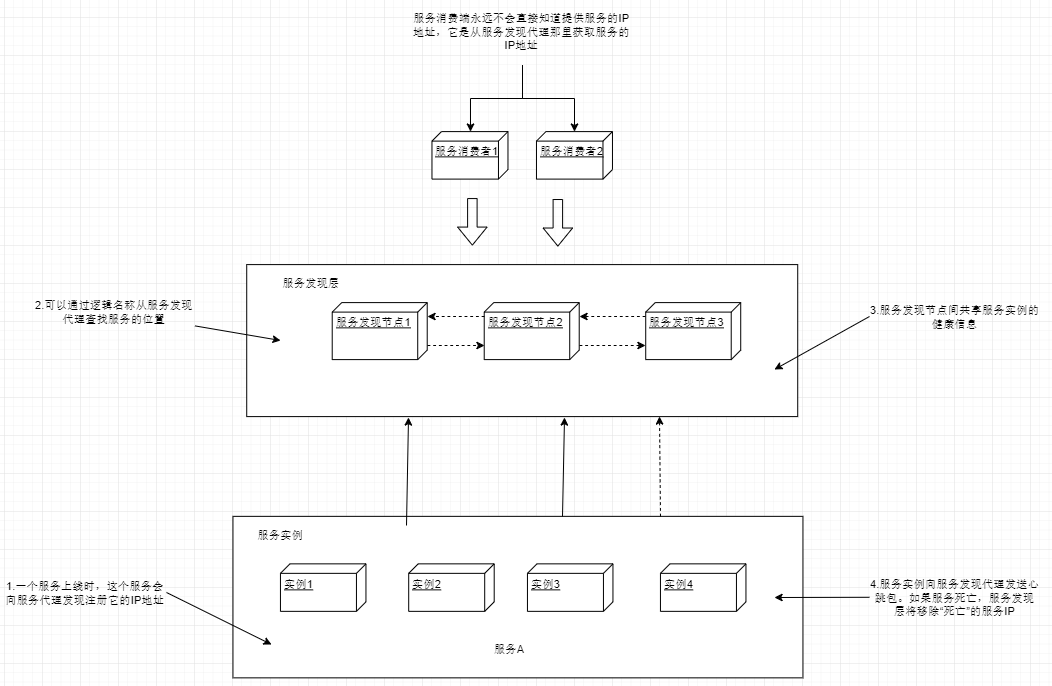
通常服务实例都只向一个服务发现实例注册,服务发现实例之间再通过数据传输,让每个服务实例注册到所有的服务发现实例中。
服务在向服务发现实例注册后,这个服务就能被服务消费者调用了。服务消费者可以使用多种模型来"发现"服务。
- 每次调用服务时,通过服务发现层来获取目标服务地址并进行调用。这种用的比较少,弊端较多。首先是每次服务调用都通过服务发现层来完成,耗时会比直接调用高。最主要的是这种方法很脆弱,消费端完全依赖于服务发现层来查找和调用服务。
- 更健壮的方法是使用所谓的客户端负载均衡。
如下图所示:
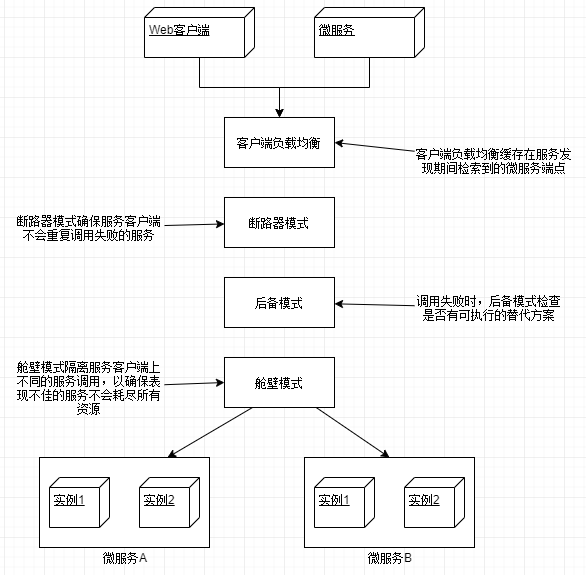
在这个模型中,当服务消费者需要调用一个服务时:
(1)联系服务发现层,获取所请求服务的所有服务实例,然后放到本地缓存中。
(2)每次调用该服务时,服务消费者从缓存中取出一个服务实例的位置,通常这个'取出'使用简单的复制均衡算法,如“轮询”,“随机",以确保服务调用分布在所有实例之间。
(3)客户端将定期与服务发现层进行通信,并刷新服务实例的缓存。
(4)如果在调用服务的过程中,服务调用失败,那么本地缓存将从服务发现层中刷新数据,再次尝试。
二、spring cloud 实战
使用 spring cloud 和 Netflix Eureka 搭建服务发现实例。
1、构建 Spring Eureka 服务
eurekasvr POM 主要配置如下:
<!-- 其他依赖省略 -->

<dependency>

    <groupId>org.springframework.cloud</groupId>

    <artifactId>spring-cloud-starter-eureka-server</artifactId>

</dependency>
applicaiton.yml 配置如下:
server:

  port: 8761

eureka:

  client:

    #不注册自己

    register-with-eureka: false

    #不在本地缓存注册表信息

    fetch-registry: false

  server:

    #接受请求前的等待实际,开发模式下不要开启

    #wait-time-in-ms-when-sync-empty: 5
最后在启动类上加入注释@SpringBootApplication即可启动服务中心。服务中心管理页面:http://localhost:8761
2、将服务注册到服务中心
这里我们编写一个新服务注册到服务中心,organizationservice:组织服务。并将上一篇的两个服务:confsvr:配置中心服务,licensingservice:授权服务注册到服务中心。
a、confvr 注册
首先修改 POM 文件:
<dependency>

    <groupId>org.springframework.cloud</groupId>

    <artifactId>spring-cloud-config-server</artifactId>

</dependency>

<dependency>

    <groupId>org.springframework.cloud</groupId>

    <artifactId>spring-cloud-starter-eureka</artifactId>

</dependency>
然后修改配置文件 application.yml:
server:

  port: 8888

eureka:

  instance:

    #注册服务的IP,而不是服务器名

    prefer-ip-address: true

  client:

    #向eureka注册服务

    register-with-eureka: true

    #拉取注册表的本地副本

    fetch-registry: true

    service-url:

      #Eureka服务的位置(如果有多个注册中心,使用,分隔)

      defaultZone: http://localhost:8761/eureka/

spring:

  profiles:

    # 使用文件系统来存储配置信息,需要设置为native

    active: native

  application:

    name: confsvr

  cloud:

    config:

      server:

        native:

          # 使用文件来存放配置文件,为每个应用程序提供用逗号分隔的文件夹列表

          searchLocations: file:///D:/configFolder/licensingservice,file:///D:/configFolder/organizationservice
最后在启动类加入注解@EnableDiscoveryClient,启动即可在 eureka 管理页面发现。
b、licensingservice 注册
首先修改 POM
<dependency>

    <groupId>org.springframework.cloud</groupId>

    <artifactId>spring-cloud-starter-eureka</artifactId>

</dependency>

<dependency>

    <groupId>org.springframework.cloud</groupId>

    <artifactId>spring-cloud-config-client</artifactId>

</dependency>
然后修改配置文件 bootstrap.yml
spring:

  application:

    #指定名称,以便spring cloud config客户端知道查找哪个配置

    name: licensingservice

  profiles:

    #指定环境

    active: dev

  cloud:

    config:

      #设为true便会自动获取从配置中心获取配置文件

      enabled: true

eureka:

  instance:

    prefer-ip-address: true

  client:

    register-with-eureka: true

    fetch-registry: true

    service-url:

      defaultZone: http://localhost:8761/eureka/
最后在启动类加入注解@EnableDiscoveryClient,启动即可在 eureka 管理页面发现本服务实例。
c、创建 organizationservice
首先在文件夹file:///D:/configFolder/organizationservice下创建两个配置文件:organizationservice.yml,organizationservice-dev.yml,内容分别为:
#organizationservice-dev.yml

server:

  port: 10012
#organizationservice.yml

spring:

  application:

    name: organizationservice
主要 POM 配置如下:
<dependency>

    <groupId>org.springframework.cloud</groupId>

    <artifactId>spring-cloud-starter-eureka</artifactId>

</dependency>

<dependency>

    <groupId>org.springframework.cloud</groupId>

    <artifactId>spring-cloud-config-client</artifactId>

</dependency>
然后修改配置文件,bootstrap.yml
spring:

  application:

    #指定名称,以便spring cloud config客户端知道查找哪个配置

    name: organizationservice

  profiles:

    #指定环境

    active: dev

  cloud:

    config:

      enabled: true

eureka:

  instance:

    prefer-ip-address: true

  client:

    register-with-eureka: true

    fetch-registry: true

    service-url:

      defaultZone: http://localhost:8761/eureka/
最后在启动类加入注解@EnableDiscoveryClient,启动。
3、使用服务发现来查找服务
现在已经有两个注册服务了,现在来让许可证服务调用组织服务,获取组织信息。首先在 organizationservice 服务中的 controller 包中加入一个 controller 类,让它能够响应请求:
//OrganizationController.java

@RestController

public class OrganizationController {

    @GetMapping(value = "/organization/{orgId}")

    public Object getOrganizationInfo(@PathVariable("orgId") String orgId) {

        Map<String, String> data = new HashMap<>(2);

        data.put("id", orgId);

        data.put("name", orgId + "公司");

        return data;

    }

}
接下来让许可证服务通过 Eureka 来找到组织服务的实际位置,然后调用该接口。为了达成目的,我们将要学习使用 3 个不同的 Spring/Netflix 客户端库,服务消费者可以使用它们来和 Ribbon 进行交互。从最低级别到最高级别,这些库包含了不同的与 Ribbon 进行交互的抽象封装层次:
- Spring DiscoveryClient
- 启用了 RestTemplate 的 Spring DiscoveryClient
- Neflix Feign 客户端
a、使用 Spring DiscoveryClient
该工具提供了对 Ribbon 和 Ribbon 中缓存的注册服务最低层次的访问,可以查询通过 Eureka 注册的所有服务以及这些服务对应的 URL。
首先在 licensingservice 的启动类中加入@EnableDiscoveryClient注解来启用 DiscoveryClient 和 Ribbon 库。
然后在 service 包下创建 OrganizationService.java
@Service

public class OrganizationService {

    private static final String SERVICE_NAME = "organizationservice";

    private DiscoveryClient discoveryClient;

    @Autowired

    public OrganizationService(DiscoveryClient discoveryClient) {

        this.discoveryClient = discoveryClient;

    }

    /**

     * 使用Spring DiscoveryClient查询

     *

     * @param id

     * @return

     */

    public Organization getOrganization(String id) {

        RestTemplate restTemplate = new RestTemplate();

        List<ServiceInstance> instances = discoveryClient.getInstances(SERVICE_NAME);

        if (instances.size() == 0) {

            throw new RuntimeException("无可用的服务");

        }

        String serviceUri = String.format("%s/organization/%s", instances.get(0).getUri().toString(), id);

        ResponseEntity<Organization> responseEntity = restTemplate.exchange(serviceUri, HttpMethod.GET

                , null, Organization.class, id);

        return responseEntity.getBody();

    }

}
接着在 controller 包中新建 LicensingController.java
@RestController

public class LicensingController {

    private OrganizationService organizationService;

    @Autowired

    public LicensingController(OrganizationService organizationService) {

        this.organizationService = organizationService;

    }

    @GetMapping("/licensing/{orgId}")

    public Licensing getLicensing(@PathVariable("orgId") String orgId) {

        Licensing licensing = new Licensing();

        licensing.setValid(false);

        licensing.setOrganization(organizationService.getOrganization(orgId));

        return licensing;

    }

}
启动所有项目,访问localhost:10011/licensing/12,可以看到返回如下结果:
{

  "organization": {

    "id": "12",

    "name": "12公司"

  },

  "valid": false

}
在实际开发中,基本上是用不到这个的,除非是为了查询 Ribbon 以获取某个服务的所有实例信息,才会直接使用。如果直接使用它存在以下两个问题:
- 没有利用 Ribbon 的客户端负载均衡
- 和业务无关的代码写得太多
b、使用带 Ribbon 功能的 Spring RestTemplate 调用服务
这种方法是较为常用的微服务通信机制之一。要启动该功能,需要使用 Spring Cloud 注解@LoadBanced 来定义 RestTemplate bean 的构造方法。方便起见直接在启动类中定义 bean:
#LicensingserviceApplication.java

@SpringBootApplication

@EnableDiscoveryClient  //使用不带Ribbon功能的Spring RestTemplate,其他情况下可删除

public class LicensingserviceApplication {

    /**

     * 使用带有Ribbon 功能的Spring RestTemplate,其他情况可删除

     */

    @LoadBalanced

    @Bean

    public RestTemplate getRestTemplate(){

        return new RestTemplate();

    }

    public static void main(String[] args) {

        SpringApplication.run(LicensingserviceApplication.class, args);

    }

}
接着 service 包下增加一个类:OrganizationByRibbonService.java
@Component

public class OrganizationByRibbonService {

    private RestTemplate restTemplate;

    @Autowired

    public OrganizationByRibbonService(RestTemplate restTemplate) {

        this.restTemplate = restTemplate;

    }

    public Organization getOrganizationWithRibbon(String id) {

        ResponseEntity<Organization> responseEntity = restTemplate.exchange("http://organizationservice/organization/{id}",

                HttpMethod.GET, null, Organization.class, id);

        return responseEntity.getBody();

    }

}
最后就是在 LicensingController.js 中加一个访问路径:
//不要忘记注入OrganizationByRibbonService服务

@GetMapping("/licensingByRibbon/{orgId}")

    public Licensing getLicensingByRibbon(@PathVariable("orgId") String orgId) {

        Licensing licensing = new Licensing();

        licensing.setValid(false);

        licensing.setOrganization(organizationService.getOrganization(orgId));

        return licensing;

    }

}
访问localhost:10011/licensingByRibbon/113,即可看到结果。
c、使用 Netflix Feign 客户端调用
Feign 客户端是 Spring 启用 Ribbon 的 RestTemplate 类的替代方案。开发人员只需定义一个接口,然后使用 Spring 注解来标注接口,即可调用目标服务。除了编写接口定义无需编写其他辅助代码。
首先启动类上加一个@EnableFeignClients注解启用 feign 客户端。然后在 POM 中加入 Feign 的依赖
<dependency>

  <groupId>org.springframework.cloud</groupId>

  <artifactId>spring-cloud-starter-feign</artifactId>

</dependency>
然后在 client 包下新建 OrganizationFeignClient.java
@FeignClient("organizationservice")//使用FeignClient注解指定目标服务

public interface OrganizationFeignClient {

    /**

     * 获取组织信息

     *

     * @param orgId 组织id

     * @return Organization

     */

    @RequestMapping(method = RequestMethod.GET, value = "/organization/{orgId}", consumes = "application/json")

    Organization getOrganization(@PathVariable("orgId") String orgId);

}
最后修改LicensingController.java,加入一个路由调用 Feign。
//注入OrganizationFeignClient,使用构造注入

@GetMapping("/licensingByFeign/{orgId}")

public Licensing getLicensingByFeign(@PathVariable("orgId") String orgId) {

    Licensing licensing = new Licensing();

    licensing.setValid(false);

    licensing.setOrganization(organizationFeignClient.getOrganization(orgId));

    return licensing;

}
访问localhost:10011/licensingByFeign/11313,即可看到结果。
总结
这一节磨磨蹭蹭写了好几天,虽然例子很简单,但是相信应该是能够看懂的。由于篇幅原因代码没有全部贴上,想要查看完整代码,可以访问这个链接:点击跳转。
本篇原创发布于:http://tapme.top/blog/detail/2018-11-22-15-57
springCloud学习笔记2(服务发现)的更多相关文章
- SpringCloud学习笔记:服务支撑组件
SpringCloud学习笔记:服务支撑组件 服务支撑组件 在微服务的演进过程中,为了最大化利用微服务的优势,保障系统的高可用性,需要通过一些服务支撑组件来协助服务间有效的协作.各个服务支撑组件的原理 ...
- SpringCloud学习笔记:服务注册与发现Eureka(2)
1. Eureka简介 Eureka是一个用于服务注册和发现的组件,分为Eureka Server和Eureka Client,Eureka Server为Eureka服务注册中心,Eureka Cl ...
- SpringCloud学习笔记(3):使用Feign实现声明式服务调用
简介 Feign是一个声明式的Web Service客户端,它简化了Web服务客户端的编写操作,相对于Ribbon+RestTemplate的方式,开发者只需通过简单的接口和注解来调用HTTP API ...
- SpringCloud学习笔记(6):使用Zuul构建服务网关
简介 Zuul是Netflix提供的一个开源的API网关服务器,SpringCloud对Zuul进行了整合和增强.服务网关Zuul聚合了所有微服务接口,并统一对外暴露,外部客户端只需与服务网关交互即可 ...
- SpringCloud学习笔记(2):使用Ribbon负载均衡
简介 Spring Cloud Ribbon是基于Netflix Ribbon实现的一套客户端负载均衡工具,在注册中心对Ribbon客户端进行注册后,Ribbon可以基于某种负载均衡算法,如轮询(默认 ...
- SpringCloud学习笔记(7):使用Spring Cloud Config配置中心
简介 Spring Cloud Config为分布式系统中的外部化配置提供了服务器端和客户端支持,服务器端统一管理所有配置文件,客户端在启动时从服务端获取配置信息.服务器端有多种配置方式,如将配置文件 ...
- SpringCloud学习笔记(4):Hystrix容错机制
简介 在微服务架构中,微服务之间的依赖关系错综复杂,难免的某些服务会出现故障,导致服务调用方出现远程调度的线程阻塞.在高负载的场景下,如果不做任何处理,可能会引起级联故障,导致服务调用方的资源耗尽甚至 ...
- SpringCloud学习笔记(5):Hystrix Dashboard可视化监控数据
简介 上篇文章中讲了使用Hystrix实现容错,除此之外,Hystrix还提供了近乎实时的监控.本文将介绍如何进行服务监控以及使用Hystrix Dashboard来让监控数据图形化. 项目介绍 sc ...
- SpringCloud学习笔记(四):Eureka服务注册与发现、构建步骤、集群配置、Eureka与Zookeeper的比较
简介 Netflix在设计Eureka时遵守的就是AP原则 拓展: 在分布式数据库中的CAP原理 CAP原则又称CAP定理,指的是在一个分布式系统中,Consistency(一致性). Availab ...
随机推荐
- SqlComparison
package com.ufo.leftjoin; import java.security.MessageDigest; import java.sql.Connection; import jav ...
- [转]理解Vuex的辅助函数mapState, mapActions, mapMutations用法
原文地址:https://www.cnblogs.com/tugenhua0707/p/9794423.html 在讲解这些属性之前,假如我们项目的目录的结构如下: ### 目录结构如下: demo1 ...
- ELK集群安装配置X-Pack
目前使用的版本不是最新的-6.2.4,6.3以后的版本应该就是集成的了 官方资料: 在线安装步骤:https://www.elastic.co/cn/downloads/x-pack 离线安装步骤:h ...
- odoo开发笔记 -- 用户字段值,默认给当前登录用户
场景描述: 在一些视图下,当系统用户创建某条记录的时候,需要给某个用户字段设置默认值,即:默认值为系统的当前登录用户,如何实现? 处理方式: 在定义模型的时候,给该字段赋值就可以: operator_ ...
- debian8 vga 文本模式下出现闪屏
这种问题是因为 grub 里面关于 分辨率大小不对的问题. 在 debian 里面,在文件 /boot/grub/grub.cfg 里面可以添加 vga 参数配置. 如下: 在 kernel 启动参数 ...
- 带有Q_OBJECT的类要放在头文件的第一个类位置,否则可能无法moc
如果头文件中有多个类,带有Q_OBJECT的类要放在头文件的第一个类位置,否则可能无法moc
- Better ultra_simple for Slamtec RPLIDAR on Linux
Improved the ultra_simple program to visualize the samples with GLUT on Linux, tested with Slamtec R ...
- 解决ImportError: No module named utils
转载:https://blog.csdn.net/weixin_43979572/article/details/86159265 在Python中遇到了导包错误,其实包已经有了.原因是我再B文件的a ...
- Nginx修改时间戳
1.安装nginx,注意不要安装nginx-common或者nginx-full sudo apt-get install nginx sudo apt-get install nginx-commo ...
- Quartz学习笔记:集群部署&高可用
Quartz学习笔记:集群部署&高可用 集群部署 一个Quartz集群中的每个节点是一个独立的Quartz应用,它又管理着其他的节点.这就意味着你必须对每个节点分别启动或停止.Quartz集群 ...