
【转】在Linux下搭建Git服务器
在 Linux 下搭建 Git 服务器
环境:

服务器 CentOS6.6 + git(version 1.7.1)
客户端 Windows10 + git(version 2.8.4.windows.1)
① 安装 Git
Linux 做为服务器端系统,Windows 作为客户端系统,分别安装 Git
服务器端:
#yum install -y git
安装完后,查看 Git 版本
[root@localhost ~]# git --version

git version 1.7.
客户端:
下载 Git for Windows,地址:https://git-for-windows.github.io/
安装完之后,可以使用 Git Bash 作为命令行客户端。
安装完之后,查看 Git 版本
$ git --version

git version 2.8.4.windows.
② 服务器端创建 git 用户,用来管理 Git 服务,并为 git 用户设置密码
[root@localhost home]# id git

id: git:无此用户

[root@localhost home]# useradd git

[root@localhost home]# passwd git
③ 服务器端创建 Git 仓库
设置 /home/data/git/gittest.git 为 Git 仓库
然后把 Git 仓库的 owner 修改为 git
[root@localhost home]# mkdir -p data/git/gittest.git

[root@localhost home]# git init --bare data/git/gittest.git

Initialized empty Git repository in /home/data/git/gittest.git/

[root@localhost home]# cd data/git/

[root@localhost git]# chown -R git:git gittest.git/
第三步:实现自动部署代码到Web目录
我当前的git仓库目录是:/home/data/git/xxx.git
Web网站的目录是:/home/www/wwwroot/xxx
配置git仓库下hooks
|
1
|
[root@localhost]# vi /home/git/xxx.git/post-recive
|
输入以下代码保存,其中/home/www/wwwroot/xxx是我要部署代码的路径
|
1
2 |
#!/bin/bash
git --work-tree=/home/www/wwwroot/xxx checkout -f |
修改post-receive文件执行权限
|
1
|
[root@localhost]# chmod +x /home/git/xxx.git/post-receive
|
完成后服务端就已经配置完毕了~!
④ 客户端 clone 远程仓库
进入 Git Bash 命令行客户端,创建项目地址(设置在 d:/wamp64/www/gittest_gitbash)并进入:

dee@Lenovo-PC MINGW64 /d

$ cd wamp64/www

dee@Lenovo-PC MINGW64 /d/wamp64/www

$ mkdir gittest_gitbash

dee@Lenovo-PC MINGW64 /d/wamp64/www

$ cd gittest_gitbash

dee@Lenovo-PC MINGW64 /d/wamp64/www/gittest_gitbash

$
然后从 Linux Git 服务器上 clone 项目:
$ git clone git@192.168.56.101:/home/data/gittest.git
如果SSH用的不是默认的22端口,则需要使用以下的命令(假设SSH端口号是7700):
$ git clone ssh://git@192.168.56.101:7700/home/data/gittest.git
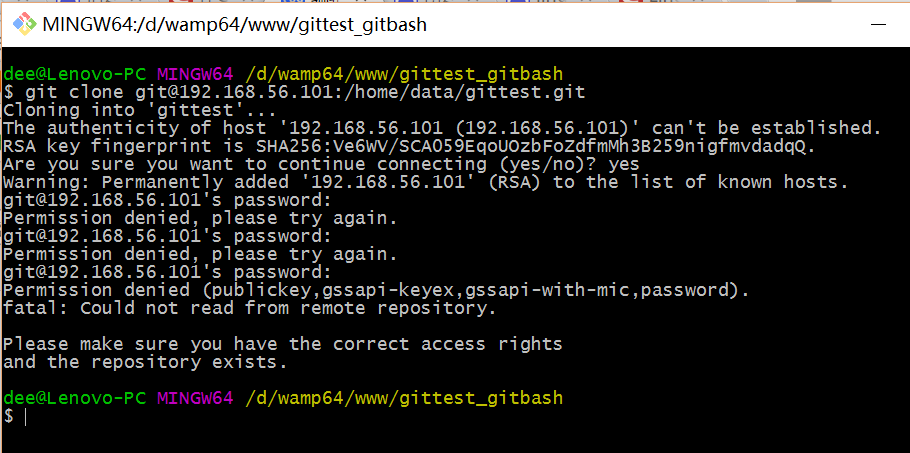
当第一次连接到目标 Git 服务器时会得到一个提示:
The authenticity of host '192.168.56.101 (192.168.56.101)' can't be established.

RSA key fingerprint is SHA256:Ve6WV/SCA059EqoUOzbFoZdfmMh3B259nigfmvdadqQ.

Are you sure you want to continue connecting (yes/no)?
选择 yes:
Warning: Permanently added '192.168.56.101' (RSA) to the list of known hosts.
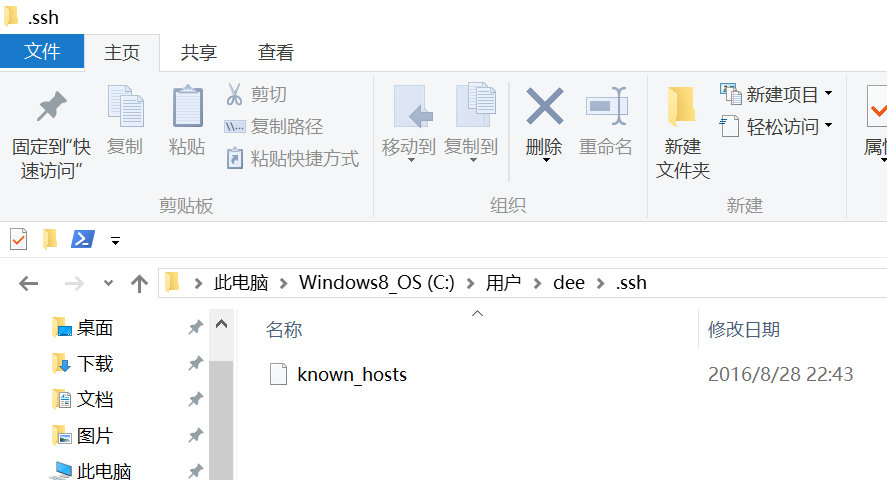
此时 C:\Users\用户名\.ssh 下会多出一个文件 known_hosts,以后在这台电脑上再次连接目标 Git 服务器时不会再提示上面的语句。
后面提示要输入密码,可以采用 SSH 公钥来进行验证。
⑤ 客户端创建 SSH 公钥和私钥
$ ssh-keygen -t rsa -C "472323087@qq.com"
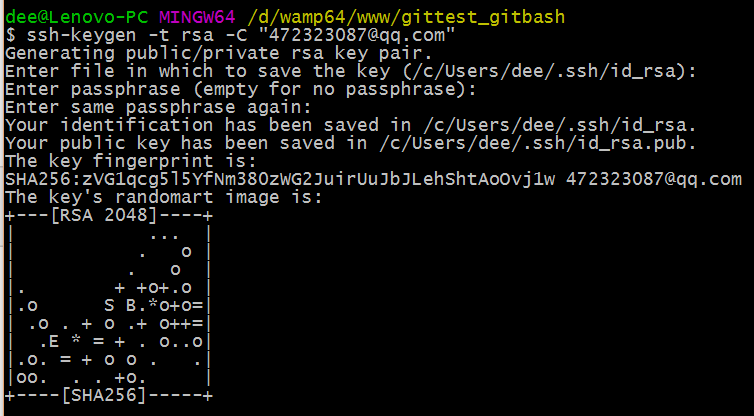
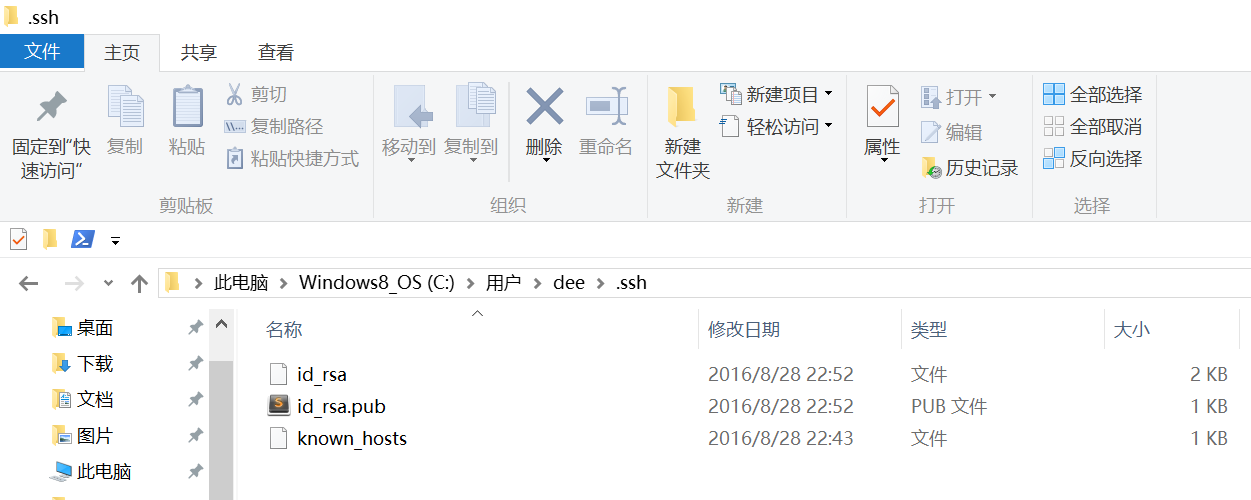
此时 C:\Users\用户名\.ssh 下会多出两个文件 id_rsa 和 id_rsa.pub
id_rsa 是私钥
id_rsa.pub 是公钥
⑥ 服务器端 Git 打开 RSA 认证
进入 /etc/ssh 目录,编辑 sshd_config,打开以下三个配置的注释:
RSAAuthentication yes

PubkeyAuthentication yes

AuthorizedKeysFile .ssh/authorized_keys
保存并重启 sshd 服务:
[root@localhost ssh]# /etc/rc.d/init.d/sshd restart
由 AuthorizedKeysFile 得知公钥的存放路径是 .ssh/authorized_keys,实际上是 $Home/.ssh/authorized_keys,由于管理 Git 服务的用户是 git,所以实际存放公钥的路径是 /home/git/.ssh/authorized_keys
在 /home/git/ 下创建目录 .ssh
[root@localhost git]# pwd

/home/git
[root@localhost git]# mkdir .ssh
[root@localhost git]# ls -a
. .. .bash_logout .bash_profile .bashrc .gnome2 .mozilla .ssh
然后把 .ssh 文件夹的 owner 修改为 git
[root@localhost git]# chown -R git:git .ssh

[root@localhost git]# ll -a

总用量 32

drwx------. 5 git  git  4096 8月  28 20:04 .

drwxr-xr-x. 8 root root 4096 8月  28 19:32 ..

-rw-r--r--. 1 git  git    18 10月 16 2014 .bash_logout

-rw-r--r--. 1 git  git   176 10月 16 2014 .bash_profile

-rw-r--r--. 1 git  git   124 10月 16 2014 .bashrc

drwxr-xr-x. 2 git  git  4096 11月 12 2010 .gnome2

drwxr-xr-x. 4 git  git  4096 5月   8 12:22 .mozilla

drwxr-xr-x. 2 git  git  4096 8月  28 20:08 .ssh
⑦ 将客户端公钥导入服务器端 /home/git/.ssh/authorized_keys 文件
回到 Git Bash 下,导入文件:
$ ssh git@192.168.56.101 'cat >> .ssh/authorized_keys' < ~/.ssh/id_rsa.pub
需要输入服务器端 git 用户的密码

回到服务器端,查看 .ssh 下是否存在 authorized_keys 文件:
[root@localhost git]# cd .ssh

[root@localhost .ssh]# ll

总用量 4

-rw-rw-r--. 1 git git 398 8月  28 20:08 authorized_keys
可以查看一下是否是客户端生成的公钥。
重要:
修改 .ssh 目录的权限为 700
修改 .ssh/authorized_keys 文件的权限为 600
[root@localhost git]# chmod 700 .ssh

[root@localhost git]# cd .ssh

[root@localhost .ssh]# chmod 600 authorized_keys
⑧ 客户端再次 clone 远程仓库
$ git clone git@192.168.56.101:/home/data/git/gittest.git

查看客户端项目目录:
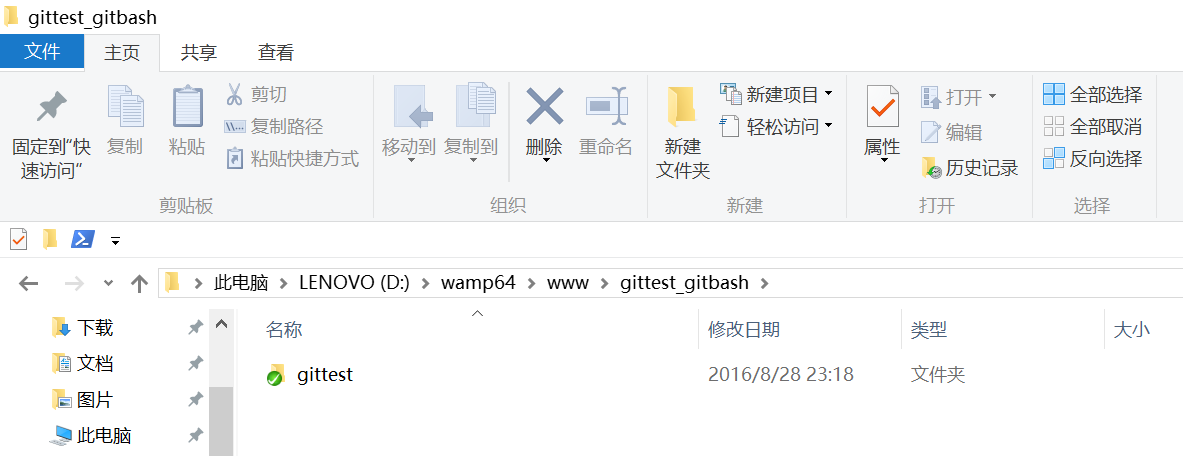
项目已经 clone 了。
也可以使用 tortoiseGit 客户端来管理项目:
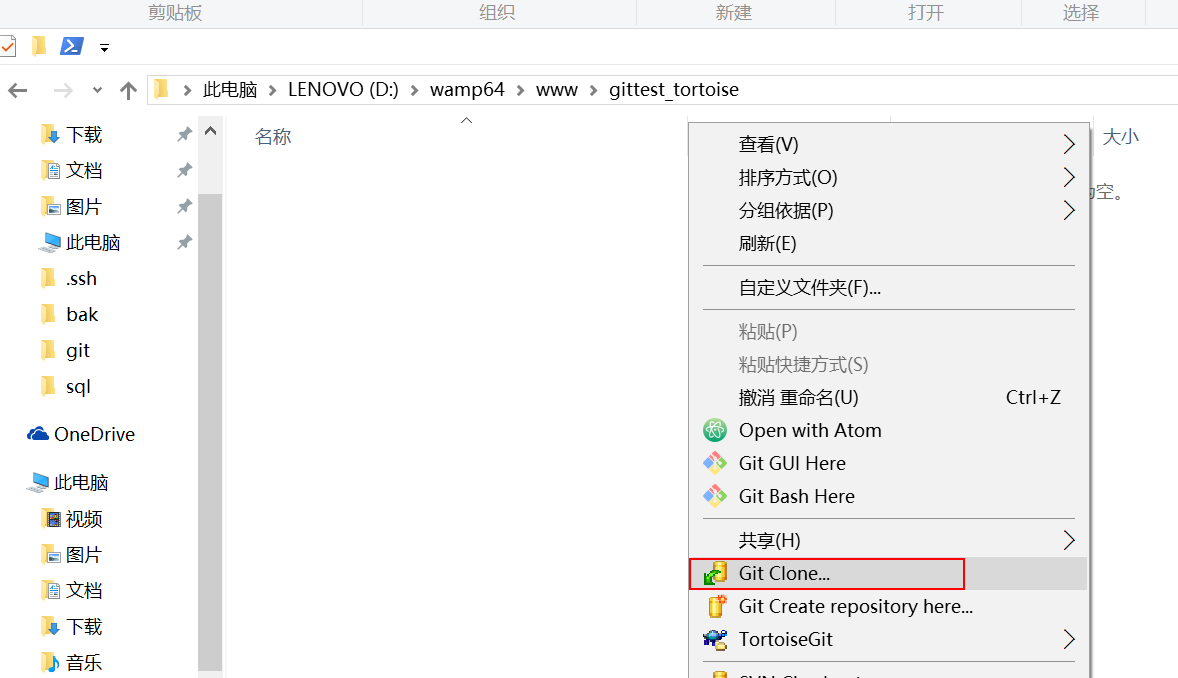
clone
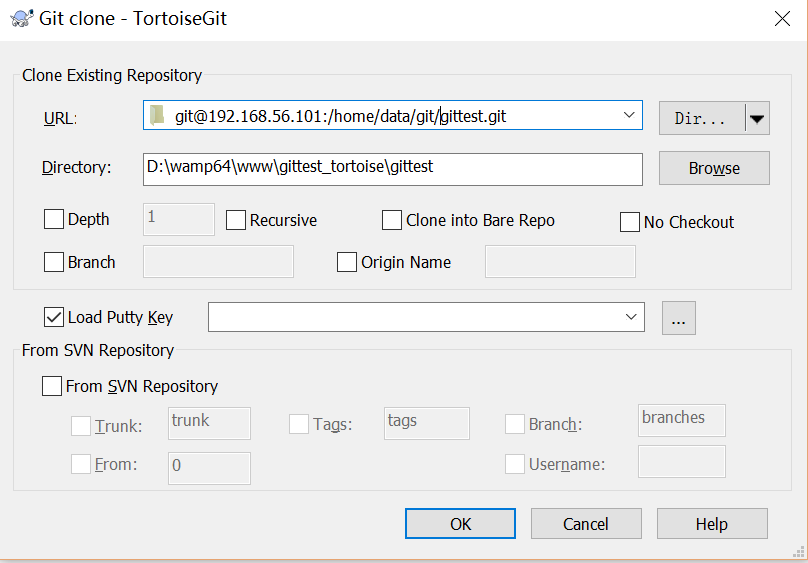
⑨ 禁止 git 用户 ssh 登录服务器
之前在服务器端创建的 git 用户不允许 ssh 登录服务器
编辑 /etc/passwd
找到:
git:x:502:504::/home/git:/bin/bash
修改为
git:x:502:504::/home/git:/bin/git-shell
此时 git 用户可以正常通过 ssh 使用 git,但无法通过 ssh 登录系统。
【转】在Linux下搭建Git服务器的更多相关文章
- 在Linux下搭建Git服务器的方法是什么样?
第一步 安装git:可以通过命令的方式快速安装,不同的linux的安装方法可能不一样,我的是采用的yum方法.ubuntu可以用apt-get命令.sudo yum install git 第二步 添 ...
- 在 Linux 下搭建 Git 服务器
环境: 服务器 CentOS6.6 + git(version 1.7.1)客户端 Windows10 + git(version 2.8.4.windows.1) ① 安装 Git Linux 做为 ...
- 在 Linux 下搭建 Git 服务器(yum安装)
服务端(linux): 1. 安装git [root@localhost ~]# yum -y install git 2. 增加一个git账户 为了管理的方便,在linux下面增添一个 " ...
- 在Linux下搭建Git服务器步骤
环境: 服务器 CentOS6.6 + git(version 1.7.1) 客户端 Windows10 + git(version 2.8.4.windows.1) ① 安装 Git Linux ...
- Linux下搭建Git服务器
1.安装Git 见 Jenkins持续集成环境部署 第四节 2.创建Git用户和用户组 groupadd git useradd git -g git 3.创建证书切换到git用户创建证书 su gi ...
- Linux 下搭建Git 服务器详细步骤
参考: https://www.cnblogs.com/dee0912/p/5815267.html#_label0 https://blog.csdn.net/carfge/article/deta ...
- kali linux 下搭建git服务器
参考:http://www.cnblogs.com/dee0912/p/5815267.html https://www.liaoxuefeng.com/wiki/001373951630592960 ...
- 在Linux下搭建git服务器
http://www.cnblogs.com/dee0912/p/5815267.html 步骤很详细,很受用
- Windows下搭建Git 服务器: BONOBO GIT SERVER + TortoiseGit
本文将介绍如何在Windows操作系统下搭建Git服务器和客户端.服务器端采用的是Bonobo Git Server,一款用ASP.NET MVC开发的Git源代码管理工具,界面简洁,基于Web方式配 ...
随机推荐
- Java中不得不谈的值传递和地址传递
个人的一些认识,希望能对初学Java的你,或者困惑于方法参数传递的你祈祷一丝帮助! 下面是一些作者的个人观点,如果有错,欢迎各位大牛指出错误,灰常感谢您的观看与支持... -------------- ...
- Nginx + fastcgi + php 的原理与关系
CGI:Common Gateway Interface 公共网关接口,web服务器和脚本语言通信的一个标准.接口.协议[协议] FastCGI:CGI协议的升级版[协议] PHP-CGI: 实现了C ...
- 基于随机游走的三维网格分割算法(Random Walks)
首先以一维随机游走(1D Random Walks)为例来介绍下随机游走(Random Walks)算法,如下图所示,从某点出发,随机向左右移动,向左和向右的概率相同,都为1/2,并且到达0点或N点则 ...
- 掌握 Maven 私服
前言 在 Java EE 开发中,我们使用 Maven 构建工具主要来管理项目的第三方库的依赖,以及公司内部其他项目服务的依赖.因此 Maven 私服就是必不可少的一环,本文主要对 Maven 私服的 ...
- 【乘风破浪】Android系统启动流程整理
前言 对于一个Android应用层开发者来说,了解Android系统的启动流程对理解Android系统有很大的帮助.这其中包含了大量的细节,而且前面很多步骤包含了C/C++实现的native层逻辑,作 ...
- PHP CURL根据详细地址获取腾讯地图经纬度
<?php $address = "广东省广州市天河区"; $point = getPoint($address); var_dump($point);//输出经纬度 /** ...
- HDU-6356 Glad You Came 线段树 ST表
HDU-6356 题意:有m次操作,每次操作通过给定的随机函数生成 l , r , v,使得在 l 到 r 区间内,所有的a[i]变为max(a[i] , v). 最后输出n个a[i]* i的异或和. ...
- 洛谷P1661 & yzoj 1650 扩散 题解
题意 先讲一下一种容易陷入误区错误思路 要使时间最小,就去找相对于每个点的最短曼哈顿距离,然后取最大值,时间就是(maxn+1)/2. 代码 #include<cstring> #incl ...
- DELPHI GDI + TGPFont UnitPixel 问题解决
查不少资料,在 GPfont := TGPFont.Create(fontFamily, Font.Size , FontStyleRegular,UnitPixel ); 时,显示的字体,并不是按D ...
- 不要小看小小的 emoji 表情
前言 好久没更新了,最近事比较多,或许下个月就会恢复到正常的发文频次. 这篇文章得从一个 emoji 表情开始,我之前开源的一个 IM 项目中有朋友提到希望可以支持 emoji 表情传输. https ...