
Entity Framework Tutorial Basics(30):
CRUD using Stored Procedure:
In the previous chapter, we have seen how to get data using a stored procedure. In this chapter, we will use stored procedures for CUD (create, update, delete) operation using DbContext. That means context will execute stored procedures instead of DDL statements on context.SaveChanges().
We will use the following stored procedures:
- sp_InsertStudentInfo stored procedure to insert a new student into the database
- sp_UpdateStudent to update the student
- sp_DeleteStudent to delete the student in the database.
Sp_InsertStudentInfo:
CREATE PROCEDURE [dbo].[sp_InsertStudentInfo]

    -- Add the parameters for the stored procedure here

    @StandardId int = null,

    @StudentName varchar

AS

BEGIN

    -- SET NOCOUNT ON added to prevent extra result sets from

    -- interfering with SELECT statements.

    SET NOCOUNT ON;

        INSERT INTO [SchoolDB].[dbo].[Student]([StudentName],[StandardId])

        VALUES(@StudentName, @StandardId)

    SELECT SCOPE_IDENTITY() AS StudentId

END
sp_UpdateStudent:
CREATE PROCEDURE [dbo].[sp_UpdateStudent]

    -- Add the parameters for the stored procedure here

    @StudentId int,

    @StandardId int = null,

    @StudentName varchar

AS

BEGIN

    -- SET NOCOUNT ON added to prevent extra result sets from

    -- interfering with SELECT statements.

    SET NOCOUNT ON;

    Update [SchoolDB].[dbo].[Student]

    set StudentName = @StudentName,StandardId = @StandardId

    where StudentID = @StudentId;

END
sp_DeleteStudent
CREATE PROCEDURE [dbo].[sp_DeleteStudent]

    -- Add the parameters for the stored procedure here

    @StudentId int

AS

BEGIN

    -- SET NOCOUNT ON added to prevent extra result sets from

    -- interfering with SELECT statements.

    SET NOCOUNT ON;

    DELETE FROM [dbo].[Student]

    where StudentID = @StudentId

END
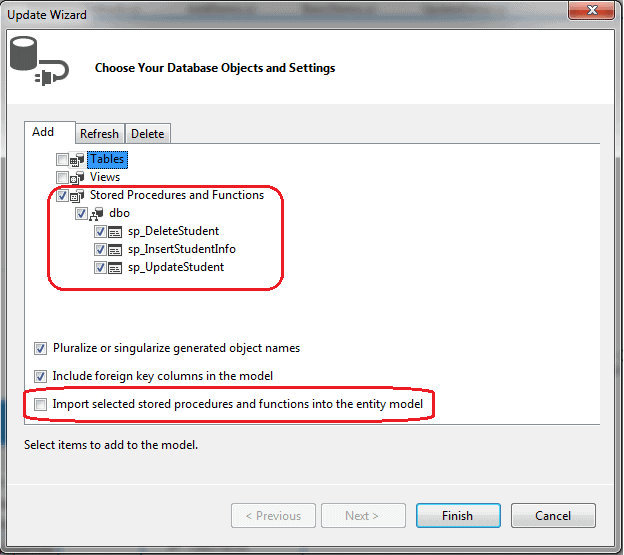
First of all, add these stored procedures into EDM and make sure that the Import selected stored procedures and function into the entity model checkbox is unchecked as we will map these procedures with Student entity directly.
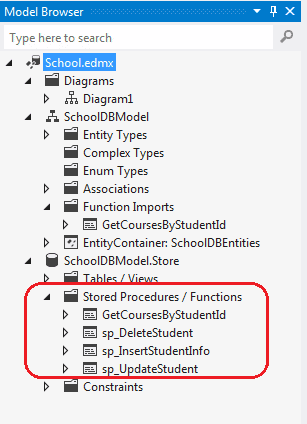
Now, Model Browser will add procedures into Storage model but not in Function Imports
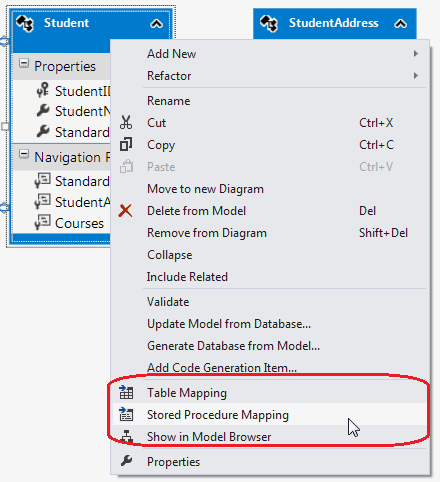
In the EDM designer, right click on Student entity and select Stored Procedure Mapping to open Mapping details:
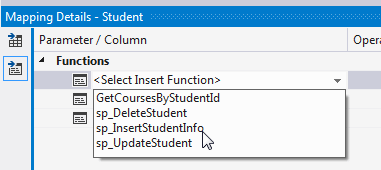
In the Mapping Details, you will see <Select Insert Function>, <Select Update Function>, and <Select Delete Function>. Select the appropriate stored procedure for each one, e.g. Select sp_InsertStudentInfo for Insert function, as shown below:
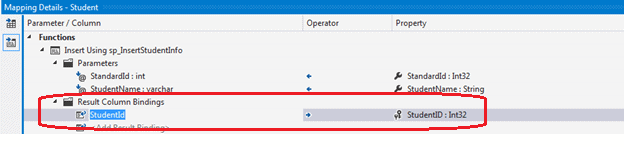
sp_InsertStudentInfo returns new auto generated StudentId. Map that with Student Entity’s StudentID as shown below:
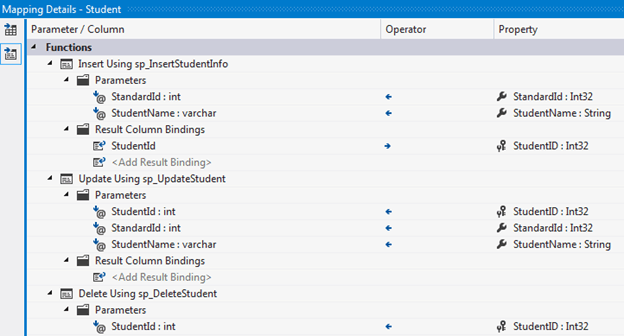
Complete the mapping of Insert, Update and Delete procedures as shown below:
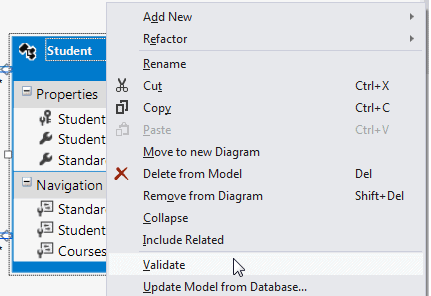
Now, we need to validate it before executing to ensure that there will not be a run time error. To accomplish this, right click on Student entity in the designer and click Validate and make sure that there are no warnings or errors:
Now you can add, update, and delete student as shown below:
using (var context = new SchoolDBEntities())

{

    Student newStudent = new Student() { StudentName = "New Student using SP"};

    context.Students.Add(newStudent);

    //will execute sp_InsertStudentInfo

    context.SaveChanges();

    newStudent.StudentName = "Edited student using SP";

    //will execute sp_UpdateStudent

    context.SaveChanges();

    context.Students.Remove(newStudent);

    //will execute sp_DeleteStudentInfo

    context.SaveChanges();

}
The code shown above will execute the following stored procedures on each SaveChanges():
exec [dbo].[sp_InsertStudentInfo] @StandardId=NULL,@StudentName='New Student using SP'

go

exec [dbo].[sp_UpdateStudent] @StudentId=47,@StandardId=NULL,@StudentName='Edited student using SP'

go

exec [dbo].[sp_DeleteStudent] @StudentId=47

go
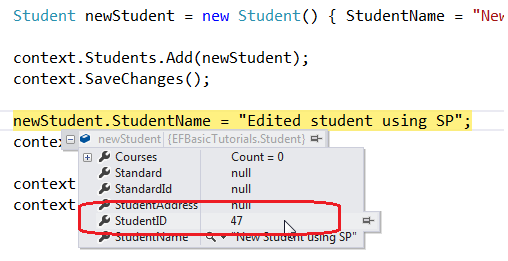
Note: Once context calls SaveChanges after adding a new student, it will assign new StudentID to StudentID property of the Student entity because sp_InsertStudentInfo returns StudentId. This is necessary in order to use that entity object for further operation.
Download sample project for the demo.
Entity Framework Tutorial Basics(30):的更多相关文章
- Entity Framework Tutorial Basics(1):Introduction
以下系列文章为Entity Framework Turial Basics系列 http://www.entityframeworktutorial.net/EntityFramework5/enti ...
- Entity Framework Tutorial Basics(4):Setup Entity Framework Environment
Setup Entity Framework Environment: Entity Framework 5.0 API was distributed in two places, in NuGet ...
- Entity Framework Tutorial Basics(43):Download Sample Project
Download Sample Project: Download sample project for basic Entity Framework tutorials. Sample projec ...
- Entity Framework Tutorial Basics(42):Colored Entity
Colored Entity in Entity Framework 5.0 You can change the color of an entity in the designer so that ...
- Entity Framework Tutorial Basics(41):Multiple Diagrams
Multiple Diagrams in Entity Framework 5.0 Visual Studio 2012 provides a facility to split the design ...
- Entity Framework Tutorial Basics(37):Lazy Loading
Lazy Loading: One of the important functions of Entity Framework is lazy loading. Lazy loading means ...
- Entity Framework Tutorial Basics(36):Eager Loading
Eager Loading: Eager loading is the process whereby a query for one type of entity also loads relate ...
- Entity Framework Tutorial Basics(34):Table-Valued Function
Table-Valued Function in Entity Framework 5.0 Entity Framework 5.0 supports Table-valued functions o ...
- Entity Framework Tutorial Basics(33):Spatial Data type support in Entity Framework 5.0
Spatial Data type support in Entity Framework 5.0 MS SQL Server 2008 introduced two spatial data typ ...
随机推荐
- New Concept English three (56)
The river which forms the eastern boundary of our farm has always played an important part in our li ...
- SQL夯实基础(六):MqSql Explain
关系型数据库中,互联网相关行业使用最多的无疑是mysql,虽然我们C# Developer很多用的都是sql server ,但是学习一些mysql方面的知识也是必要的,他山之石么. 先上一个expl ...
- 关于一种fastjson的死循环情况记录
最近在一次项目中,使用fastjson做接口转换中,碰到了一个Stack Overflow.发现在getxxx方法内如果再次嵌套使用fastjson作json转换,就会无限循环. 错误实例: clas ...
- 如何修改MAC自带的PHP的版本?
1. 切换到root目录,新建“.profile”文件 cd ~ vim .profile 2.在.profile文件中添加PATH环境变量 比如这样的路径 export PATH=/Applicat ...
- [转载]Python print函数用法,print 格式化输出
使用print输出各型的 字符串 整数 浮点数 出度及精度控制 strHello = 'Hello Python' print strHello #输出结果:Hello Python #直接出字符串 ...
- c# OrderBy 实现List升序降序
本文转载自:http://blog.csdn.net/chadcao/article/details/8730132 1)前台代码 <%@ Page Language="C#" ...
- [转]ubuntu11.04配置nfs--解决mount.nfs: access denied问题
总算通过了nfs的localhost测试. 配置很简单,下面摘自网络,并且整理下: 1 安装nfs #apt-get install nfs-kernel-server #apt-get instal ...
- MySQL mysqldump与innobackupex 组合备份
此脚本,在01点进行一次逻辑全备份,03点进行一次物理全备份,中午12点进行一次增量物理备份 #! /bin/bash #05 01,03,12 * * * mysql /data/mysqldata ...
- python-xlrd 实现excel 导入数据
首先安装 xlrd 两种方式: 1.wheel 方式 安装: 首先要下载 wheel :
- 利用XmlDocument操作XML文件
利用XmlDocument可以方便的操作XML文件. .操作XML文件基本方法 ()添加对System.Xml的引用,并使用using语句添加引用: ()假设要读取的XML文件如下: <?xml ...